
-
 jyg
posted in news • read more
jyg
posted in news • read moreDid you re-upload the latest audiolab 0.71.1 ?
As I wrote in the pdlist thread, Plugdata now silently and successfully installs audiolab on all tested computers (mac and windows)
I still have some issues with puredata on my main W11 computer, but this seems related to the fact I migrated my personnal folders and home to another logical drive formated as exFAT instead of NTFS.
Anyway, thanks for your attention. -
jyg
posted in news • read more
@solipp I have the same problem with else. Deken turns in loop as shown in the video above.
All I can say is that I have defined a custom target folder for externals, on another drive (D:)
I'll check tomorrow on another machine.
Meanwhile, I opened a ticket on the puredata list : https://lists.iem.at/hyperkitty/list/pd-list@lists.iem.at/thread/DT7GLBV75QARBGHNECH2KUAB2EI65QVE/However, did you try to install audiolab from plugdata ?
-
jyg
posted in news • read more
@solipp I wrote to the plugdata discord forum to signal the issue. May be the deken implementation in plugdata is less permissive than with puredata.
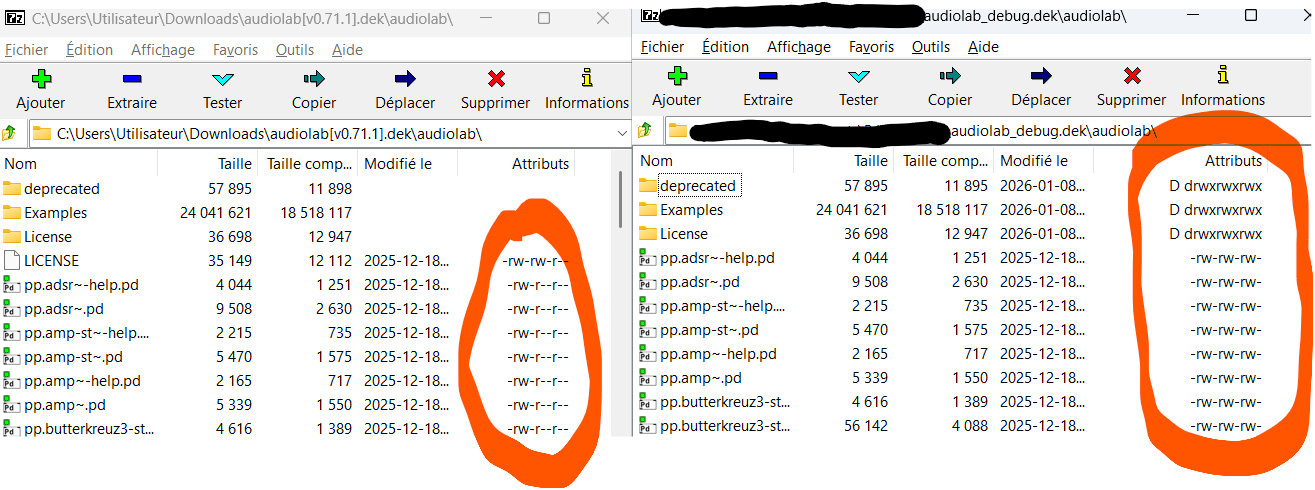
However, I tried something that worked : I extracted audiolab last version (0.7.1) , then rezipped it (under Windows 11) and renamed the archive as audiolab_debug.dek, with the side effect that Windows changed the permissions for all files/folders. Finally I put it on the puredata server.
It solved all my issues, as well with puredata as with plugdata.
Below the permissions as displayed with 7-zip utility for original and modified audiolab 0.7.1 deken files.
I hope this helps.
-
jyg
posted in news • read more
The problem occurs during installation of audiolab, with plugdata (find externals menu) that triggers an error when attempting to create the LICENCE folder.
May be it is related to file permissions in the archive ?
On the other hand, in puredata I still get this strange behaviour (see video : "replace existing files ?")
audiolab-installDeken.mp4 -
jyg
posted in technical issues • read more
Here is a christmas' basic vanilla preset system
 . Use as many instances of preset object as data you have to save.

-
jyg
posted in technical issues • read more
In puredata, sliders and other guis can memorize state : check init parameter in properties.
There is also an option for arrays to save their contents in patch, Idem for text objects with -k flag.
You can dynamically change message boxes (with "set" messages), so you can retrieve their values when reopening the patch.
If you use abstractions, you should use savestate object inside of them to save some data within the main patch.
For preset system there are several implementations, but it is not trivial out of the box.
Check bop for puredata, else externals, audiolab abstractions, for example.