
Ganymede: an 8-track, semi-automatic samples-looper and percussion instrument based on modulus instead of metro
Ganymede.7z (includes its own limited set of samples)
Background:
Ganymede was created to test a bet I made with myself:
that I could boil down drum sequencing to a single knob (i.e. instead of writing a pattern).
As far as I am concerned, I won the bet.
The trick is...
Instead of using a knob to turn, for example, up or down a metro, you use it to turn up or down the modulus of a counter, ie. counter[1..16]>[mod X]>[sel 0]>play the sample. If you do this then add an offset control, then where the beat occurs changes in Real-Time.
But you'll have to decide for yourself whether I won the bet.  .
.
(note: I have posted a few demos using it in various stages of its' carnation recently in the Output section of the Forum and intend to share a few more, now that I have posted this.)
Remember, Ganymede is an instrument, i.e. Not an editor.
It is intended to be "played" or...allowed to play by itself.
(aside: specifically designed to be played with an 8-channel, usb, midi, mixer controller and mouse, for instance an Akai Midimix or Novation LaunchPad XL.)
So it does Not save patterns nor do you "write" patterns.
Instead, you can play it and save the audio~ output to a wave file (for use later as a loop, song, etc.)
Jumping straight to The Chase...
How to use it:
REQUIRES:
moonlib, zexy, list-abs, hcs, cyclone, tof, freeverb~ and iemlib
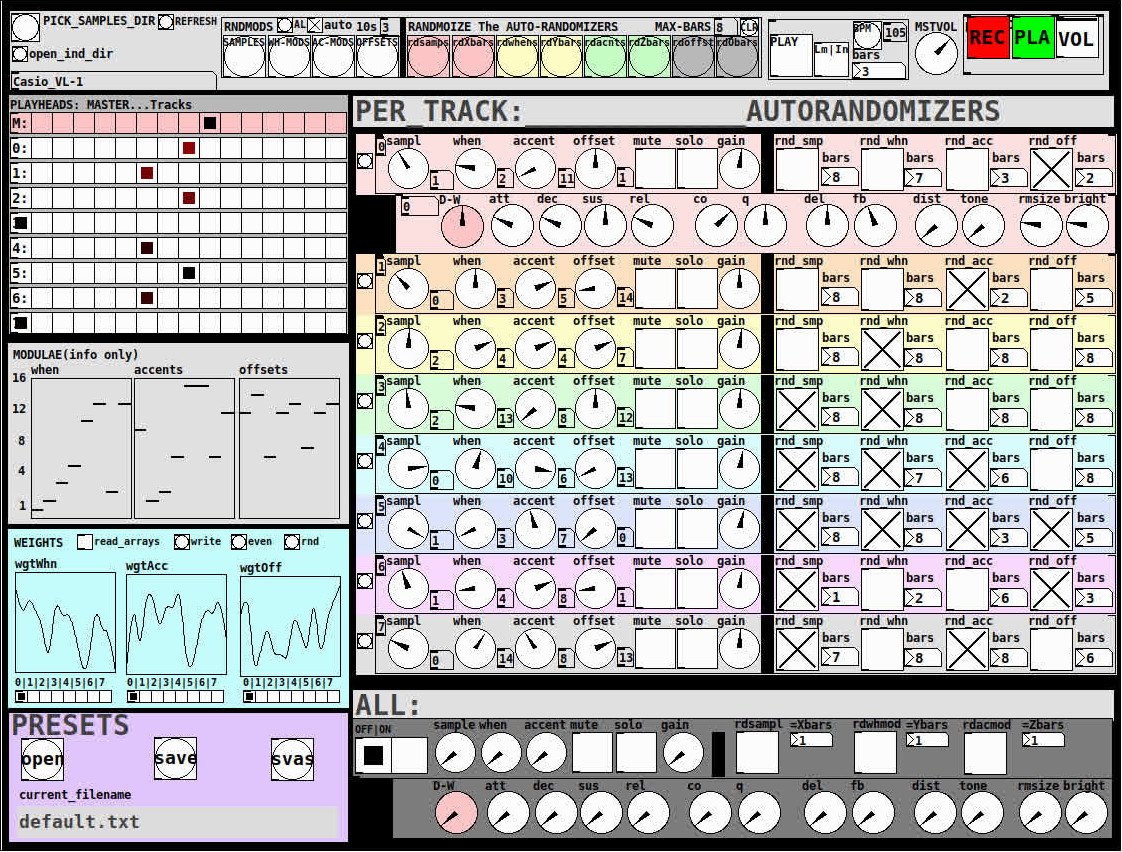
THE 7 SECTIONS:
- GLOBAL:
- to set parameters for all 8 tracks, exs. pick the samples directory from a tof/pmenu or OPEN_IND_DIR (open an independent directory) (see below "Samples"for more detail)
- randomizing parameters, random all. randomize all every 10*seconds, maximum number of bars when randomizing bars, CLR the randomizer check boxes
- PLAY, L(imited) or I(nfinite) counter, if L then number of bars to play before resetting counter, bpm(menu)
- MSTVOL
- transport/recording (on REC files are automatically saved to ./ganymede/recordings with datestamp filename, the output is zexy limited to 98 and the volume controls the boost into the limiter)
- PLAYHEADS:
- indicating where the track is "beating"
- blank=no beat and black-to-red where redder implies greater env~ rms
- MODULAE:
- for information only to show the relative values of the selected modulators
- WEIGHTS:
- sent to [list-wrandom] when randomizing the When, Accent, and Offset modulators
- to use click READ_ARRAYS, adjust as desired, click WRITE, uncheck READ ARRAYS
- EVEN=unweighted, RND for random, and 0-7 for preset shapes
- PRESETS:
- ...self explanatory
-
PER TRACK ACCORDION:
- 8 sections, 1 per track
- each open-closable with the left most bang/track
- opening one track closes the previously opened track
- includes main (always shown)
- with knobs for the sample (with 300ms debounce)
- knobs for the modulators (When, Accent, and Offset) [1..16]
- toggles if you want that parameter to be randomized after X bars
- and when opened, 5 optional effects
- adsr, vcf, delayfb, distortion, and reverb
- D-W=dry-wet
- 2 parameters per effect
-
ALL:
when ON. sets the values for all of the tracks to the same value; reverts to the original values when turned OFF
MIDI:
CC 7=MASTER VOLUME
The other controls exposed to midi are the first four knobs of the accordion/main-gui. In other words, the Sample, When, Accent, and Offset knobs of each track. And the MUTE and SOLO of each track.
Control is based on a midimap file (./midimaps/midimap-default.txt).
So if it is easier to just edit that file to your controller, then just make a backup of it and edit as you need. In other words, midi-learn and changing midimap files is not supported.
The default midimap is:
By track
CCs
| ---TRACK--- | ---SAMPLE--- | ---WHEN--- | ---ACCENT--- | --- OFFSET--- |
|---|---|---|---|---|
| 0 | 16 | 17 | 18 | 19 |
| 1 | 20 | 21 | 22 | 23 |
| 2 | 24 | 25 | 26 | 27 |
| 3 | 28 | 29 | 30 | 31 |
| 4 | 46 | 47 | 48 | 49 |
| 5 | 50 | 51 | 52 | 53 |
| 6 | 54 | 55 | 56 | 57 |
| 7 | 58 | 59 | 60 | 61 |
NOTEs
| ---TRACK--- | ---MUTE--- | ---SOLO--- |
|---|---|---|
| 0 | 1 | 3 |
| 1 | 4 | 6 |
| 2 | 7 | 9 |
| 3 | 10 | 12 |
| 4 | 13 | 15 |
| 5 | 16 | 18 |
| 6 | 19 | 21 |
| 7 | 22 | 24 |
SAMPLES:
Ganymede looks for samples in its ./samples directory by subdirectory.
It generates a tof/pmenu from the directories in ./samples.
Once a directory is selected, it then searches for ./**/.wav (wavs within 1-deep subdirectories) and then ./*.wav (wavs within that main "kit" directory).
I have uploaded my collection of samples (that I gathered from https://archive.org/details/old-school-sample-cds-collection-01, Attribution-Non Commercial-Share Alike 4.0 International Creative Commons License, 90's Old School Sample CDs Collection by CyberYoukai) to the following link on my Google Drive:
https://drive.google.com/file/d/1SQmrLqhACOXXSmaEf0Iz-PiO7kTkYzO0/view?usp=sharing
It is a large 617 Mb .7z file, including two directories: by-instrument with 141 instruments and by-kit with 135 kits. The file names and directory structure have all been laid out according to Ganymede's needs, ex. no spaces, etc.
My suggestion to you is unpack the file into your Path so they are also available for all of your other patches.
MAKING KITS:
I found Kits are best made by adding directories in a "custom-kits" folder to your sampls directory and just adding files, but most especially shortcuts/symlinks to all the files or directories you want to include in the kit into that folder, ex. in a "bongs&congs" folder add shortcuts to those instument folders. Then, create a symnlink to "bongs&congs" in your ganymede/samples directory.
Note: if you want to experiment with kits on-the-fly (while the patch is on) just remember to click the REFRESH bang to get a new tof/pmenu of available kits from your latest ./samples directory.
If you want more freedom than a dynamic menu, you can use the OPEN_IND(depedent)_DIR bang to open any folder. But do bear in mind, Ganymede may not see all the wavs in that folder.
AFTERWARD/NOTES
-
the [hcs/folder_list] [tof/pmenu] can only hold (the first) 64 directories in the ./samples directory
-
the use of 1/16th notes (counter-interval) is completely arbitrary. However, that value (in the [pd global_metro] subpatch...at the noted hradio) is exposed and I will probably incorporate being able to change it in a future version)
-
rem: one of the beauties of this technique is: If you don't like the beat,rhythm, etc., you need only click ALL to get an entirely new beat or any of the other randomizers to re-randomize it OR let if do that by itself on AUTO until you like it, then just take it off AUTO.
-
One fun thing to do, is let it morph, with some set of toggles and bars selected, and just keep an ear out for the Really choice ones and record those or step in to "play" it, i.e. tweak the effects and parameters. It throws...rolls...a lot of them.
-
Another thing to play around with is the notion of Limited (bumpy) or Infinite(flat) sequences in conjunction with the number of bars. Since when and where the modulator triggers is contegent on when it resets.
-
Designed, as I said before, to be played, esp. once it gets rolling, it allows you to focus on the production (instead of writing beats) by controlling the ALL and Individual effects and parameters.
-
Note: if you really like the beat Don't forget to turn off the randomizers. CLEAR for instance works well. However you can't get the back the toggle values after they're cleared. (possible feature in next version)
-
The default.txt preset loads on loadbang. So if you want to save your state, then just click PRESETS>SAVE.
-
[folder_list] throws error messages if it can't find things, ex. when you're not using subdirectories in your kit. No need to worry about it. It just does that.
POSTSCRIPT
If you need any help, more explanation, advise, or have opinions or insight as to how I can make it better, I would love to hear from you.
I think that's >=95% of what I need to tell you.
If I think of anything else, I'll add it below.
Peace thru Music.
Love thru Pure Data.
-s
,
 posted in patch~
What should I do (again!) about graphics?
OK. So another semester has passed, and I'm still stuck with the same dilemma about graphics in Pd.
Gem:
- Pro: Features (image analysis, tons of pix_es).
- Pro: Long history.
- Pro: Design fits well into the Pd paradigm.
- Con: Some students on Mac couldn't use it.
- Con: Some students in Windows couldn't use it.
- Con: How is it 2021 and it doesn't automatically enable antialiasing? (Part of me wants to apologize for being punchy about this, but... it is actually 2021. Anti-aliasing is standard. Because GEM has problems with it, it looks really REALLY out of date. Like, if Pd used eight-bit integer samples only. That kind of out of date. And no, [polygon_smooth] does exactly nothing on my system. I tried. No effect at all.)
- Con: Some more complex use cases were really difficult for me to figure out (e.g., unclear when [pix_buffer] is or isn't needed).
Ofelia:
- Pro: Examples look very slick and performant.
- Pro: Anti-aliasing (generally beautiful rendering).
- Pro: 60Hz's abstractions make it more approachable, for basic use cases.
- Con: Outside of the basic use cases, Lua will be very hard for the students in my class to approach.
- Con: No image analysis features. (Open Frameworks has ofxOpenCV as an add-on, but it isn't easy to use add-ons with Ofelia, especially if I have to provide binaries of my own Ofelia fork to students in both Mac and Windows.) So... "You know how in Gem or jitter, you can read the webcam and do stuff with the data? Yeah. You can't do that with Ofelia." (At which point, clever students would ask why I'm using it at all.) IMO this is a massive, huge, gaping hole in Ofelia's feature set.
- Con: 60Hz's abstractions have so far undergone limited testing.
- Con: I would have to redevelop/port various shaders, and still not approach the number of pixes in Gem.
Max/MSP/jitter:
- Pro: Well, it just works.
- Con: Make me boot into Windows several times a week to prepare course material. Grrrrrr.
- Con: Not FLOSS.
Rewrite the entire course using SC and Processing:
- Pro: Everything works.
- Con: Students here won't touch code.
Quit my job:
- Pro: Relax and make music.
- Con: Run out of money in a few years.
I don't know what to do, and I have about a week to make a decision. If I go with Ofelia, I will have to put off other projects because it's going to take a bunch of work to get a handful of shaders up and running. I don't really want to do that. But, last fall semester, there were a few student machines that just couldn't run Gem. One of them could hack [gemwin] but that kind of thing shakes confidence.
I would really like Ofelia to add ofxOpenCV. I would just about not hesitate to use it then.
hjh
 posted in pixel#
Mono / stereo detection
aha, so they take messages when you name them?
[quote]What would not work is to patch a control and a signal in simultaneously: the signal will overwrite the control.[/quote]
haha, in max it is like that:
most externals take signals and messages at the signal inlets.
if you connect a signal and a number to math objects like +~, the number would multiply the signal value.
if you want to connect signals and messages to an abstraction, you have to use something like [route start stop int float] inside the abstraction - the signal will come out of the "does not match" output of [route].
to complete the magic, you can pack signals into named connections using [prepend stereoL] [prepend stereoR] [prepend modulation1] [prepend modulation2] and then you can send all 4 signals through one connection into the subpatch.
you can also mix different types of connections that way.
...
regarding the problem of the OP:
in max i made myself abstractions to enhance the function of inlets and outlets, where you can send a [metro 3000] into using s/r in order to find out which inlets are connected and which not.
in theory one could do that with audio, too, and add a pulsetrain of + 1000. to a stream, later decode the stuff by modulo 1000.
 posted in technical issues
NoxSiren - Modular synthesizer system <- [v15]
NoxSiren is a modular synthesizer system where the punishment of failure is the beginning of a new invention.
--DOWNLOAD-- NoxSiren for :
-
Pure Data :
NoxSiren v15.rar
NoxSiren v14.rar -
Purr Data :
NoxSiren v15.rar
NoxSiren v14.rar
--DOWNLOAD-- ORCA for :
- x64, OSX, Linux :
https://hundredrabbits.itch.io/orca
In order to connect NoxSiren system to ORCA system you also need a virtual loopback MIDI-ports:
--DOWNLOAD-- loopMIDI for :
- Windows 7 up to Windows 10, 32 and 64 bit :
https://www.tobias-erichsen.de/software/loopmidi.html
#-= Cyber Notes [v15] =-#
- added BORG-IMPLANT module.
- introduction to special modules.
- more system testing.
#-= Special Modules [v15] =-#
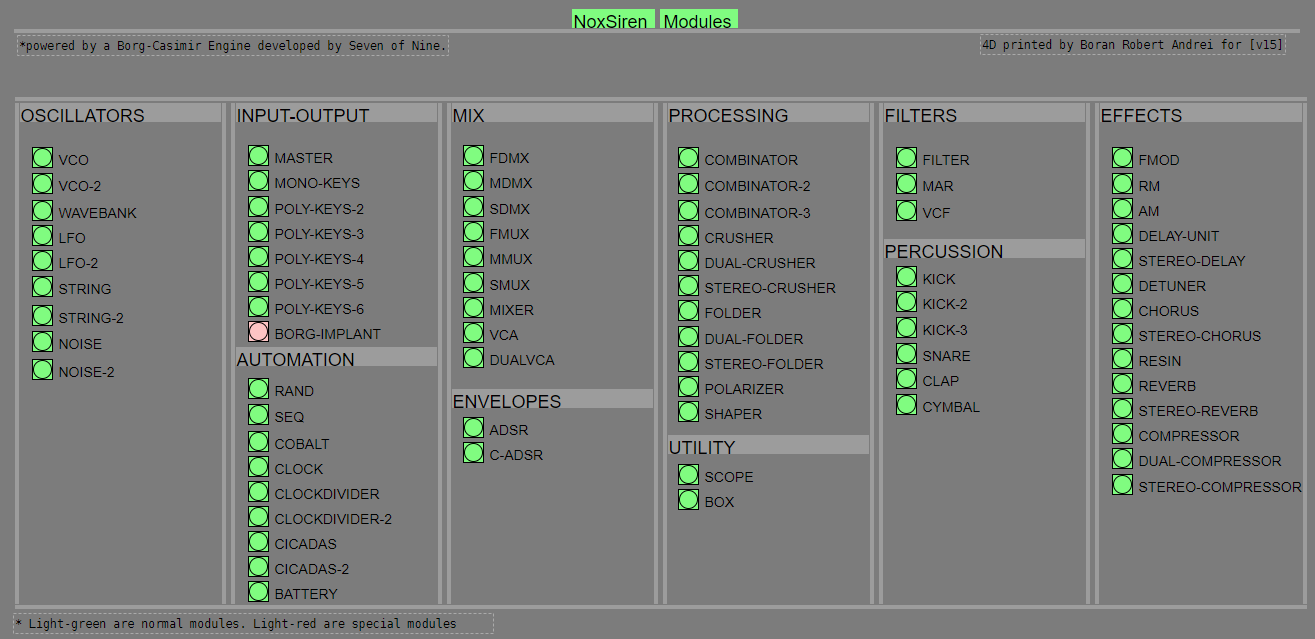
- BORG-IMPLANT (connects ORCA MIDI system to NoxSiren system)
#-= Current Modules [v15] =-#
- VCO (voltage-controlled-oscillator)
- VCO2 (advance voltage-controlled-oscillator)
- WAVEBANK (additive synthesis oscillator)
- ADSR (Attack-Decay-Sustain-Release envelope)
- C-ADSR (Curved Attack-Decay-Sustain-Release envelope)
- CICADAS (128 steps-Euclidean rhythm generator)
- CICADAS-2 (advance 128-steps polymorphic-Euclidean rhythm generator)
- COMPRESSOR (lookahead mono compressor unit)
- DUAL-COMPRESSOR (2-channel lookahead mono compressor unit)
- STEREO-COMPRESSOR (lookahead stereo compressor unit)
- MONO-KEYS (virtual 1-voice monophonic MIDI keyboard)
- POLY-KEYS-2 (virtual 2-voice polyphonic MIDI keyboard)
- POLY-KEYS-3 (virtual 3-voice polyphonic MIDI keyboard)
- POLY-KEYS-4 (virtual 4-voice polyphonic MIDI keyboard)
- POLY-KEYS-5 (virtual 5-voice polyphonic MIDI keyboard)
- POLY-KEYS-6 (virtual 6-voice polyphonic MIDI keyboard)
- BATTERY (simple manual triggered machine for drumming.)
- REVERB (reverb unit with lowpass control)
- STEREO-REVERB (stereo reverb unit with lowpass control)
- RESIN (advanced rain effect/texture generator)
- NOISE (generates black,brown,red and orange noise)
- NOISE2 (generates yellow,blue,pink and white noise)
- COBALT (6-stage polyrhythm generator)
- SHAPER (basic shaper unit)
- FOLDER (basic wave folding unit)
- STEREO-FOLDER (stereo wave folding unit)
- DUAL-FOLDER (advance wave folding unit)
- POLARIZER (transform a signal into bi-polar, uni-polar, inverted or inverted uni-polar form)
- CLOCK (generates a BPM clock signal for sequencing other modules)
- CLOCKDIVIDER (a clock divider with even division of clock signal)
- CLOCKDIVIDER2 (a clock divider with odd division of clock signal)
- DELAY-UNIT (delay unit)
- STEREO-DELAY (stereo delay unit)
- CHORUS (chorus unit)
- STEREO-CHORUS (stereo chorus unit)
- SEQ (advance 16-step/trigger sequencer)
- KICK (synthesize kick unit)
- KICK2 (synthesize flavor of KICK module)
- KICK3 (synthesize flavor of KICK module)
- SNARE (synthesize snare unit)
- CLAP (synthesize clap unit)
- CYMBAL (synthesize cymbal unit)
- RAND (RNG generator for other modules parameters)
- FMOD (feedback modulation unit)
- AM (amplitude modulation unit)
- RM (ring modulation unit)
- LFO (low-frequency-oscillator)
- LFO2 (advance low-frequency-oscillator)
- COMBINATOR (combine two waves)
- COMBINATOR2 (combine three waves)
- COMBINATOR3 (combine four waves)
- STRING (Karplus-Strong string synthesis unit)
- STRING2 (advance Karplus-Strong string synthesis unit)
- DETUNER (parametric 4-channel detuner unit)
- CRUSHER (basic audio resolution unit)
- STEREO-CRUSHER (basic stereo audio resolution unit)
- DUAL-CRUSHER (advance audio resolution unit)
- FILTER (basic filter)
- VCF (voltage-controlled-filter)
- MAR (Moog-analog-resonant filter)
- VCA (voltage-controlled-amplifier)
- DUAL-VCA (advance voltage-controlled-amplifier)
- FMUX (multiplexer with fast A/D internal envelope)
- MMUX (multiplexer with medium A/D internal envelope)
- SMUX (multiplexer with slow A/D internal envelope)
- FDMX (demultiplexer with fast A/D internal envelope)
- MDMX (demultiplexer with medium A/D internal envelope)
- SDMX (demultiplexer with slow A/D internal envelope)
- MIXER (mix 1-4 possible waves)
- SCOPE (oscilloscope analyzer)
- MASTER (fancy DAC~)
- BOX (useless decorative module)
NoxSiren integrated modules menu system.
 posted in patch~
Closing patches without Pd crashing, hopefully in an elegant way...
EUREKA! I solved the following problem:
Problem: provide a mechanism for allowing patches to self-close without Pd crashing.
Requirements: (1) uses only Pd vanilla; (2) action to close patch starts on the very patch that will be closed.
Solution: copy patch killer.pd in the same folder as the patch to be closed, and send a message containing ";pd open killer.pd <dir>;kill_me symbol patch_to_be_closed.pd":
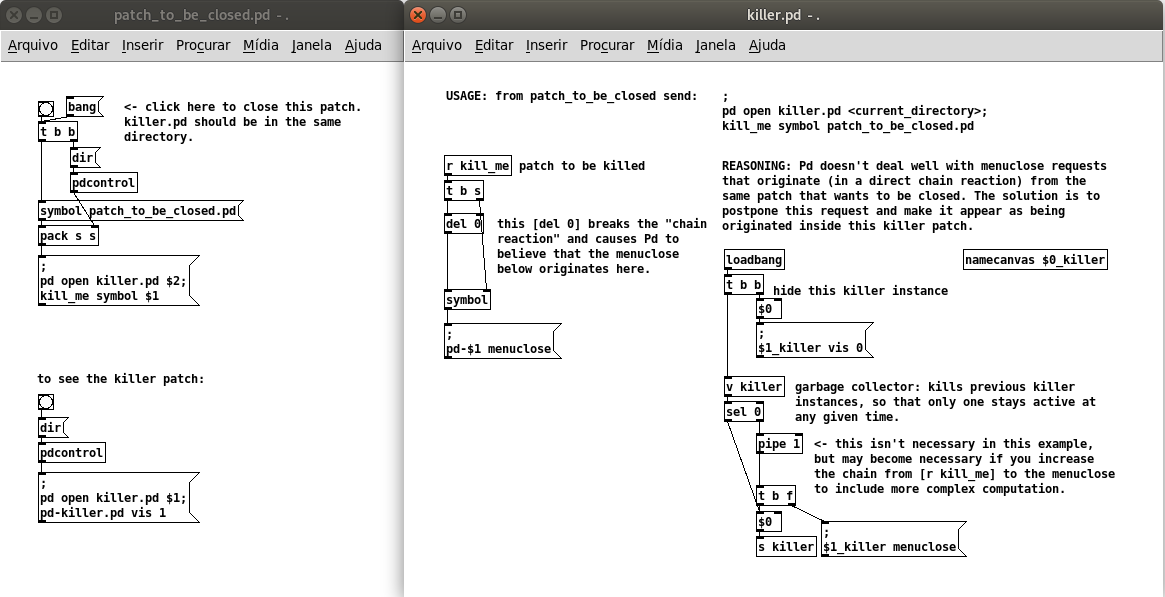
killer.pd
patch_to_be_closed.pd
Comments: (documented in the killer patch) Pd doesn't deal well with menuclose requests that originate (in a direct chain reaction) from the same patch that wants to be closed, so a separate killer patch is needed, which can be opened by the same patch requesting to be closed. In order to break the direct chain reaction, the solution is to postpone this request and make it appear as being originated inside the killer patch. This is done by storing the received symbol and delaying the message menuclose by 0 ms, which is enough to issue a new chain of events. The killer patch stays alive (but invisible), and any new instances of the killer patch will silently kill the previous instances so that only one killer patch is alive at any given time. [EDIT: I included a safeguard [pipe 1] in the killer patch, check the inline comments]. This implementation fixes the problems with my previous solution and also with the 3-patches method by @ingox, both of which didn't work through a send/receive pair. It also does not depend on dynamic patching.
This has been tested in Pd 0.50-2 and Ubuntu 20.04. I appreciate feedback to confirm if it works in other platforms/versions.
@whale-av Thanks again David for the suggestions (hcs, mouse clicks)! I wasn't too keen on the idea of depending on external libraries, and I also had to abandom the idea of having the killer patch embedded in the patch to be closed.
 posted in technical issues
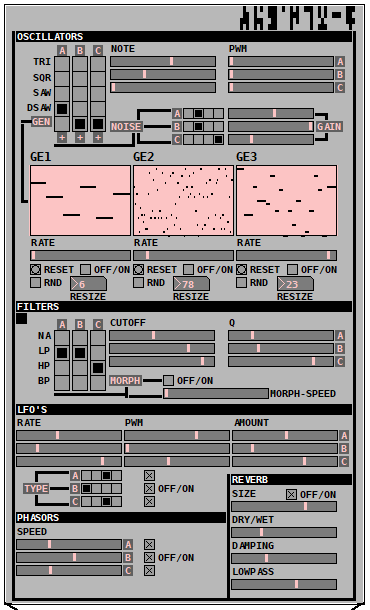
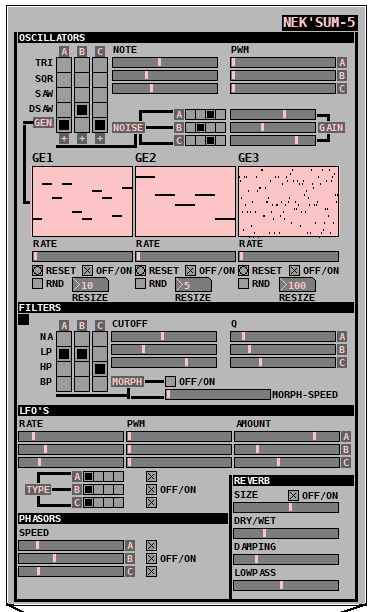
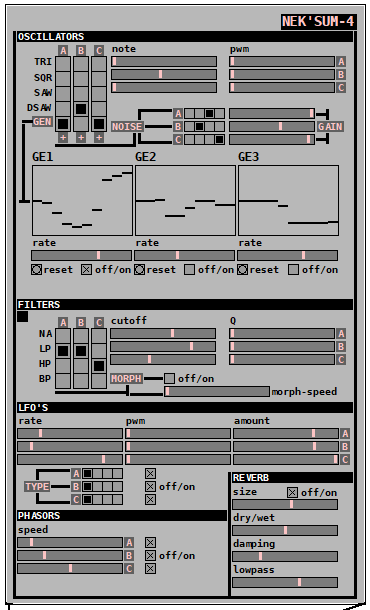
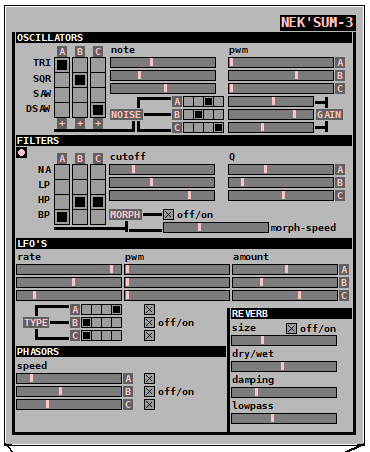
Nek'Sum - An advanced drone/texture monophonic synthesizer <- [v6.0] + // Mandarin Edition //
Nek'Sum-6 drone/texture monophonic synthesizer is compose of 5 stages :
First stage -> 3 main OSC with noise mixer option and generative synthesis support with 5 types of waves (tri,sqr,saw,supersaw,generative).
Second stage -> Filter stage with morph option and 4 filters types : Pass through, Lowpass, Highpass, Bandpass for the first stage.
Third stage -> 3 LFO (sin,tri,sqr,saw) modulators for the second stage.
Forth stage -> 3 Phasor's for the third stage.
Fifth stage -> 1 Deep Reverb with Lowpass filter for the forth stage.
It is capable of generating a large soundscape of drone/texture sounds inspired by The Doctor.
-UPDATE-
Thanks to Seven of Nine Nek'Sum is now at version [v6.0]
- Added Mandarin edition after cyber-brainstorming with Jade Chia-Jung [v6.0].
- Translation of the Ancient Egyption logo into obscure dialect of Anquietas language, thanks to Daniel Jackson [v6.0].
- Thanks to Nox cyberart society now the GUI is much better [v5.0].
- Added reset, randomization and resize for the generative synthesis [v5.0].
- Added generative synthesis support for each oscillator [v4.0].
- Added a noise mixer with 4 types of noise for each oscillator (orange,yellow,blue,pink) [v3.0].
- Added a morphing mechanism for filter stage [v3.0].
- This new version has a better GUI interface powered by a Borg-Casimir engine [v2.0].
-CYBERLOG-
Project manager : Oma Desala
Programming/UX design : Boran Robert Andrei
QA engineer : Anubis
Generative synthesis system design/Lead engineer : Seven of Nine
DSP engineering : Jade Chia-Jung, The Doctor
Testing/debugging system engineer : Lt. Colonel Samantha Carter
Language consultant : Daniel Jackson
Patch Download English Edition :
Nek'Sum 6.rar
Nek'Sum 5.rar
Nek'Sum 4.rar
Nek'Sum 3.rar
Nek'Sum2.rar
Nek'Sum.zip
Patch Download Mandarin Edition :
Nek'Sum 6 - Mandarin Edition.rar
Mandarin special edition :
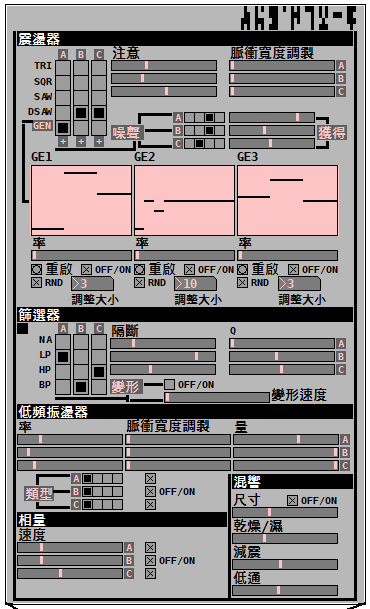
Snapshots :
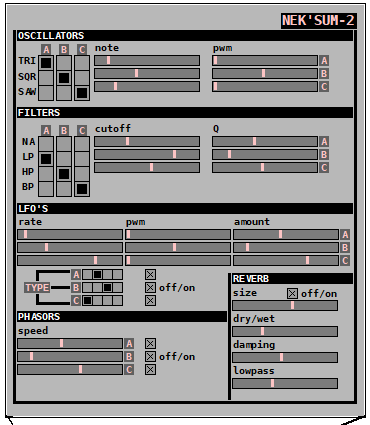
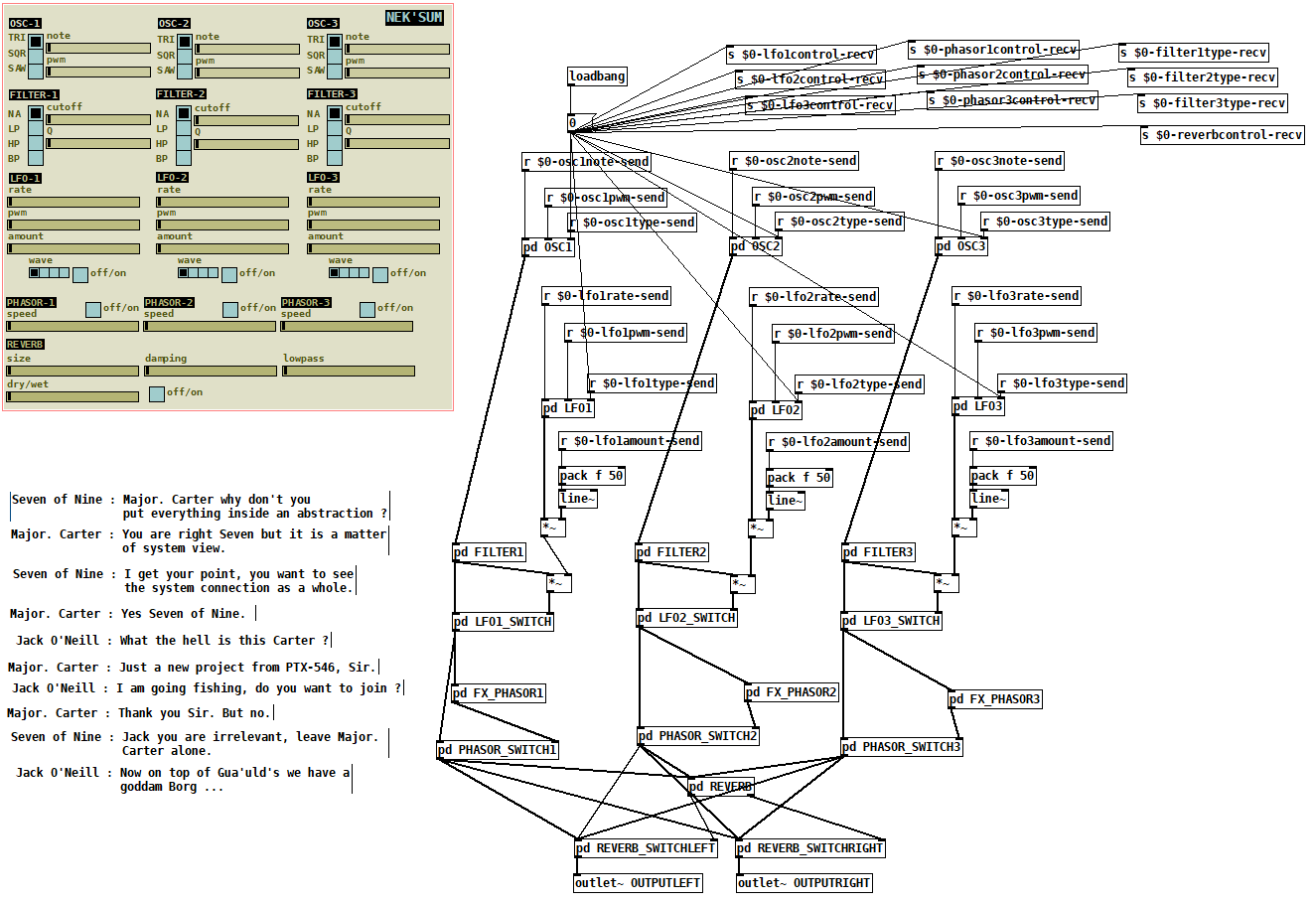
posted in patch~
ffplay~ - An implementation of FFmpeg for audio playback of almost any media format
An implementation of FFmpeg for audio playback of almost any media format
When building, the FFmpeg libraries are dynamically linked by default, which means that you'll need a local installation of these libraries in order for the external to work.
Includes the following features:
-
play/pause and seek functionality.
-
changing the speed of playback.
-
reading and iterating through m3u playlists.
-
It reads pseudo m3u playlists. Each line in the m3u should be just the file name, preceded by a path relative to the location of the m3u if they don't reside in the same folder.
-
The m3u reader can also read nested m3u's. For example, an m3u could consist of the following three lines:
disc1.m3u disc2.m3u disc3.m3u -
-
opening files from http urls.
-
retrieving metadata.
Creation args
- numeric list
-
The channel layout. Defaults to stereo if no args given.
-
Numbers specified represent the bits of an audio channel bit-mask. A full list of available channels can be found here: https://github.com/FFmpeg/FFmpeg/blob/master/libavutil/channel_layout.h
-
Inlets
-
bang - Play/pause the currently loaded track.
- Sends a 1 or 0 through the last outlet to indicate whether it's playing or paused.
float - (Re)start playback of a given track number
- Zero will stop playback.
anything - Look for matching metadata
- If metadata is found, it will be sent through the right-most outlet.
- A file must be successfully opened for any of the above to work
- signal - Change the playback speed.
-
speed can be a factor between 16 and 1/16th.
-
speed can also be altered by sending the message [ speed $1 ( to the 1st inlet.
-
Outlets
-
signal - Left channel
-
signal - Right channel
- The number of signal outlets there are depends on the number of creation args given, with the default being 2 signals for stereo.
-
list - Outputs various messages including information regarding whether a file was successfully opened, whether a track is currently playing, track metadata, etc.
Messages
-
[ print $.. ( or [ info $.. ( - Prints metadata info.
-
If no args given, it will print general info. Otherwise, it will print custom info.
-
metadata needs to be surrounded with percent signs.
- Example [ print %artist% - %title% (
-
-
[ send $.. ( - Sends metadata info through the
last outlet. -
[ open $1 ( - Attempts to open a file.
- Sends a 1 or 0 through the last outlet to indicate success or failure.
-
[ seek $1 ( - Seek to a track position.
-
[ speed $1 ( - Set the playback speed.
-
[ play $1 ( - Set playback state to either playing or paused.
- Acts as a toggle when no args are given.
- When an arg is given, state is forced to playing(1) or paused(0).
-
[ interp $1 ( - Change the interpolation algorithm.
- Options include:
- Sinc (good | medium | fast)
- Zero-order hold
- Linear (the default)
- Options include:
-
[ stop ( - An alias for [ 0 (.
-
[ pos ( - Returns the track position.
-
Any unrecognized message is assumed to be a metadata term. If there is a match, the metadata will be sent through the last outlet.
Update - March 16 2022:
ffplay~ now uses Secret Rabbit Code for resampling, which makes playback speed transitions much smoother. Playback speed can also be manipulated with signals via the 2nd inlet.
ffplay~ is now available through deken. It is part of a larger library called quilt. Searching either "quilt" or "ffplay~" should give a result.
The FFmpeg libraries are still separate, but can be either easily downloaded or easily installed via a package manager.
For Windows users, the FFmpeg libraries can be downloaded here: https://github.com/myQwil/pd-quilt/releases/download/v0.7.7/ffmpeg.v4.4.1.Windows-amd64-32.zip.
For Linux and macOS users, A README file is included, which lists the dependencies for those platforms.
 posted in extra~
Newbie struggling to find "demux" object - please help
I found that I have one "pd-extras" on my desktop and another "pd-extras" on my "home" folder.
I switched paths and re-started pd but "demux" still didn't work.
I seem to be missing at least "zexy/0x2e", but don't know where to find it.
I found a zip file for "deken" but i havent got a clue what to type in.
I have tried to install extras in the "help>find externals" window - zexy 1 2 3 4 5 6. Still didn't work.
Can you please tell me what exactly I should type in to the linux terminal to get the latest "pd/extendeded edition" for linux mint:
apt-get...?
Can any one explain whats going on here? I have a working "demux" in the help file but it won't work on the "stage"? How can it work in the help file but not on the "stage"?
Also i have found that although "demux" in the help file has inlets and outlets, it still doesn't trigger any of the print objects? Why not?
Can any one explain?
Many thanks for your on-going support. : )
 posted in technical issues
Top 3 cay nuoc nong lanh Karofi ban chay nhat nam 2020
Bạn đã biết về top 3 cây nóng lạnh Karofi tốt nhất tại dienmay Sakura chưa? Nếu chưa biết đến 3 sản phẩm này bạn có thể tham khảo bài viết dưới đây để tìm hiểu thêm thông tin về những sản phẩm cây nóng lạnh bán chạy nhất năm 2020.
Cây nước nóng lạnh Karofi HC 15 tiết kiệm điện - mẫu úp bình hiện đại
Các thông số kỹ thuật của máy
● Kích thước máy: 285 x 336 x 1004 (đơn vị: mm)
● Mức điện áp: 220V/50Hz
● Công suất máy nóng lạnh: 500W/ 85W
● Trọng lượng máy: 13.5 kg
● Nhiệt độ làm nóng nước: Từ 85 đến 95 độ C
● Nhiệt độ nước lạnh: Từ 5 đến 10 độ C
● Màu sắc: Màu trắng
● Dung tích của bình nước nóng lạnh: 1.1 / 2.8 lít
● Khóa an toàn của vòi nước nóng: Có
● Khoang chứa đồ: Có
Ưu điểm nổi bật của mẫu cây nóng lạnh HC15
● Có hệ thống làm nóng và lạnh nước uống tự động. Đây là ưu điểm vô cùng tiện lợi và đơn giản cho người dùng trong bất cứ hoàn cảnh nào. Khi nào bạn cần sử dụng chỉ cần mở vòi và lấy nước là được.
● Trang bị khóa an toàn cho trẻ nhỏ đối với vòi nước nóng. Đây là một ưu điểm được đánh giá cao và cực kỳ phù hợp với những gia đình có trẻ nhỏ.
● Sử dụng công tắc nóng và lạnh riêng biệt. Người dùng có thể linh hoạt trong việc bật hoặc tắt bất cứ khi nào có nhu cầu sử dụng. Nhờ có điều này mà người dùng có thể tiết kiệm điện năng.
● Dễ dàng hơn trong việc quan sát để có thể chủ động thay bình mới khi hết nước.
● Có khoang chứa đồ vô cùng tiện lợi nằm ngay bên dưới cây nước. Vị trí được thiết kế thích hợp để đặt cốc nước, cà phê hoặc những gói đồ uống khác, …
● Hệ thống hai vòng nóng lạnh riêng biệt với hai màu sắc khác nhau giúp người dùng dễ dàng hơn trong việc phân biệt.
● Thiết kế hiện đại, trang nhã, phù hợp với không gian hiện đại lẫn truyền thống.
Máy nước nóng lạnh Karofi tốt nhất - HC18 mẫu hút bình khác biệt
Thông số kỹ thuật mẫu HC18
● Kích thước cây nóng lạnh: 300 x 330 x 1010 (đơn vị mm)
● Trọng lượng của máy: 13.9 kg
● Mức điện áp: 220V/ 50Hz
● Công suất làm nước nóng / lạnh: 500W /90W
● Nhiệt độ làm nước nóng: 85oC - 95oC
● Nhiệt độ làm nước lạnh: 5 đến 10 độ C
● Màu sắc: Trắng đi cùng với tấm ốp mặt màu đen
● Dung tích tổng thể của cây nóng/ lạnh: 1.1 lít/ 3.2 lít
● Khóa an toàn của vòi nước nóng: Có
● Khoang chứa đồ: Không có
Ưu điểm của cây nóng lạnh mẫu HC18
● Thiết kế bắt mắt, trang nhã và tinh tế. Dễ dàng trở thành điểm nhấn trong không gian nhà ở hoặc chốn văn phòng làm việc.
● Hệ thống làm nóng hoặc lạnh tự động nguồn nước uống đầu vào. Đơn giản, dễ dàng sử dụng và cực kỳ tiện lợi cho người dùng. Khi người sử dụng có nhu cầu, chỉ cần mở vòi và lấy nước dùng.
● Khóa an toàn cho trẻ nhỏ ở vòi nước nóng hỗ trợ các gia đình có em nhỏ an toàn hơn trong trường hợp bất cẩn.
● Thiết kế hai công tắc nóng và lạnh với hai màu sắc dễ dàng phân biệt. Dễ dàng hơn cho người sử dụng dùng độc lập tùy theo nhu cầu sử dụng của từng đối tượng. Đồng thời với thiết kế riêng biệt như vậy giúp cho người dùng tiết kiệm được nhiều điện năng hơn.
● Sử dụng công nghệ hút bình mới: Thao tác thay bình nước mới sẽ dễ dàng hơn, đồng thời nâng cao tính thẩm mỹ của sản phẩm. Thiết kế nhỏ gọn không chiếm nhiều không gian diện tích
● Có ba vòi lấy nước với từng chế độ riêng biệt: Nóng - lạnh và chế độ nước ở nhiệt độ thường cho người dùng thoải mái lựa chọn.
Review cây nước nóng lạnh Karofi HC300-RO tốt nhất - không cần thay thế bình nước
Thông số kỹ thuật máy nóng lạnh Karofi HC300-RO
● Trọng lượng của máy: 14 kg
● Kích thước máy: 300 x 395 x 1110 (đơn vị: mm)
● Mức điện áp: 220V / 50Hz
● Công suất làm nước nóng/ lạnh: 500W/ 85W
● Nhiệt độ nước nóng: từ 85oC đến 95oC
● Nhiệt độ của nước lạnh: từ 5oC đến 10oC
● Màu sắc: Trắng trang nhã
● Dung tích tổng của cây nước nóng/ lạnh: 1.1 lít / 3.2 lít
● Khóa an toàn của vòi nước nóng: Có
● Khoang chứa đồ: Không có.
Ưu điểm nổi trội của sản phẩm
● Hệ thống tự làm nóng và lạnh nguồn nước uống đầu vào: Tiện lợi hơn cho người dùng trong mọi trường hợp cần có nhu cầu sử dụng.
● Khóa an toàn ở vòi nước nóng: Đảm bảo sự an toàn cho những gia đình có trẻ nhỏ trong những trường hợp bất cẩn.
● Thiết kế công tắc hai vòi nóng và lạnh riêng biệt với hai màu sắc khác nhau: Giúp người dùng có những sự lựa chọn độc lập đồng thời hỗ trợ tiết kiệm điện năng.
● Tích hợp với hệ thống lọc nước RO hiện đại: Nguồn nước đầu vào trong hệ thống máy nóng lạnh được lấy ra từ hệ thống lọc RO để đảm bảo được nguồn nước sạch và hợp vệ sinh. Thiết kế tiện dụng, người dùng không cần phải thay thế bình nước trong quá trình sử dụng sản phẩm. Đồng thời cũng sẽ chủ động kiểm soát được nguồn nước một cách đảm bảo chất lượng nhất.
● Không cần thay thế bình nước mà sử dụng trực tiếp nước từ nguồn nối.
● Có 3 vòi nước nóng, lạnh và thường tùy nhu cầu sử dụng.
Hệ thống lọc RO hiện đại tích hợp trong máy làm nóng/ lạnh nguồn nước
● Lõi lọc PP 5 micron
● Lõi lọc OCB
● Lõi lọc PP 1 micron
● Màng lọc RO 100GPD Hàn
● Lọc lọc T33
● Lõi lọc Nano Silver diệt hơn 99% vi khuẩn ở trong nước
Nguồn: https://dienmaysakura.vn/top-3-cay-nong-lanh-karofi-ban-chay-nhat-nam-2020.html
 posted in extra~
Configure audio jack on Windows
UPDATING...
Changing the JackRouter.ini file, as suggested by @ whale-av, worked! But in parts ...
1º - I'm testing Jack on two Windows machines. A descktop and a notebook. Same version of PD and system.
2º - On both machines the JackRouter.ini file contained 4 channels as standard.
3º - On the notebook, when I started the PD, I got 4 channels on Jack. In the descktop the result is the print attached above.
4º - After changing the JackRouter.ini file on the notebook, I got the expected result. But ...
5º - In the descktop I still got two PD channels in Jack.
6º - I installed PD 0.48 on the descktop and Jack introduced me to the channels corresponding to those edited in the JackRouter.ini file.
7º - I tried the versions 0.49 and 0.50 of the PD in the descktop and I am still presented with only two channels in Jack, even reinstalling Jack and changing JackRouter.ini.
8º - In Cubase LE I also have the same problem ...
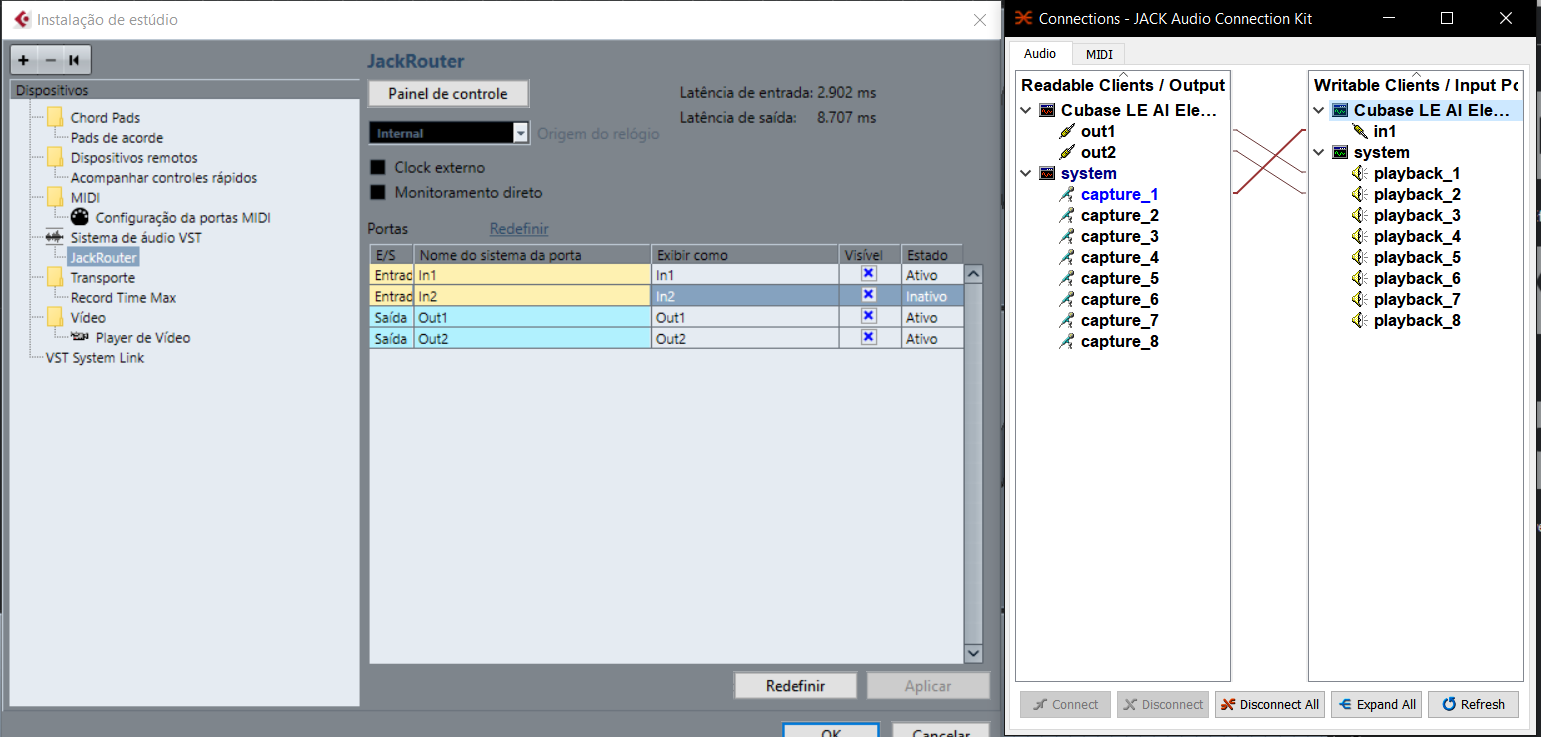
ps: sorry, english is not my native language
 posted in technical issues