
Pure Data external GEM on Raspberry Pi
@ddw_music Thank you so much. That helped immensely and was much easier than I thought once I knew where GEM installed.
It was as simple as:
$ sudo apt install gem
// Then just to see what came up:
$ apt show gem
// Then to see that gem installed where you said it would:
$ dpkg -L gem
// and /usr/lib/pd/extra showed. I hope it does not cause any problems there.
Sorry about the hacked together reply with odd formatting. I do not know how to add the blackbackground formatting yet. I imagine there is a sticky somewhere about that.
From there I opened Pd, went to Preferences > Edit Preferences > Path > New > went to the root and selected /lib/pd/extra/Gem.
Then went to the Startup tab > New > typed in Gem + Enter > OK.
Then I closed and opened Pd and it showed GEM loaded. I opened a basic example from the Browser and it ran. I see now what you meant by [declare -lib Gem]. I am very new to Pd and have also been learning SuperCollider. A lot of the things get forgotten until I get into the relative platform environment. In that example, [declare -lib Gem] was there. It looks just like it does on the Mac.
 posted in technical issues
Pure Data external GEM on Raspberry Pi
@playinmyblues said:
In my op, I provide what I used to install it but I think that was just for Ruby.
Actually not:
$ apt show gem
... skipped some stuff...
Description: Graphics Environment for Multimedia - Pure Data library
So it's definitely gem for pd.
I could not find the library anywhere on my Raspberry Pi...
I always forget this and I always have to do a google search for "linux apt list installed files," but:
$ dpkg -L gem
... long list of files, including a lot of them like this:
/usr/lib/pd/extra/Gem/GEMglBegin-help.pd
/usr/lib/pd/extra/Gem/GLdefine-help.pd
/usr/lib/pd/extra/Gem/Gem-meta.pd
/usr/lib/pd/extra/Gem/Gem.pd_linux
... where I pasted these specifically because the last one, Gem.pd_linux, is the actual library that gets loaded when you [declare -lib Gem].
Then you can infer that /usr/lib/pd/extra/Gem is the location to which the package is installed. (The point being that even in a command-line environment, there are ways to find out what was installed where. You might have to do some searching to find the commands. BTW I'm not using rpi now but its OS is based on debian, so these commands "should" be OK.)
As I see it, there are just a few possibilities:
- (1) Maybe
sudo apt install gemdidn't install it properly. That seems unlikely (but, worth it toapt show gemto check the package metadata). - (2) Or, maybe
sudo apt install gemdid install it properly. That divides into a couple of sub-cases:- (2a) Maybe Pd can't find the package. If that's the case, then what I would do is: go to the pd path preferences and make sure
/usr/lib/pd/extrais in the list. Then [declare -lib Gem] should find it. - (2b) Or maybe the package is incompatible with RPi. In that case, everything would look right environmentally but the package simply wouldn't load.
- (2a) Maybe Pd can't find the package. If that's the case, then what I would do is: go to the pd path preferences and make sure
For 2a, everybody -- everybody -- gets tripped up on pd external loading. For me, the best strategy has been to keep the Pd "path" preferences as simple as possible -- /home/your_user_name/Documents/Pd/externals for user-specific externals, and maybe add /usr/lib/pd/extra for systemwide packages -- and nothing else. Then the Gem/ root folder would go directly into one of these, e.g. /usr/lib/pd/extra/Gem. I rigorously avoid putting externals in any other locations.
Then, use a [declare] in the patch. [declare -lib Gem] tries path ++ "/Gem" for each of the entries in your path preferences. If you have kept things in standardized locations, this will work.
Maybe try this with a different external package first, one that is RPi compatible, to make sure that you understand the mechanics. (I've seen a lot of threads where people were haphazard about external installation and got tied up in knots. It's really worth some time to get it right, to be certain that this case can be ruled out.)
For 2b, if there is no pre-compiled package available for RPi, the only alternative is to compile it yourself, unfortunately. The ./configure script should tell you if that's supported for your machine or not.
sudo installs gem for you
Well, not exactly. sudo is "superuser do," which runs a command with elevated privileges so that, for instance, files can be installed in system executable locations that are normally write-protected. sudo itself doesn't install anything.
sudo apt install gem would install Gem. apt is the package manager -- this is the component that actually installs it.
I mean, now I see what you were trying to say, but there were enough pieces left out of your comment that the meaning was unclear.
hjh
 posted in technical issues
CPU load with Purr-Data and GEM
Hi there,
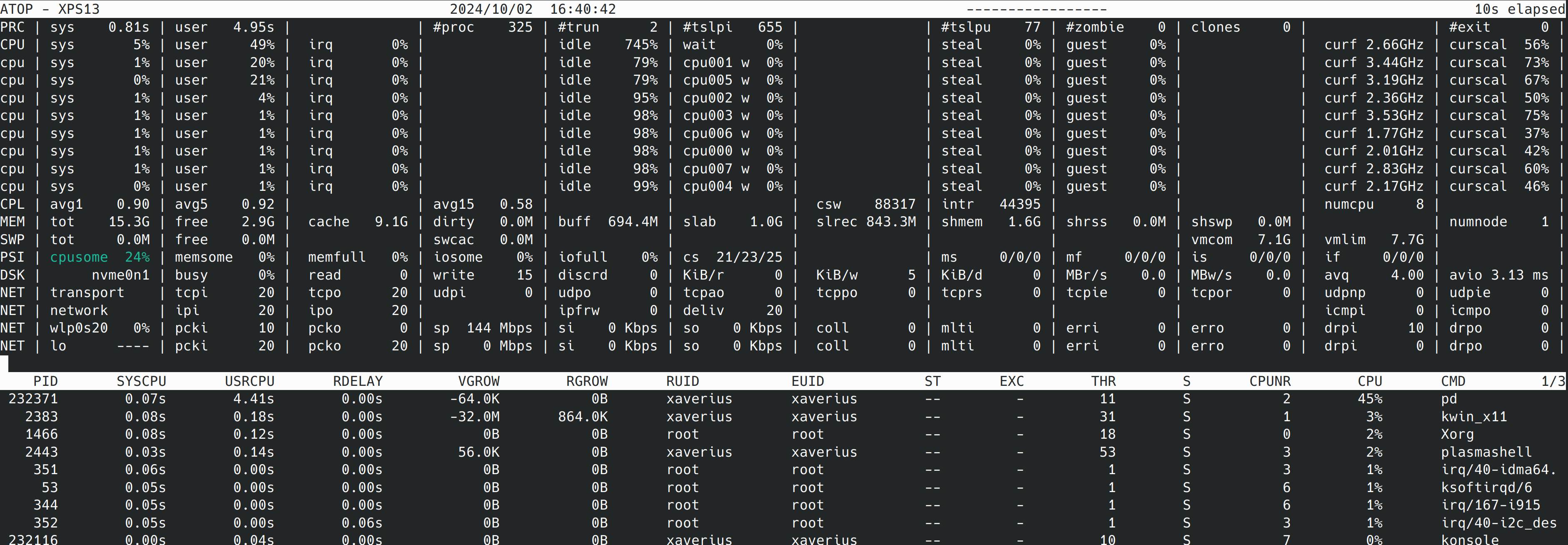
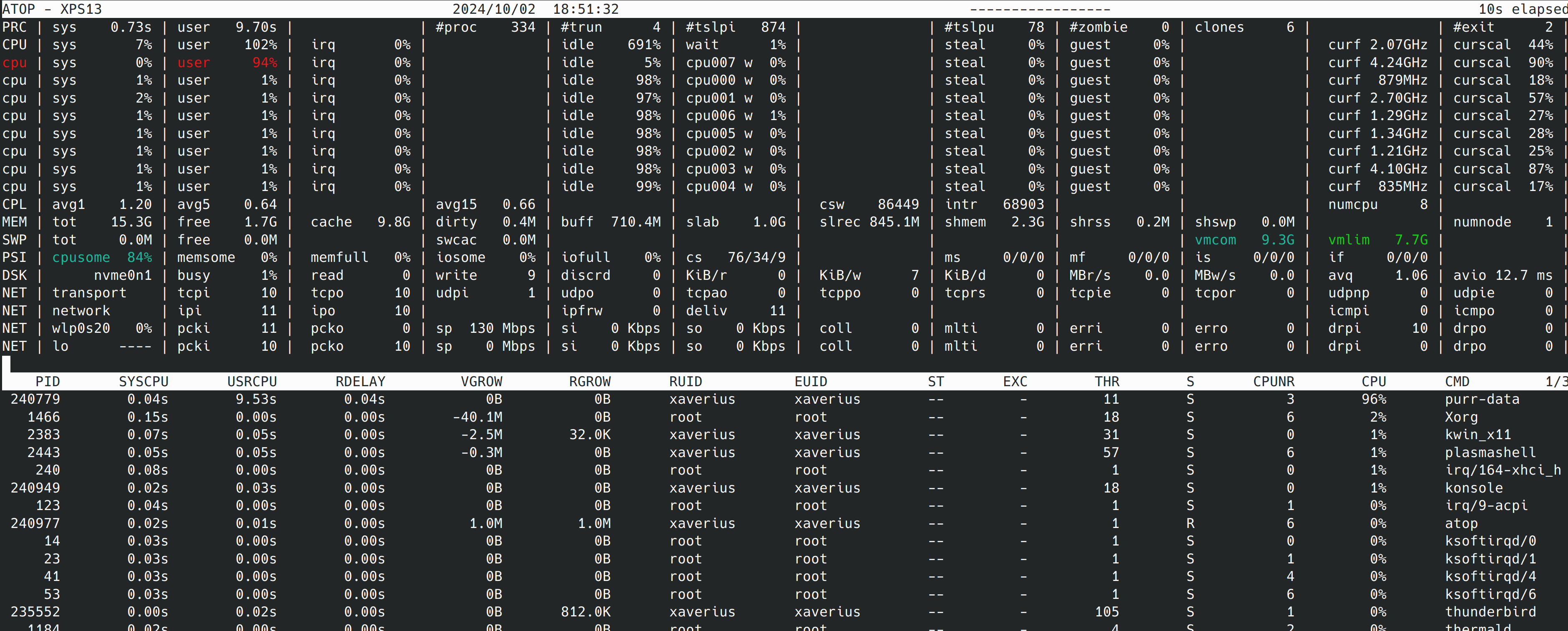
I started dealing with GEM and implemented a very simple patch that simply plays back a video. When I run this patch with pd-gem the playback is all good. But with purr-data the playback stutters since the CPU load is too high. Please find attached screenshots of the patch and atop while running the patch with purr-data and pd-gem.
The pd version with purr-data and pd-gem is slightly different, but I assume that this is not the root cause. So, what is the problem with purr-data and how can I solve it?
Thank you in advance!
Andre
-- purr-data --
Purr-Data 2.19.3
Pd version 0.48.0
GEM version 0.94
-- pd-gem --
Pd version 0.52.1
GEM version 0.94
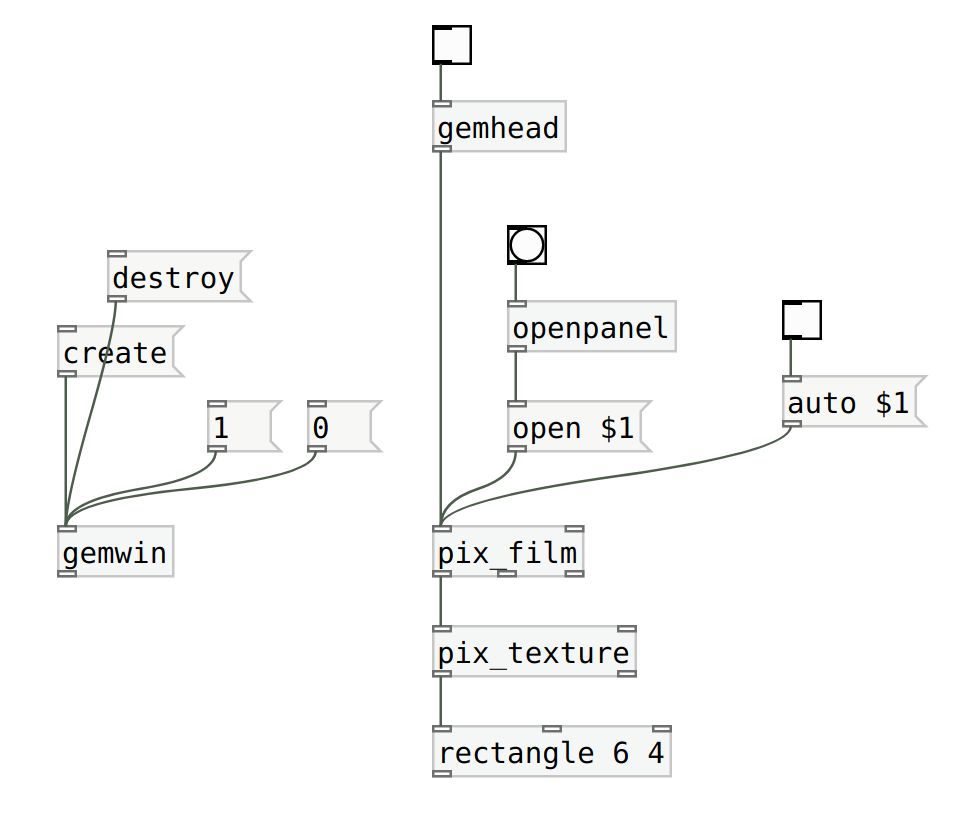
 posted in technical issues
Fast Prototyping for Ofelia
FWIW, I don't think it needs to be a replacement for GEM, or pretend to make the interfaces similar to GEM. As noted at the top of the thread, GEM is outdated.
If an obstacle is converting Ofelia's pixel system into something like GEM's normalized coordinates, then... why not simply abandon the idea of normalized coordinates? Unless it's really necessary for practical use. If the only reason to normalize the coordinates was to make it "similar to GEM," I'd say, don't waste time on it.
FWIW, I'm not going to be able to tolerate GEM for another year. Like today -- it took me over two hours to figure out how to extract the alpha channel from pixes. (Like, how many years has GEM existed, and nobody thought it would be useful to have an object to transfer the alpha channel to the main channel of a grayscale pix? Or, if you don't need an object for it, this still seems to me a pretty basic use case... but of course hard to find in the documentation...)
I realize that a set of abstractions on top of Ofelia is not likely to be fully-featured -- but I could cobble together enough Lua to add abstractions myself where needed (and contribute them back), whereas trying to add objects to Gem is impractical (1, my C is not that good and 2, I could build in Linux but not Mac or Windows). Even a partial set of abstractions might be a starting point to get around the kinds of problems I'm facing now, where the existing objects don't quite do what I want and there's not a good way to add functionality.
Otherwise, for this course, I might not have a choice but to jump ship and go to jitter (which some of the students have already done). It pains me to think of switching away from FLOSS but where I am right now is simply not sustainable.
TL;DR Even if the current state is incomplete, would you mind sharing so I could have a look?
hjh
posted in pixel#
[pix_share_read] and [pix_share_write] under windows
@whale-av, here is a log running pd with -lib Gem -verbose.
tried both 32bit and 64bit pd 0.48-1...
tried ./Gem.m_i386 and failed
tried ./Gem.dll and failed
tried ./Gem/Gem.m_i386 and failed
tried ./Gem/Gem.dll and failed
tried ./Gem.pd and failed
tried ./Gem.pat and failed
tried ./Gem/Gem.pd and failed
tried C:/Users/Raphael Isdant/Documents/Pd/externals/Gem.m_i386 and failed
tried C:/Users/Raphael Isdant/Documents/Pd/externals/Gem.dll and failed
tried C:/Users/Raphael Isdant/Documents/Pd/externals/Gem/Gem.m_i386 and failed
tried C:/Users/Raphael Isdant/Documents/Pd/externals/Gem/Gem.dll and failed
tried C:/Users/Raphael Isdant/Documents/Pd/externals/Gem.pd and failed
tried C:/Users/Raphael Isdant/Documents/Pd/externals/Gem.pat and failed
tried C:/Users/Raphael Isdant/Documents/Pd/externals/Gem/Gem.pd and failed
tried C:/Users/Raphael Isdant/AppData/Roaming/Pd/Gem.m_i386 and failed
tried C:/Users/Raphael Isdant/AppData/Roaming/Pd/Gem.dll and failed
tried C:/Users/Raphael Isdant/AppData/Roaming/Pd/Gem/Gem.m_i386 and failed
tried C:/Users/Raphael Isdant/AppData/Roaming/Pd/Gem/Gem.dll and failed
tried C:/Users/Raphael Isdant/AppData/Roaming/Pd/Gem.pd and failed
tried C:/Users/Raphael Isdant/AppData/Roaming/Pd/Gem.pat and failed
tried C:/Users/Raphael Isdant/AppData/Roaming/Pd/Gem/Gem.pd and failed
tried C:/Program Files/Common Files/Pd/Gem.m_i386 and failed
tried C:/Program Files/Common Files/Pd/Gem.dll and failed
tried C:/Program Files/Common Files/Pd/Gem/Gem.m_i386 and failed
tried C:/Program Files/Common Files/Pd/Gem/Gem.dll and failed
tried C:/Program Files/Common Files/Pd/Gem.pd and failed
tried C:/Program Files/Common Files/Pd/Gem.pat and failed
tried C:/Program Files/Common Files/Pd/Gem/Gem.pd and failed
tried D:/pd-0.48-1.windows.64bit/extra/Gem.m_i386 and failed
tried D:/pd-0.48-1.windows.64bit/extra/Gem.dll and failed
tried D:/pd-0.48-1.windows.64bit/extra/Gem/Gem.m_i386 and failed
tried D:/pd-0.48-1.windows.64bit/extra/Gem/Gem.dll and succeeded
D:\\pd-0.48-1.windows.64bit\\extra\\Gem\\Gem.dll: couldn't load
tried D:/pd-0.48-1.windows.64bit/extra/Gem.pd and failed
tried D:/pd-0.48-1.windows.64bit/extra/Gem.pat and failed
tried D:/pd-0.48-1.windows.64bit/extra/Gem/Gem.pd and failed
tried D:/pd-0.48-1.windows.64bit/doc/5.reference/Gem.m_i386 and failed
tried D:/pd-0.48-1.windows.64bit/doc/5.reference/Gem.dll and failed
tried D:/pd-0.48-1.windows.64bit/doc/5.reference/Gem/Gem.m_i386 and failed
tried D:/pd-0.48-1.windows.64bit/doc/5.reference/Gem/Gem.dll and failed
tried D:/pd-0.48-1.windows.64bit/doc/5.reference/Gem.pd and failed
tried D:/pd-0.48-1.windows.64bit/doc/5.reference/Gem.pat and failed
tried D:/pd-0.48-1.windows.64bit/doc/5.reference/Gem/Gem.pd and failed
Gem: can't load library``` posted in pixel#
3 shader adaptions: sonogram / vectorscope and conway
I realized recently that Gem has some very similar (and nice) shader examples, like a game of life, or a multi pass rendering (I learned that this is what I am doing with the effect chain in the video player).
And the timbreID library has some nice Gem patches for visualizing audio.
And Gem has of course a video player.
I ask myself now, because I do not want to reinvent the wheel, what are the advantages and disadvantages if I compare Gem to Ofelia?
I did some experiments with Gem some time ago but at a certain point I got stuck, whether because of my lacking knowledge or because the patch was getting slow.
So it could be possible to do exactly the same with both libraries?
Here I found a very old paper about Gem that states Gem is using openGL up to 1.2.
https://puredata.info/downloads/gem/documentation/manual/pub/zmoelnig2004gem.pdf
Has that changed? Or could that be a difference? I think the openGL versions that Ofelia can use depend only on the hardware.
What I like about ofelia so far is (in comparison to Gem):
To compile the patch as a standalone application.
To make nice interfaces.
(but I think those points are not openGL related...)
That it gives access to lua and open frameworks (which could make it easier to do complex graphics calculations / interfaces?).
Is anyone else in the position to compare those libraries, or has an opinion about them?
 posted in patch~
source package for gem
It depends if you're on Mac, Windows or Linux.
I'm on MacOS and I use Gem without Pd-extended. I just have to use Pd-Vanilla 32 bits (Pd-0.49-0-i386) and I've downloaded Gem via Help -> Find Externals -> Gem (in the research) and you choose the version from Deken Gem 0.93.3. Install it. Close Pure Data.
To load Gem when you're starting PureData : Open Pure data and go to Pd -> Preferences -> StartUp . In the StartUp Flags you tape Gem, 'Enter' and you juste have to close Pd and re-open and you can use Gem.
With cmd+B, you open the Help Browser and you have a Gem section with all the help you'll need to understand Gem (I've started two months ago).
Have Fun !
 posted in technical issues
Trying to run Gem for Pd Windows 10 64 bit
@jeffgrips I have it running with vanilla in Windows7.... but it was hard...... and it's a long story....
I cannot see any reason that it would not work for widows10.
I have not found any other easier better solution.
(((SEE below though for the fact that the -lib needs to be declared...!
That could be your only problem? But I doubt it..!!! )))
I used the 64-bit GEM from here (0.94-test3.zip)..... https://github.com/avilleret/Gem/releases/
I unzipped it and put it in a folder (which I called "dot") on my desktop.
Because I am using many different versions of Pure Data I left it there, and I start Pd with a shortcut that also points to the GEM folder and loads it as a library (It has to be loaded at startup as a library...... and that could be why you don't have it working.... but probably not...).
This is the contents of the line "target" in the shortcut.......
"C:\Users\David\Desktop\Pd Vanilla\pd-0.47-1.msw\pd\bin\pd.exe" -lib C:\Users\David\Desktop\dot\0.94-test3/Gem -font-size 10 -font-face "Consolas"
Be careful with forward / backward slashes.
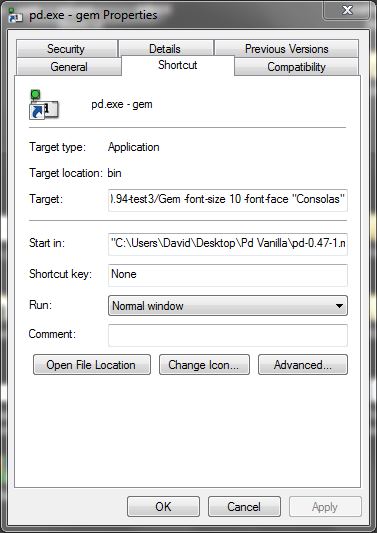
I am pretty sure that I tipped the contents of the "QT" folder out into the "0.94-test3 folder" where gem.dll is (from within the "QT" folder inside "0.94-test3").
If you find some .dlls are missing then post back with a list, and I can upload them....... but you might not have the correct C++ redistributables from Microsoft.
But if you want to start Pd normally by double-clicking a patch then you will need to declare the library in Pd.. edit....preferences.... startup......
If you have GEM in the extra folder you should only need to put "-lib Gem" where you see that I have put "-noautopatch".......
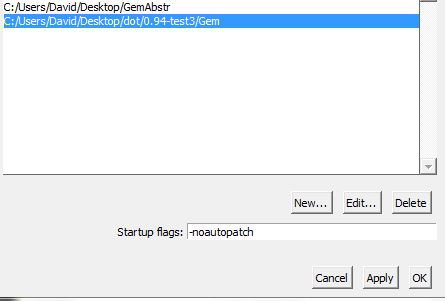
The gem abstractions could not be found though (the "parts of Gem... .like [pix_image] pix_video] [gemwin] etc. worked fine) I copied the contents of the Gem folder from "extended" into a folder on the desktop called "GemAbstr" and set a path to it in Pd preferences.
I removed gem.dll from that folder (no conflicts....!).
The abstractions now create, but the help files for embedded objects cannot be found (different "search" for embedded objects) so I have to open my "GemAbstr" folder and open them manually.
Everything works. All the patches from https://puredata.info/downloads/extended-view-toolkit create and run correctly. The camera on my computer even works (I had never had it working before).
And it works with Spout.
If you go this route then I wish you good luck.......
@zerino has confirmed that it can work with widows10........ https://forum.pdpatchrepo.info/topic/11450/pix-and-geometric-objects-not-being-loaded-in-pd-vanilla/7
........and resolved the "help" file problem.....
For the time being you are lucky that you are using Windows.
This solution is not available for other systems.
David.
 posted in technical issues
Purr Data Linux-64 and GEM?
Ok, here in Puppy-Linux apt-get is not installed.
Now I installed libftgl2_2.1.3 successfully with the package manager.
Doing the same as before
[Gem] creates! Yes!
In the commandline (linux-console) [shortened]:
pd-l2ork -noprefs -nostdpath -nrt -verbose
Pd-L2Ork version 2.4.6 (20171213-rev.46ffba3)
compiled 22:30:53 Dec 13 2017
port 5401
guidir is /usr/lib/pd-l2ork/bin
"/usr/lib/pd-l2ork/bin"/nw/nw --user-data-dir="/root/.config/purr-data" "/usr/lib/pd-l2ork/bin" 5401 localhost pd-l2ork "/usr/lib/pd-l2ork/bin" xf3c100Waiting for connection request...
[0426/002010.733670:WARNING:chrome_main_delegate.cc(565)] final extension:
... connected
/etc/pd/gem.conf: No such file or directory
/root/.config/pure-data/gem.conf: No such file or directory
./gem.conf: No such file or directory
load plugins 'film' in '/usr/lib/pd-l2ork/extra/Gem/'
pattern : /usr/lib/pd-l2ork/extra/Gem/gem_film*.so
dylib loading file '/usr/lib/pd-l2ork/extra/Gem/gem_filmAVIPLAY.so'!
library loading returned: dlerror 'libaviplay-0.7.so.0: cannot open shared object file: No such file or directory'
dylib loading file '/usr/lib/pd-l2ork/extra/Gem/gem_filmGMERLIN.so'!
library loading returned: dlerror 'libgmerlin_avdec.so.1: cannot open shared object file: No such file or directory'
dylib loading file '/usr/lib/pd-l2ork/extra/Gem/gem_filmMPEG3.so'!
library loading returned: dlerror 'libmpeg3.so.2: cannot open shared object file: No such file or directory'
dylib loading file '/usr/lib/pd-l2ork/extra/Gem/gem_filmQT4L.so'!
library loading returned: dlerror 'libquicktime.so.2: cannot open shared object file: No such file or directory'
[...]
dylib loading file '/usr/lib/pd-l2ork/extra/Gem/gem_imageMAGICK.so'!
library loading returned: dlerror 'libMagick++-6.Q16.so.5: cannot open shared object file: No such file or directory'
[...]
dylib loading file '/usr/lib/pd-l2ork/extra/Gem/gem_imageMAGICK.so'!
library loading returned: dlerror 'libMagick++-6.Q16.so.5: cannot open shared object file: No such file or directory'


[...]
dylib loading file '/usr/lib/pd-l2ork/extra/Gem/gem_recordQT4L.so'!
library loading returned: dlerror 'libquicktime.so.2: cannot open shared object file: No such file or directory'
[...]
There are some more libs missing, maybe I should install them too?
All the examples of Gem seem to work now!
Even the teapod and openGL stuff.
And my final patches, also work. So nice!
Now I will review what those flags actually do:
https://puredata.info/docs/faq/commandline
But I am wondering, if I was lucky, that Gem is programmed for printing messages in the commandline and other non-working libraries probably won't do so?
Thank you so much
 posted in technical issues
Purr Data Linux-64 and GEM?
Welcome to Purr Data
warning: your system's font stack is not optimal
Pd has started the GUI
canvasinfo: v0.1
stable canvasinfo methods: args dir dirty editmode vis
pdinfo: v.0.1
stable pdinfo methods: dir dsp version
classinfo: v.0.1
stable classinfo methods: size
objectinfo: v.0.1
stable objectinfo methods: class
[import] $Revision: 1.2 $
    [import] is still in development, the interface could change!
    compiled against Pd-l2ork version 2.4.6 (20171213-rev.46ffba3)
input channels = 2, output channels = 2
working directory is /usr/lib/pd-l2ork/extra/Gem
input channels = 2, output channels = 2
audio buffer set to 50
opened input device name hw:0
configuring sound input...
Sample width set to 4 bytes
configuring sound output...
Sample width set to 4 bytes
error: audio I/O dropout
tried but couldn't sync A/D/A
tried /usr/lib/pd-l2ork/extra/Gem/Gem.l_ia64 and failed
tried /usr/lib/pd-l2ork/extra/Gem/Gem.pd_linux and succeeded
verbose( 1):/usr/lib/pd-l2ork/extra/Gem/Gem.pd_linux: libftgl.so.2: cannot open shared object file: No such file or directory
tried /usr/lib/pd-l2ork/extra/Gem/Gem.pd and failed
tried /usr/lib/pd-l2ork/extra/Gem/Gem.pat and failed
tried /usr/lib/pd-l2ork/extra/Gem/Gem/Gem.pd and failed
 Gem
... couldn't create
libftgl is missing?
posted in technical issues