
Purr-Data build dependencies
Hi there,
I'd like to compile Purr-Data for Ubuntu Studio 25.10. since the provided OBS downloads only support Ubuntu 25.04 at the moment. Unfortunately, the dependency list in the Purr-Data GitHub wiki is outdated and not distro-specific. I tried to contact Albert Gräf, who seems to maintain the wiki and the OBS downloads, but did not get a reply.
Is someone able to provide an up-to-date dependency list for Ubuntu? Purr Data is a complicated package with many parts and dependencies.
Thank you in advance!
BTW: I was surprised to see that plugdata does not provide a binary package for Ubuntu 25.10 either.
 posted in technical issues
MIDI key aftertouch with else/sfont~
Hello,
I am using sf2 soundfonts with [else/sfont~( with a launchpad and a keyboard. Both the keyboard and the launchpad send the usual note messages, but the launchpad also sends polytouch messages ("key aftertouch": value, key, channel) when keeping pressure on the pad.
According to my tests (ELSE v1.0.0_RC14), sfont~ does not seem to process the polytouch messages, i.e. the volume of the note played does not change with the pressure. Is this a limitation of fluidsynth itself, or am I missing something?
I've tried to convert the polytouch messages into [ctl $1 7( where CC 7 is the actual volume control of fluidsynth. It works when playing one note at a time, but when playing multiple notes then $1 changes too much - I'm currently trying to use [poly] to use only the max value from all current notes with polytouch value > 0, not working yet (poly seems to struggle to output the full stream of values coming from polytouch):
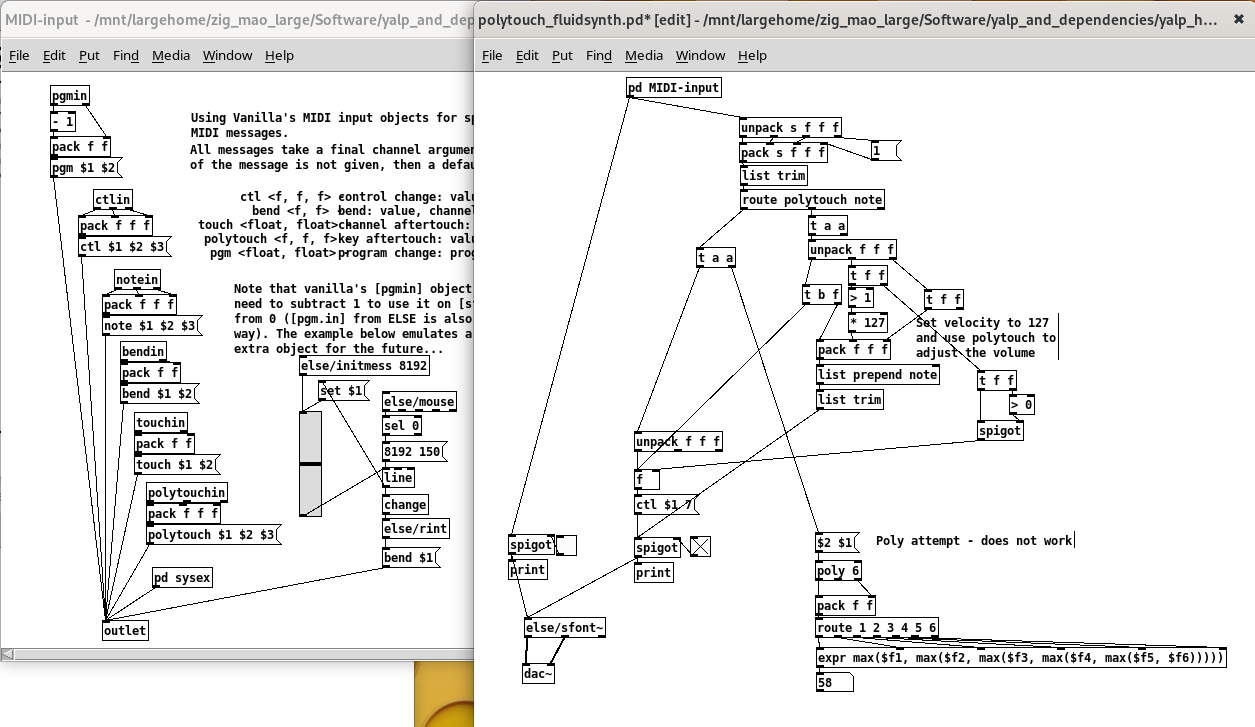
Edit: I just found out about [else/voices] but it also does not output the full stream of polytouch values, only the first value after 0.
Alternatively, I guess I could maybe use [touch( instead of CC7, but I've never tried channel aftertouch yet.
Any other ideas?
Thanks!
 posted in technical issues
Streaming youtube livestream into GEM
I recenlty used OBS to capture different IP camera stream and get the image in pix_video using a virtual camera as output in OBS.
-
First issue is that pix_video cannot get thevirtual camera texture under Windows or MacOS (https://github.com/umlaeute/Gem/issues/433)
-
I changed to Ubuntu linux and a second issue was that RTSP stream doesn't work anymore under Ubuntu, so I installed a
special version of VLC to allows RTSP and finally made a VLC source in OBS...
 posted in pixel#
Puredata on android phone using andronix: no sound!
@sadielcuentas Andronix uses pulseaudio to send a stream to the speakers, and pulseaudio is the intermediate layer for alsa. It will need to be enabled..... https://docs.andronix.app/troubleshoot/sound/
You will then need the appropriate modules for pulseaudio....... https://wiki.archlinux.org/title/PulseAudio
..... and you might need to configure Ubuntu to enable Alsa?
That link says you don't need to add your user to the audio group..... but I have seen people having problems with Pd audio if they have not done so...... including in the link below.
But @1mark had a solution years ago that might work still...... for Pd streaming directly to pulseaudio....... https://forum.pdpatchrepo.info/topic/11146/ubuntu-browsers-and-puredata-wont-share-audio-output-device-solved/3 (you will need to expand the down arrow probably to read it).
That thread could solve all your problems.
David.
 posted in technical issues
Passing a list as parameter to csound6~
Hi everyone,
I've been playing a bit with a Csound handpan synth from here and I've used the r_cycle external to make a handpan with my Launchpad  (the patch is not very complicated so I didn't try to make it neat, sorry!).
The csound patch maps specific MIDI notes to the synth according to a scale, and the Pd patch lights up the pads so each colored group of pads sends the corresponding MIDI note to CSound:
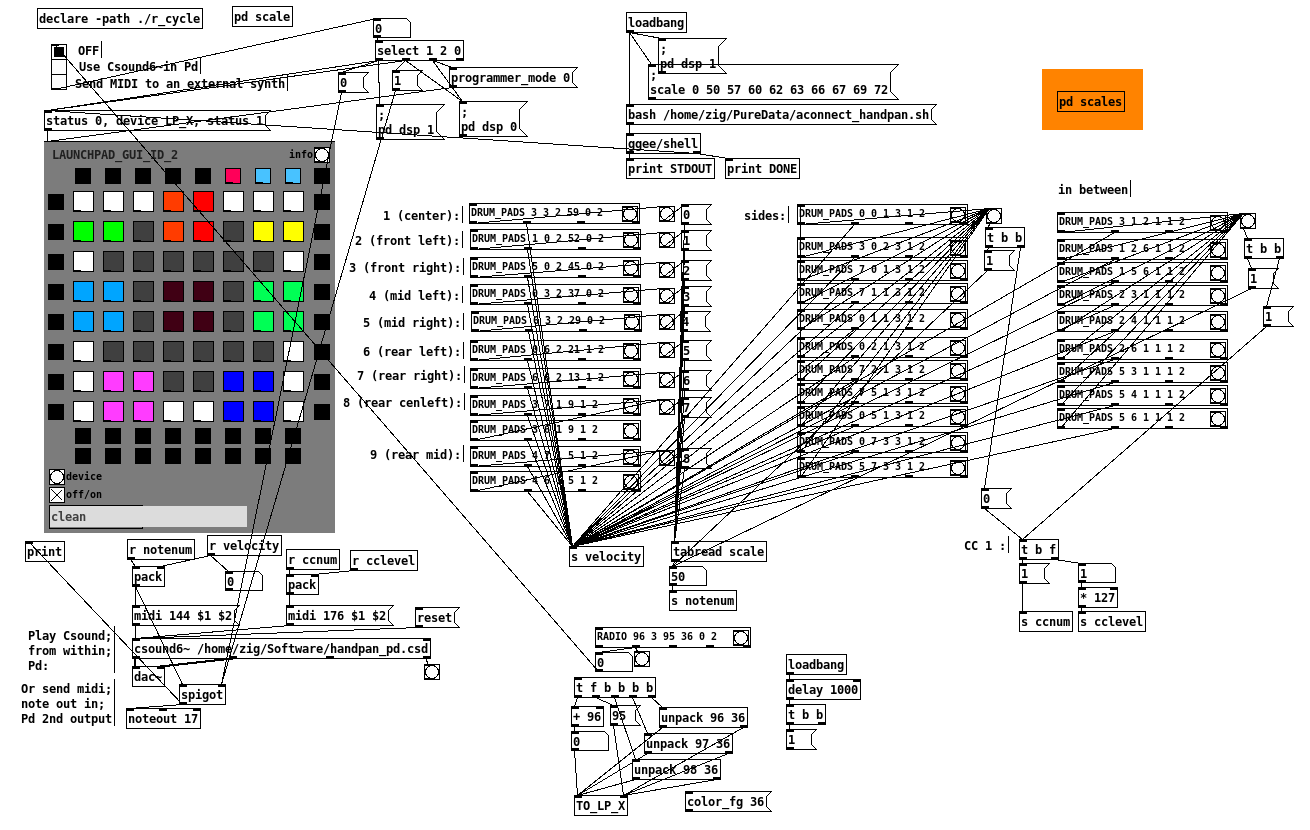
I'm super happy with it, but the next step is to make it configurable: the csound patch contains many different scales defined with giNotes = ftgen(0, 0, -<number of notes>, -2, <list of note numbers> ) :
; B Kurd
;giNotes = ftgen(0, 0, -10, -2, 47, 54, 55, 57, 59, 61, 62, 64, 66, 69)

; B Golden Arcadia
giNotes = ftgen(0, 0, -9, -2, 47, 51, 54, 58, 59, 61, 65, 66, 68)
So instead of editing the CSD file and changing the color mapping of the launchpad when I want to change scale, I would like to send a list/array/table of note numbers from Pd to [csound6~] via a message (and adjust the MIDI notes sent by the launchpad at the same time).
I know basically nothing about Csound, so I've read up and found examples using chnget/chnset or invalue which seem relatively straightforward to change the value of a single int variable. However I don't really have any idea on how to pass the list/array of scale notes using chnset or invalue, or if there is a better way to do it.
Maybe someone around here has an idea? Thanks for reading so far in any case 
posted in technical issues
Launchpad4Oktatrack
hello everyone
since you cannot change outgoing midi messages in those devices,here is my patch to turn Novation Launchad mini mk1&mk2 into Octatrack midi controller,plus i added few small but nice features...
Repo
https://github.com/k2z3k0/launchpad-for-octatrak-in-pure-data
Example video
Getting Started with Raspberry Pi, Pure Data
How to deal with Raspberry Pi as usb midi host
Raspberry Pi audio/midi board
https://blokas.io/pisound/
Raspberry Pi audio/midi board
https://www.osaelectronics.com/.../midi-board-for.../
Raspberry Pi how to get midi out out of onboard GPIO
https://github.com/nugluke/midi2gpio
best regards
Kazik
 posted in patch~
Newbie struggling to find "demux" object - please help
@pharaoh-sean The inlets and outlets sort of "cling on" even when the object will not create because they were there when the help file was made.
For "Find externals" (which is Deken in fact) you should just search for just simply ....... zexy
If you are unsure which one (sometimes there is a choice) then post a screenshot of what it offers.
If it says...... cannot be found..... then you could install extended..... this could help (ignore that it says Ubuntu and look at Gilberto's post)...... https://forum.pdpatchrepo.info/topic/9161/how-can-i-install-pd-extended-on-ubuntu-14-10
If still no good you would have to compile from source...... http://puredata.info/downloads/pd-extended which is usually easy in Linux......... BUT it will be 32-bit so if you are running a 64-bit only OS then it will not work.
Or of course compile zexy from source...... https://git.iem.at/pd/zexy/
If you just really need [demux] and only [demux] I have made you a simple abstraction to do the same thing.
You will have to look inside and change it if you need for example [demux 1 2 3 4 5 6 7 8]
I made it for [demux 1 2 3 4]
You would just need to change the [route 0 1 2 3] to [route 0 1 2 3 4 5 6 7] and add another 4 outlets.
demux.zip
David.
posted in technical issues
Serial communication method which is native to vanilla
@liamorourke More here..... https://forum.pdpatchrepo.info/topic/11567/solved-anyone-using-mobmuplat-having-some-port-number-issues
Are you still planning to run Ubuntu alongside Android though? If you are you can use the Mobmuplat wrapper to set up communication between them (Mobmuplat GUI in Android and Pd in Ubuntu).... see that thread...... and in Pd..... running in Ubuntu..... you can use [comport] for the Arduino...... maybe.....?
David.
posted in technical issues
Building a Linux Desktop
Yes and a topic that I like very much.
We're in 2020! Like I always say, we sent a spacecraft to the moon with a 2.048 MHz computer
@cheesemaster said:
-Ubuntu Studio, maybe an RME PCI card
Why RME PCI, you can find good external soundcard, I guess it depends on the computer that you will choose (more on that later). Yes I like Ubuntu Studio, good choice.
-Really only doing audio (oscillators, arrays, filtering, delays) No graphics.
Perfect, start pd with -rt -nogui
Use [pd~] only if topping 100% CPU (pd is single thread).
-Keeping the the machine quiet (low fan noise) is VERY important.
Fanless is possible, again depending on the computer you choose.
What CPU specs matter most for common audio and MIDI tasks in PD? Number of cores? Thread count? Clock speed?
Clock speed = lowest latency (you can push jack to buffer 64) without xruns. If you are not playing live (for example using ADC) you don't need low latency configuration (I am lucky and not very good at detecting latency, my setup is around 38ms (round-trip). You can detect latency using jack_iodelay.
RAM is important if you want to load samples in PD in advance (avoiding glitches).
NVMe SSD if you can.
If I run other apps (VCV rack, Carla, various Jack plugins) will those processes distribute to the other Cores?
Yes, again Pd is single thread. Others are usually better (GUI on a separated thead for example).
Does Pd benefit from a more powerful GPU card? Or will there be no difference if I use the GPU embedded in the CPU? Is it different if I launch Pd without the gui? (-nogui)
If you don't use Gem you don't need a dedicated GPU card.
Here's some ideas for you, I've been building some setup over the years:
Theremin à crayon:
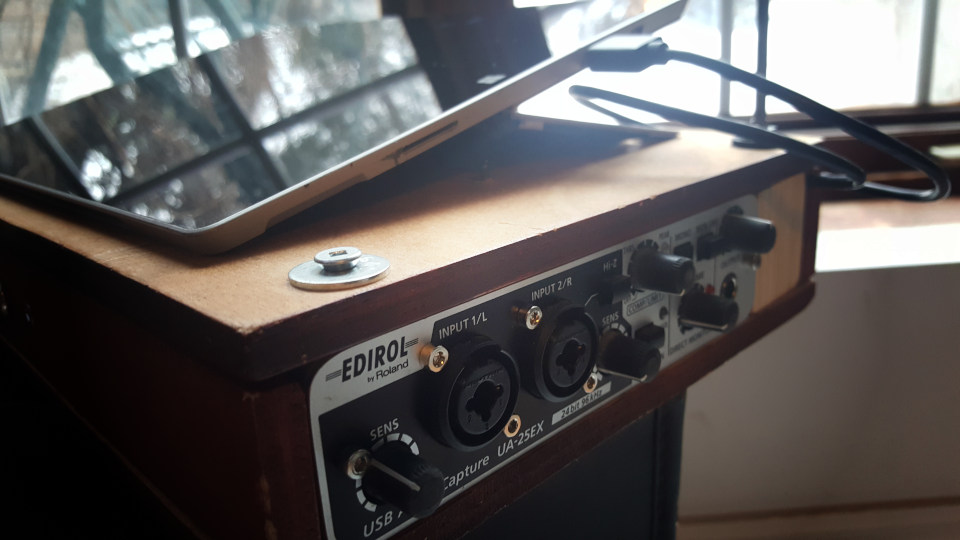
Using a Surface Pro 3 running Ubuntu Studio with a "old" USB 1.1 sound card. Heavy patch using lots of software : Bitwig, SooperLooper, Guitarix and of course PD. Midi (PD), OSC (Bitwig, SooperLooper). Very quiet but the Surface gets hot (fans are kind of quiet like a good laptop).
Heavybox:
https://www.workinprogress.ca/projects/heavy-box/
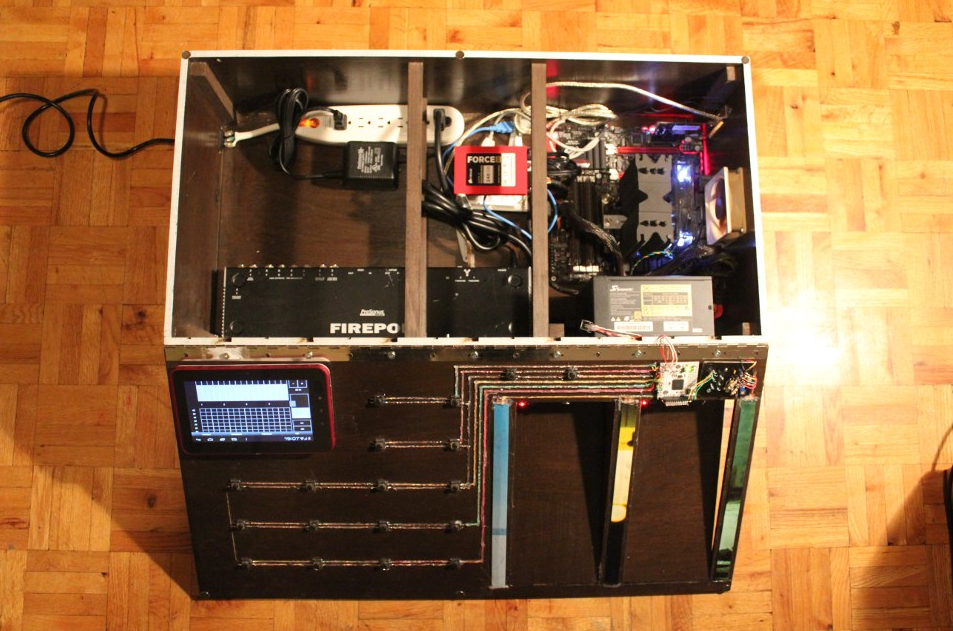
Similar setup, a quiet PC using a big heat sink and a overrated power supply so the fan never start. Noctura fan on the side (expensive but quiet). Old soundcard (firewire) but I can do low latency. 8 ins/8 outs.
Biscuit box computer:
https://www.workinprogress.ca/biscuit-box-computer/
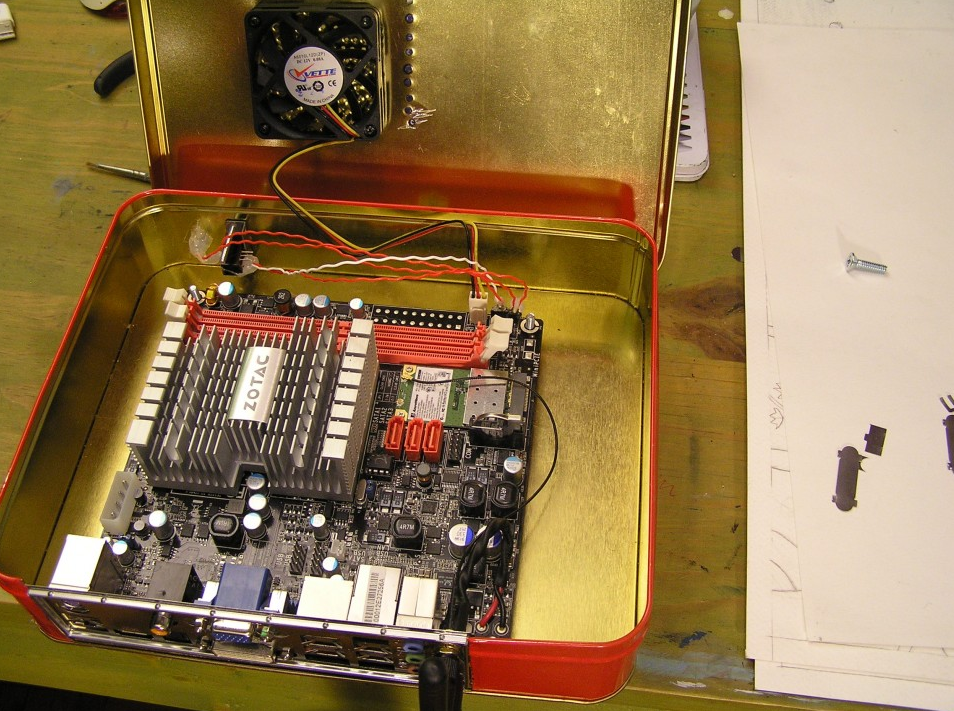
Mini-pc not quiet, not very fast in this case a cheap usb soundcard (you know +- 8$ barely better than the embedded one).
Phimatics:
A raspberry pi 2 with wolfson audio card. Using only PD with Alsa, I am getting very good result (low latency) quiest setup. But of course I need to be careful with the CPU.
JAS:
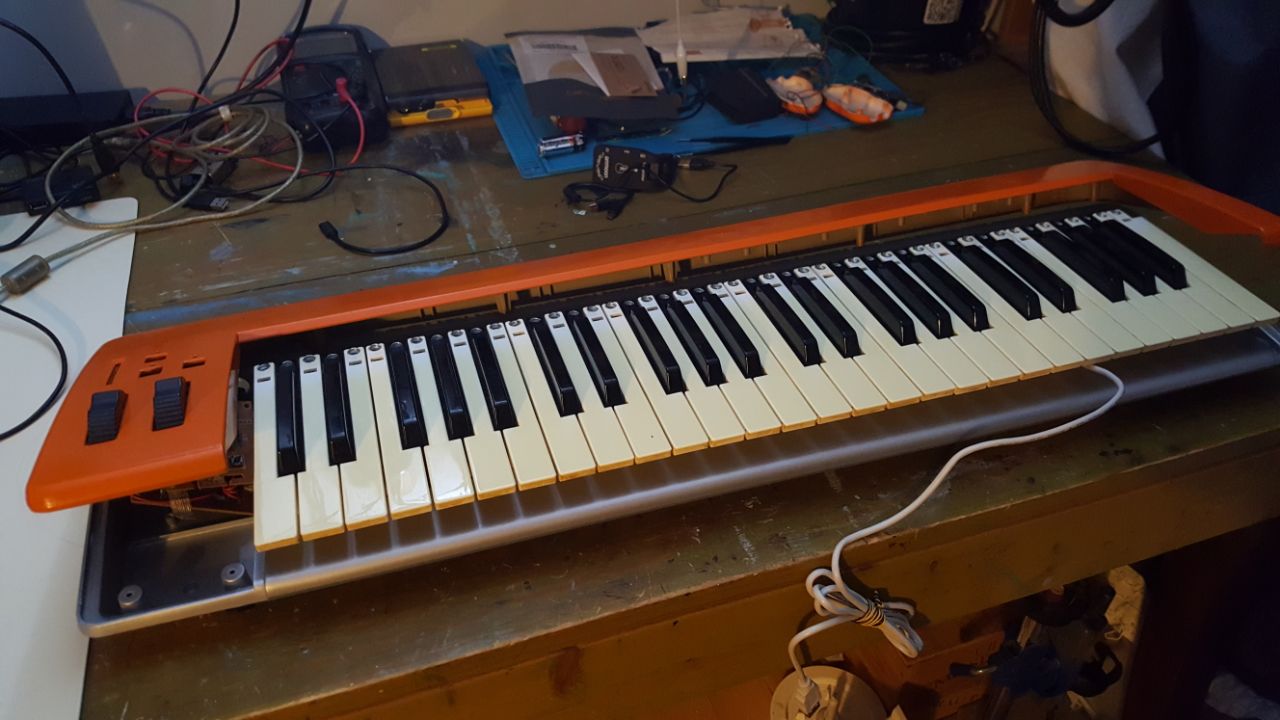
Working on a new project, I found this midi keyboard in the trash / snow. I will put Khadas VIM version 1 (ARM) with a BEHRINGER UCG102 (usb soundcard for guitar). Quiet, no fan can be run on a battery (5V). Will post the project when over.
Lattepanda:
Never worked with it, but looks very powerful. There's a price tag. Maybe for the next project.
Cheers
 posted in I/O hardware diy
Install Purr Data on Linux (Ubuntu Studio)
I can't remember all the little differences between the various Ubuntu flavors.
Albert has a repo for xubuntu here. You could give it a shot using the instructions here:
https://github.com/agraef/purr-data/wiki/Installation#ubuntu
If you get dependency errors after apt install purr-data it means we'll have to compile specifically for Ubuntu Studio. Otherwise you should have a fully working install.
 posted in technical issues