
external does not load anymore
Hello,
I wrote an external a while ago and now I cant load it anymore
it's on a respberry pi, so I did not change anything about the setup nor the version of puredata nor reinstall the box
I noticed something strange is happening, in verbose mode, it tries tons of different paths, then says it can find the external (2 times) but then it fails to create it
how can I solve/debug this ?
regards
tried /usr/lib/puredata/extra/main/main.l_arm and failed
tried /usr/lib/puredata/extra/main/main.pd_linux and succeeded <<<<<<<<<<<<<<<<<<<<<<<<<<<<<<<<
tried /usr/lib/puredata/extra/main/main.pd and failed
...
tried /usr/lib/puredata/extra/main.pd_linux and failed
tried /usr/lib/puredata/extra/main/main.l_arm and failed
tried /usr/lib/puredata/extra/main/main.pd_linux and succeeded <<<<<<<<<<<<<<<<<<<<<<<<<<<<<<<<
tried /usr/lib/puredata/extra/main.pd and failed
...
 main 13
... couldn't create
 posted in technical issues
what can a blender make? the best blenders are incredible kitchen appliances
Most families have a kitchen blender of certain sorts. A portion of those blenders are more remarkable than others. A few clients are more proficient than others with regards to recognizing what a blender can do. Recognizing what your blender can do can set aside you cash and enhance your cooking experience just as spare you https://goodfoodblogph.com/ time in the kitchen.
Mixed Drinks
Each child realizes that blenders are remarkably acceptable at making mixed beverages. Blenders can make milk shakes, smoothies, natural product shakes, solidified beverages, and the more remarkable blenders can make squashed ice for margaritas and daiquiris. These beverages can be made with and without liquor. Blenders are ideal for family social occasions, local gatherings or for the each morning power drink.
The blender's capacity decides how smooth your beverage will be. On the off chance that for instance you are including almonds or carrots they will be separated into a lot littler parts the more remarkable your blender is. What's more, in the event that you do like lumps in your beverage and you have an exceptionally ground-breaking blender then you simply need to decrease the mixing time. Anyway it doesn't work the reverse way around. In the event that your blender comes up short on the force it will always be unable to deliver a truly smooth mixed beverage, particularly when utilizing more strong things.
Purees, Dips, Salsas and Soups
Blenders are the ideal kitchen apparatuses with regards to making purees, plunges, salsas and soups. You can make any kind of soup you need, simply include 1 cup of cooked vegetable, some cooked boneless chicken on the off chance that you like, and a ¼ cup of water to your blender. At that point mix until it is smooth enough for you.
You can without much of a stretch mix any of the accompanying: avocado cream, guacamole, cream of mushroom/tomato, Mexican salsa, dark bean plunge, new organic product yogurt, new pesto sauce, fruit purée, and some more. Numerous sound and fun suppers and bites can without much of a stretch be made with the correct blender, frequently setting aside you time and cash all the while.
Infant Foods
Who would not like to take care of its infant new and solid food. Blenders are a simple method to make a variety of various enhanced and supporting infant nourishments. From fruit purée to carrot puree to verdant green squeezes, all can be newly made and individualized to give you 100% control of what you feed your child. This will likewise spare you a great deal of cash as well.
Pounded Spices and Fresh Grinded Coffee
Envision pounding your own new espresso each morning, or on the ends of the week. Envision the smell and the full flavor that you get from newly crushed espresso. There is then no requirement for you to stop by a coffeehouse on your approach to work and drop $4 or more dollars each time you need great new espresso. The more impressive blenders can crush espresso beans as fine as you might want them to be.
Make your own newly ground pepper from peppercorns. You can even make your own pepper mix by combining various kinds of peppercorns. Do likewise with nutmeg, cinnamon and other dried flavors. Whenever you have visitors over for supper or BBQ dazzle them by revealing to them that you made the flavor blend yourself.
Crushed/Shred Meat
Make your own burger patties from lean cut meats and set aside cash all the while. Additionally, another preferred position is that you know precisely what meat is truly in your patty. Shred cooked meats for sandwiches, e.g., chicken or pork. For this Best Blenders suggests an incredible blender.
Cleaved Vegetables
Do you scorn cleaving onions? Why not utilize your blender? You need hacked carrots as well? Not an issue, utilize your blender. Utilize a low setting or the beat highlight on your blender https://www.flickr.com/people/blenderforsmoothiesreviews/ and the activity will be done right away. It doesn't make a difference on the off chance that they are dry or wet, a decent blender will cleave them to an ideal serving size in no time flat, sparing you time and tears.
Ground Cheese
You like including ground cheddar your pasta or making new pizza or meal? At that point why not utilize newly ground cheddar? It is exceptionally easy to do - cut your cheddar into 3D squares, throw into your blender and utilize your blender's heartbeat include until you have the cheddar ground to your ideal size. Newly ground cheddar consistently tastes better!
Serving of mixed greens Dressings and Mayonnaise
Practically any blender can make serving of mixed greens dressing. Pick your dressing fixings and mix until smooth. At that point bottle it for next time or to take it to the workplace or cookout.
For mayonnaise the fundamental formula is two eggs, 1 tsp. mustard and ½ crushed lemon (whenever liked), mix at fast until foamy, at that point gradually include 1 ¼ cup cooking oil and keep on mixing at rapid until thick and rich. Spot not utilized segment into a container and store in cooler. All new and scrumptious, and everything is without additives.
Crushed Whole Grains
You like eating entire grains? What about creation entire grain flapjacks? It is without a doubt less expensive than locally acquired blends, and truly easy to do as well. Most don't know that a blender can deliver a fine powder from entire grains. The blender ought to have more force than a normal home blender for this errand.
Frozen yogurt
Make the most extravagant seasoned frozen yogurts ever with your blender. Ideal for birthday celebrations or home film evenings. Truly easy to do as well, as relatively few fixings are required. It is additionally remarkably simple to store your newly made frozen yogurt in the cooler until one week from now or the end of the week after. With a bit of testing your companions will before long be advising you to bundle your frozen yogurt and sell it. To make frozen yogurt your blender will require enough mixing capacity to have the option to deal with solidified products of the soil in the event that you decide to utilize them. The more remarkable the blender the creamier and smoother the frozen yogurt.
Additive Free Fresh Nut Butters
Make your own new nutty spread, or almond or cashew margarine. Ideal for snacks, picnics or bites. This can be a solid and reasonable choice to locally acquired items. Envision the expression on your companions faces when you disclose to them that you make it yourself. Here is the way to make new nutty spread https://gab.com/topbestblenderreviews without any preparation utilizing your blender.
First mix 2 cups of cooked peanuts and ½ tablespoon of vegetable or nut oil until it becomes glue like. At that point taste and if necessary include minuscule amounts of earthy colored sugar, nectar or salt to fit individual taste. On the off chance that you like your nut spread crunchy, include some more peanuts at the end and mix just for a couple of moments. Best Blenders suggests the more remarkable blenders for this kind of mixing.
 posted in Off topic
Purr Data 2.5.0
ok dependencies seems to be ok...this is my log
fremen@fremenCPU MINGW64 ~
$ pacman -S autoconf automake git libtool \
make mingw-w64-x86_64-dlfcn mingw-w64-x86_64-fftw
mingw-w64-x86_64-fluidsynth
mingw-w64-x86_64-ftgl mingw-w64-x86_64-fribidi
mingw-w64-x86_64-ladspa-sdk mingw-w64-x86_64-lame
mingw-w64-x86_64-libsndfile mingw-w64-x86_64-libvorbis
mingw-w64-x86_64-lua mingw-w64-x86_64-toolchain
mingw-w64-x86_64-libjpeg-turbo
rsync unzip wget
warning: autoconf-2.69-3 is up to date -- reinstalling
warning: automake-wrapper-10-1 is up to date -- reinstalling
warning: git-2.10.1-1 is up to date -- reinstalling
warning: libtool-2.4.6-2 is up to date -- reinstalling
warning: make-4.2.1-1 is up to date -- reinstalling
:: There are 16 members in group mingw-w64-x86_64-toolchain:
:: Repository mingw64
- mingw-w64-x86_64-binutils 2) mingw-w64-x86_64-crt-git
- mingw-w64-x86_64-gcc 4) mingw-w64-x86_64-gcc-ada
- mingw-w64-x86_64-gcc-fortran 6) mingw-w64-x86_64-gcc-libgfortran
- mingw-w64-x86_64-gcc-libs
 mingw-w64-x86_64-gcc-objc
 - mingw-w64-x86_64-gdb 10) mingw-w64-x86_64-headers-git
- mingw-w64-x86_64-libmangle-git 12) mingw-w64-x86_64-libwinpthread-git
- mingw-w64-x86_64-make 14) mingw-w64-x86_64-pkg-config
- mingw-w64-x86_64-tools-git 16) mingw-w64-x86_64-winpthreads-git
Enter a selection (default=all):
warning: mingw-w64-x86_64-binutils-2.27-2 is up to date -- reinstalling
warning: mingw-w64-x86_64-crt-git-5.0.0.4745.d2384c2-1 is up to date -- reinstal ling
warning: mingw-w64-x86_64-gcc-6.2.0-2 is up to date -- reinstalling
warning: mingw-w64-x86_64-gcc-libgfortran-6.2.0-2 is up to date -- reinstalling
warning: mingw-w64-x86_64-gcc-libs-6.2.0-2 is up to date -- reinstalling
warning: mingw-w64-x86_64-headers-git-5.0.0.4747.0f8f626-1 is up to date -- rein stalling
warning: mingw-w64-x86_64-libwinpthread-git-5.0.0.4741.2c8939a-1 is up to date - - reinstalling
warning: mingw-w64-x86_64-winpthreads-git-5.0.0.4741.2c8939a-1 is up to date -- reinstalling
warning: unzip-6.0-2 is up to date -- reinstalling
warning: wget-1.18-1 is up to date -- reinstalling
resolving dependencies...
looking for conflicting packages...
warning: dependency cycle detected:
warning: mingw-w64-x86_64-gcc-libgfortran will be installed before its mingw-w64 -x86_64-gcc-libs dependency
warning: dependency cycle detected:
warning: mingw-w64-x86_64-harfbuzz will be installed before its mingw-w64-x86_64 -freetype dependency
warning: dependency cycle detected:
warning: mingw-w64-x86_64-cairo will be installed before its mingw-w64-x86_64-fr eetype dependency
warning: dependency cycle detected:
warning: mingw-w64-x86_64-fontconfig will be installed before its mingw-w64-x86_ 64-freetype dependency
Packages (58) mingw-w64-x86_64-cairo-1.15.2-4 mingw-w64-x86_64-flac-1.3.1-2
mingw-w64-x86_64-fontconfig-2.12.0-2
mingw-w64-x86_64-freetype-2.7-1 mingw-w64-x86_64-gdbm-1.12-1
mingw-w64-x86_64-glib2-2.50.1-2
mingw-w64-x86_64-graphite2-1.3.8-5
mingw-w64-x86_64-harfbuzz-1.3.2-1
mingw-w64-x86_64-libogg-1.3.2-2 mingw-w64-x86_64-libpng-1.6.26-1
mingw-w64-x86_64-ncurses-6.0.20161001-1
mingw-w64-x86_64-pcre-8.38-1 mingw-w64-x86_64-pixman-0.34.0-3
mingw-w64-x86_64-portaudio-19_20140130-2
mingw-w64-x86_64-python2-2.7.12-1
mingw-w64-x86_64-readline-6.3.008-1
mingw-w64-x86_64-speex-1.2rc2-2
mingw-w64-x86_64-speexdsp-1.2rc3-2 mingw-w64-x86_64-tcl-8.6.6-1
mingw-w64-x86_64-termcap-1.3.1-2 mingw-w64-x86_64-tk-8.6.6-1
mingw-w64-x86_64-wineditline-2.101-4 winpty-0.4.0-2
autoconf-2.69-3 automake-wrapper-10-1 git-2.10.1-1
libtool-2.4.6-2 make-4.2.1-1 mingw-w64-x86_64-binutils-2.27-2
mingw-w64-x86_64-crt-git-5.0.0.4745.d2384c2-1
mingw-w64-x86_64-dlfcn-1.0.0-2 mingw-w64-x86_64-fftw-3.3.5-1
mingw-w64-x86_64-fluidsynth-1.1.6-3
mingw-w64-x86_64-fribidi-0.19.7-1
mingw-w64-x86_64-ftgl-2.1.3rc5-2 mingw-w64-x86_64-gcc-6.2.0-2
mingw-w64-x86_64-gcc-ada-6.2.0-2
mingw-w64-x86_64-gcc-fortran-6.2.0-2
mingw-w64-x86_64-gcc-libgfortran-6.2.0-2
mingw-w64-x86_64-gcc-libs-6.2.0-2
mingw-w64-x86_64-gcc-objc-6.2.0-2 mingw-w64-x86_64-gdb-7.12-1
mingw-w64-x86_64-headers-git-5.0.0.4747.0f8f626-1
mingw-w64-x86_64-ladspa-sdk-1.13-2
mingw-w64-x86_64-lame-3.99.5-4
mingw-w64-x86_64-libjpeg-turbo-1.5.1-1
mingw-w64-x86_64-libmangle-git-5.0.0.4669.7de6266-1
mingw-w64-x86_64-libsndfile-1.0.26-1
mingw-w64-x86_64-libvorbis-1.3.5-1
mingw-w64-x86_64-libwinpthread-git-5.0.0.4741.2c8939a-1
mingw-w64-x86_64-lua-5.3.3-1
mingw-w64-x86_64-make-4.1.2351.a80a8b8-1
mingw-w64-x86_64-pkg-config-0.29.1-2
mingw-w64-x86_64-tools-git-5.0.0.4669.7de6266-1
mingw-w64-x86_64-winpthreads-git-5.0.0.4741.2c8939a-1
rsync-3.1.2-2 unzip-6.0-2 wget-1.18-1
Total Download Size: 76.81 MiB
Total Installed Size: 749.00 MiB
Net Upgrade Size: 369.69 MiB
:: Proceed with installation? [Y/n] Y
:: Retrieving packages...
mingw-w64-x86_64-dl... 9.6 KiB 9.41M/s 00:00 [#####################] 100%
mingw-w64-x86_64-ff... 4.0 MiB 1146K/s 00:04 [#####################] 100%
mingw-w64-x86_64-wi... 32.7 KiB 6.39M/s 00:00 [#####################] 100%
mingw-w64-x86_64-pc... 859.1 KiB 1252K/s 00:01 [#####################] 100%
mingw-w64-x86_64-gl... 2.9 MiB 1247K/s 00:02 [#####################] 100%
mingw-w64-x86_64-li... 191.2 KiB 7.18M/s 00:00 [#####################] 100%
mingw-w64-x86_64-fl... 582.7 KiB 1588K/s 00:00 [#####################] 100%
mingw-w64-x86_64-li... 331.2 KiB 1761K/s 00:00 [#####################] 100%
mingw-w64-x86_64-sp... 472.2 KiB 1349K/s 00:00 [#####################] 100%
mingw-w64-x86_64-sp... 519.0 KiB 1458K/s 00:00 [#####################] 100%
mingw-w64-x86_64-li... 359.9 KiB 1874K/s 00:00 [#####################] 100%
mingw-w64-x86_64-po... 143.6 KiB 7.01M/s 00:00 [#####################] 100%
mingw-w64-x86_64-fl... 252.2 KiB 1425K/s 00:00 [#####################] 100%
mingw-w64-x86_64-fo... 220.8 KiB 1284K/s 00:00 [#####################] 100%
mingw-w64-x86_64-pi... 289.5 KiB 1591K/s 00:00 [#####################] 100%
mingw-w64-x86_64-ca... 755.8 KiB 1423K/s 00:01 [#####################] 100%
mingw-w64-x86_64-gr... 167.0 KiB 7.09M/s 00:00 [#####################] 100%
mingw-w64-x86_64-ha... 314.4 KiB 1700K/s 00:00 [#####################] 100%
mingw-w64-x86_64-li... 285.9 KiB 1571K/s 00:00 [#####################] 100%
mingw-w64-x86_64-fr... 503.3 KiB 1422K/s 00:00 [#####################] 100%
mingw-w64-x86_64-ft... 118.8 KiB 7.25M/s 00:00 [#####################] 100%
mingw-w64-x86_64-fr... 93.4 KiB 7.02M/s 00:00 [#####################] 100%
mingw-w64-x86_64-la... 8.3 KiB 8.13M/s 00:00 [#####################] 100%
mingw-w64-x86_64-la... 373.9 KiB 1928K/s 00:00 [#####################] 100%
mingw-w64-x86_64-lu... 269.6 KiB 1506K/s 00:00 [#####################] 100%
mingw-w64-x86_64-gc... 18.0 MiB 1203K/s 00:15 [#####################] 100%
mingw-w64-x86_64-gc... 8.1 MiB 1209K/s 00:07 [#####################] 100%
mingw-w64-x86_64-gc... 13.6 MiB 1202K/s 00:12 [#####################] 100%
mingw-w64-x86_64-gd... 164.1 KiB 6.97M/s 00:00 [#####################] 100%
mingw-w64-x86_64-nc... 1697.2 KiB 1237K/s 00:01 [#####################] 100%
mingw-w64-x86_64-te... 12.6 KiB 12.3M/s 00:00 [#####################] 100%
mingw-w64-x86_64-re... 327.4 KiB 1732K/s 00:00 [#####################] 100%
mingw-w64-x86_64-tc... 2.9 MiB 1242K/s 00:02 [#####################] 100%
mingw-w64-x86_64-tk... 1873.6 KiB 1218K/s 00:02 [#####################] 100%
mingw-w64-x86_64-py... 11.2 MiB 1216K/s 00:09 [#####################] 100%
mingw-w64-x86_64-gd... 2.9 MiB 1234K/s 00:02 [#####################] 100%
mingw-w64-x86_64-li... 26.7 KiB 6.51M/s 00:00 [#####################] 100%
mingw-w64-x86_64-ma... 103.2 KiB 7.20M/s 00:00 [#####################] 100%
mingw-w64-x86_64-pk... 237.5 KiB 1357K/s 00:00 [#####################] 100%
mingw-w64-x86_64-to... 257.4 KiB 1446K/s 00:00 [#####################] 100%
mingw-w64-x86_64-li... 379.7 KiB 1957K/s 00:00 [#####################] 100%
winpty-0.4.0-2-x86_64 495.6 KiB 1404K/s 00:00 [#####################] 100%
rsync-3.1.2-2-x86_64 259.9 KiB 1460K/s 00:00 [#####################] 100%
wget-1.18-1-x86_64 582.1 KiB 1595K/s 00:00 [#####################] 100%
(58/58) checking keys in keyring [#####################] 100%
(58/58) checking package integrity [#####################] 100%
(58/58) loading package files [#####################] 100%
(58/58) checking for file conflicts [#####################] 100%
(58/58) checking available disk space [#####################] 100%
warning: could not get file information for usr/share/man/man3/Git::I18N.3pm.gz
warning: could not get file information for usr/share/man/man3/Git::SVN::Editor. 3pm.gz
warning: could not get file information for usr/share/man/man3/Git::SVN::Fetcher .3pm.gz
warning: could not get file information for usr/share/man/man3/Git::SVN::Memoize ::YAML.3pm.gz
warning: could not get file information for usr/share/man/man3/Git::SVN::Prompt. 3pm.gz
warning: could not get file information for usr/share/man/man3/Git::SVN::Ra.3pm. gz
warning: could not get file information for usr/share/man/man3/Git::SVN::Utils.3 pm.gz
:: Processing package changes...
( 1/58) reinstalling autoconf [#####################] 100%
( 2/58) reinstalling automake-wrapper [#####################] 100%
( 3/58) reinstalling git [#####################] 100%
( 4/58) reinstalling libtool [#####################] 100%
( 5/58) reinstalling make [#####################] 100%
( 6/58) reinstalling mingw-w64-x86_64-libwinpt... [#####################] 100%
( 7/58) reinstalling mingw-w64-x86_64-gcc-libg... [#####################] 100%
( 8/58) reinstalling mingw-w64-x86_64-gcc-libs [#####################] 100%
( 9/58) installing mingw-w64-x86_64-dlfcn [#####################] 100%
(10/58) installing mingw-w64-x86_64-fftw [#####################] 100%
(11/58) installing mingw-w64-x86_64-wineditline [#####################] 100%
(12/58) installing mingw-w64-x86_64-pcre [#####################] 100%
(13/58) installing mingw-w64-x86_64-glib2 [#####################] 100%
No schema files found: doing nothing.
(14/58) installing mingw-w64-x86_64-libogg [#####################] 100%
(15/58) installing mingw-w64-x86_64-flac [#####################] 100%
(16/58) installing mingw-w64-x86_64-libvorbis [#####################] 100%
(17/58) installing mingw-w64-x86_64-speexdsp [#####################] 100%
(18/58) installing mingw-w64-x86_64-speex [#####################] 100%
(19/58) installing mingw-w64-x86_64-libsndfile [#####################] 100%
(20/58) installing mingw-w64-x86_64-portaudio [#####################] 100%
(21/58) installing mingw-w64-x86_64-fluidsynth [#####################] 100%
(22/58) installing mingw-w64-x86_64-fontconfig [#####################] 100%
Fontconfig configuration is done via /mingw64/etc/fonts/conf.avail and conf.d.
Read /mingw64/etc/fonts/conf.d/README for more information.
updating font cache... C:/msys64/mingw64/bin/fc-cache.exe: error while loading s hared libraries: ?: cannot open shared object file: No such file or directory
done.
(23/58) installing mingw-w64-x86_64-pixman [#####################] 100%
(24/58) installing mingw-w64-x86_64-cairo [#####################] 100%
Optional dependencies for mingw-w64-x86_64-cairo
mingw-w64-x86_64-glib2: libcairo-gobject [installed]
(25/58) installing mingw-w64-x86_64-graphite2 [#####################] 100%
(26/58) installing mingw-w64-x86_64-harfbuzz [#####################] 100%
Optional dependencies for mingw-w64-x86_64-harfbuzz
mingw-w64-x86_64-icu: harfbuzz-icu support
(27/58) installing mingw-w64-x86_64-libpng [#####################] 100%
(28/58) installing mingw-w64-x86_64-freetype [#####################] 100%
(29/58) installing mingw-w64-x86_64-ftgl [#####################] 100%
(30/58) installing mingw-w64-x86_64-fribidi [#####################] 100%
(31/58) installing mingw-w64-x86_64-ladspa-sdk [#####################] 100%
(32/58) installing mingw-w64-x86_64-lame [#####################] 100%
(33/58) installing winpty [#####################] 100%
(34/58) installing mingw-w64-x86_64-lua [#####################] 100%
(35/58) reinstalling mingw-w64-x86_64-binutils [#####################] 100%
(36/58) reinstalling mingw-w64-x86_64-headers-git [#####################] 100%
(37/58) reinstalling mingw-w64-x86_64-crt-git [#####################] 100%
(38/58) reinstalling mingw-w64-x86_64-winpthre... [#####################] 100%
(39/58) reinstalling mingw-w64-x86_64-gcc [#####################] 100%
(40/58) installing mingw-w64-x86_64-gcc-ada [#####################] 100%
(41/58) installing mingw-w64-x86_64-gcc-fortran [#####################] 100%
(42/58) installing mingw-w64-x86_64-gcc-objc [#####################] 100%
(43/58) installing mingw-w64-x86_64-gdbm [#####################] 100%
(44/58) installing mingw-w64-x86_64-ncurses [#####################] 100%
(45/58) installing mingw-w64-x86_64-termcap [#####################] 100%
(46/58) installing mingw-w64-x86_64-readline [#####################] 100%
(47/58) installing mingw-w64-x86_64-tcl [#####################] 100%
(48/58) installing mingw-w64-x86_64-tk [#####################] 100%
(49/58) installing mingw-w64-x86_64-python2 [#####################] 100%
(50/58) installing mingw-w64-x86_64-gdb [#####################] 100%
(51/58) installing mingw-w64-x86_64-libmangle-git [#####################] 100%
(52/58) installing mingw-w64-x86_64-make [#####################] 100%
(53/58) installing mingw-w64-x86_64-pkg-config [#####################] 100%
(54/58) installing mingw-w64-x86_64-tools-git [#####################] 100%
(55/58) installing mingw-w64-x86_64-libjpeg-turbo [#####################] 100%
(56/58) installing rsync [#####################] 100%
(57/58) reinstalling unzip [#####################] 100%
(58/58) reinstalling wget [#####################] 100%
 posted in news
No audio coming out of pd when playing score
@whale-av hey david which one would you recommend?
http://articulo.mercadolibre.com.mx/MLM-586353740-mac-mini-late-2014-3-ghz-intel-core-i7-16gb-ram-el-capitan-_JM
or
https://www.apple.com/mx/shop/buy-mac/macbook-pro?product=MPXQ2E/A&step=config
the guy at the mac store was i think just trying to sell the most expensive one he could, i like the mac mini, but he said it wasnt good enough for my work haha :/
i think the mac mini is pretty powerful.
 posted in technical issues
MobMuPlat NUMPAD "template" (as .json + .pd abstraction) for direct and precise entry of #'s into MMP
Stemming from a different project, I've made a MobMuPlat (MMP) NUMPAD "template" so that numbers may be entered directy (and more Precisely) into MMP instead of selected from siders, knobs, or other controls (which  apparently pd can do by just clicking a number field, typing in the number, and pressing ENTER (Thanks, again, @LiamG)
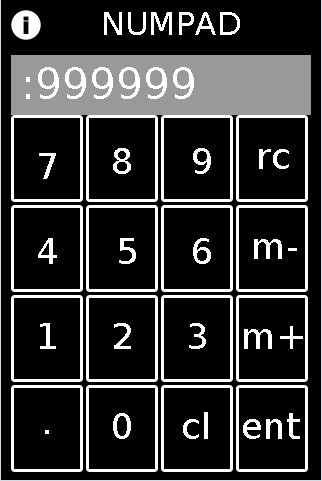
FEATURES:
Integers and Decimals from 1e-8 to 999999;
m+,m-,rcl: for storing (m+), removing stored number (m-) and recalling numbers (rcl)
cl:clear (but no backspace)
HOW-TO:
To test: in the MMP editor open the "mmp_numpad_template.mmp" file and experiment. (note: it will not start entering decimals until after you click "." and Then the next number). It is associated to the "abs_mmp_numpad_test.pd" which has the template embedded as an abstraction in it. It also has a slider on the second page, to test routing the ENTERed number to different "locations".
To implement:
First embed "abs_mmp_numpad_template.pd" as an abstraction in your MMP's .pd file. It has one outlet: the current value after the NUMPAD's ENTer is clicked and will receive all control signals coming from the NUMPAD.
Next, with a text-editor, open the "numpad-codeblock.jsn" file (or copy it from the code block below);
VERY IMPORTANT!!!: make a backup copy of your own mmp file before doing this.
In the text-editor, open "as-text" your .mmp file (or to experiment, the "pasteJSNtest.mmp" file which I have provided);
Past the numpad_template.jsn codeblock (from the file or the codeblock below), in between the mmp 'gui' brackets, as shown here:
{"backgroundColor":[0.5019608,0.5019608,0.5019608,1.0],"pageCount":1,"port":54321,"isPageScrollShortEnd":false,"startPageIndex":0,"canvasType":"widePhone","gui":[],"isOrientationLandscape":false,"version":1.64}
Once you have pasted it in, save your file, and open it in the MMP Editor.
The control and associated labels will be on the first page. You can move them, resize, etc. as you wish. And no matter where you put it (given its precise field names the entered value will get sent to the "abs_mmp_numpad_template" abstraction.
Sounds like a lot of work. But once you get the hang of it. I think it's well worth the effort: you will be able to have exact control over Any mmp value.
numpad-codeblock.jsn
{"mode":1,"highlightColor":[1.0,0.0,0.0,1.0],"borderThickness":3,"address":"/numgrid/0","color":[1.0,1.0,1.0,1.0],"dim":[4,4],"class":"MMPGrid","cellPadding":2,"frame":[10.0,115.0,300.0,360.0]},{"highlightColor":[1.0,0.0,0.0,1.0],"address":"/myLabel","textSize":36,"color":[1.0,1.0,1.0,1.0],"androidFont":"Roboto-Regular","textFontFamily":"Default","text":"cl","textFont":"","class":"MMPLabel","frame":[175.0,405.0,50.0,45.0]},{"highlightColor":[1.0,0.0,0.0,1.0],"address":"/myLabel","textSize":36,"color":[1.0,1.0,1.0,1.0],"androidFont":"Roboto-Regular","textFontFamily":"Default","text":".","textFont":"","class":"MMPLabel","frame":[35.0,400.0,40.0,50.0]},{"highlightColor":[1.0,0.0,0.0,1.0],"address":"/myLabel","textSize":36,"color":[1.0,1.0,1.0,1.0],"androidFont":"Roboto-Regular","textFontFamily":"Default","text":"ent","textFont":"","class":"MMPLabel","frame":[235.0,405.0,75.0,45.0]},{"highlightColor":[1.0,0.0,0.0,1.0],"address":"/myLabel","textSize":36,"color":[1.0,1.0,1.0,1.0],"androidFont":"Roboto-Regular","textFontFamily":"Default","text":"m-","textFont":"","class":"MMPLabel","frame":[245.0,225.0,60.0,45.0]},{"highlightColor":[1.0,0.0,0.0,1.0],"address":"/myLabel","textSize":36,"color":[1.0,1.0,1.0,1.0],"androidFont":"Roboto-Regular","textFontFamily":"Default","text":"m+","textFont":"","class":"MMPLabel","frame":[235.0,315.0,75.0,50.0]},{"highlightColor":[1.0,0.0,0.0,1.0],"address":"/myLabel","textSize":36,"color":[1.0,1.0,1.0,1.0],"androidFont":"Roboto-Regular","textFontFamily":"Default","text":"1","textFont":"","class":"MMPLabel","frame":[30.0,315.0,40.0,50.0]},{"highlightColor":[1.0,0.0,0.0,1.0],"address":"/myLabel","textSize":36,"color":[1.0,1.0,1.0,1.0],"androidFont":"Roboto-Regular","textFontFamily":"Default","text":"2","textFont":"","class":"MMPLabel","frame":[105.0,315.0,40.0,50.0]},{"highlightColor":[1.0,0.0,0.0,1.0],"address":"/myLabel","textSize":36,"color":[1.0,1.0,1.0,1.0],"androidFont":"Roboto-Regular","textFontFamily":"Default","text":"3","textFont":"","class":"MMPLabel","frame":[180.0,315.0,40.0,50.0]},{"highlightColor":[1.0,0.0,0.0,1.0],"address":"/myLabel","textSize":36,"color":[1.0,1.0,1.0,1.0],"androidFont":"Roboto-Regular","textFontFamily":"Default","text":"4","textFont":"","class":"MMPLabel","frame":[30.0,230.0,40.0,50.0]},{"highlightColor":[1.0,0.0,0.0,1.0],"address":"/myLabel","textSize":36,"color":[1.0,1.0,1.0,1.0],"androidFont":"Roboto-Regular","textFontFamily":"Default","text":"5","textFont":"","class":"MMPLabel","frame":[110.0,230.0,40.0,50.0]},{"highlightColor":[1.0,0.0,0.0,1.0],"address":"/myLabel","textSize":36,"color":[1.0,1.0,1.0,1.0],"androidFont":"Roboto-Regular","textFontFamily":"Default","text":"6","textFont":"","class":"MMPLabel","frame":[185.0,230.0,40.0,45.0]},{"highlightColor":[1.0,0.0,0.0,1.0],"address":"/myLabel","textSize":36,"color":[1.0,1.0,1.0,1.0],"androidFont":"Roboto-Regular","textFontFamily":"Default","text":"7","textFont":"","class":"MMPLabel","frame":[30.0,145.0,40.0,40.0]},{"highlightColor":[1.0,0.0,0.0,1.0],"address":"/myLabel","textSize":36,"color":[1.0,1.0,1.0,1.0],"androidFont":"Roboto-Regular","textFontFamily":"Default","text":"9","textFont":"","class":"MMPLabel","frame":[185.0,140.0,40.0,50.0]},{"highlightColor":[1.0,0.0,0.0,1.0],"address":"/myPanel","color":[0.6,0.6,0.6,1.0],"passTouches":false,"class":"MMPPanel","frame":[10.0,55.0,300.0,60.0]},{"highlightColor":[1.0,0.0,0.0,1.0],"address":"/numlabel/0","textSize":42,"color":[1.0,1.0,1.0,1.0],"androidFont":"Roboto-Regular","textFontFamily":"Default","text":":256 ","textFont":"","class":"MMPLabel","frame":[15.0,60.0,290.0,55.0]},{"highlightColor":[1.0,0.0,0.0,1.0],"address":"/myLabel","textSize":36,"color":[1.0,1.0,1.0,1.0],"androidFont":"Roboto-Regular","textFontFamily":"Default","text":"0","textFont":"","class":"MMPLabel","frame":[105.0,405.0,40.0,50.0]},{"highlightColor":[1.0,0.0,0.0,1.0],"address":"/myLabel","textSize":36,"color":[1.0,1.0,1.0,1.0],"androidFont":"Roboto-Regular","textFontFamily":"Default","text":"8","textFont":"","class":"MMPLabel","frame":[105.0,140.0,40.0,50.0]},{"highlightColor":[1.0,0.0,0.0,1.0],"address":"/myLabel","textSize":36,"color":[1.0,1.0,1.0,1.0],"androidFont":"Roboto-Regular","textFontFamily":"Default","text":"rc","textFont":"","class":"MMPLabel","frame":[250.0,135.0,50.0,50.0]}
Hope this may be of use to you.
Enjoy. And as a side comment: MMP is by far the fastest development environment I have ever worked in and is excellent as a ProtoTyper (tho admittedly my experience is limited). It works GREAT as an OSC-Controller, too. Daniel has done us all a great service by building it. Additionally kudos, to the PdDroidParty and libPD developers upon whose backbone it is built.
Many Happy Returns,
Scott
 posted in libpd / webpd
Loading a pure data patch ( .pd file ) within a pure data patch ( .pd file )
HI!
Quick version:
My folder structure:
/mother-patch.pd ( main pure data patch first loaded and running... )
/patches/1/main.pd
/patches/2/main.pd
/patches/3/main.pd
...
How i could open /patches/1/main.pd triggered by some action in the mother-patch.pd?
How i could close /patches/1/main.pd triggered by some action in the mother-patch.pd?
Long read
I'm attempting to clone the Critter and Guitari organelle ( link ).
This instrument is basically a computer running libpd and running very cool pure data patches
You can read more about my project here ( link )
I have a mother pure data patch that it's first loaded when the device is on, this patch is doing some [send] and [receive] operations related to the knobs/keyboard/volume/led and it should be also managing the loading ( opening and closing ) of the child pure data patches ( mentioned above ). This child patches are receiving the actions from the mother patch.
If I open the mother patch and the child patches manually, everything works fine. But now I need to OPEN this CHILD PURE DATA patches with a object within the mother patch.
I've been testing [open] , for opening the main.pd of the child patches but it does not work.
I've been testing [pd] , for opening the main.pd of the child patches but it does not work.
I wouldn't like to modify the original organelle patches.
I wouldn't like to end up loading all the patches using [pd ...] and inserting a [switch] object inside every main.pd file in the patches in order to enable only the dsp of the desired patch.
It would be perfect If i could have a folder with all the patches and load them within the mother patch with some kind of object. And I would also want to be able to CLOSE the pure data patch and open another ( changing patches... )
Every little and big help woul be MUCH APRECIATED!
THANKS!!!!!!!
 posted in technical issues
pd cannot load external
Hi,
after having created/compiled my own external, I tried to instal it in /usr/lib/pd/externals.... but with no luck
then I installed it manualy in my home folder ~/pd-externals/main/main.pd-linux
pd found it, but complains "main_setup" is not found, although it is there
here is a dump of the library
http://i.imgur.com/SWpwZxU.png

I compiled it doing this
g++ -Wall -c "main.c" -I"/usr/include/pd" -DPD -DVERSION='"0.0"' -fPIC -O6 -funroll-loops -fomit-frame-pointer -W -g -o "main.o"
g++ -Wall -rdynamic -shared -fPIC -Wl,-rpath,"\$ORIGIN",--enable-new-dtags -o "main.pd_linux" "main.o" -lc
chmod a-x "main.pd_linux"
can someone find what I do wrong ? Is it not supposed to work when compiled with c++ ? I prefer using c++ it has more posibilities than c
thanks
#include "/usr/include/pd/m_pd.h"

static t_class *main_class;

typedef struct _main
{
    t_object x_obj;
} t_main;

void main_bang(t_main *x)
{
  post("Hello world !! %p",x);
}

void *main_new(void)
{
  t_main *x = (t_main *)pd_new(main_class);

  return (void *)x;
}

void main_setup(void)
{
  main_class = class_new(
        gensym("main"),
        (t_newmethod)main_new,
        NULL,
        sizeof(t_main),
        CLASS_DEFAULT,
        (t_atomtype)0);

  class_addbang(main_class, main_bang);
}
how does [list drip] actually work?
@rjp9 yup, basically you put items into a stack and take them out of the stack the reverse order, so it is used to remember what needs to be done next.
an example, the "call stack" is the term used for an area of RAM that stores which function a program is in, so if you have a "main" function:
main(int argc, char ** argv) {
       somefunction()
       someotherfunction()
}
and the functions look like:
somefunction() {
       int cat
      cat = somethirdfunction()
}
someotherfunction() {
       float dog
     somefunction()
}
somethirdfunction() {
       char lettera
         -- do nothing
}
then when the program runs the call stack will look like this at various times:
when it starts main:
main -- has space for function info and argc, argv
when somefunction is called:
main (bottom of stack)
      somefunction - top of stack - has space for function info and an integer (cat)
then somethirdfunction is called and cat's value is set, while in somethirdfunction the stack looks like this:
main (bottom of stack)
      somefunction - middle of stack
            somethirdfunction - top of stack, has space for lettera
since somethirdfunction doesn't do anything, it returns:
main (bottom of stack)
      somefunction - middle of stack
some function exits:
main (bottom of stack)
and someotherfunction is called:
main (bottom of stack)
      someotherfunction - middle of stack
since someotherfunction calls somefunction which calls somethirdfunction, the call stack will eventually look like this when in somethirdfunction here:
main (bottom of stack)
      someotherfunction - second member of stack
            somefunction - third member
                  somethirdfunction -top of stack
and this whole time the "automatic variables" and their values are remembered in the function info. This includes arguments to the function (like in trigger_anything) and other variables declared at the top of each function. and you can have a function call itself too, and have itself in it's own call stack eventually, as in recursive cases like this.
in this case, the stack would be more like, if you have 8 elements:
trigger_anything
 split off first 4 elements
    trigger_anything
      split off first 2 elements
        trigger_anything
           split off first element
             output first element
          split off second element
             output second element
      split off 3rd and 4th elements together (in 2nd trigger_anything)
         trigger anything
           split off 3rd argument
             output 3rd argument
          split off 4th
             output 4th
     split off last 4 elements (from 1st trigger_anything)
and repeat the exact same thing with the last 4
wikipedia has a good page on it https://en.wikipedia.org/wiki/Stack_(abstract_data_type)
 posted in technical issues
Pd-extended 0.40.3 released, dedicated to Jamie Tittle
@hans said:
Finally, it's done! The most polished release of Pd yet. We are further refining Pd into a truly powerful and usable programming platform.
http://puredata.org/downloads/
This release is dedicated to Jamie Tittle, aka tigital, who recently died of cancer. He was a long time and key contributor to Gem and Pd in general, even while he was in the hospital undergoing treatment. He is sorely missed in this community, and I am sure by many others.
Some highlights of this release:
* more functional namespace tools ([declare] and [import])
* new appearance designed to enhance readability
* GLSL shader support in Gem
* usability improvements
* on Mac OS X, you can now build "standalone" applications
* standard locations for user-installed externals
* many bug fixesHere's the rough changelog:
next visual appearance designed for readability
default locations for user-installed externals, helpfiles, etc.
GNU/Linux: /usr/local/lib/pd-externals and ~/pd-externals
Mac OS X: /Library/Pd and ~/Library/Pd
Windows: %ProgramFiles%/Common Files/Pd and %UserProfile%/Application Data/Pdlots of standard key bindings added:
Enter/Return for OK
Escape for Cancel
Ctrl/Cmd-W closes all windows
on Mac OS X, Cmd-` cycles thru open windows
on Mac OS X, Cmd-m minimizes windows
Ctrl/Cmd-R raises/lowers Pd window
Ctrl/Cmd-Shift-R shrinks/grows Pd window
Ctrl/Cmd-Shift-L clears Pd window's text console
Ctrl/Cmd-B opens the Help Browseryou can now use "~" in all paths to mean home folder, and on Windows you can use environment variables, lie %UserProfile% in paths
improved Cut/Copy/Paste support for working in object and message boxes
fixed Cut/Copy/Paste for the Pd window's console
[declare] and [import] now sorted out for loading (but much work needs to be done before there namespace support is complete)
"File -> Save As" defaults to the Home folder (~/) on Mac OSX
new patches default to the folder last saved in
included pgp_opengl aka 3dp on GNU/Linux and Mac OS X
'hardware' and 'deprecated' removed from libraries loaded by default
On Debian/Ubuntu, the packages now install into /usr rather than /usr/local
On Mac OS X, you can now build "standalone" applications from the File menu.
bug fixes and clean up of [hid] and mapping externals
included config in Info.plist for the Spotlight Importer
KNOWN BUGS
check http://puredata.info/dev/bugtracker before reporting bugs
Escape, Enter, and Ctrl/Cmd-W don't close the Path and Startup preferences
pdp_opengl is alpha and will definitely crash Pd
loading pdp_opengl will crash Pd if X11 is not open before trying to load it
the GUI runs slower in some situations
The new visual style is very nice indeed,
 posted in news
How to install externals, libraries, gui plug-ins, etc.
Edit: This post was originally written with Pd-extended 0.43 in mind. These days there is a nice little plugin called Deken that you can use to easily download and install most of the popular libraries in Pd. It comes bundled with recent versions of Pd-vanilla. You can still use namespaces to load up the objects for most libraries, but for some libraries like zexy that have all the objects bundled into a single file, you will still need to use [declare] to load it up.
Installing libraries and plug-ins isn't so obvious. This guide will hopefully clear up the process, and may even explain more than you need to know.
Recent changes
This first section is mainly for those upgrading to Pd-0.43 from previous versions. If you're new to Pd and are starting on 0.43, you can just skip this section and get on with loading libraries.
It use to be that installing a library was done by putting it wherever you wanted on your system and adding its path to the preferences. While this wasn't particularly difficult, it did have some problems. Recent efforts have been made to standardize this a bit so those problems can be avoided.
In Pd-extended 0.43, you can't add paths from within Pd any more like you used to. You can open the preferences and add a path, but it won't save it. This means that non-default libraries won't load on start-up any more; you have to load them from within the patch. While this sounds like a hassle, it does have the advantage that patches are much easier to share. You don't have to worry about others having different start-up settings than you. It also forces the patch to document what libraries are being used, so if an object isn't loading, you don't have to go on some crazy hunt to find out where it came from or what it's supposed to do.
Putting them in the right folder
To make sure Pd can easily find the library, you need to put them in the right folder. This is OS dependent. The following folders are your options (taken from here). I personally recommend putting them in the user-specific folders since they are likely easier to migrate when updating your OS.
Linux:
User-specific:
~/pd-externals
Global:
/usr/local/lib/pd-externals
Mac OSX
User-specific:
~/Library/Pd
Global:
/Library/Pd
Windows
User-specific:
%AppData%/Pd
Global:
%CommonProgramFiles%/Pd
Linux and OSX are pretty straight-forward. "~" means your home folder.
Windows is a bit trickier. %AppData% and %CommonProgramFiles% are environment variables that contain specific directories. What the exact directory is depends on which version of Windows you are on. You can find out what it is by opening up the command line and typing this:
echo %AppData%
You might end up with something like C:\Users\username\AppData\Roaming or C:\Documentes and Settings\username\Application Data. Also, to see it in the file browser, you might need to show hidden files. At any rate, once you find the directory, create a Pd folder if there isn't one, and put your library, objects, or plug-ins there.
Loading whole libraries
To load a library you have a few options. The one that works on both vanilla and extended is to use [declare -stdpath libraryname]. The libraryname is the name of the folder that all the objects/abstractions are in.
[declare] doesn't always work as expected in abstractions, though. In Pd-extended, you can also use [import], which works well in abstractions. I have found that sometimes it doesn't work with libraries of abstractions that don't have a meta file, though. But that can be fixed by just making one. Simply create an empty Pd patch and save it as libraryname-meta.pd in the library's folder. That's all the meta patch is.
A third option (also Pd-extended only) is to use [path]. This is new to Pd-extended 0.43 and works similarly to [declare]. I haven't needed it, yet. But it's there.
Once the library is loaded, you should be able to load an object or abstraction just by creating it by name.
Loading objects or abstractions using namespaces
While this method means a little more typing, it is also the safest, and it makes it easier to find out what objects are from which library. The way you do it is add the library name (i.e. the namespace) to the beginning of the object when you call it, like this:
[zexy/multiplex~] <-- load the [multiplex~] object from zexy
[cyclone/comb~] <-- load [comb~] from cyclone
You don't have to load the library with [import] or [declare] for this to work. You just call the object that way.
Why is this safest? Because it's possible for different libraries to have objects with the same name. For example, both cyclone and zexy have an object called [mean]. But they don't work exactly the same. zexy's takes a list, while cyclone's takes in a continuous stream. If you have both libraries loaded (and in Pd-extended, these two libraries happen to be loaded by default), you can't be sure which one you're getting if you just type [mean]. However, if you type [cyclone/mean], you know exactly which one you are getting.
 posted in tutorials