
Two beginner "what object should I use?" questions.
@alexandros said:
Am I missing something, or the patch below isn't correct?
[phasor~ 1]
|
[threshold 0.5 10 0.5 10]
|
[o]
This does output a bang whenever [phasor~] resets.
Nice, provided this operates as suggested (haven't tested), this does precisely what I'm looking for.
I literally started with PD last week, so I just haven't encountered the threshold module to consider (I used Max/MSP back in the Nato.0+55+3d days, supercollider in the early 2000s, and patch modulars extensively since the Nord Modular days, but ignored PD for the most part under an impression it lacked refinement).
My aim is quite simple, embarrassingly so: I'm learning how to play back samples loaded into arrays, and wanted to test my bpm calculations after changing the phasor's speed. As a test I wanted to run a metro at the quarter note time of the new BPM, triggering a kick sample, and confirm the hits are falling where I expect them to,... but then I ran into the issue of getting my metro to start precisely in time with the looping sample (which is just freely looping endlessly via a phasor). Since the phasor~ lacked a phase output, I was stumped, and figured getting the array index = 0 = bang would be a simpler approach.
Per the randomF, the multiplicative scaling by 0.1 works, but then limits my range to 0-1. The use of a second random added to these values would fix this easily, but didn't seem as efficient as finding something that might already exist. Good to hear else has a "rand.f" (or whatever is typed above). I have this external already installed, but haven't exhaustively worked through what is included.
Thanks again, one and all.
p.s. Per the playback of arrays, I have learned a method of chopping samples with a dedicated start button using direct indexing of the slice's start in sample size values (fed as arguments into a vline module set to read from tabread4), but haven't learned how to do so when indexing via a phasor~, I suspect I'll get there in the next day or so.
The vline approach feels superior, but I'm not so sure it lends itself to rate control as easily as phasor~. Indexing via phase seems simpler too since it'll always be 0-1.
 posted in technical issues
Two beginner "what object should I use?" questions.
@_ish said:
- there used to be a random object that spit floats (randomF).
The ELSE library has [rand.f].
(I wish, when I started with Pd, that someone had pointed me to ELSE... a lot of the things that are missing from vanilla, or "build it yourself," are just there.)
- Earlier I was working on an array, and really wanted to send a bang every time it looped around to index 0. This feels like it should be really easy, but I couldn't think of anything that would send the active index step as out (the contents of the index step, sure, but not the step number itself).
Are you reading the array in the control or signal domain?
whale-av:
As in that link if using [phasor~] catching it's output as it passes 0 is unreliable because the value of [phasor~] will likely not be 0 as it is captured at a block boundary.
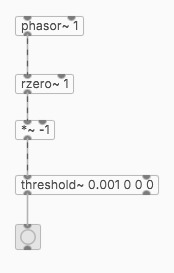
The value of phasor~ isn't reliable for this, but the two-point difference ([rzero~ 1]) is guaranteed to be positive most of the time, and negative only when the phasor jumps down. So this will always work (for a positive phasor~ frequency).
hjh
 posted in technical issues
Objects for formant synthesis?
So, how about we discuss all these options and how they relate to each other? Anyone with me?
Let me talk about FOF here... Basically, it's a hard-synced oscillator! And I always thought hard synced oscillators sounded really nice for forcing harmonics into a fundamental pitch, and that's it... Ok, there's more to that of course, and it also passes through a decay envelope, which can be implemented with [rpole~], here's a minimal Pd patch of this main core.... it uses objects from ELSE of course... specially for making hard sync easier. Below, 150 is 'f0' (fundamental), 390 is center/formant frequency, and 100 is bandwidth, all in Hertz...
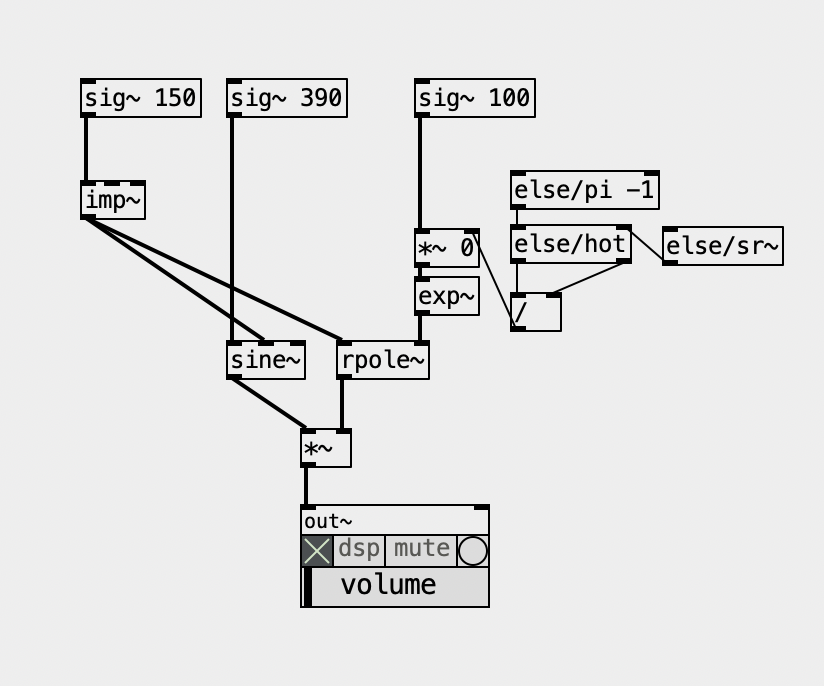
But then, the envelope grain might and can overlap. The Csound implementation is pretty much "Csoundy", ridiculously complicated with way too many parameters and options, not to mention a seemingly inexplicable low output that forces you to multiply it by a ridiculously large and arbitrary number. Besides the decay envelope, it also applies another envelope on top of it, which might be pretty useless when the first envelope simply dies before it, but it can be useful to apply an attack phase. What a mess! The FAUST implementation is simpler and makes more sense!
The Formlet UGen from supercollider implements a filter with attack and decay, and it rings, so you don't need the hard synced oscillator. Plus, it can "overlap" grains quite seeminglessly. It's pretty clever and it made its way back into Csound, where it's called fofilter.
What makes no sense for me is the "BandWidth" parameter in FOF (or using Formlet). In Pd's examples we have the paf like patches and the bandwidth makes actual sense because it represents a bandwidth of partials over the center frequency. In FOF we don't have that  and the larger the bandwidth, the thinner the sound actually is because the decay is faster.
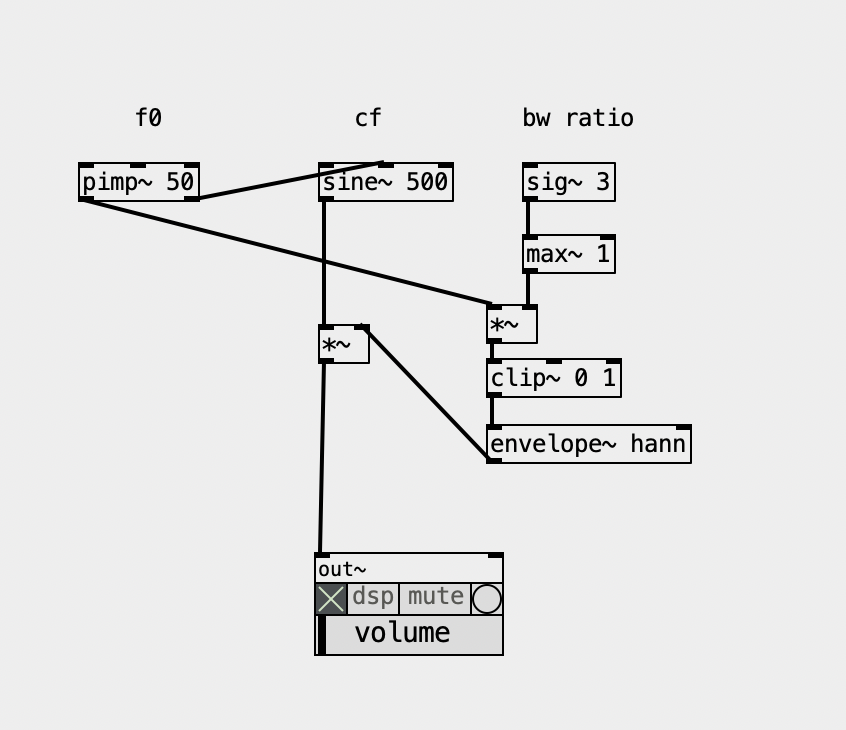
Now, i also ported the Formant UGen and this is what it is, basically, as a patch, guess what? Yup, another hard synced oscillator, basically, being enveloped, so... I guess it relates to the Fof approach... but not quite... one way or another, there's no reference in the docs or code of where it comes from and maybe I should ask the SC Forum (again) Below, BW ratio means the ratio of bandwidth according to the fundamental, so '3' is '150' hz. This parameter to me feels like controlling the "brightness" anyhow.
And there are also the FM approach, the paf, the VOSIM, not to mention the filterbank approach... Gosh, what a mess... I guess I know why I procrastinated so much to finally deal with this... but it's time and now I'll map them all and see how they relate to each other. And I'll sort it all out in my Live Electronics Tutorial...
I'm still thinking what are the objects that make sense actually including in ELSE...
 posted in technical issues
snapshotting and restoring the state of a [phasor~] exactly
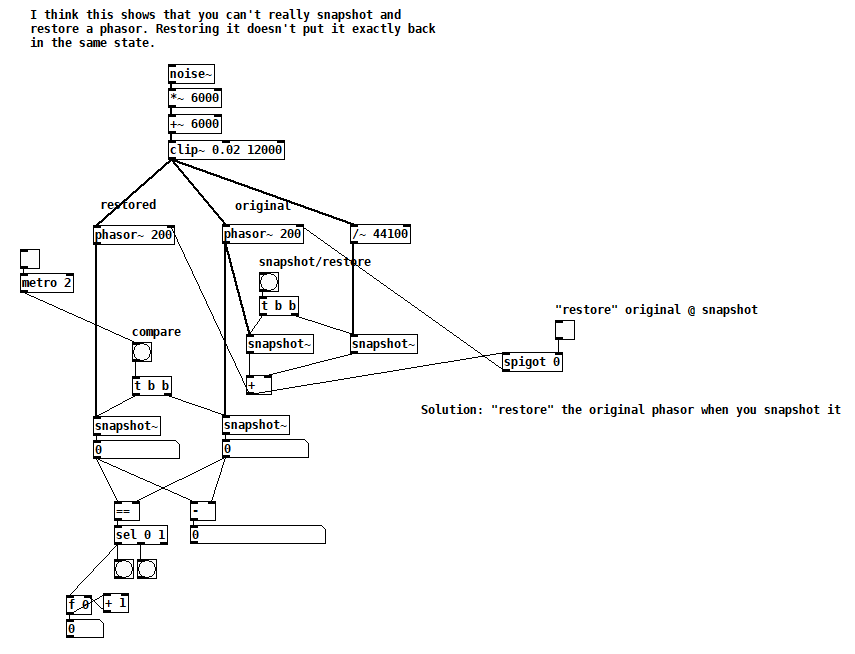
Suppose you want to capture the state of a [phasor~] in order to return to it later, i.e. you want it to output the exact same sequence of samples as it did from the moment you captured its state. As a first attempt, you might [snapshot~] the [phasor~]'s output and then send that value to the [phasor~]'s right inlet sometime later to restore it. Of course you also want to capture the state of its frequency inlet (and record it if it's changing). But there are two subtleties to consider. Firstly, the value you write to the right inlet is the next value that the [phasor~] will output, but when you [snapshot~]ed it, the next value it output was a little greater, greater by the amount of the last frequency divided by the current sample rate. So really, this greater value (call it "snap++") is the one you should be writing to the right inlet.
The second subtlety has to do with the limits of Pd's single precision floats. Internally, [phasor~] is accumulating into a double precision float, so in a way, the right inlet overwrites the state of the phasor with something that can only approximate its state. The only solution I could find is to immediately write snap++ to the right inlet of the running [phasor~], so that the current and all future runs output the exact same sequence of samples. This might not be acceptable in your application if you are reliant on [phasor~]'s double precision accumulation because you'd be disrupting it in exchange for repeatability.
Here's a test patch that demonstrates the issue:
phasor snapshot restore test.pd
 posted in technical issues
Looking for advice on using phasor~ to randomize tabread4~ playback
@nicnut said:
There is a number box labeled "transpose." The first step is to put a value in there, 1 being the original pitch, .5 is an octave down, 2 is an octave up, etc.
Here, you'd need to calculate the phasor frequency corresponding to normal playback speed, which is 1 / dur, where dur is the soundfile duration in seconds. Soundfile duration = soundfile size in samples / soundfile sample rate, so the phasor~ frequency can be expressed as soundfile sample rate / soundfile size in samples. Then you multiply this by a transpose factor, ok.
But I don't see you accounting for the soundfile's size or sample rate, so you have no guarantee of actually hitting normal playback speed.
After that you can change the frequency of the phasor in the other number box labled "change phasor frequency without changing pitch."
If you change the phasor frequency here, you will also change the transposition.
This way, I can make the phasor frequency, say .5 and the transposition 2,
Making the eventual playback speed 1 (assuming it was 1 to begin with), undoing the transposition.
which I don't think I can do using line~ with tabread4~.
The bad news is, you can't do this with phasor either.
hjh
posted in technical issues
Looking for advice on using phasor~ to randomize tabread4~ playback
@nicnut said:
Yes line~ would be better, but one thing I am doing is also playing the file for longer periods of time, by lowering the phaser~ frequency, and doing some math the transpose the pitch of the playback that I would like to keep. With line~ I don't know how to separate the pitch and the playback speed.
If I understand you right, separating pitch and playback speed would require pitch shifting...?
With phasor~, you can play the audio faster or slower, and the pitch will be higher or lower accordingly.
With line~, you can play the audio faster or slower, with the same result.
To take a concrete example -- if you want to play 0-10 seconds in the audio file, you'd use a phasor~ frequency of 0.1 and map the phasor's 0-1 range onto 0 .. (samplerate*10) samples. If instead, the phasor~ frequency were 0.05, then it would play 10 seconds of audio within 20 seconds = half speed, one octave down.
With line~, if you send it messages "0, $1 10000" where $1 = samplerate*10, then it would play the same 10 seconds' worth of audio, in 10 seconds.
To change the rate, you'd only need to change the amount of time: 10000 / 0.5 (half speed) = 20000. 10 seconds of audio, over 20 seconds -- exactly the same as the phasor~ 0.05 result.
frequency = 1 / time, time = 1 / frequency. Whatever you multiply phasor~ frequency by, just divide line~ time by the same amount.
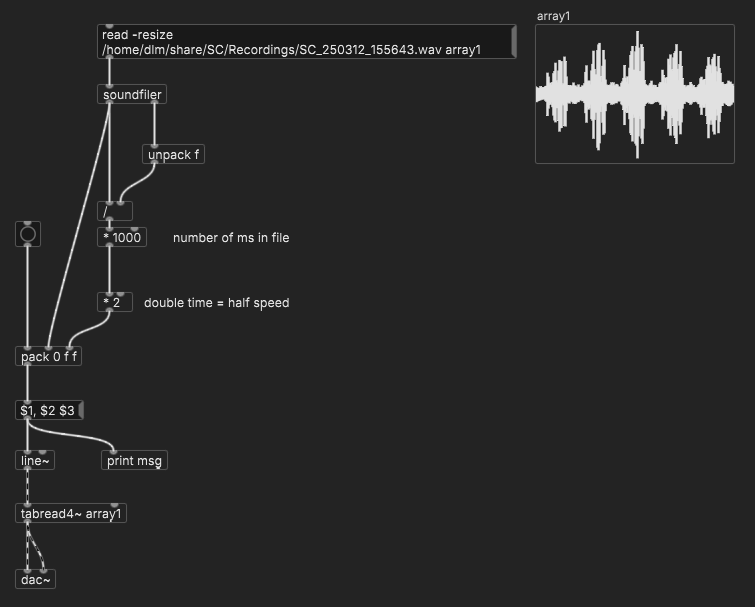
(line~ doesn't support changing rate in the middle though. There's another possible trick for that but perhaps not simpler than phasor~.)
hjh
posted in technical issues
Sync Audio with OSC messages
@earlyjp There might well be a better way than the two options that I can think of straight away.
You could play the audio file from disk, and send a bang into [delay] objects as you start playback, with the delays set to trigger the messages at the correct time.
I am not sure how long a [delay] you can create though because of the precision limit of a number size that can be saved in Pd. You might need to use [timer] banged by a [metro]
Or as you say you could load the file into RAM using [soundfiler] and play the track in the array using [phasor~] and trigger the messages as the output of [phasor~] reaches certain values.
Using [phasor~] the sample will loop though.
To play just once you could use [line~] or [vline~]
You would need to catch the values from [phasor~] [line~] or [vline~] using [snapshot~].
[<=] followed by [once] would be a good idea for catching, as catching the exact value would likely be unreliable...... once.pd
The same will be true if you use [timer] as the [metro] will not make [timer] output every value.
Again, number precision for catching the value could be a problem with long audio files.
Help for the second method....... https://forum.pdpatchrepo.info/topic/9151/for-phasor-and-vline-based-samplers-how-can-we-be-sure-all-samples-are-being-played
The [soundfiler] method will use much more cpu if that is a problem.
If there is a playback object that outputs it's index then use that, but I have not seen one.
David.
 posted in patch~
simple polyphonic synth - clone the central phasor or not?
@manuels That's clever, thanks! I especially like how you get the slope of the input phasor (compensating for that downward jump every cycle) and how you construct the output phasor. But I think there are two issues with it. Firstly, a sync will reset the phase of the output phasor at an arbitrary point unless the output phasor frequency is an exact multiple of the input frequency. Secondly, without sync, I think the output phasor may drift WRT the input phasor due to floating point roundoff error. Agree?
Backing out to look at the big picture again, i.e. Brendan's question, this means that it couldn't be used to make either a "hardsync" synthesizer (disclaimer: I don't really know what that is) or a "phasor~-synchronized system", assuming that both require a precise phase relationship between the input and output phasors and that the output phasor doesn't contain discontinuities. What do you think?
posted in technical issues
Question about [tabread4~]
I would test Pd by recording a few seconds of [phasor~ 1], and measuring the number of samples per cycle. Obviously this should be the system sample rate, give or take floating point rounding error.
The worry in this thread is that Pd is playing at the wrong speed.
The only way this could happen is if [phasor~ 1] is running at the wrong speed, because in the demo patch, phasor~ is the only thing controlling the speed.
Therefore, if there is no evidence of phasor~ running at the wrong speed, then Pd must be playing the file at the true speed!
"But what if the system sample rate differs from the file's?" The file is at the lowest sample rate in common use. If Pd is playing it slower than Audacity, then Pd would have to be running below 44.1 kHz, which is unlikely to be supported in hardware. So I'm comfortable ruling that out (not to mention that scaling the phasor~ by the file's number of samples already accounts for this). Common scenario would be: 44.1 kHz file, 48 kHz system SR, without correcting for this then Pd would play faster, but that isn't the report.
is audacity running at 44100?
I'm pretty sure Audacity has no power to override the hardware sample rate. I've never heard of soundcards issuing separate, per-app interrupts at different rates (imagine how difficult that would be, to make it work, highly implausible). AFAIK Audacity does sample rate conversion when the file is at a different rate from the hardware... just like all other audio software.
Is it 100% guaranteed that Audacity is playing it at the right speed?
hjh
posted in technical issues
Video tutorial: PD sync with Ableton Link and with DAW (PlugData)
Been working on this for awhile, only this week had a chance to record the material.
[abl_link~] (in Deken) has existed for awhile for Ableton Link sync. PlugData is more recent for Pd to run in a DAW, with timeline sync.
With both approaches, however, you'll crash into a handful of problems whose solutions are not at all obvious. This project is all about: What does it really take to have Ableton Link, or DAW timeline, sync working properly. 49 minutes  a bit longer than I expected.
(This is exposing some rough edges in Pd's interfaces. Unfortunately rough edges can end up being a feedback loop -- something is hard, so people avoid it, and as a result, it remains hard and people continue to avoid it. I hope this will break the feedback loop in some crucial places and make these types of sync more approachable.)
hjh
PS Note one correction in the video's description.
posted in tutorials