
Gem for 64-bit OSX
@jancsika yes I did everything from homebrew, other than gmerlin which ultimately failed.. I did
./configure --with-libvlc-CFLAGS=-I/Applications/VLC.app/Contents/MacOS/include --with-libvlc-LIBS="-L/Applications/VLC.app/Contents/MacOS/lib -lvlc" --with-pd=/Applications/Pd.app/Contents/Resources --without-QuickTime-framework --without-Carbon-framework --with-defaultwindow=gemcocoawindow
and make install DEST=~/Library/Pd libdir=~/Library/Pd prefix=~/Library/Pd/stuff/lib
then I install_name_tool'ed the .so files in the main directory for the following libs from Homebrew, and put them in stuff/lib (and install_name_tooled them also where necessary):
libltdl.7.dylib
libMagickCore-7.Q16HDRI.4.dylib
liblzma.5.dylib
libfreetype.6.dylib
libpng16.16.dylib
libftgl.2.dylib
libtiff.5.dylib
libjpeg.9.dylib:
I also changed all the help files & examples to include [declare -stdlib Gem]
I used these 2 pages:
https://github.com/umlaeute/Gem/wiki/Getting-Started:-Working-on-native-64-bit-OSX-Plugins
https://github.com/umlaeute/Gem/wiki/How-to-build-Gem-on-MacOSX-Mavericks
@beep.beep I think I got the VLC lib compiled on my first try (though I had some trouble afterwards for some reason). However, I'm not sure how to test it because the help file is just some send objects??
Anyway, the Gem I posted has the .so file correctly linked (I believe) with the assumption that VLC is in Applications
 posted in extra~
Gem for 64-bit OSX
Coincidentally, I've been working on the same thing myself for the past several days. I succeeded in compiling Gem on OSX 10.12 with Pd 0.47.1 (64 bit), using an amalgam of these instructions:
As seb noted, no quicktime film/video support, and I also get the extra dock icon & Pd crashing sometimes when I close my patch.
Having noticed this conversation the other day, I tried compiling Gem against Purr Data 2.3.1 using the same general method, but didn't get far at all. I didn't save the errors, but got a sense that it'd be much more involved than just adjusting paths to Pd-l2ork/Contents/Resources...
I haven't tried to compile the gmerlin plugin, but I have the imageJPEG plugin working, and I've spent many hours trying to get videoVLC working. There are several mailing list discussions which suggest that the problem might be with gem_videoVLC.so (perhaps not pointing to libvlc.5.dylib correctly, either needing editing or symlinking?).
I'm reaching the limits of my meager hacking abilities, but nonetheless it's pretty exciting to have Gem back up & running on 64 bit! I'm happy to join the cause if others are also interested in trying to work out the kinks in enabling the rest of the workaround plugins (gmerlin, videoVLC), and hopefully also find a way to get Gem working on Purr Data.
 posted in extra~
Purr Data on OS X with GEM external, is it possible?
@Doug_Meatloaf I maintain Purr Data.
I tried compiling Gem using these instructions:
https://github.com/umlaeute/Gem/wiki/Getting-Started:-Working-on-native-64-bit-OSX-Plugins
I took a shot at compiling using those instructions but couldn't get Gem to work. You can see the error I got in this thread:
https://forum.pdpatchrepo.info/topic/10803/a-few-questions-about-pd-l2ork-purr-data-on-osx/12
If someone can get those instructions to produce a working version of Gem, and then test to make sure the same version of Gem compiles and runs successfully on Windows and Linux (where I'm currently using an old bug-fixed version of Gem as a stop-gap), I'll happily accept a merge request at
 posted in technical issues
A few questions about Pd-L2ork/Purr Data on osX
I don't know if it helps but there are a lot of useful instructions on how to built gem in umläute's ghithub wiki page:
https://github.com/umlaeute/Gem/wiki/Getting-Started:-Working-on-native-64-bit-OSX-Plugins#
I took a shot at this on OSX VM. It compiled ok. It installed in /Gem for some reason but I could at least get Purr Data to load the Gem lib.
Unfortunately I couldn't create a gem window in any of the help patches:
error: [gemcocoawindow]: failed to init GLEW: your system only supports openGL-1.0
I don't have time to debug or develop Gem. But if someone can successfully get it to compile, install, successfully create a Gem window, and write clear unambiguous instructions on how to achieve all of that then I'll take it from there. (And again, the discipline is only to use brew install and the build instructions at the link above.)
posted in technical issues
how to install gem library in pd
@maddynakedymaddy A bit hard to work out like this at a distance....
If you have put the "contents" of the 0.94-test3 folder in a folder called Gem inside the extra folder then you will need to put....... exactly....
C:/Program_Files_(x86)/Pd/extra/Gem/Gem
If you have put the 0.94-test3 folder in a folder called Gem inside the extra folder then you will need to put........ exactly.......
C:/Program_Files_(x86)/Pd/extra/Gem/0.94-test3/Gem
In both cases the last "Gem"..... /Gem loads the Gem.dll (the library) in the folder that contains it...... it is a bit confusing... and "abnormal"....
Spaces in names are not tolerated in Pd, and spaces are not tolerated in paths in Windows7 or previous versions....... Windows 10? I don't know?
Backslashes...... \ .... are dropped (ignored) in Pd..... they need to be forwards....... /
David.
 posted in technical issues
how to install gem library in pd
@maddynakedymaddy Do you get these lines in terminal? or others? (obviously not the same paths though)
tried C:/Users/David/Desktop/dot/0.94-test3/Gem.dll and succeeded

GEM: Graphics Environment for Multimedia
GEM: ver: 0.93.CVS
GEM: compiled: Sep 22 2014

GEM: compiled for MMX/SSE2 architecture
GEM: using SSE2 optimization
GEM: detected 8 CPUs
GEM: image loading support: QT SGI
GEM: image saving support: QT SGI
Probably you get others...... as it is not working.
What do you get?
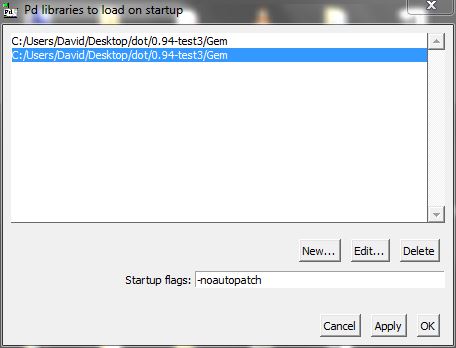
You might simply need to to set startup preferences like this (again...... not "desktop/david"...put whatever your path is.....)
You need the complete path to the "Gem" within 0.94-test3. It is documented somewhere. "Gem" is the library, not the folder that contains Gem.dll ..... It must be Gem with a capital, and without the extension.
You don't need -noautopatch........ it is just one of my preferences.
David.
posted in technical issues
Load Libraries, plug-ins
@Balwyn I've follow your steps but still nothing this is what i got in the console:
'pd-gui' connecting to 'pd' on localhost 5400 ...
------------------ done with main ----------------------
Default font: DejaVu Sans Mono
tried ./Gem.m_i386 and failed
tried ./Gem.dll and failed
tried ./Gem/Gem.m_i386 and failed
tried ./Gem/Gem.dll and failed
tried ./Gem.pd and failed
tried ./Gem.pat and failed
tried ./Gem/Gem.pd and failed
tried C:/Users/Jose/pd-externals/Gem.m_i386 and failed
tried C:/Users/Jose/pd-externals/Gem.dll and failed
tried C:/Users/Jose/pd-externals/Gem/Gem.m_i386 and failed
tried C:/Users/Jose/pd-externals/Gem/Gem.dll and succeeded
C:\Users\Jose\pd-externals\Gem\Gem.dll: couldn't load
tried C:/Users/Jose/pd-externals/Gem.pd and failed
tried C:/Users/Jose/pd-externals/Gem.pat and failed
tried C:/Users/Jose/pd-externals/Gem/Gem.pd and failed
tried C:/Users/Jose/pd-externals/Gem/Gem.m_i386 and failed
tried C:/Users/Jose/pd-externals/Gem/Gem.dll and succeeded
C:\Users\Jose\pd-externals\Gem\Gem.dll: couldn't load
tried C:/Users/Jose/pd-externals/Gem/Gem.pd and failed
tried C:/Users/Jose/pd-externals/Gem/Gem.pat and failed
tried C:/Users/Jose/pd-externals/Gem/Gem/Gem.pd and failed
Gem: can't load library
Loading plugin: C:/Program Files (x86)/Pd/tcl/pd_deken.tcl
The Pd window filtered 26 lines
The Pd window filtered 27 lines
 posted in extra~
GEM
Thx a lot,
Unfortunately there's another problem.The only Video I can load into pix_film seems to be with the following Codec:
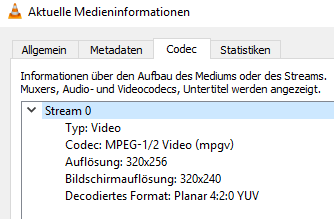
All the other formats I tried didn't work. But I need to play Videos from different smartphones.
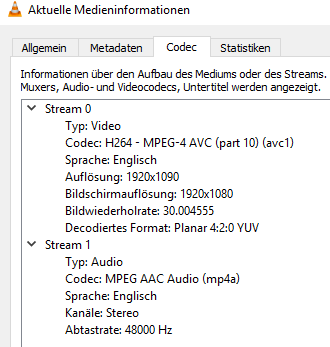
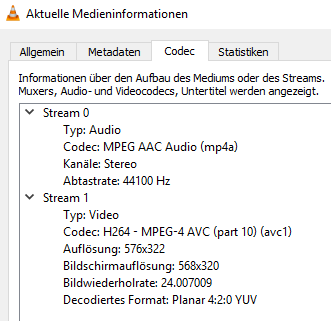
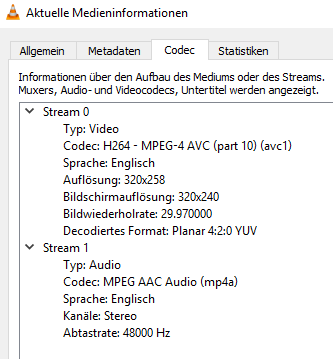
In the manuals I read it seems like it should be possible to play most formats which I can play back with VLC player.
How can I fix this problem?
Thx a lot!!!
 posted in technical issues
Gem window crashes / Install struggles on Ubuntu
Please help! Sooooo many hours trying to figure this out, should be simple I think but I'm not a sophisticated user of Linux.
The Gem objects appear properly when I open the windows, but whenever I try to open/create a gemwindow, it immediately crashes (however, it seems to respond when I change the data - for instance, I can see color changes when i make those changes, but again, the gem window crashes immediately...)
A possible solution lies here but haven't been able to get a response when I attempt to implement this
"
Why does Gem crash when creating the Gem-window? !
When I try to create a Gem-window, my X-server crashes (or worse)? btw, I am using Ubuntu/hoary with fglrx drivers.
quick
try setting the environment variable GEM_SINGLE_CONTEXT to 1
explanation
Gem establishes an (invisible) openGL-context at startup, even if no Gem-window is created yet. When you create the Gem-window, a 2nd openGL-context is used (which shares some properties with the invisible context).
For some reasons this seems to be not possible with some gfx-drivers (e.g. ATI's proprietary fglrx drivers) and some window-managers (i suspect compiz/beryll), leading to crashes of the X-server and/or system freezes.
The current workaround is to set the environment variable GEM_SINGLE_CONTEXT=1, which prevents this dual-context magic.
how?
if you are starting Pd from the bash, you can start Pd/Gem with GEM_SINGLE_CONTEXT=1 pd -lib Gem
on bash, you can also set this permanently by adding a the line export GEM_SINGLE_CONTEXT=1 to either ~/.bashrc (the bash-configuration file in your home-directory) or to /etc/bash.bashrc (to set it for all users)
"
- newer linux user but though I followed compiling instructions for installing Gem, it seems never to create a conf file.. when I open pd-extended in terminal, I get this message:
open: ./gem.conf: No such file or directory
any thoughts or input would be VERY APPRECIATED, thanks!
 posted in technical issues
Compiling gem for Vanilla on Mac OS 10.9.5
Could anyone give me some tips for how to compile the GEM library for Vanilla? Maybe just a short list of instructions to get me started? I am a total noob at this stuff and there are so many files 
PS I'm sure i have to compile because just moving the GEM library into one of pd's paths gives me this at the console:
/Applications/Pd-extended.app/Contents/Resources/extra/Gem/Gem.pd_darwin: dlopen(/Applications/Pd-extended.app/Contents/Resources/extra/Gem/Gem.pd_darwin, 10): no suitable image found. Did find:
/Applications/Pd-extended.app/Contents/Resources/extra/Gem/Gem.pd_darwin: mach-o, but wrong architecture Gem: can't load library posted in pixel#