
3 shader adaptions: sonogram / vectorscope and conway
I realized recently that Gem has some very similar (and nice) shader examples, like a game of life, or a multi pass rendering (I learned that this is what I am doing with the effect chain in the video player).
And the timbreID library has some nice Gem patches for visualizing audio.
And Gem has of course a video player.
I ask myself now, because I do not want to reinvent the wheel, what are the advantages and disadvantages if I compare Gem to Ofelia?
I did some experiments with Gem some time ago but at a certain point I got stuck, whether because of my lacking knowledge or because the patch was getting slow.
So it could be possible to do exactly the same with both libraries?
Here I found a very old paper about Gem that states Gem is using openGL up to 1.2.
https://puredata.info/downloads/gem/documentation/manual/pub/zmoelnig2004gem.pdf
Has that changed? Or could that be a difference? I think the openGL versions that Ofelia can use depend only on the hardware.
What I like about ofelia so far is (in comparison to Gem):
To compile the patch as a standalone application.
To make nice interfaces.
(but I think those points are not openGL related...)
That it gives access to lua and open frameworks (which could make it easier to do complex graphics calculations / interfaces?).
Is anyone else in the position to compare those libraries, or has an opinion about them?
 posted in patch~
source package for gem
It depends if you're on Mac, Windows or Linux.
I'm on MacOS and I use Gem without Pd-extended. I just have to use Pd-Vanilla 32 bits (Pd-0.49-0-i386) and I've downloaded Gem via Help -> Find Externals -> Gem (in the research) and you choose the version from Deken Gem 0.93.3. Install it. Close Pure Data.
To load Gem when you're starting PureData : Open Pure data and go to Pd -> Preferences -> StartUp . In the StartUp Flags you tape Gem, 'Enter' and you juste have to close Pd and re-open and you can use Gem.
With cmd+B, you open the Help Browser and you have a Gem section with all the help you'll need to understand Gem (I've started two months ago).
Have Fun !
 posted in technical issues
Compiling GEM
hello my fellows, been trying to compile GEM on osx myself, since most copies I get lacks some plugins (cant export imgs with pix_write(r) for instance).
I'm following this tutorial, but I'm on El Capitan
https://github.com/umlaeute/Gem/wiki/How-to-build-Gem-on-MacOSX-Mavericks
I'm getting the following error:
fribidi_log2vis
^
2 warnings and 1 error generated.
make[3]: *** [libUtils_la-GemString.lo] Error 1
make[2]: *** [all-recursive] Error 1
make[1]: *** [all] Error 2
make: *** [all-recursive] Error 1
before hand, I was also trying to compile gavl, so I could incunde gmerlin in gem's build, but I had a similar error and decided to go without it.
test -z "/usr/local/share/doc/gavl/apiref" || .././install-sh -c -d "/usr/local/share/doc/gavl/apiref"
/usr/bin/install -c -m 644 apiref/* /usr/local/share/doc/gavl/apiref
install: apiref/*: No such file or directory
make[2]: *** [install-data-local] Error 71
make[1]: *** [install-am] Error 2
make: *** [install-recursive] Error 1
maybe theres something missing on my system?
 posted in technical issues
video unable to open/play on windows 7
@zerino What is the file format that you are trying to use? Is it a compressed format?
For a .mov you could try putting these .dlls in the same folder as gem.dll
If you already have files with the same names there then move them somewhere safe first so that you can recover.......
this.zip
Although you might need to install Quicktime too.
If that doesn't work then try this........ https://forum.pdpatchrepo.info/topic/11390/trying-to-run-gem-for-pd-windows-10-64-bit/2
I have the whole of https://puredata.info/downloads/extended-view-toolkit running with Gem 0.94-test3 on Windows 7 64-bit using Vanilla........
If you are only trying to manipulate video (not using gems other gems) there are other solutions....
https://hcgilje.wordpress.com/vpt/
https://www.derivative.ca/088/Downloads/
That can both be controlled by OSC messages, and deal more easily with any audio track that is embedded.
VPT cannot be run at the same time on the same machine as Pd though........
David.
 posted in technical issues
Trying to run Gem for Pd Windows 10 64 bit
@jeffgrips I have it running with vanilla in Windows7.... but it was hard...... and it's a long story....
I cannot see any reason that it would not work for widows10.
I have not found any other easier better solution.
(((SEE below though for the fact that the -lib needs to be declared...!
That could be your only problem? But I doubt it..!!! )))
I used the 64-bit GEM from here (0.94-test3.zip)..... https://github.com/avilleret/Gem/releases/
I unzipped it and put it in a folder (which I called "dot") on my desktop.
Because I am using many different versions of Pure Data I left it there, and I start Pd with a shortcut that also points to the GEM folder and loads it as a library (It has to be loaded at startup as a library...... and that could be why you don't have it working.... but probably not...).
This is the contents of the line "target" in the shortcut.......
"C:\Users\David\Desktop\Pd Vanilla\pd-0.47-1.msw\pd\bin\pd.exe" -lib C:\Users\David\Desktop\dot\0.94-test3/Gem -font-size 10 -font-face "Consolas"
Be careful with forward / backward slashes.
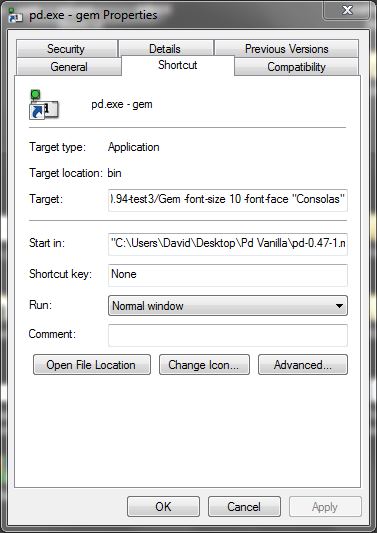
I am pretty sure that I tipped the contents of the "QT" folder out into the "0.94-test3 folder" where gem.dll is (from within the "QT" folder inside "0.94-test3").
If you find some .dlls are missing then post back with a list, and I can upload them....... but you might not have the correct C++ redistributables from Microsoft.
But if you want to start Pd normally by double-clicking a patch then you will need to declare the library in Pd.. edit....preferences.... startup......
If you have GEM in the extra folder you should only need to put "-lib Gem" where you see that I have put "-noautopatch".......
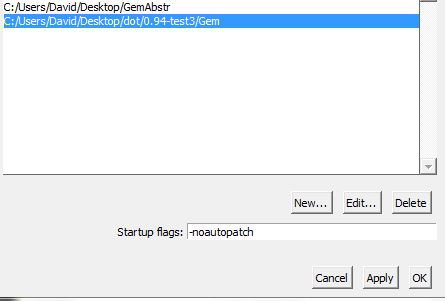
The gem abstractions could not be found though (the "parts of Gem... .like [pix_image] pix_video] [gemwin] etc. worked fine) I copied the contents of the Gem folder from "extended" into a folder on the desktop called "GemAbstr" and set a path to it in Pd preferences.
I removed gem.dll from that folder (no conflicts....!).
The abstractions now create, but the help files for embedded objects cannot be found (different "search" for embedded objects) so I have to open my "GemAbstr" folder and open them manually.
Everything works. All the patches from https://puredata.info/downloads/extended-view-toolkit create and run correctly. The camera on my computer even works (I had never had it working before).
And it works with Spout.
If you go this route then I wish you good luck.......
@zerino has confirmed that it can work with widows10........ https://forum.pdpatchrepo.info/topic/11450/pix-and-geometric-objects-not-being-loaded-in-pd-vanilla/7
........and resolved the "help" file problem.....
For the time being you are lucky that you are using Windows.
This solution is not available for other systems.
David.
posted in technical issues
Purr Data Linux-64 and GEM?
Ok, here in Puppy-Linux apt-get is not installed.
Now I installed libftgl2_2.1.3 successfully with the package manager.
Doing the same as before
[Gem] creates! Yes!
In the commandline (linux-console) [shortened]:
pd-l2ork -noprefs -nostdpath -nrt -verbose
Pd-L2Ork version 2.4.6 (20171213-rev.46ffba3)
compiled 22:30:53 Dec 13 2017
port 5401
guidir is /usr/lib/pd-l2ork/bin
"/usr/lib/pd-l2ork/bin"/nw/nw --user-data-dir="/root/.config/purr-data" "/usr/lib/pd-l2ork/bin" 5401 localhost pd-l2ork "/usr/lib/pd-l2ork/bin" xf3c100Waiting for connection request...
[0426/002010.733670:WARNING:chrome_main_delegate.cc(565)] final extension:
... connected
/etc/pd/gem.conf: No such file or directory
/root/.config/pure-data/gem.conf: No such file or directory
./gem.conf: No such file or directory
load plugins 'film' in '/usr/lib/pd-l2ork/extra/Gem/'
pattern : /usr/lib/pd-l2ork/extra/Gem/gem_film*.so
dylib loading file '/usr/lib/pd-l2ork/extra/Gem/gem_filmAVIPLAY.so'!
library loading returned: dlerror 'libaviplay-0.7.so.0: cannot open shared object file: No such file or directory'
dylib loading file '/usr/lib/pd-l2ork/extra/Gem/gem_filmGMERLIN.so'!
library loading returned: dlerror 'libgmerlin_avdec.so.1: cannot open shared object file: No such file or directory'
dylib loading file '/usr/lib/pd-l2ork/extra/Gem/gem_filmMPEG3.so'!
library loading returned: dlerror 'libmpeg3.so.2: cannot open shared object file: No such file or directory'
dylib loading file '/usr/lib/pd-l2ork/extra/Gem/gem_filmQT4L.so'!
library loading returned: dlerror 'libquicktime.so.2: cannot open shared object file: No such file or directory'
[...]
dylib loading file '/usr/lib/pd-l2ork/extra/Gem/gem_imageMAGICK.so'!
library loading returned: dlerror 'libMagick++-6.Q16.so.5: cannot open shared object file: No such file or directory'
[...]
dylib loading file '/usr/lib/pd-l2ork/extra/Gem/gem_imageMAGICK.so'!
library loading returned: dlerror 'libMagick++-6.Q16.so.5: cannot open shared object file: No such file or directory'


[...]
dylib loading file '/usr/lib/pd-l2ork/extra/Gem/gem_recordQT4L.so'!
library loading returned: dlerror 'libquicktime.so.2: cannot open shared object file: No such file or directory'
[...]
There are some more libs missing, maybe I should install them too?
All the examples of Gem seem to work now!
Even the teapod and openGL stuff.
And my final patches, also work. So nice!
Now I will review what those flags actually do:
https://puredata.info/docs/faq/commandline
But I am wondering, if I was lucky, that Gem is programmed for printing messages in the commandline and other non-working libraries probably won't do so?
Thank you so much
 posted in technical issues
Purr Data Linux-64 and GEM?
Welcome to Purr Data
warning: your system's font stack is not optimal
Pd has started the GUI
canvasinfo: v0.1
stable canvasinfo methods: args dir dirty editmode vis
pdinfo: v.0.1
stable pdinfo methods: dir dsp version
classinfo: v.0.1
stable classinfo methods: size
objectinfo: v.0.1
stable objectinfo methods: class
[import] $Revision: 1.2 $
    [import] is still in development, the interface could change!
    compiled against Pd-l2ork version 2.4.6 (20171213-rev.46ffba3)
input channels = 2, output channels = 2
working directory is /usr/lib/pd-l2ork/extra/Gem
input channels = 2, output channels = 2
audio buffer set to 50
opened input device name hw:0
configuring sound input...
Sample width set to 4 bytes
configuring sound output...
Sample width set to 4 bytes
error: audio I/O dropout
tried but couldn't sync A/D/A
tried /usr/lib/pd-l2ork/extra/Gem/Gem.l_ia64 and failed
tried /usr/lib/pd-l2ork/extra/Gem/Gem.pd_linux and succeeded
verbose( 1):/usr/lib/pd-l2ork/extra/Gem/Gem.pd_linux: libftgl.so.2: cannot open shared object file: No such file or directory
tried /usr/lib/pd-l2ork/extra/Gem/Gem.pd and failed
tried /usr/lib/pd-l2ork/extra/Gem/Gem.pat and failed
tried /usr/lib/pd-l2ork/extra/Gem/Gem/Gem.pd and failed
 Gem
... couldn't create
libftgl is missing?
posted in technical issues
Purr Data Linux-64 and GEM?
@jancsika said:
ls /usr/lib/pd-l2ork/extra/Gem/Gem*
ls /usr/lib/pd-l2ork/extra/Gem/Gem*
/usr/lib/pd-l2ork/extra/Gem/Gem.la
/usr/lib/pd-l2ork/extra/Gem/Gem-meta.pd
/usr/lib/pd-l2ork/extra/Gem/Gem.pd_linux
/usr/lib/pd-l2ork/extra/Gem/GemPrimer.pdf
du -h /usr/lib/pd-l2ork/extra/Gem/Gem*
du -h /usr/lib/pd-l2ork/extra/Gem/Gem*
4.0K /usr/lib/pd-l2ork/extra/Gem/Gem.la
4.0K /usr/lib/pd-l2ork/extra/Gem/Gem-meta.pd
5.6M /usr/lib/pd-l2ork/extra/Gem/Gem.pd_linux
568K /usr/lib/pd-l2ork/extra/Gem/GemPrimer.pdf
posted in technical issues
Multiple webcams operating at once
@lovelovevideo It depends whether the OS reports the second webcam, and whether Gem has the correct backend to read its input. On my MacBook the built-in FaceTime camera is not recognised and crashes Pd unless it is correctly initiated as Gem starts..... which adds to the difficulty building a patch.
If you download "Extended View"...... http://www.marianweger.com/projects/extended.shtml from....... https://github.com/extendedview/extended_view_toolkit then you might have a better chance getting the second webcam to work. It is designed to work with Vanilla though...... so you need to get Gem working with Vanilla or many abstractions will fail.
Opening 03b_ev_example_360_degree_livecam.pd from "extview" will make my FaceTime camera work. One day I might find the time to figure out why..... as that is the only patch that succeeds!..... and only using Gem 0.94-test3......https://github.com/avilleret/Gem/releases/...... with Vanilla 64-bit on Windows7.
Getting the dimensions correct for the cam output helps as well.........
Try this...... twin_cam.pd and report back...
Do get "extview" anyway, even with only half of it working (in Extended) you will absolutely love it.
David.
posted in pixel#
PD-Vanilla will not load PD-Externals--Mint Linux
Hello, I am able to load a couple of PD externals. I am using Pd 0.46.7 on Linux Mint 18.2 Cinnamon 64-bit. I am using the find externals command under the help menu. I see the directories in my ~pd-externals folder. But when I try and use objects like [counter] that are supposed to be in these externals I get a can"t create error?
I get this message when I start PD
sys_midiapi 1
input channels = 2, output channels = 2
priority 6 scheduling failed; running at normal priority
tried /home/lulujoe13/pd-externals/zexy.l_ia64 and failed
tried /home/lulujoe13/pd-externals/zexy.pd_linux and failed
tried /home/lulujoe13/pd-externals/zexy/zexy.l_ia64 and failed
tried /home/lulujoe13/pd-externals/zexy/zexy.pd_linux and failed
/home/lulujoe13/pd-externals/zexy: can't load library
tried /home/lulujoe13/pd-externals/cyclone.l_ia64 and failed
tried /home/lulujoe13/pd-externals/cyclone.pd_linux and failed
tried /home/lulujoe13/pd-externals/cyclone/cyclone.l_ia64 and failed
tried /home/lulujoe13/pd-externals/cyclone/cyclone.pd_linux and succeeded
Cyclone 0.3 beta 2; Released: June 19th, 2017
This is a sub library containing the objects:
[!-], [!-~], [!/], [!/~], [!=~], [%~], [+=~], [<=~], [<~], [==~], [>=~] and [>~]
tried /home/lulujoe13/pd-externals/upp.l_ia64 and failed
tried /home/lulujoe13/pd-externals/upp.pd_linux and failed
tried /home/lulujoe13/pd-externals/upp/upp.l_ia64 and failed
tried /home/lulujoe13/pd-externals/upp/upp.pd_linux and failed
/home/lulujoe13/pd-externals/upp: can't load library
tried /home/lulujoe13/pd-externals/Gem.l_ia64 and failed
tried /home/lulujoe13/pd-externals/Gem.pd_linux and failed
tried /home/lulujoe13/pd-externals/Gem/Gem.l_ia64 and failed
tried /home/lulujoe13/pd-externals/Gem/Gem.pd_linux and succeeded
/home/lulujoe13/pd-externals/Gem/Gem.pd_linux: libftgl.so.2: cannot open shared object file: No such file or directory
/home/lulujoe13/pd-externals/Gem: can't load library
deken-plugin.tcl (Pd externals search) in /home/lulujoe13/pd-externals/deken-plugin loaded.
Platform detected: Linux-x86_64-64bit
'deken-plugin.tcl' already loaded, ignoring: '/home/lulujoe13/pd-externals/deken-plugin/deken-plugin.tcl'
Opened Alsa Client 128 in:0 out:2
counter 1
... couldn't create
Can anyone offer suggestions and help? Thanks. JoeF.
 posted in technical issues