
understanding a simple feedback oscillator
I was just experimenting with the “classic” feedback FM and stumbled on a related technique that seems quite interesting to me, especially because of its chaotic behavior. It’s actually very simple: The output of an oscillator is delayed and, scaled by some factor, fed back into that same oscillator as its frequency. So there is no external input, no carrier frequency (or a zero carrier frequency if you will), which means that it is a symmetric “through-zero” FM.
By guessing I figured out how the delay time determines the frequency of the oscillator, but I still don’t understand a few things: Why is there a factor of 4 involved so that the delay is one quarter of a cycle? And why is there still some error? I found two ways to fix it, first by oversampling and second by reducing the delay time by the duration of one half sample. To be honest I don’t have a clue why this works ... Any ideas?
What I find particularly interesting is the path from sinusoidal tones at modulation index 1 (which seems to be a critical value) to different modes of periodic oscillation and finally to chaos when the modulation index is increased: First odd harmonics are added, then even harmonics, then a period doubling or “bifurcation” occurs, and shortly after that we get into the chaotic region. This seems to be not too different from the logistic map or related chaotic maps. So I’m wondering if it’s possible to analyze the oscillator in terms of chaos theory to better understand and control its behavior.
Apart from being mathematically interesting, I think this could also be a usable noise generator with spectral control. Other effects can be achieved by adding an external input ... but for now, I’m more interested in understanding that simpler case.
 posted in patch~
Linked abstractions, synth experiment
Hello,
I am new to puredata, just started very recently and still learning how the language works.
I created a minimoog style oscillator where I can change certain parameters like: waveform, fine tuning, panning, volume. This file I named oscillator.pd, after which I created a "synth.pd" file that basically uses two "oscillator.pd" as an abstraction.
The problem is the following: when I modify one oscillator it also modifies the other, so I can't use them separately but it's as if they are linked together.
I attach the files, thanks in advance for the help!
Agustin Davrieux
 posted in technical issues
3rd Release Candidate of ELSE 1.0-0 (with Live Electronics Tutorial)
HEY!!! I'm really proud of this one.
This took kind of a while so there's lots and lots of new stuff and breaking changes. This is the 1st release to reach and exceed 450 objects (459 in total now, next milestone, 500 objects?). Total number of examples in the tutorial is now 477. Here are the release's highlights:
- MOST ESPECIALLY, WE FINALLY HAVE DECENT COMPILED BANDLIMITED OSCILLATORS ([bl.saw~], [bl.tri~], [bl.vsaw~], [bl.square~],[bl.imp~], [bl.imp2~]) thanks to Tim Schoen from PlugData, who has become a great partner in the development of ELSE, since ELSE is part of PlugData
 This was one of the last milestones for a proper final release, so maybe we're close. BTW, I have to say that the oscillators from ELSE are the only ones I know out there that have BOTH hard sync input AND phase modulation input. I don't know any other not only in Pd, but in MAX, SuperCollider, Csound, Chuck, Reaktor, whatever...
 - Now we have a new [numbox~] GUI compiled object for monitoring and generating signals (this replaces [diisplay~], which was removed). This is thanks to Tim Schoen again.
- The [bicoeff] object has been renamed to [bicoeff2] and [bicoeff] is now a new GUI object based on the "filtergraph" external (this one is still very experimental and not really acceptable yet).
- All objects with random generators have been revised to take a seed value and generate unique seeds every time you open the patch. I made a PR to Pure Data so we have something similar for [random], [noise~] and [array random].
- [brown~] has an impulse signal input to generate random steps now as well.
- There are 13 new objects, most importantly and not yet mentioned: [brown] (control browninan motion), [bl.osc~] (a band limited oscillator based on wavetables), [blip~] (a bandlimited impulse generator) and [scala] (for importing tunings in the Scala software format).
Complete changelog is here: https://github.com/porres/pd-else/releases/tag/v1.0-rc3
It's up on deken, have fun.
 posted in news
gensyn~: generic, multi-modulator synthesizer abstraction
Via @Valuska-Yoshimitsu's comments and some work I have been doing to make Gemini/Jass~ a raspberry+arduino piece of hardware, I have made some improvements on gensyn, including but not limited to the following:
- The code is now better encapsulated to separate the controls from the audio processing;
- The cpuload has been improved (dropping on my computer the original 6% cpu load to 1-2%, putting it back in range of a Pi 3b+)
(this was done by turning each voice's (audio processing) switch~ on when velocity >=0, and off when the outgoing env~=0)
As to your comments @Valuska-Yoshimitsu:
'First, the $1 creation arguments on the wavetables are not assigning the $1 float to the table id, instead, the wavetables are named "$1-wavetable" If I rename the wavetable to, for instance, 2-wavetable, then everything writes correctly.'
This occurs because the gensyn is designed to be used as a clone, in which case the $1 is found by the clone object and then created.
The implication is that each voice (i.e. in terms of poly) can have its own set of wavetables. Check out the example: "CHANGING VALUES OVER TIME > randomize wav1/voice every 2secs" to see what that sounds like. Sort of like Chaos  , but personally I like that sort of thing and since all of the other parameters are also /voice based they could be tuned to make the differences more smooth.
'...switching to random partial generation for all gensyn clones in the help patch causes a huge lag, after which everything works. (this one could totally be a system issue, but I thought I'd mention it as long as I was commenting here.)'
I think this was probably do to the "pd-float:round to 2048" warnings it had been throwing. I have resolved those errors in the latest gensyn_b version(above). Thank you for inspiring me to resolve that long standing issue.
Please, Do let me know if you come upon anything else or just want to discuss the work.
Peace through sharing,
s
 posted in abstract~
wavebypartial.pd: Waveshaping intermediate waves between the four basic waveshapes
Hey!
I've been trying to play with this and gensyn -- both seem like really neat synth ideas! However, I have run into a couple of issues.
I'm running the latest purr-data release installed through AUR.
First, the $1 creation arguments on the wavetables are not assigning the $1 float to the table id, instead, the wavetables are named "$1-wavetable" If I rename the wavetable to, for instance, 2-wavetable, then everything writes correctly.
Secondly, with wavebypartial_b(via-xyslider), purr-data is unable to create the objects "adsr" and "mknob".
Thirdly, switching to random partial generation for all gensyn clones in the help patch causes a huge lag, after which everything works. (this one could totally be a system issue, but I thought I'd mention it as long as I was commenting here.)
 posted in abstract~
Few questions about oversampling
Hi,
About a year ago I started to learn a bit pure data in order to create a patch that would act as a groovebox and that should perform on limited cpu resources since I want it to run on a raspberry pi. First I tried to make somekind of fork of the Martin Brinkmann groovebox patch, even if it allowed me to learn a lot about data flow I didn't went to the core of the patch tweaking with sound generation. This led me to end this attempt at forking MNB groovebox patch because even if I could seperate GUI stuff from sound generation and run it on different thread ect... I couldn't go further in optimization in order to reduce the cpu use.
Then a few weeks ago I decided to start again from scratch my project and this time I wanted to be more patient and learn anything needed in order to be capable of optimizing my patch as much as possible. After making a functional drum machine which runs at 2/3% of cpu with 8 different tracks, 126 steps sequencer, a bit of fx ect... I tried to find synths that would opperate well aside the drum machine. And I basicly didn't find any patch that wouldn't use massive amount of cpu time. So I created my own synths, nothing incredible but I'm happy with what I got, though I noticed some aliasing. I read a bit the floss manual about anti aliasing and apply the method used in the manual(http://write.flossmanuals.net/pure-data/antialiasing/), it work well but my synths almost trippled their cpu use, even if I put all my oscilators in the same subpatch in order to use only one instance of oversampling.
I didn't tried to oversample it less than 16 time but since oversampling is so cpu intensive I'm wondering if there's no other option in order to get a good sound definition at a lower cpu cost. I'm already using banlimited waveform so I don't know what I could do in order to limit the aliasing, especialy for my fm patch where bandlimited waveform isn't very useful in order to reduce aliasing.
Since I want to have at least 4 synth track with some at least one synth having 5 voice polyphony I want to know what the best thing to do. Letting FM aside for this project and use switch~ for oversampling 2 or 4 time my synths that use bandlimited waveform ? Or should I try to run different instances of pd for each synth and controling it from a gui/control patch with netsend(though it wouldn't bring down the cpu use at least it would provide somekind of multithreading for my patch) ? Or is there another way to get some antiliasing ? Or should I review lower my expectation because there is no solution that could provide a decent antialiasing for 4 or more synth running at the same time with a low cpu use in pure data in 2021.
Thanks to everyone that would read my topic and try to give some advice in order to get the best antialising/low cpu use solution.
 posted in technical issues
help with sixteen_harmonics.pd
@trumpetfish1 Hello and welcome to the forum.
Indeed, the $1 is the problem.
[sixteen_harmonics] is what we call an abstraction...... a patch that can be used many times inside another patch.
So that it can be used many times without conflicts between each copy it has been given a variable for the name of the array....... $1
It was designed to be used by the patch (in the same folder) building_waveforms_with_sines.pd
If you open that patch you will see that [sixteen_harmonics] has been given what we call an "argument".
In this case the argument is "wavetable" and as the patch is opened the $1 within [sixteen_harmonics wavetable] has been replaced with wavetable.
You don't see that change but if you open [sixteen_harmonics wavetable] you will see the patch you had trouble with working...... and if you put a [print] after [symbol $1] it will print "wavetable" to the terminal as you move a fader. The $1 in the following message will then also be replaced by "wavetable".
BEWARE $1 in an object and $1 in a message have different purposes...... see the link below...!!
It is a very powerful feature that you should know about and will let you build much faster and more easily once you understand it...... https://forum.pdpatchrepo.info/topic/9774/pure-data-noob/4
David.
 posted in technical issues
NoxSiren - Modular synthesizer system <- [v15]
NoxSiren is a modular synthesizer system where the punishment of failure is the beginning of a new invention.
--DOWNLOAD-- NoxSiren for :
-
Pure Data :
NoxSiren v15.rar
NoxSiren v14.rar -
Purr Data :
NoxSiren v15.rar
NoxSiren v14.rar
--DOWNLOAD-- ORCA for :
- x64, OSX, Linux :
https://hundredrabbits.itch.io/orca
In order to connect NoxSiren system to ORCA system you also need a virtual loopback MIDI-ports:
--DOWNLOAD-- loopMIDI for :
- Windows 7 up to Windows 10, 32 and 64 bit :
https://www.tobias-erichsen.de/software/loopmidi.html
#-= Cyber Notes [v15] =-#
- added BORG-IMPLANT module.
- introduction to special modules.
- more system testing.
#-= Special Modules [v15] =-#
- BORG-IMPLANT (connects ORCA MIDI system to NoxSiren system)
#-= Current Modules [v15] =-#
- VCO (voltage-controlled-oscillator)
- VCO2 (advance voltage-controlled-oscillator)
- WAVEBANK (additive synthesis oscillator)
- ADSR (Attack-Decay-Sustain-Release envelope)
- C-ADSR (Curved Attack-Decay-Sustain-Release envelope)
- CICADAS (128 steps-Euclidean rhythm generator)
- CICADAS-2 (advance 128-steps polymorphic-Euclidean rhythm generator)
- COMPRESSOR (lookahead mono compressor unit)
- DUAL-COMPRESSOR (2-channel lookahead mono compressor unit)
- STEREO-COMPRESSOR (lookahead stereo compressor unit)
- MONO-KEYS (virtual 1-voice monophonic MIDI keyboard)
- POLY-KEYS-2 (virtual 2-voice polyphonic MIDI keyboard)
- POLY-KEYS-3 (virtual 3-voice polyphonic MIDI keyboard)
- POLY-KEYS-4 (virtual 4-voice polyphonic MIDI keyboard)
- POLY-KEYS-5 (virtual 5-voice polyphonic MIDI keyboard)
- POLY-KEYS-6 (virtual 6-voice polyphonic MIDI keyboard)
- BATTERY (simple manual triggered machine for drumming.)
- REVERB (reverb unit with lowpass control)
- STEREO-REVERB (stereo reverb unit with lowpass control)
- RESIN (advanced rain effect/texture generator)
- NOISE (generates black,brown,red and orange noise)
- NOISE2 (generates yellow,blue,pink and white noise)
- COBALT (6-stage polyrhythm generator)
- SHAPER (basic shaper unit)
- FOLDER (basic wave folding unit)
- STEREO-FOLDER (stereo wave folding unit)
- DUAL-FOLDER (advance wave folding unit)
- POLARIZER (transform a signal into bi-polar, uni-polar, inverted or inverted uni-polar form)
- CLOCK (generates a BPM clock signal for sequencing other modules)
- CLOCKDIVIDER (a clock divider with even division of clock signal)
- CLOCKDIVIDER2 (a clock divider with odd division of clock signal)
- DELAY-UNIT (delay unit)
- STEREO-DELAY (stereo delay unit)
- CHORUS (chorus unit)
- STEREO-CHORUS (stereo chorus unit)
- SEQ (advance 16-step/trigger sequencer)
- KICK (synthesize kick unit)
- KICK2 (synthesize flavor of KICK module)
- KICK3 (synthesize flavor of KICK module)
- SNARE (synthesize snare unit)
- CLAP (synthesize clap unit)
- CYMBAL (synthesize cymbal unit)
- RAND (RNG generator for other modules parameters)
- FMOD (feedback modulation unit)
- AM (amplitude modulation unit)
- RM (ring modulation unit)
- LFO (low-frequency-oscillator)
- LFO2 (advance low-frequency-oscillator)
- COMBINATOR (combine two waves)
- COMBINATOR2 (combine three waves)
- COMBINATOR3 (combine four waves)
- STRING (Karplus-Strong string synthesis unit)
- STRING2 (advance Karplus-Strong string synthesis unit)
- DETUNER (parametric 4-channel detuner unit)
- CRUSHER (basic audio resolution unit)
- STEREO-CRUSHER (basic stereo audio resolution unit)
- DUAL-CRUSHER (advance audio resolution unit)
- FILTER (basic filter)
- VCF (voltage-controlled-filter)
- MAR (Moog-analog-resonant filter)
- VCA (voltage-controlled-amplifier)
- DUAL-VCA (advance voltage-controlled-amplifier)
- FMUX (multiplexer with fast A/D internal envelope)
- MMUX (multiplexer with medium A/D internal envelope)
- SMUX (multiplexer with slow A/D internal envelope)
- FDMX (demultiplexer with fast A/D internal envelope)
- MDMX (demultiplexer with medium A/D internal envelope)
- SDMX (demultiplexer with slow A/D internal envelope)
- MIXER (mix 1-4 possible waves)
- SCOPE (oscilloscope analyzer)
- MASTER (fancy DAC~)
- BOX (useless decorative module)
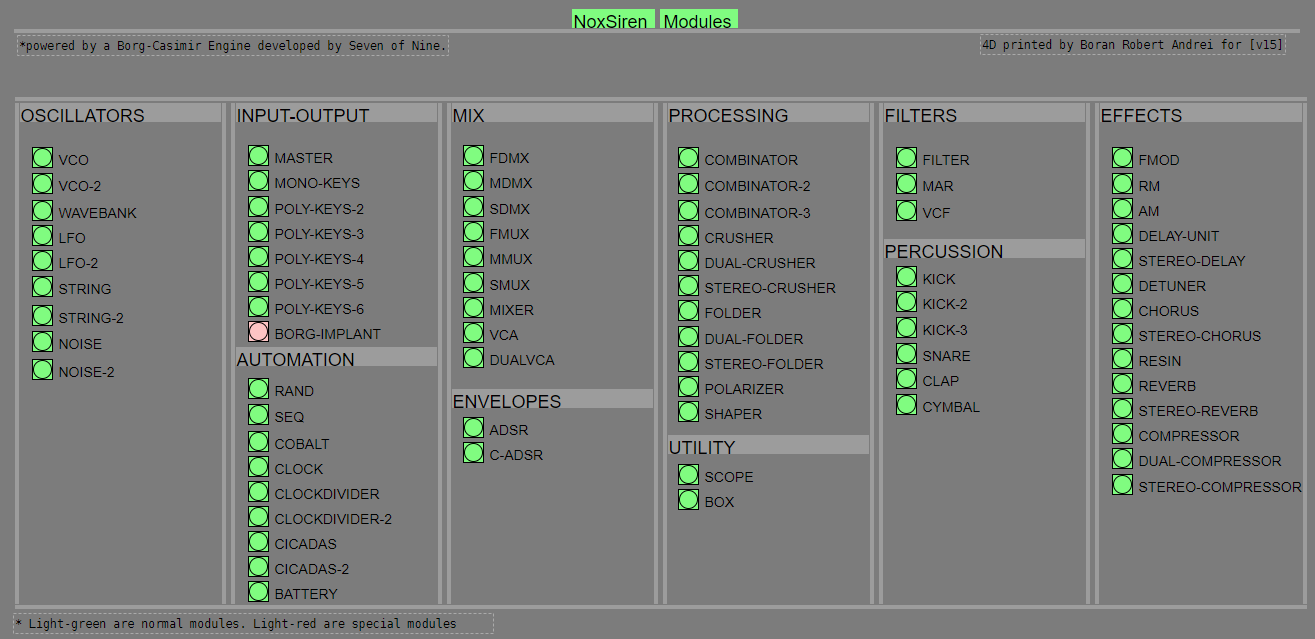
NoxSiren integrated modules menu system.
 posted in patch~
Smooth frequency transition
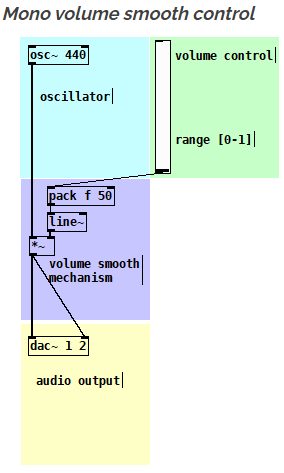
you should use a logarithmic line~ object to adjust the curve as smooth as you want.
On top of that you should apply a Nyquist correction to the output of your oscillator abstraction.
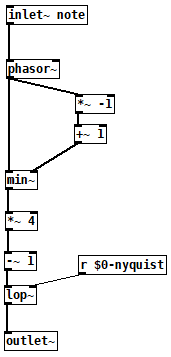
So here you have some imagines how to do that. The Nyquist abstraction is used in the output of the triangle oscillator abstraction as an example. Then the final output can be controlled with a logarithmic line~ object.
OBS : If you need more then one oscillator you can apply this for each oscillator and then use a mixer and then the output of the mixer you use again the same idea. In this way you have an oscillator smooth stage control and a final mixer stage control for extra smoothness.
This is just the simple mono smooth control (no curve adjustment)
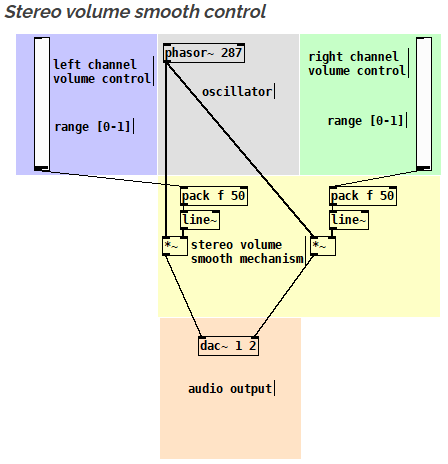
The same idea but as a stereo version
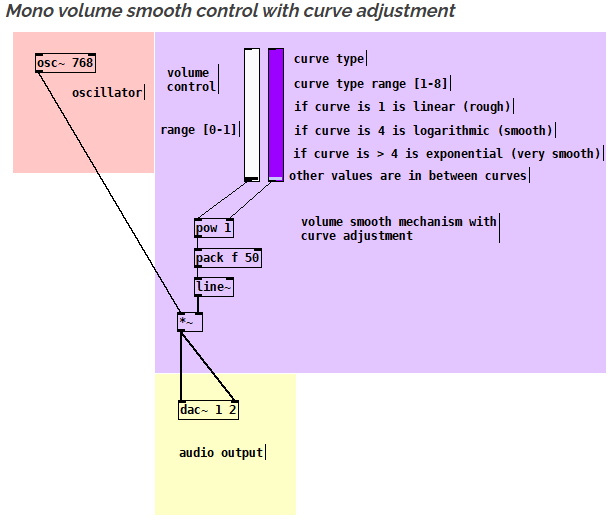
Here is with logarithmic smooth control (with curve adjustment)
Here you have a Nyquist correction abstraction
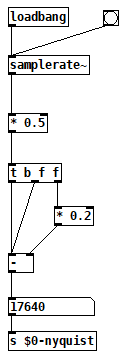
Here you have a triangle oscillator with Nyquist correction
You can also download xline~ which is an object that is doing just that :
https://forum.pdpatchrepo.info/topic/13084/xline-logarithmic-line-object
posted in technical issues
JASS, Just Another Synth...Sort-of, codename: Gemini (UPDATED: esp with midi fixes)
JASS, Just Another Synth...Sort-of, codename: Gemini (UPDATED TO V-1.0.1)
jass-v1.0.1( esp with midi fixes).zip
1.0.1-CHANGES:
- Fixed issues with midi routing, re the mode selector (mentioned below)
- Upgraded the midi mode "fetch" abstraction to be less granular
- Fix (for midi) so changing cc["14","15","16"] to "rnd" outputs a random wave (It has always done this for non-midi.)
- Added a midi-mode-tester.pd (connect PD's midi out to PD's midi in to use it)
- Upgrade: cc-56 and cc-58 can now change pbend-cc and mod-cc in all modes
- Update: the (this) readme
INFO: Values setting to 0 on initial cc changes is (given midi) to be expected.
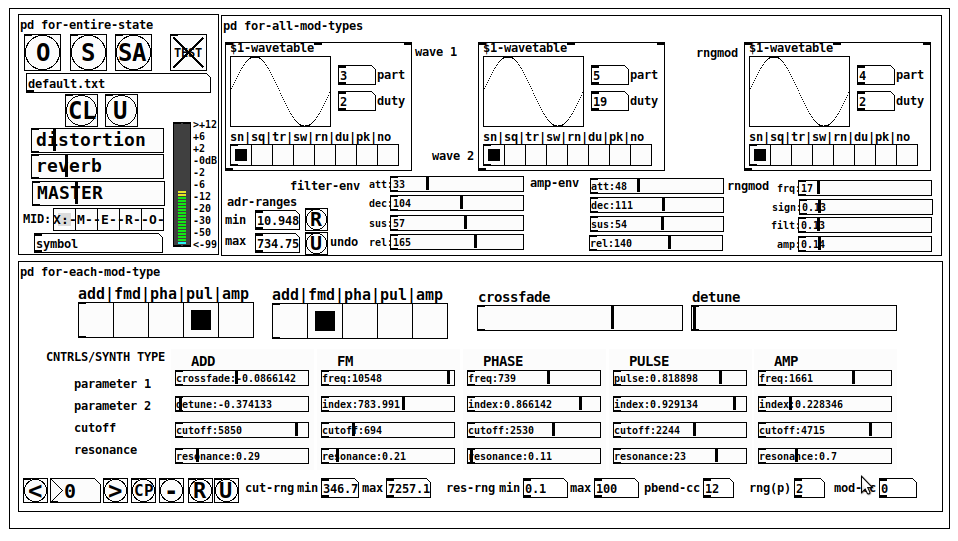
JASS is a clone-based, three wavetable, 16 voice polyphonic, Dual-channel synth.
With...
- The initial, two wavetables combined in 1 of 5 possible ways per channel and then adding those two channels. Example: additive+frequency modulation, phase+pulse-modulation, pulse-modulation+amplitude modulation, fm+fm, etc
- The third wavetable is a ring modulator, embedded inside each mod type
- 8 wave types, including a random with a settable number of partials and a square with a settable dutycycle
- A vcf~ filter embedded inside each modulation type
- The attack-decay-release, cutoff, and resonance ranges settable so they immediately and globally recalculate all relevant values
- Four parameters /mod type: p1,p2, cutoff, and resonance
- State-saving, at both the global level (wavetables, env, etc.), as well as, multiple "substates" of for-each-mod-type settings.
- Distortion, reverb
- Midiin, paying special attention to the use of 8-knob, usb, midi controllers (see below for details)
- zexy-limiters, for each channel, after the distortion, and just before dac~
Instructions
Requires: zexy
for-entire-state
- O: Open preset. "default.txt" is loaded by...default
- S: Save preset (all values incl. the multiple substates) (Note: I have Not included any presets, besides the default with 5 substates.)
- SA: Save as
- TEST: A sample player
- symbol: The filename of the currently loaded preset
- CL: Clear, sets all but a few values to 0
- U: Undo CL
- distortion,reverb,MASTER: operate on the total out, just before the limiter.
- MIDI (Each selection corresponds to a pgmin, 123,124,125,126,127, respectively, see below for more information)
- X: Default midi config, cc[1,7,8-64] available
- M: Modulators;cc[10-17] routed to ch1&ch2: p1,p2,cutoff,q controls
- E: Envelopes; cc[10-17] routed to filter- and amp-env controls
- R: Ranges; cc[10-17] routed to adr-min/max,cut-off min/max, resonance min/max, distortion, and reverb
- O: Other; cc[10-17] routed to rngmod controls, 3 wavetypes, and crossfade
- symbol: you may enter 8 cc#'s here to replace the default [10-17] from above to suit your midi-controller's knob configuration; these settings are saved to file upon entry
- vu: for total out to dac~
for-all-mod-types
- /wavetable
- graph: of the chosen wavetype
- part: partials, # of partials to use for the "rn" wavetype; the resulting, random sinesum is saved with the preset
- duty: dutycycle for the "du" wavetype
- type: sin | square | triangle | saw | random | duty | pink (pink-noise: a random sinesum with 128 partials, it is not saved with the preset) | noise (a random sinesum with 2051 partials, also not saved)
- filter-env: (self-explanatory)
- amp-env: (self-explanatory)
- rngmod: self-explanatory, except "sign" is to the modulated signal just before going into the vcf~
- adr-range: min,max[0-10000]; changing these values immediately recalculates all values for the filter- and amp-env's scaled to the new range
- R: randomizes all for-all-mod-types values, but excludes wavetype "noise"; rem: you must S or SA the preset to save the results
- U: Undoes R
for-each-mod-type
- mod-type-1: (In all cases, wavetable1 is the carrier and wavetable2 is the modulator); additive | frequency | phase | pulse | amplitude modulation
- mod-type-2: Same as above; mod-type-2 May be the same type as mod-type-1
- crossfade: Between ch1 and ch2
- detune: Applied to the midi pitch going into ch2
- for-each-clone-type controls:
- p1,p2: (self-explanatory)
- cutoff, resonance: (self-explanatory)
- navigation: Cycles through the saved substates of for-each-mod-type settings (note: they are lines on the end of a [text])
- CP: Copy the current settings, ie. add a line to the end of the [text] identical to the current substate
- -: Delete the current substate
- R: Randomize all (but only a few) substate settings
- U: Undo R
- cut-rng: min,max[0-20000] As adr-range above, this immediately recalculates all cutoff values
- res-rng: min,max[0-100], same as previously but for q
- pbend: cc,rng: the pitchwheel may be assigned to a control by setting this to a value >7 (see midi table below for possibilities); rng is in midi pitches (+/- the value you enter)
- mod-cc: the mod-wheel may be assigned to a control [7..64] by setting this value
midi-implementation
| name | --- | Description |
|---|---|---|
| sysex | not supported | |
| pgmin | 123,124,125,126,127; They set midi mode | |
| notein | 0-127 | |
| bendin | pbend-cc=7>pitchbend; otherwise to the cc# from below | |
| touch | not supported | |
| polytouch | not supported |
cc - basic (for all midi-configs)
| # | name | --- | desciption |
|---|---|---|---|
| 1 | mod-wheel | (assignable) | |
| 7 | volume | Master |
cc - "X" mode/pgmin=123
| cc | --- | parameter |
|---|---|---|
| 8 | wavetype1 | |
| 9 | partials 1 | |
| 10 | duty 1 | |
| 11 | wavetype2 | |
| 12 | partials 2 | |
| 13 | duty 2 | |
| 14 | wavetype3 | |
| 15 | partials 3 | |
| 16 | duty 3 | |
| 17 | filter-att | |
| 18 | filter-dec | |
| 19 | filter-sus | |
| 20 | filter-rel | |
| 21 | amp-att | |
| 22 | amp-dec | |
| 23 | amp-sus | |
| 24 | amp-rel | |
| 25 | rngmod-freq | |
| 26 | rngmod-sig | |
| 27 | rngmod-filt | |
| 28 | rngmod-amp | |
| 29 | distortion | |
| 30 | reverb | |
| 31 | master | |
| 32 | mod-type 1 | |
| 33 | mod-type 2 | |
| 34 | crossfade | |
| 35 | detune | |
| 36 | p1-1 | |
| 37 | p2-1 | |
| 38 | cutoff-1 | |
| 39 | q-1 | |
| 40 | p1-2 | |
| 41 | p2-2 | |
| 42 | cutoff-2 | |
| 43 | q-2 | |
| 44 | p1-3 | |
| 45 | p2-3 | |
| 46 | cutoff-3 | |
| 47 | q-3 | |
| 48 | p1-4 | |
| 49 | p2-4 | |
| 50 | cutoff-4 | |
| 51 | q-4 | |
| 52 | p1-5 | |
| 53 | p2-5 | |
| 54 | cutoff-5 | |
| 55 | q-5 | |
| 56 | pbend-cc | |
| 57 | pbend-rng | |
| 58 | mod-cc | |
| 59 | adr-rng-min | |
| 60 | adr-rng-max | |
| 61 | cut-rng-min | |
| 62 | cut-rng-max | |
| 63 | res-rng-min | |
| 64 | res-rng-max |
cc - Modes M, E, R, O
Jass is designed so that single knobs may be used for multiple purposes without reentering the previous value when you turn the knob, esp. as it pertains to, 8-knob controllers.
Thus, for instance, when in Mode M(pgm=124) your cc send the signals as listed below. When you switch modes, that knob will then change the values for That mode.
In order to do this, you must turn the knob until it hits the previously stored value for that mode-knob.
After hitting that previous value, it will begin to change the current value.
cc - Modes M, E, R, O assignments
Where [10..17] may be the midi cc #'s you enter in the MIDI symbol field (as mentioned above) aligned to your particular midi controller.
| cc# | --- | M/pgm=124 | --- | E/pgm=125 | --- | R/pgm=126 | --- | O/pgm=127 |
|---|---|---|---|---|---|---|---|---|
| 10 | ch1:p1 | filter-env:att | adr-rng-min | rngmod:freq | ||||
| 11 | ch1:p2 | filter-env:dec | adr-rng-max | rngmod:sig | ||||
| 12 | ch1:cutoff | filter-env:sus | cut-rng-min | rngmod:filter | ||||
| 13 | ch1:q | filter-env:re | cut-rng-max | rngmod:amp | ||||
| 14 | ch2:p1 | amp-env:att | res-rng-min | wavetype1 | ||||
| 15 | ch2:p2 | amp-env:dec | res-rng-max | wavetype2 | ||||
| 16 | ch2:cutoff | amp-env:sus | distortion | wavetype3 | ||||
| 17 | ch2:q | amp-env:rel | reverb | crossfade |
In closing
If you have anywhere close to as much fun (using, experimenting with, trying out, etc.) this patch, as I had making it, I will consider it a success.
For while an arduous learning curve (the first synth I ever built), it has been an Enormous pleasure to listen to as I worked on it. Getting better and better sounding at each pass.
Rather, than say to much, I will say this:
Enjoy. May it bring a smile to your face.
Peace through love of creating and sharing.
Sincerely,
Scott
posted in patch~