
Sound distorts when going through send~ and receive~
I'm fairly new to Pure Data, though I'm excited by what I've learned so far. I followed this tutorial -- http://designingsound.org/2013/04/pure-data-wavetable-synth-part-1/ -- up through the second-to-last step (with some adjustments for things that didn't quite work when I followed them in the tutorial), and then began modifying it to add more modulation and other features I wanted. I'm currently trying to implement what I'm thinking of as "suboscillators" that will be able to be tuned in relation to the main oscillator, mixed in with it, modulate pitch and amplitude, and take their own envelopes. I also want the suboscillators to be able to take modulation from either of the two "LFO"s [in quotes since the first LFO actually outputs in the audible range] (adding a second to what's specified in the tutorial, along with additional layers of LFOs below them), so I've been moving things around and redesigning the patch a little bit, breaking it off and on, and trying to get it working again.
While working on this, I noticed a behavior that's baffling me: the signal of the first LFO appears to distort when sent out through send~ and then back in through receive~. If I connect the output of the LFO directly to dac~, it sounds fine. Sent through send~ and back through receive~ and then to dac~ and it sounds louder and there are some other frequencies seemingly present, as if it's maybe clipping a little bit. I thought that send~ and receive~ were functionally the same as just using connector cords, so I'm seriously confused by this. For the purposes of the patch, having the LFO signal distort is not good, so I feel like I need to figure this out before I go forward with the features I want to implement. Being new, I imagine it's something simple I'm overlooking.
Here's a link to part of the patch where the problem is occurring: http://imgur.com/a/GkRUI I haven't tested yet to figure out if other send~ receive~ pairs are causing distortion. Any clarification or ideas about why this is happening would be much appreciated.
[edit: There's also apparently an error message going along with this: "consistency check failed: signal_free 3" I thought it was some other part of the larger patch generating the error, but I copied just the LFO generator section to a separate patch to play with, and that message still appears in the console. The weird distortion with receive~ still occurs too.]
 posted in technical issues
Permutations, second part, can anybody get this patch to work?
@Ale-H.H. I am out tonight..... so no help I'm afraid.
I start to understand.
You can assign curves to what you wish....... so?
Anyway.... the last patch allows you to draw curves for each oscillator controlled by just one iaanix timbre curve.
You just have to decide how each oscillator should respond to that curve to create the timbre.
If you want the first oscillator volume to simply follow the iaanix curve then draw a line in "a" from bottom left to top right.
If you want the last oscillator to do the inverse then draw in "h" a straight line from top left to bottom right.
If you want the second oscillator volume to rise quickly as the iannix curve goes to 0.5 and then fall back to zero as the iannix curve reaches 1 then draw a triangle in "b"
I hope that makes sense.
David.
 posted in technical issues
Noob Trying to Create a MIDI Chorder/Harmonizer
Yet more progress!
But still stuck on sending noteoff messages to a note after its number has changed. Maybe there’s something to do with a cold inlet, working as memory? Wait! Might have found part of the solution…
Followed the first two parts on the synth creation tutorial on Libre Music Production,
(The third and last part of the LMP tutorial has to do with filters and UI, so it shouldn’t have an answer to my noteoff issue.)
Through that tutorial, was able to make a simple polyphonic synth which takes MIDI in and outputs ADSR-enveloped notes to the DAC. So far, so good.
Added a fifth to the mix. Still works. No stuck note.
Then tried adding a third note which progressively goes up with a counter… Boom, noteoff problem again. It does make some sense: need to trigger a velocity of zero to the previous note, But this is where memory would come in handy.
Found part of a solution in using the right inlet of a [float] object,
libremusic-synth.pd
Now, the synth produces the correct effect, even with multiple incoming notes.
In fact, doing this with [poly] may bring us closer to the original effect created by Robby Kilgore on the Oberheim Xpander! Adding more polyphony than the notes which are produced internally, getting a rotation of notes… and a comeback of the noteoff problem.
libremusic-synth-rot.pd
So, getting closer, but my learning path is still winding around. Will search for known solutions, as it’s surely a common problem. Don’t necessarily want to go all the way to a minimal sequencer with [tabwrite] and [tabread], but it could be a solution and would have the added advantage of leaving a trace on which notes have been generated.
Will get it eventually!
 posted in technical issues
Programming Additive Synthesiser
Hi, I am wondering if it is possible to create an additive synthesiser for a verbos harmonic oscillator: https://static1.squarespace.com/static/52cddaa9e4b0999c86f84b8a/t/56145344e4b0e58796be4889/1444172612979/harmonic+oscillator+postcard.pdf
There are two parts to it, namely the oscillator core and the harmonic mixer. For the oscillator core, it has to output saw, square and triangle waves. How do I do that in pd?
 posted in tutorials
ADSR clips when triggering new note while old one is releasing
I am trying to make a monophonic synth in PD. I have yet to add an LFO or VCF or a second oscillator, but I have created a waveform switcher (sawtooth-triangle-pulse) for the first one. One quirk I have found so far is that when triggering a new note, if there is a older note releasing, it will cut that one and begin playing the new one.
This isn't an issue with the sawtooth, but with the triangle (and to a lesser extent the pulse) this old note will pop. I am unsure how to fix this.
The synth.pd file is the main file, adsr.pd and note.pd are both required to run the synth. The waveform switcher is in Synth.pd.
 posted in technical issues
FYI: Bristol Synth Emulator (in repos with midi via Jack/Qjackctl)
Just some info in case you have missed it:
The Linux repos include an app called "Bristol" which is a Synth Emulator for about 20+ classic synths (see link, below 1-its sourceforge main page and 2-its first Synth)
They can all be controlled via midi on both alsa and Jack if set up correctly.
Personally not a Synth player, I have still always been blown away by this program's possibilities.
May you enjoy it and beautiful music issue from yr of fingers,
s
1-
[link Bristol Synth Emulator on Sourceforge](link http://bristol.sourceforge.net/)
2-[link "Mini Moog (-mini) (1970/1977)"](link http://bristol.sourceforge.net/mini.html)
 posted in Off topic
GUI port of Pd-l2ork Alpha 0 release
Hello,
Below are links to the first alpha release of the GUI port of Pd-l2ork.
The GUI has been ported from tcl/tk to nw.js. The biggest visual improvements are ability to zoom in and out of a canvas, smoother animation of canvas objects (like the PacData game), user-friendly editing inside msg/obj boxes, and a more flexible API for visualizing data structures.
I've nicknamed it "Purr Data", because cats.
This is mainly a bug-collecting release. It should be decent enough to do some basic patching for awhile before hitting a bug. Some caveats up front: OSX is missing Gem and PDP, and both OSX and Windows are missing some pd-l2ork-related externals.
Bug tracker is here:
https://puredata.osuosl.org/jwilkes/purr-data/issues
Alpha builds are listed below (I'm abusing gitlab to distribute these, so some may have a zip within a zip):
OSX x_64 - https://puredata.osuosl.org/purr-data-binaries/osx-64-alpha0/repository/archive.zip?ref=master
Ubuntu 15.10 x_64 - https://puredata.osuosl.org/purr-data-binaries/ubuntu-15.10-64-alpha0/repository/archive.zip?ref=master
Ubuntu 14.04 x_64 - https://puredata.osuosl.org/purr-data-binaries/ubuntu-14.04-64-alpha0/repository/archive.zip?ref=master
Ubuntu 14.04 i386 - https://puredata.osuosl.org/purr-data-binaries/ubuntu-14.04-32-alpha0/repository/archive.zip?ref=master
Debian Jessie x_64 - https://puredata.osuosl.org/purr-data-binaries/debian-jessie64-alpha0/repository/archive.zip?ref=master
Debian Jessie i386 - https://puredata.osuosl.org/purr-data-binaries/debian-jessie32-alpha0/repository/archive.zip?ref=master
Windows 32-bit - https://puredata.osuosl.org/purr-data-binaries/win32-alpha0/repository/archive.zip?ref=master
 posted in news
Korg Monotron emulator
Basically you want to create an oscillator (bandlimited) then feed that through a resonant filter, then to your speakers.
Bear in mind lop~ isn't resonant, other people have created externals that are, or there is the moog~, although this will sound nothing like the monotron filter, from what I remember Korgs might be 12dB/octave (might be wrong!). Good luck in designing your own Analogue modeling filter, I tried and it was solid!
To replicate the monotron ribbon controller, it's probably simplest to control the frequency of the oscillator
create another oscillator (a simple sine wave), this will be your LFO. connect that up to either filter cutoff or amplitude
Amplitude would require you to multiply the output of your main oscillator by the output of LFO
Cutoff would mean multiplying the LFO output by The value you are inputting into your filter cutoff input.
You could incorporate a button switch so you could flick between them like the monotron
It is a very simple synth to emulate, I recommend reading this site to explain the basics of subtractive synthesis in PD , it also mentions bandlimited oscillators, which will stop them aliasing THIS IS VERY IMPORTANT!
http://en.flossmanuals.net/pure-data
A guy from this forum also wrote this site
http://obiwannabe.co.uk/html/music/6SS/six-simple-synthesisers.html
You will soon grow bored of replicating the monotron, and move into doing minimoog replications, and maybe even modular stuff.
I saw a video of someone who did a Swarmatron replication, very impressive. Wish I had that patch...
 posted in technical issues
BECAUSE you guys are MIDI experts, you could well help on this...
Dear Anyone who understands virtual MIDI circuitry
I'm a disabled wannabe composer who has to use a notation package and mouse, because I can't physically play a keyboard. I use Quick Score Elite Level 2 - it doesn't have its own forum - and I'm having one HUGE problem with it that's stopping me from mixing - literally! I can see it IS possible to do what I want with it, I just can't get my outputs and virtual circuitry right.
I've got 2 main multi-sound plug-ins I use with QSE. Sampletank 2.5 with Miroslav Orchestra and Proteus VX. Now if I choose a bunch of sounds from one of them, each sound comes up on its own little stave and slider, complete with places to insert plug-in effects (like EQ and stuff.) So far, so pretty.
So you've got - say - 5 sounds. Each one is on its own stave, so any notes you put on that stave get played by that sound. The staves have controllers so you can control the individual sound's velocity/volume/pan/aftertouch etc. They all work fine. There are also a bunch of spare controller numbers. The documentation with QSE doesn't really go into how you use those. It's a great program but its customer relations need sorting - no forum, Canadian guys who wrote it very rarely answer E-mails in a meaningful way, hence me having to ask this here.
Except the sliders don't DO anything! The only one that does anything is the one the main synth. is on. That's the only one that takes any notice of the effects you use. Which means you're putting the SAME effect on the WHOLE SYNTH, not just on one instrument sound you've chosen from it. Yet the slider the main synth is on looks exactly the same as all the other sliders. The other sliders just slide up and down without changing the output sounds in any way. Neither do any effects plugins you put on the individual sliders change any of the sounds in any way. The only time they work is if you put them on the main slider that the whole synth. is sitting on - and then, of course, the effect's applied to ALL the sounds coming out of that synth, not just the single sound you want to alter.
I DO understand that MIDI isn't sounds, it's instructions to make sounds, but if the slider the whole synth is on works, how do you route the instructions to the other sliders so they accept them, too?
Anyone got any idea WHY the sounds aren't obeying the sliders they're sitting on? Oddly enough, single-shot plug-ins DO obey the sliders perfectly. It's just the multi-sound VSTs who's sounds don't individually want to play ball.
Now when you select a VSTi, you get 2 choices - assign to a track or use All Channels. If you assign it to a track, of course only instructions routed to that track will be picked up by the VSTi. BUT - they only go to the one instrument on that VST channel. So you can then apply effects happily to the sound on Channel One. I can't work out how to route the effects for the instrument on Channel 2 to Channel 2 in the VSTi, and so on. Someone told me on another forum that because I've got everything on All Channels, the effects signals are cancelling eachother out, I can't find out anything about this at the moment.
I know, theoretically, if I had one instance of the whole synth and just used one instrument from each instance, that would work. It does. Thing is, with Sampletank I got Miroslav Orchestra and you can't load PART of Miroslav. It's all or nothing. So if I wanted 12 instruments that way, I'd have to have 12 copies of Miroslav in memory and you just don't get enough memory in a 32 bit PC for that.
To round up. What I'm trying to do is set things up so I can send separate effects - EQ etc - to separate virtual instruments from ONE instance of a multi-sound sampler (Proteus VX or Sampletank.) I know it must be possible because the main synth takes the effects OK, it's just routing them to the individual sounds that's thrown me. I know you get one-shot sound VSTi's, but - no offence to any creators here - the sounds usually aint that good from them. Besides, all my best sounds are in Miroslav/Proteus VX and I just wanted to be able to create/mix pieces using those.
I'm a REAL NOOOB with all this so if anyone answers - keep it simple. Please! If anyone needs more info to answer this, just ask me what info you need and I'll look it up on the program.
Yours respectfully
ulrichburke
 posted in Off topic
Oscillator & array - discrepancy between frequency & graph
Hi!
I'm quite new to PD and simply played around a little bit when the following question crossed my mind:
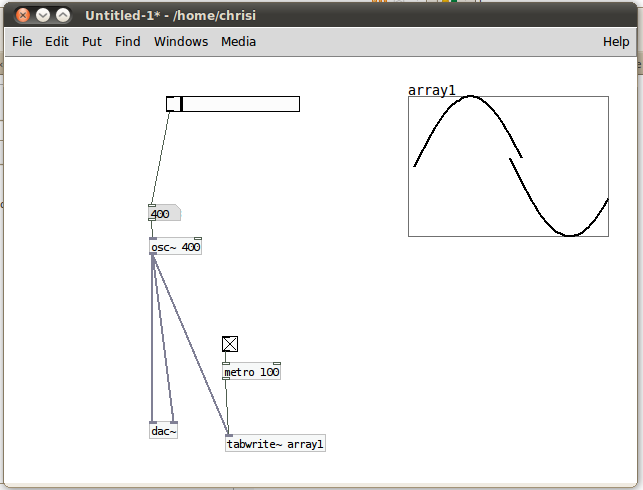
I have an oscillator running at 100Hz and and array which is updated every 100ms. 100Hz means 100 oscillations per second, so one full oscillator swing (from 1 to 1) should last a hundreth of a second = 10ms.
So, if I'm not already wrong at his point, I am supposed to see ten full oscillator circles on the array, no?
What happens with me is that I see one full oscillation at 400Hz. I attached a screenshot of this situation.
What am I getting wrong? 
Thanks for your help!
 posted in technical issues