
Send .syx file
@lo94 [midiout] requires decimal....... and a sysex file will be in Hex (almost certainly)....... https://forum.pdpatchrepo.info/topic/377/sysex/32
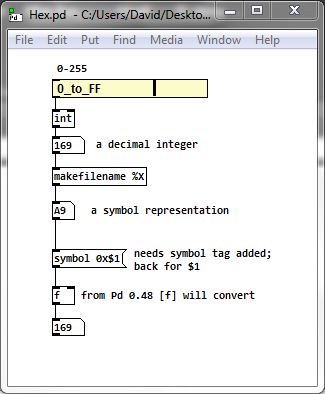
Hex/decimal conversion can be done easily in Pd since version 0.48
Hex.pd
You will need to drip [list-drip] the symbols into the "symbol representation" box and group the messages that you send to [midiout] starting a message when you drip 240 (F0 hex) and ending the message when 247 (F7 hex) has dripped.... rinse and repeat (see link above).
[list-drip] [select] and the messages [set( and [add2( will be your friends.
handle.zip (Hex.pd included)
It is possible that a whole sysex dump can be passed in one message (still decimal though) to [midiout], but I have no means for testing that.
David.
 posted in technical issues
Hex to (decimal?) bytes
@Johnny-Mauser Yes, I thought so at first.
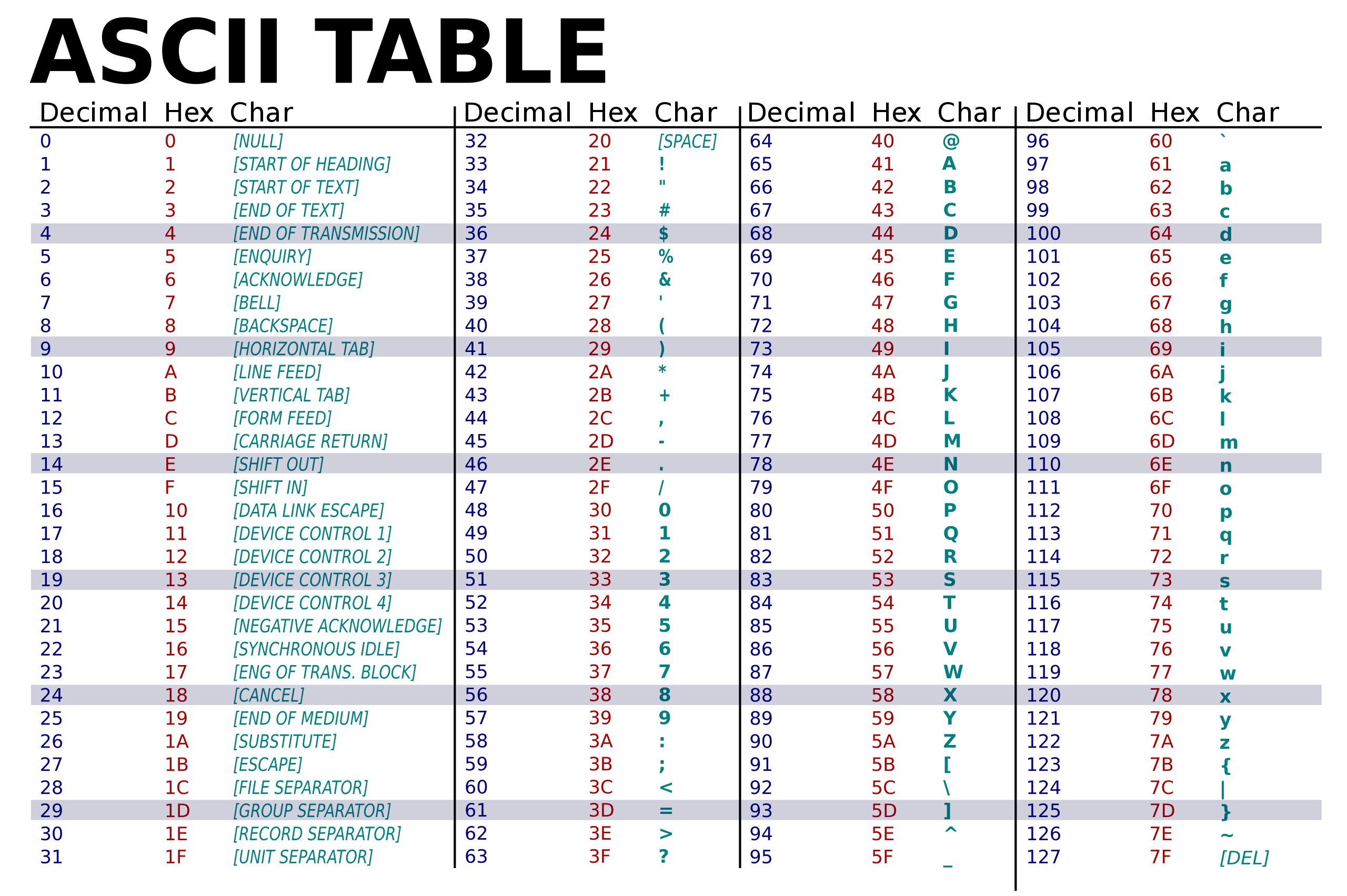
But it returns the ASCII decimal values for example of the characters D and E separately...... list D E
What is needed is the decimal value of the 8-byte HEX DE.
There is no decimal ascii value for a character DE as the character does not exist.
It would be possible using [list fromsymbol] and some maths but it is complicated because when the list is split using [list split 1] the second outlet continues to output the remembered 2nd value (E) when there is no new value....... i.e. for decimal 0 to 15 (HEX 00 to 0F).
David.
posted in technical issues
Hex to (decimal?) bytes
@Johnny-Mauser If it's just those 7 numbers you need to convert to decimal, why not just Google it? Or if you are on Windows 10, you can use the built-in calculator in programmer mode, select hex, type in the number, and read out the decimal representation.
 posted in technical issues
Large number representation in pd
@60hz double precision would solve the bit-depth issue, but the textual representation of numbers (floats) would also have to be changed to add precision. (I haven't checked if pd-double does this or not.. katja's page makes it seem like it does though)
here is her description from https://www.katjaas.nl/doubleprecision/doubleprecision.html :
You have probably noticed that single precision floats are represented in Pd with a maximum of 6 significant digits. This is done to hide inconsistencies like 33 * 0.3 = 9.900001, which happens when 7 decimal digits are shown. The limitation to 6 significant digits is however very annoying when we want to type or see large integers, like indexes of long audio buffers.
In calculations, Pd can use all integers from 0 to 2^24 = 16,777,216, over 16 million. Numbers with up to 8 decimal digits. But in the GUI, 1 million is shown in scientific notation as 1e+06. This scientific notation also uses a maximum of 6 significant digits. Therefore, the next representable number is 1.00001e+06, that is 1 million and 10. See below how the result of 2^20 is rounded in the GUI, as an example. The fact that numbers are also stored with patches this way, makes things worse. At 44100 Hz samplerate, one million samples is about 23 seconds - not at all that much. Longer audio buffers are allowed, but handling them in the GUI becomes tricky.
 posted in technical issues
Truncate in Pd
@cfry if you want the actual number truncated, that's usually done with multiplication and [int]. (for instance to get truncation within 2 decimal points, multiply by 100, use [int], then multiply by 0.01 to get back to original range.
If you just want to display a certain number of decimal places, you can use the formatting specifiers in [makefilename]
posted in technical issues
Stripping the decimal points from an IP address.
Hi all, does anyone know if there is an object with which you can strip a specified character from a message before unpacking?
Here is my example: Say I have an IP address, four numbers seperated by a decimal 111.111.111.111 I want to have this IP sent into a message then stripped of its decimals leaving only 111 111 111 111 which is then sent to be unpacked and each number routed to one of 4x osc~.
Can anyone assist?
 posted in technical issues
Bizarre Comport issue
@Tombot7 It is sending the decimal value of ASCII characters....... not floats.
ASCII 13 is "carriage return" and ASCII 10 is "line feed".
They are reserved characters (all decimal values 0-31) are functions and do not print).
13 and 10 are nearly the same thing but not exactly...... "line feed" does not return the cursor to the start of the new line.
Anyway, I am surprised at the translation as I would expect the same UNIX behaviour on a Mac and an RPI. I have no idea why the RPI would change the value.
Of course you receive the decimal values as integers and can use them as such in Pd.
David.
posted in technical issues
how to get dynamically updated values into Pd from Python
@Coalman Maybe define the send as ascii or convert to a string of the decimal values of the ascii characters in python before sending? ......... https://www.codegrepper.com/code-examples/python/ascii+to+decimal+python
[list tosymbol] will convert the decimal back to characters in Pd........ and it might then be easier to diagnose any problems.
Also there is a dedicated binary in your Pd distribution called pdsend (it is in the bin folder along with the Pd binary). It can be called in Python (probably needs to be copied to a folder where Python will find it).
Then use [netreceive] in Pd to receive what is sent through pdsend.
There is a code snippet here........ https://guitarextended.wordpress.com/2012/11/03/make-python-and-pure-data-communicate-on-the-raspberry-pi/ ...... unfortunately a screenshot so it will need to be typed out again.
BUT the comma in the message "IU.SFJD.00.BHZ | 2021-08-19T12:45:49.019538Z - 2021-08-19T12:46:05.269538Z | 20.0 Hz, 326 samples" will split the message when it arrives in Pd.
AND more importantly.... I am pretty sure that a pipe "|" in Python passes information (before the pipe) to an operator (after the pipe) and that could be why the message fails....... trying to pass "IU.SFJD.00.BHZ" to a non-existent operator "2021-08-19T12"
David.
posted in technical issues
Metro beat time, with phase
Hello everybody,
I would like to create a metronome that provides a beat time with phase, like the one provided by abl_link~ object, but in realm of messages.
The decimal values of the phase will be used by my sequencers to derive the rhythmic subdivisions (1/8, 1/16, 1/32, etc...), and in this way they can follow the realtime changes of the bpm.
I made a patch that use [metro], [cup] and [line], and it's working, but I noticed that at some bpm I don't have stable subdivisions, perceived by ear and also verified with a simple tap tempo.
Comparing my implementation to another one that uses [line ~], I noticed that the one with [line ~] is more precise, probably because [line~] provides more decimals than [line], and perhaps this is what causes the subdivisions based on [line] to be less precise.
What do you think? Do you have any advice on how I could implement it to have stable subdivisions?
I would like to avoid solutions in the "audio realm" like [line ~], because they would create other problems of sync with other pieces of my project, which works exclusively with messages.
Here is the patch I made (both [line] and [line~] included):
metro_phase.pd
 posted in patch~
Just Another (Drum) Sequencer...SortOf, codename: Virgo
Just Another (Drum) Sequencer...SortOf, codename: Virgo
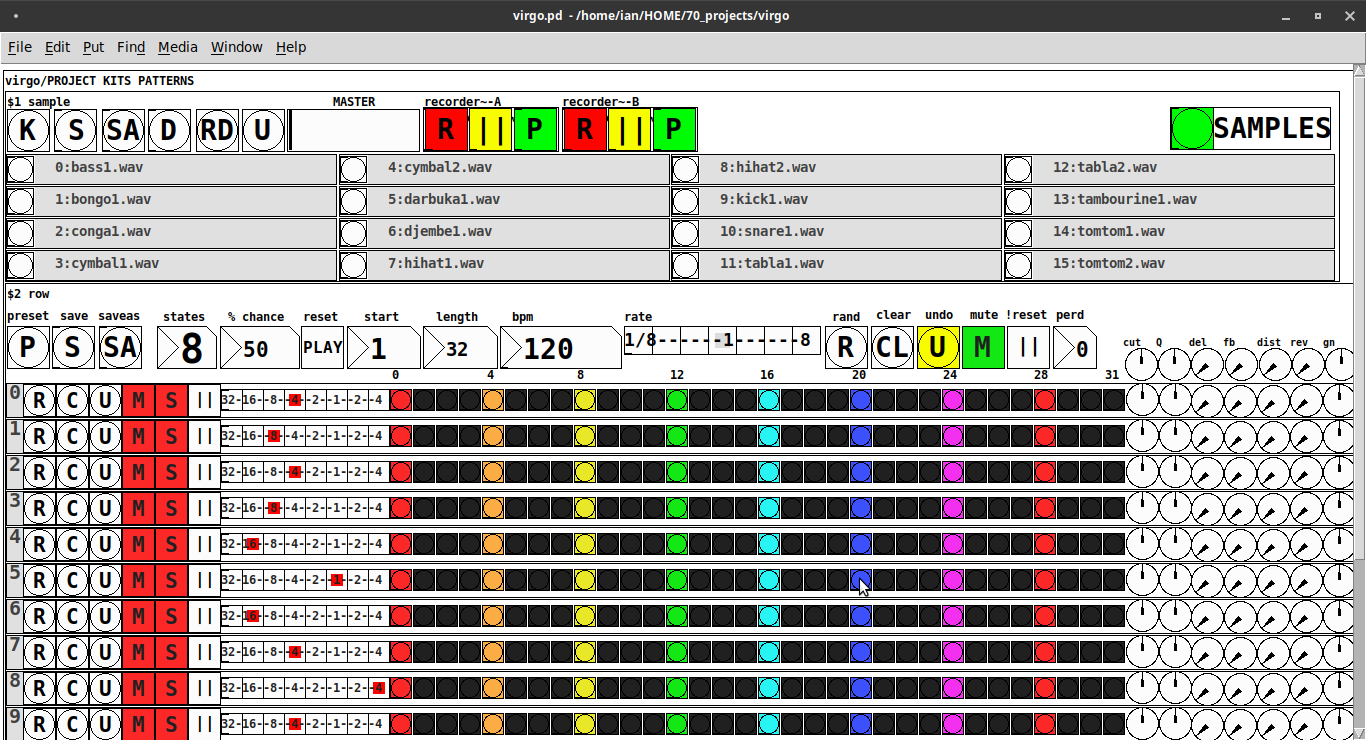
REQUIRES: zexy, moonlib, tof (as of Pd 0.50.2, all of which are in deken) and hcs (which comes by default with Pd 0.50.2 and is in deken (for extended))
Special Features
- Unique playhead per row; each with their own metro (beat)
- Up to 8 Volume states-per-beat (by clicking multiple times on the bang; where an rms=1 is divide among the states (2 states:0=rms=0(black), 1=rms=1(red); 3 states:rms=[0|0.5|1])
- Design approach: using creation arguments to alias abstractions, so subsequently they are referred to by their creation arguments, ex. in [KITS sample] sample is referred to as [$1]; which is how they are listed below)
(notes: what I learned experimenting with this design approach, I will share as a separate post. Currently, it does not include cut-copy-paste (of regions of the pattern)). I good way to start trying it out is clicking the "R" to get a random kit and a random pattern).
virgo:[virgo/PROJECT KITS PATTERNS]
- PROJECT[KITS PATTERNS]
- $1:[KITS sample]
- GUI
- K: openpanel to load a previously saved *.txt (text object) kit of samples; on loadbang the default.txt kit is loaded
- S: save the current set of samples to the most recently opened *.txt (kit) preset
- SA: saveas a *.txt of the current set of samples
- D: foldererpanel a sample directory to load the first (alphabetically) 16 samples into the 16 slots
- RD: load a random kit from the [text samples] object where the samples where previously loaded via the "SAMPLES" bang on the right
- U: undo; return to the previously opened or saved *.txt kit, so not the previously randomized
- MASTER: master gain
- (recorder~: of the total audio~ out)
- record
- ||: pause; either recording or play;
- play: output is combined with the sequencer output just before MASTER out to [dac~]
- SAMPLES: folderpanel to load a (recursive) directory of samples for generating random kits
- ABSTRACTIONS
- $1: sample
- bang: openpanel to locate and load a sample for a track
- canvas: filename of the opened sample; filenames are indexed in alignment with track indices in the PATTERNS section
- $1: sample
- GUI
- $2:[PATTERNS row]
- GUI
- P: openpanel to load a previously saved *.txt (pattern) preset file; on loadbang the default.txt pattern is loaded; the preset file includes the beat, pattern, and effect settings for the row
- S: save the current pattern to the most recently opened pattern .txt
- SA: save as (self-explanatory)
- states: the number of possible states [2..8] of each beat;
- %: weight; chance of a beat being randomized; not chance of what it will result in; ex. 100% implies all beats are randomized ; random beats result in a value)gain) between 1 and states-1
- PLAY(reset): play the pattern from "start" or on stop reset all playheads to start
- start: which beat to start the playheads on
- length: how many beats to play [+/-32]; if negative the playheads will play in reverse/from right to left
- bpm: beats-per-minute
- rate: to change the rate of play (ie metro times) by the listed factor for all playheads
- R: randomize the total pattern (incl period and beats, but not the effect settings; beats of 1/32 are not included in the possibilities)
- CL: clear, set all beats to "0", i.e. off
- U: undo random; return to the previously opened or saved preset, ie. not the previous random one
- M: mute all tracks; the playheads continue moving but audio does not come out of any track
- ||:pause all playheads; play will resume from that location when un-paused
- per: period; if 0=randomizes the period, >0 sets the period to be used for all beats
- Edit Mode
- Check the [E] to enter edit mode (to cut, copy, or paste selected regions of the pattern)
- Entering edit mode will pause the playing of the pattern
- Play, if doing so beforehand, will resume on leavng edit mode
- The top-left most beat of the pattern grid will be selected when first entering edit mode
- Single-click a beat to select the top-left corner of the region you wish to cut or copy
- Double-click a beat to select the bottom-right corner
- You may not double-click a beat "less than" the single-clicked (top-left) beat and vice-versa
- Click [CL] to clear your selection (i.e. start over)
- The selected region will turn to dark colors
- If only one beat is selected it will be the only one darkened
- Click the operation (bang) you wish to perform, either cut [CU] or copy [CP]
- Then, hold down the CTRL key and click the top-left corner of where you want to paste the region
- The clicked cell will turn white
- And click [P] to paste the region
- Cut and copied regions may both be pasted multiple times
- The difference being, cutting sets the values (gains) for the originating region to "0"
- Click [UN] to undo either the cut, copy, or paste operation
- Undoing cut will return the gains from 0s to their original value
- Check the [E] to enter edit mode (to cut, copy, or paste selected regions of the pattern)
- (effect settings applied to all tracks)
- co: vcf-cutoff
- Q: vcf-q
- del: delay-time
- fb: delay-feedback
- dist: distortion
- reverb
- gn: gain
- ABSTRACTIONS
- $1: [row (idx) b8] (()=a property not an abstraction)
- GUI
- (index): aligns with the track number in the KITS section
- R: randomize the row; same as above, but for the row
- C: clear the row, i.e. set all beats to 0
- U: undo the randomize; return to the originally opened one, ie. not the previous random one
- M: mute the row, so no audio plays, but the playhead continues to play
- S: solo the row
- (beat): unit of the beat(period); implying metro length (as calculated with the various other parameters);1/32,1/16,1/8, etc.
- (pattern): the pattern for the row; single-click on a beat from 0 to 8 times to increment the gain of that beat as a fraction of 1 rms, where resulting rms=value/states; black is rms=0; if all beats for a row =0 (are black) then the switch for that track is turned off; double-click it to decrement it
- (effects-per-row): same as above, but per-row, ex. first column is vcf-cutoff, second is vcf-q, etc.
- ABSTRACTIONS
- $1: b8 (properties:row column)
- 8-state bang: black, red, orange, yellow, green, light-blue, blue, purple; representing a fraction of rms(gain) for the beat
- $1: b8 (properties:row column)
- GUI
- $1: [row (idx) b8] (()=a property not an abstraction)
- GUI
- $1:[KITS sample]
Credits: The included drum samples are from: https://www.musicradar.com/news/sampleradar-494-free-essential-drum-kit-samples
p.s. Though I began working on cut-copy-paste, it began to pose a Huge challenge, so backed off, in order to query the community as to 1) its utility in the current state (w/o that) and 2) just how important including it really is.
p.p.s. Please, report any inconsistencies (between the instructions as listed and what it does) and/or bugs you may find, and I will try to get an update posted as soon as enough of those have collect.
Love and Peace through sharing,
Scott
 posted in patch~