
JASS, Just Another Synth...Sort-of, codename: Gemini (UPDATED: esp with midi fixes)
JASS, Just Another Synth...Sort-of, codename: Gemini (UPDATED TO V-1.0.1)
jass-v1.0.1( esp with midi fixes).zip
1.0.1-CHANGES:
- Fixed issues with midi routing, re the mode selector (mentioned below)
- Upgraded the midi mode "fetch" abstraction to be less granular
- Fix (for midi) so changing cc["14","15","16"] to "rnd" outputs a random wave (It has always done this for non-midi.)
- Added a midi-mode-tester.pd (connect PD's midi out to PD's midi in to use it)
- Upgrade: cc-56 and cc-58 can now change pbend-cc and mod-cc in all modes
- Update: the (this) readme
INFO: Values setting to 0 on initial cc changes is (given midi) to be expected.
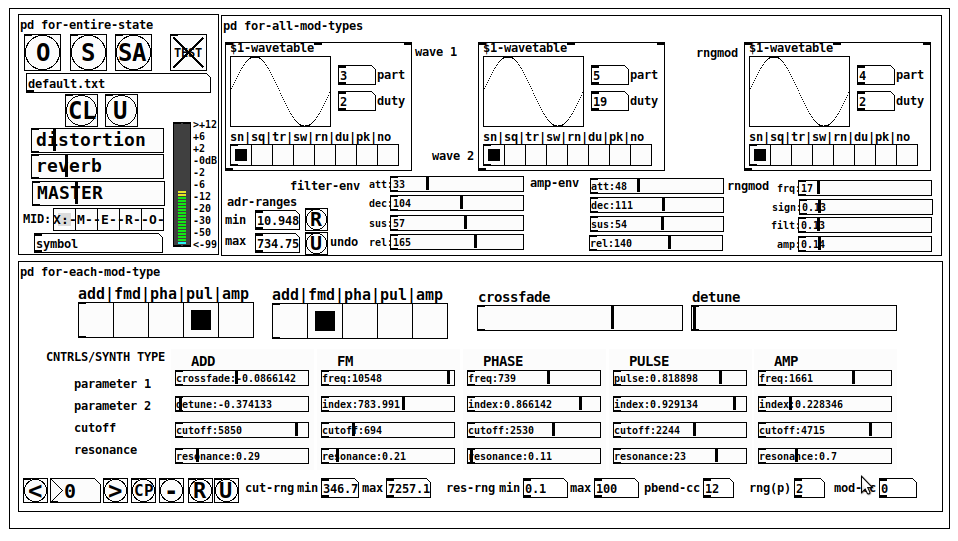
JASS is a clone-based, three wavetable, 16 voice polyphonic, Dual-channel synth.
With...
- The initial, two wavetables combined in 1 of 5 possible ways per channel and then adding those two channels. Example: additive+frequency modulation, phase+pulse-modulation, pulse-modulation+amplitude modulation, fm+fm, etc
- The third wavetable is a ring modulator, embedded inside each mod type
- 8 wave types, including a random with a settable number of partials and a square with a settable dutycycle
- A vcf~ filter embedded inside each modulation type
- The attack-decay-release, cutoff, and resonance ranges settable so they immediately and globally recalculate all relevant values
- Four parameters /mod type: p1,p2, cutoff, and resonance
- State-saving, at both the global level (wavetables, env, etc.), as well as, multiple "substates" of for-each-mod-type settings.
- Distortion, reverb
- Midiin, paying special attention to the use of 8-knob, usb, midi controllers (see below for details)
- zexy-limiters, for each channel, after the distortion, and just before dac~
Instructions
Requires: zexy
for-entire-state
- O: Open preset. "default.txt" is loaded by...default
- S: Save preset (all values incl. the multiple substates) (Note: I have Not included any presets, besides the default with 5 substates.)
- SA: Save as
- TEST: A sample player
- symbol: The filename of the currently loaded preset
- CL: Clear, sets all but a few values to 0
- U: Undo CL
- distortion,reverb,MASTER: operate on the total out, just before the limiter.
- MIDI (Each selection corresponds to a pgmin, 123,124,125,126,127, respectively, see below for more information)
- X: Default midi config, cc[1,7,8-64] available
- M: Modulators;cc[10-17] routed to ch1&ch2: p1,p2,cutoff,q controls
- E: Envelopes; cc[10-17] routed to filter- and amp-env controls
- R: Ranges; cc[10-17] routed to adr-min/max,cut-off min/max, resonance min/max, distortion, and reverb
- O: Other; cc[10-17] routed to rngmod controls, 3 wavetypes, and crossfade
- symbol: you may enter 8 cc#'s here to replace the default [10-17] from above to suit your midi-controller's knob configuration; these settings are saved to file upon entry
- vu: for total out to dac~
for-all-mod-types
- /wavetable
- graph: of the chosen wavetype
- part: partials, # of partials to use for the "rn" wavetype; the resulting, random sinesum is saved with the preset
- duty: dutycycle for the "du" wavetype
- type: sin | square | triangle | saw | random | duty | pink (pink-noise: a random sinesum with 128 partials, it is not saved with the preset) | noise (a random sinesum with 2051 partials, also not saved)
- filter-env: (self-explanatory)
- amp-env: (self-explanatory)
- rngmod: self-explanatory, except "sign" is to the modulated signal just before going into the vcf~
- adr-range: min,max[0-10000]; changing these values immediately recalculates all values for the filter- and amp-env's scaled to the new range
- R: randomizes all for-all-mod-types values, but excludes wavetype "noise"; rem: you must S or SA the preset to save the results
- U: Undoes R
for-each-mod-type
- mod-type-1: (In all cases, wavetable1 is the carrier and wavetable2 is the modulator); additive | frequency | phase | pulse | amplitude modulation
- mod-type-2: Same as above; mod-type-2 May be the same type as mod-type-1
- crossfade: Between ch1 and ch2
- detune: Applied to the midi pitch going into ch2
- for-each-clone-type controls:
- p1,p2: (self-explanatory)
- cutoff, resonance: (self-explanatory)
- navigation: Cycles through the saved substates of for-each-mod-type settings (note: they are lines on the end of a [text])
- CP: Copy the current settings, ie. add a line to the end of the [text] identical to the current substate
- -: Delete the current substate
- R: Randomize all (but only a few) substate settings
- U: Undo R
- cut-rng: min,max[0-20000] As adr-range above, this immediately recalculates all cutoff values
- res-rng: min,max[0-100], same as previously but for q
- pbend: cc,rng: the pitchwheel may be assigned to a control by setting this to a value >7 (see midi table below for possibilities); rng is in midi pitches (+/- the value you enter)
- mod-cc: the mod-wheel may be assigned to a control [7..64] by setting this value
midi-implementation
| name | --- | Description |
|---|---|---|
| sysex | not supported | |
| pgmin | 123,124,125,126,127; They set midi mode | |
| notein | 0-127 | |
| bendin | pbend-cc=7>pitchbend; otherwise to the cc# from below | |
| touch | not supported | |
| polytouch | not supported |
cc - basic (for all midi-configs)
| # | name | --- | desciption |
|---|---|---|---|
| 1 | mod-wheel | (assignable) | |
| 7 | volume | Master |
cc - "X" mode/pgmin=123
| cc | --- | parameter |
|---|---|---|
| 8 | wavetype1 | |
| 9 | partials 1 | |
| 10 | duty 1 | |
| 11 | wavetype2 | |
| 12 | partials 2 | |
| 13 | duty 2 | |
| 14 | wavetype3 | |
| 15 | partials 3 | |
| 16 | duty 3 | |
| 17 | filter-att | |
| 18 | filter-dec | |
| 19 | filter-sus | |
| 20 | filter-rel | |
| 21 | amp-att | |
| 22 | amp-dec | |
| 23 | amp-sus | |
| 24 | amp-rel | |
| 25 | rngmod-freq | |
| 26 | rngmod-sig | |
| 27 | rngmod-filt | |
| 28 | rngmod-amp | |
| 29 | distortion | |
| 30 | reverb | |
| 31 | master | |
| 32 | mod-type 1 | |
| 33 | mod-type 2 | |
| 34 | crossfade | |
| 35 | detune | |
| 36 | p1-1 | |
| 37 | p2-1 | |
| 38 | cutoff-1 | |
| 39 | q-1 | |
| 40 | p1-2 | |
| 41 | p2-2 | |
| 42 | cutoff-2 | |
| 43 | q-2 | |
| 44 | p1-3 | |
| 45 | p2-3 | |
| 46 | cutoff-3 | |
| 47 | q-3 | |
| 48 | p1-4 | |
| 49 | p2-4 | |
| 50 | cutoff-4 | |
| 51 | q-4 | |
| 52 | p1-5 | |
| 53 | p2-5 | |
| 54 | cutoff-5 | |
| 55 | q-5 | |
| 56 | pbend-cc | |
| 57 | pbend-rng | |
| 58 | mod-cc | |
| 59 | adr-rng-min | |
| 60 | adr-rng-max | |
| 61 | cut-rng-min | |
| 62 | cut-rng-max | |
| 63 | res-rng-min | |
| 64 | res-rng-max |
cc - Modes M, E, R, O
Jass is designed so that single knobs may be used for multiple purposes without reentering the previous value when you turn the knob, esp. as it pertains to, 8-knob controllers.
Thus, for instance, when in Mode M(pgm=124) your cc send the signals as listed below. When you switch modes, that knob will then change the values for That mode.
In order to do this, you must turn the knob until it hits the previously stored value for that mode-knob.
After hitting that previous value, it will begin to change the current value.
cc - Modes M, E, R, O assignments
Where [10..17] may be the midi cc #'s you enter in the MIDI symbol field (as mentioned above) aligned to your particular midi controller.
| cc# | --- | M/pgm=124 | --- | E/pgm=125 | --- | R/pgm=126 | --- | O/pgm=127 |
|---|---|---|---|---|---|---|---|---|
| 10 | ch1:p1 | filter-env:att | adr-rng-min | rngmod:freq | ||||
| 11 | ch1:p2 | filter-env:dec | adr-rng-max | rngmod:sig | ||||
| 12 | ch1:cutoff | filter-env:sus | cut-rng-min | rngmod:filter | ||||
| 13 | ch1:q | filter-env:re | cut-rng-max | rngmod:amp | ||||
| 14 | ch2:p1 | amp-env:att | res-rng-min | wavetype1 | ||||
| 15 | ch2:p2 | amp-env:dec | res-rng-max | wavetype2 | ||||
| 16 | ch2:cutoff | amp-env:sus | distortion | wavetype3 | ||||
| 17 | ch2:q | amp-env:rel | reverb | crossfade |
In closing
If you have anywhere close to as much fun (using, experimenting with, trying out, etc.) this patch, as I had making it, I will consider it a success.
For while an arduous learning curve (the first synth I ever built), it has been an Enormous pleasure to listen to as I worked on it. Getting better and better sounding at each pass.
Rather, than say to much, I will say this:
Enjoy. May it bring a smile to your face.
Peace through love of creating and sharing.
Sincerely,
Scott
 posted in patch~
Floating point modulo?
@jancsika "Both mod and % produce remainders for integer division in C and C++. Pd is written in C; since it uses the "%" operator internally to produce the output for [%] that is the operation you get."
OK, fair, but... by analogy, we might go looking for a Pd object that uses fmod() internally:
 fmod 4
... couldn't create
The specific use case was a demonstration for a class of crossfading between multiple wavetables (in the trendy Massive or Serum softsynth way). The crossfade coefficients are based on fmod(wavetable_index, 2) and really do need the fractional part.
hjh
 posted in technical issues
Kraken a low-cpu, compact, highly versatile guitar effects stompbox
Kraken a low-cpu, compact, highly versatile guitar effects stompbox
Intent:
Make a guitar effects rack that would
- do a lot (includes 8000 pedal combinations)
- cost very little cpu; and
- eliminate the need to "connect" effects abstractions
(Master-Kraken-help.pd is the main patch.)
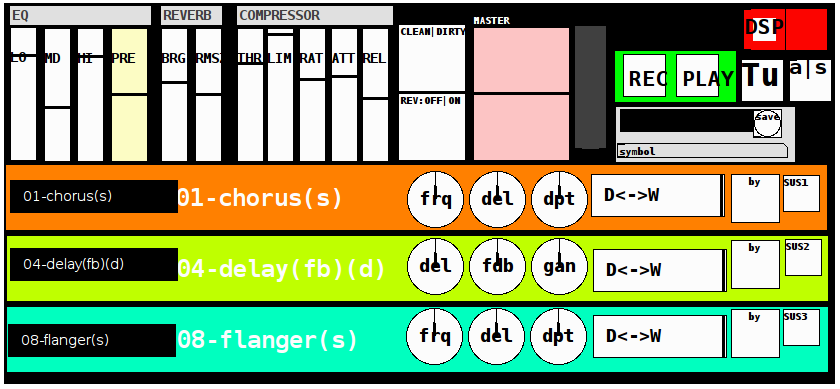
The Stack (in this order):
eq3
pre (gain)
3 effect/pedal slots (with clean-dirty "bypass" toggle for the whole set)
with each slot containing
a (tof) menu to select from 21 effects (0 being raw)
3 parameters (mknobs)
a dry-wet slider
a bypass toggle (for that line which crossfades in and out (set by the crossfade control, in ms)
and
an infinite sustain toggle (for that line)
reverb (with brightness and roomsize control and off|on toggle)
compressor (with threshold, limit, ratio, attack, release (zexy~))
master out level.
Kraken also includes:
a simple recorder (record and play (loop) toggles and recording the entire result)
a popup (standard tuning) guitar tuner
an [ adc~ | sample ] (a|s) switch (to test the sound or even post-process a track/file using openpanel)
and
a presets control which loads or saves the current settings (for the entire rack and includes a date+time prefix as well as an entered name for each preset).
Additional Info:
OpenSoundControl (OSC) has been exposed for a future/additional post ("Kraken-OSC") which I have almost finished in Mobmuplat (only, for now, PdParty and others to be added later) and can be accessed via the send and receive to network abstractions inside the patch.
**
EFFECTS LIST:
00-raw
01-chorus
02-compressor
03-delay(3-tap)
04-delay(fb)
05-delay(spectr)
06-distortion
07-filter
08-flanger
09-fuzz
10-looper(fw-bw) (>0.5 on, <0.5 off to record, play forward, or play backward)
11-octave_harmonizer
12-overdrive
13-phaser
14-pitchshifter
15-reverb
16-step-vibrato
17-tremolo
18-vcf
19-vibrato
20-wah-wah
Dependencies:
(which I believe are all available in Deken)
zexy
cyclone
moonlib
iemlib
ggee
plus zexy~ "load on startup"
Credits/Thanks/Acknowledgements:
As I think with most pure data patches Kraken is built on the back of lots of other people's hardwork and diligent effort. In particular, it owes its effects to predominantly the DYI2 library (by Hardoff), the Stamp Album library (by Balwyn), those on the Guitar Extended website (by Pierre), and less so to a few others. And to all of them, I am deeply thankful.
Tally-Ho! Happy playing.
I am very thankful to finally "Release the Kraken!". I hope it may bring you many hours of pleasure, entertainment, and possibly education.
p.s. if you see some of your work inside this, DO please let me know and I will credit you more specifically.
Thanks again. Feel free to ask any questions you may like regarding using the tool, the abstractions, etc., and I will respond to them as soon as I am able. -Peace
posted in patch~
Implementations of "wavetable" synthesis
Yes I think you will soon discover that the sounds made by crossfading between 2 arbitrary waveforms are not all that exciting. You can add interest by having a few layers of different waveforms crossfading at different rates but it's always quite bland sounding.
 posted in technical issues
Implementations of "wavetable" synthesis
@nuromantix Thanks for the info. So we could say that a simple crossfade between two waveforms (like the TG33 and Prophet VS) would be equivalent to a mix between two oscillators. On the other hand, Stepping through a wavetable (aka a bank of pre-computed waveforms) like the PPG would be equivalent to re-doing the transition that was recorded in the wavetable. In your filter example, crossfading between a filter-open and a filter-closed waveforms is not the same as opening or closing the filter, but if a high number of snapshots of the filter sweep have been saved to a wavetable as consecutive, single-cycle waveforms, stepping through the wavetable achieves a much similar result. (In my last example the patch is also crossfading between adjacent waveforms in the wavetable, which might not be necessary).
My idea was to be able to morph between two arbitrary waveforms, but I think that creating a wavetable of the "morph" between wave A and wave B is pretty much the same as crossfading. Nevertheless, a wavetable is useful if the transition from A to B involves some other processing that the crossfade can't reproduce.
 posted in technical issues
Implementations of "wavetable" synthesis
Turns out I didn't really understand what a "wavetable" in those kind of synths is. I can't find a lot of information on this but from what I understood, a "wavetable" is not a collection of unrelated waveforms one after the other (like in my previous patch), but rather the collection of "intermediate" steps from waveform A to waveform B, therefore scanning the wavetable (aka, crossfading between one step and the next) has the effect of morphing between the shape of waveform A and waveform B. The morphing is already in the wavetable.
Here is how I've implemented it in a polyphonic context. You load a wavetable and then scan the various intermediate positions with the crossfade slider.
wavetable.synth.zip
(Requires bsaylor external for the envelope)
In the utilities folder there is a patch where you load waveform A and waveform B (both must be single-cycle waveforms of the exact same length) and it generates a wavetable, which can be saved to a .wav file.
posted in technical issues
Implementations of "wavetable" synthesis
Here is my attempt with a single table. The crossfading is a bit involved but at least it works and doesn't click. I'm still not entirely sure if "morphing" the shape of two waveforms is the same as crossfading their volumes. Any ideas?
(There is some awful aliasing but I think it's because there's way too many partials in the waveforms).
posted in technical issues
Implementations of "wavetable" synthesis
Hi everyone,
I'm interested in understanding the principle behind the kind of wavetable synthesis as implemented in such synths as the PPG wave, SCI Prophet VS and the likes where the oscillators would read single cycle waveforms from lookup tables with the ability to "scan" through them, which as far as my understanding goes means crossfading between them one after the other (manually, with an lfo or an envelope or whatever).
I wonder how this could be implemented in Pd. Suppose I have a bank of n single-cycle waveforms, I'm not sure how to go about it, whether having n separate tables or join them together consecutively and have the master phasor read two tabread4~, crossfading back and forth between them and offsetting the read point.
Has anyone tried to implement this? Any insights or ideas would be very helpful.
thanks in advance.
posted in technical issues
Some questions regarding a loop station
They don't necessarily play in time anyway.
Well, nor do I.
But you can fix this later at mastering. You could record the click track to a second channel (having sent it out and back in) to aid with re-syncing. The distance from ear to monitoring you can measure physically and calculate the delay.
And when I know the latency in advance, I can record while I play along and shift the recording afterwards, so it'll be in sync again.
I'm not shure, but I think, when I use Katja's latency patch, it measures the latency between speakers and microphone. Only trouble might be too much ambient noise.
@LiamG
For now I tried to crossfade at the end of the sample. I'm mixing a fade-in of the start of the sample with a fade-out of the end of the sample.
Maybe this picture is helpfull for a better understanding:
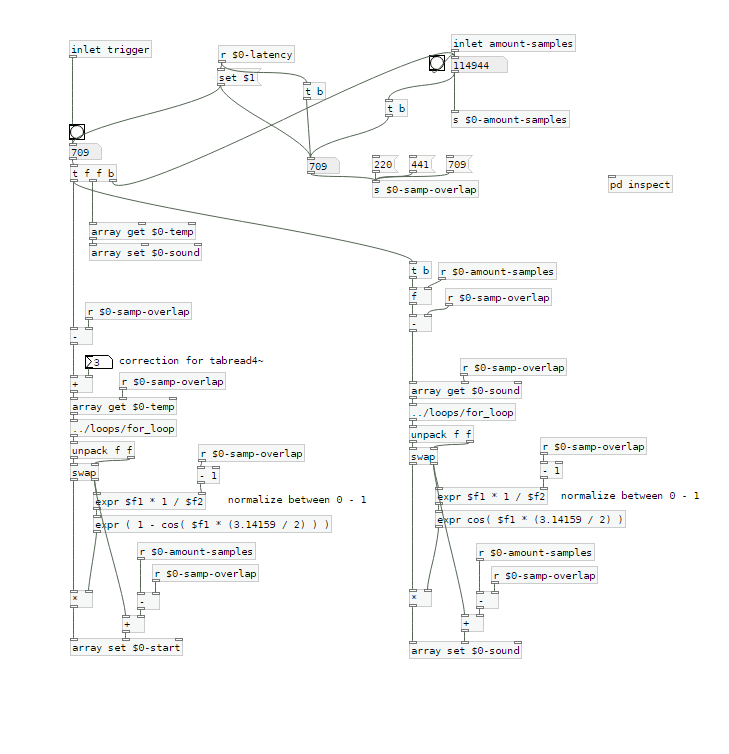
The startsamples are taken from $0-temp, which is recorded first and which is delayed by the latency.
$0-sound is the array used for playback.
I tried to use a crossfade of equal power, but still I can hear a little dip when the sample is restarted.
This is the calculation: expr ( 1 - cos( $f1 * (3.14159 / 2) ) )
with 0 < $f1 < 1
This is, what it looks like in a scope:
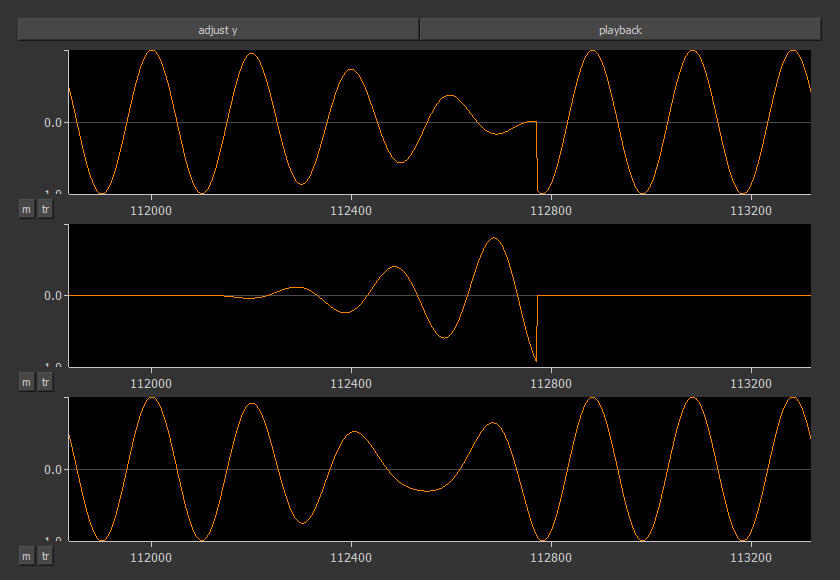
The first row shows the cutted sample $0-sound. It's start is around 112800 samples. On the left side you can see the end with a fade out.
The second row shows the fade-in of the start sample.
The third row is the mixed result.
Here's the new patch:
loop-machine.7z
Are there any ideas of how the mixing can be done better?
Xaver
 posted in technical issues
Some questions regarding a loop station
I changed my first post and uploaded a zip at the end.
Works with Purr Data or pd (plus zexy)
@whale-av
Thanks for your patch. I tested it with extended, but I get latency issues. When I record saying something like "tik" on the beat, the "tik" is heavily delayed to the metronom on playback. But on pd extended I can't set the latency lower than 24 msecs. So there might be some issues with extendend on my machine. (pd or Purr Data let me set the latency to 5 msecs without problems.)
You wrote: The biggest problem with (not noticing) an edit will be a difference of volume (power). Our ears are very sensitive to that.
The second biggest problem will be the quality.... timbre..... but as you say a crossfade could help. But the bigger the difference the longer the crossfade needs to be.
I thought about starting recording a little bit earlier and stop somewhat later, so I can crossfade between these extra samples. And maybe it's easier than I thought.
@LiamG
Thanks. How can I trigger between blocks? I thought messages are only send once during a block, aren't they?
About 3): I was wondering, if it is a problem, not to be able to set the exact metronom tempo
And here's a little screenshot to see what it looks like:
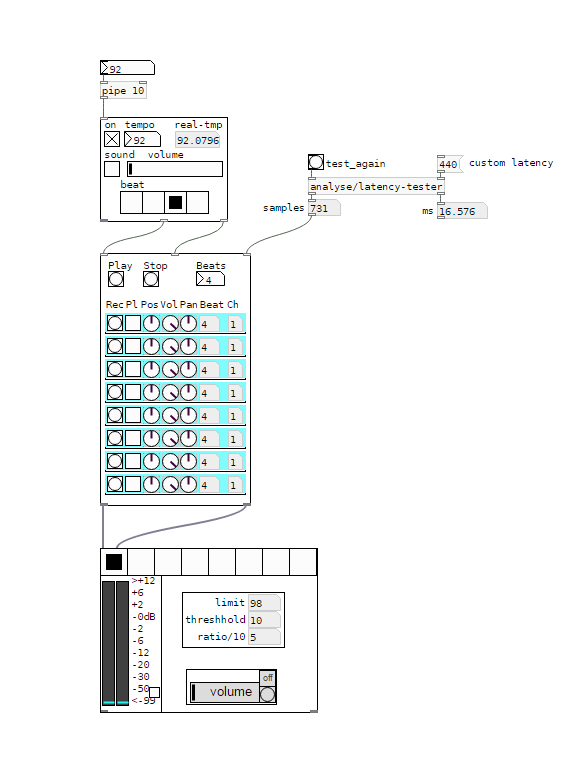
I would say, anything above 5 ms latency between the metronom and some voices starts to feel strange. And when you start to change your reference - say you start recording with the metronom, change to first recorded line as a reference, than to the second etc, - the latency will sum up and increase.
I wonder how latency is treated on hardware loop stations.
And I'm still asking myself how latency should be treated to get it right.
Regards,
Xaver
posted in technical issues