
Some questions regarding a loop station
@xgr I am not sure that latency will matter much. All the work will be done in Pd in real-time and you will just hear the result with a small delay that should not be enough to be disturbing for your brain.
The biggest problem with (not noticing) an edit will be a difference of volume (power). Our ears are very sensitive to that.
The second biggest problem will be the quality.... timbre..... but as you say a crossfade could help. But the bigger the difference the longer the crossfade needs to be.
In a real music environment it will be less noticeable if it is right on the beat.
If you zip up your complete patch and post it here it is easier for us than downloading all of the raw files from github.
Here is a looper that I built (in a hurry) for live performance with a violinist (very aware of latency).......... it has no [vline~]....... it just cuts directly.......
loop.zip
(probably "extended" sorry.... but that can be fixed........ there is nothing very unusual).
I mix it with the direct sound at the mixing desk. No complaints in the 2 years or so that I have been using it.
It sends a "click track" for the musician to stay in time, and can be controlled from my phone. It stops automatically at the end of a measure (I called it a pattern because I didn't know better) after the "cue seen" button has been pressed, or it can be programmed to stop after "X" measures.
You can set the length of the "count-in".
David.
 posted in technical issues
Some questions regarding a loop station
Hi,
I'm creating a loop station and I've got several questions about different issues.
- Latency
- Fading/Cutting recorded samples at start and end
- Metronom settings
1) Latency
I'm using the latency tester from the repo.
http://www.pdpatchrepo.info/patches/patch/92
Latency might be calculated with different methods:
a ) Connecting the output of the soundcard directly to the input via cable. This way the lowest possible latency is received. (Around 440 samples in my case)
b ) Calculating via microphone and speakers. Latency will be higher compared to a ). Also the bigger the distance between mic and speakers, the higher the latency will be.
Which calculation should be used?
(To me it seemes to be logical, to use the latency calculated by b ), as that is the method which reflects the real circumstances. But I'm not shure and it's very hard to tell by what I hear.)
2) Fading/Cutting recorded samples at start and end
When the recorded sample contains a phrase which is completly finished before the next 1, doing a fade with [vline~] sounds OK. But when you record a continuous sound (like a string pad) you will always hear that fade of [vline~].
Compared to Reaper: Cutting a sound and looping it, will result in a continuous sound. To me it seemes like some kind of crossfade between the beginning and the end of the sample is done.
Does someone know more about this? How should it be done correctly?
Crossfading seemes to be a quite difficult task in my eyes, as a lot of calculation has to be done. (Recording has to start a bit earlier and to stop later, sync has to start earlier, and so on)
3) Metronom settings
This loop station depends on a metronom and works similar to Ableton Live. As pd uses blocks of 64 samples, the tempo is corrected to a tempo which corresponds to an array with a size multiple of 64. So playing can easily be kept in sync.
I'm not shure about this. Is it a good idea to do it like this?
But changing this to a manner, where the tempo might be chosen freely, will result in much more complicated calculations. Is it worth it?
Thanks for any comments in advance,
Xaver
My patch is still in development and can be found here:
https://github.com/XRoemer/puredata/tree/master/loop-machine
(downloading from github: go up one folder and use the download/clone button
https://github.com/XRoemer/puredata/tree/master)
 posted in technical issues
vcf_filter~ clicks
This patch fixes the issue to an extent. There were two different unwanted sounds that I was hearing: 1) a high frequency tambourine-like sound. This went away if I put the filter in a subwindow and upsampled 2x. 2) a pop sound when a large change in filter frequency was made quickly. I created a dual-filter crossfade for this. Each has a switch~ to cut down on CPU, but the vcf_filter~ type which originally used less CPU than the vcf~ now uses more.
Sounds like maybe this isn't an issue for some people, but here it is anyway:
(mp3 with the high frequency sound is included here so it doesn't have to be played in the browser)
 posted in technical issues
ALFALOOP 0.1.2
Hi everyone!
Thanks to you all for this great forum.
I sure learned a lot here! I'm glad to finally present some work of mine, too...
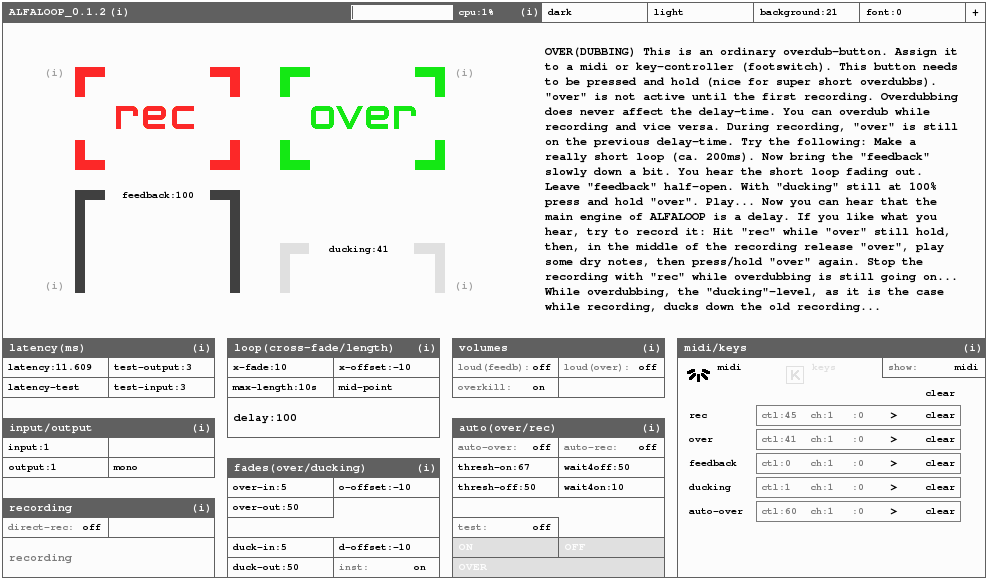
ALFALOOP is a dynamic looper I've developed with PD Vanilla 0.42.6.
I call it a "non-sticky looper" since it allows you to change its loop-length at any time.
ALFALOOP let's you do basically anything related to looping, such as:
- super short loops of a few milliseconds (that would be a delay...)
- volume-control of the loop in a delayish way (feedback). This results in a "forgettable" looper.
- recording while overdubbing and vice-versa
- free time-shift (make your loop shorter/longer, incl. adjustment of the level of the previous recordings)
- sidechain-compressing of the loop by the input-signal
- proper latency-correction
- etc...
ALFALOOP has four main-buttons: recording, overdubbing, feedback and ducking.
If you assign these four buttons to midi-controllers, you don't need to watch the computers
screen. Everything can be achieved by using these four controllers. You can assign midi or key controllers simply by "touching" like in Ableton and such.
There are plenty of settings-parameters to play around with, like:
- crossfade-length
- crossfade-offset
- fade-in/out-time of the input-signal
- fade-in/out-time of the previous recording while overdubbing (ducking-level)
- automated overdubbing (threshold)
- pre-recording-time (like: 50ms before you hit your controller, scary, isn't it?)
- etc..
All the settings get stored automatically.
My goal was that people with little knowledge of PureData (or computers in general) can easily use it too. ALFALOOP features a lot of on-screen-info.
To make sure the GUI looks more or less the same on every platform only canvases were used as visible gui-objects. I did my best to clean everything up and make it look neat...
The main-engine is a built out of a mixture of delays and tables. In a future release, I will document the subpatches.
There is still a lot to do, of course. But now I feel more like making some music...
You can download ALFALOOP and get some further information at:
https://www.marcobaumgartner.com/#puredata/ALFALOOP
Have fun!
Marco
 posted in patch~
Fast dynamic block switching with switch~
i tried initiating the switch~ on block boundaries by using [bang~], but that didn't seem to work,
so the only idea i have is to ramp your volume down to zero, with a ramp time of 5ms or so (using [vline~]), do the switch, and then ramp volume back up to 1.
you'd have to have the FFT stuff in a subpatch, and the volume ramp outside the subpatch, otherwise the ramp itself would also get messed up with the block switch glitch.
if you need to switch VERY rapidly between block sizes, and CPU is not too much concern, then you could always just turn your FFT process into an abstraction, and load different instances of it for each block size, and then crossfade between those.
admittedly, not very elegant, but you could even do stuff like switching the abstractions off (with a 0 message to [switch~]) once they have crossfaded to 0.
 posted in technical issues
LP blending into a BP blending into a HP + filter graph
Hmmmm...I built one like this once...I think.
I don't recall exactly what I did but I think this would work (better):
First things first, decide what controls it. If it's MIDI you're looking at 0-127 control values, better off with Audio control. You can make a 128 point table that uses the curve you like, then read it from [tabread4~] with a MIDI CC or a [line~] for (much) higher resolution.
Anyhoo, it sounds like you'll want to take advantage of [moses] to separate the the control values into different ranges. Here's a thought:
0-24: controls LPF
24-48: controls LPF & BPF & and a crossfade curve between them
48-72: controls BPF
72-96: controls BPF & HPF and a crossfade curve between them
96-127: controls HPF
And now someone will say "but the phase distortion..." Yeah, I'm not phased.
When we say morphing there are much more complex ways of accomplishing this effect than crossfading - but crossfading is simple.
For visualizing it - well, you know what it does so it's an unnecessary burden on your CPU, but if you don't care about latency you can explore data structures - it'd be difficult to construct. Other alternatives are silly, like using noise and an FFT plot - but you'd be able to do that by hacking apart the resynthesis sample I think, again only if you are using it for production.
Please share, I could use a well thought out filter of this type - it's common in the old Traktor, right?
-J.P.
 posted in technical issues
Stereo Crossfader with adjustable curve
I've been working on building a DJ system and I couldn't find a controllable crossfader abstraction. I found a number of ways to fade from one signal to another over time, but none that could be hooked up to a MIDI or OSC control for easy back-and-forth realtime fading. So I built one.
It's a constant-power crossfade available in stereo and mono varieties (although obviously you can hook multiple crossfaders up to the same control if you need more channels than that). The control input is on a 0 to 1 scale, not a 0 to 127 scale, so be sure and adjust accordingly. It takes a "depth" input, which is roughly analogous to the "sharpness" control on adjustable crossfaders. The default depth is 1, which gives a smooth fade suitable for beat-matching and similar applications. People doing scratching may want to use a depth of 2, 3, 4 or maybe even 5 to get a quicker fade in at the edges and a fatter middle area where both tracks can be heard. This is useful for techniques like transform scratching and variations thereon where it's nice to get a large volume response with little movement.
I'll make help patches for them at some point, but if you read the comments, they explain things pretty well.
 posted in abstract~
Stereo Crossfader with adjustable curve
I've been working on building a DJ system and I couldn't find a controllable crossfader abstraction. I found a number of ways to fade from one signal to another over time, but none that could be hooked up to a MIDI or OSC control for easy back-and-forth realtime fading. So I built one.
It's a constant-power crossfade available in stereo and mono varieties (although obviously you can hook multiple crossfaders up to the same control if you need more channels than that). The control input is on a 0 to 1 scale, not a 0 to 127 scale, so be sure and adjust accordingly. It takes a "depth" input, which is roughly analogous to the "sharpness" control on adjustable crossfaders. The default depth is 1, which gives a smooth fade suitable for beat-matching and similar applications. People doing scratching may want to use a depth of 2, 3, 4 or maybe even 5 to get a quicker fade in at the edges and a fatter middle area where both tracks can be heard. This is useful for techniques like transform scratching and variations thereon where it's nice to get a large volume response with little movement.
I'll make help patches for them at some point, but if you read the comments, they explain things pretty well.
posted in abstract~
Crossfade with polygate
I'm pretty new to pure data and I'm trying to write a patch that will loop a recorded sound but it has a little bump or click everytime it restarts. I've been trying to set it up so that I run two loops simultaneously, crossfading between them so that the clicks happen when the one clicking is at zero volume, if that makes sense. But I can't figure out the cross-fading part. I've read that polygate~ does crossfading, but I can't figure out how to use it. Can anyone help me? I've only been at this pure data thing for about a week, so I hope you have some patience.
 posted in technical issues
Strange PD problems
Hey guys! I'm pretty new to PD so excuse the very green question:
I'm designing a crossfade patch that will crossfade between various sound files. No matter what, I can't get the line whitch lowers the volume to function.
I know this has to be a very simple stupid mistake, but I can't figure out why it JUMPS to zero every time.
 posted in technical issues