
Pduino + Arduino Output to Pins
Dear Forum,
Experienced PD user, intermediate Arduino user here.
My goal is to send several different frequency square waves (to be used as "on" and "off" signals for a circuit) to various output pins on an Arduino.
I am up and running using the Pduino library, and have PD and Arduino talking to each other.
However, I am not able to output audio-rate signals to any Arduino pins. For example, sending a square~ into an appropriately timed snapshot~ to output 0's and 1's to Arduino pins yields random clicking/sputtering Arduino output, rather than the expected steady square wave tone at any freq.
My arduinos play a square wave out through the pins just fine when using the Arduino IDE...so, what am I missing in the communication between Arduino and PD/Pduino? A speed issue?
Thanks in advance for any advice!
 posted in technical issues
Some questions regarding a loop station
@whale-av
I'm using a RME Fireface uc with it's own Asio driver on Win7/10. On Purr Data or vanilla I can set latency to 2 ms as well, but the roundtrip latency tester gives me the same results for 2-5 ms (around 440 samples measured with cable). With a 48 sample buffer instead of 64 on my soundcard I receive even worse values.
But on pd-extended it just doesn't work. Don't know why, but as it's not updated anymore, I prefer working with vanilla and Purr Data.
Anyway - in the manner I'm trying to loop, latency doesn't really matter, but you have to know it's length. Even with a latency of 50 ms or more you won't notice any offset in the recorded loops as long as you know the exact length of the latency.
Tracks get recorded and shifted by the latency afterwards, so latency should be compensated.
You're right, latency won't add up in Pd. But I don't use an in ear system. So if you change your reference from a metronom to a recorded track and from that track to the next recorded one, you will add up latency when the latency isn't compensated.
Xaver
 posted in technical issues
Some questions regarding a loop station
I changed my first post and uploaded a zip at the end.
Works with Purr Data or pd (plus zexy)
@whale-av
Thanks for your patch. I tested it with extended, but I get latency issues. When I record saying something like "tik" on the beat, the "tik" is heavily delayed to the metronom on playback. But on pd extended I can't set the latency lower than 24 msecs. So there might be some issues with extendend on my machine. (pd or Purr Data let me set the latency to 5 msecs without problems.)
You wrote: The biggest problem with (not noticing) an edit will be a difference of volume (power). Our ears are very sensitive to that.
The second biggest problem will be the quality.... timbre..... but as you say a crossfade could help. But the bigger the difference the longer the crossfade needs to be.
I thought about starting recording a little bit earlier and stop somewhat later, so I can crossfade between these extra samples. And maybe it's easier than I thought.
@LiamG
Thanks. How can I trigger between blocks? I thought messages are only send once during a block, aren't they?
About 3): I was wondering, if it is a problem, not to be able to set the exact metronom tempo
And here's a little screenshot to see what it looks like:
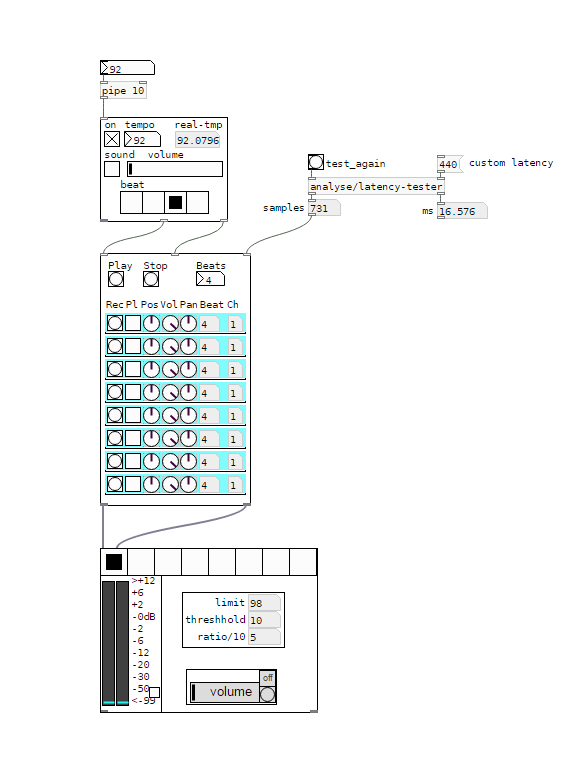
I would say, anything above 5 ms latency between the metronom and some voices starts to feel strange. And when you start to change your reference - say you start recording with the metronom, change to first recorded line as a reference, than to the second etc, - the latency will sum up and increase.
I wonder how latency is treated on hardware loop stations.
And I'm still asking myself how latency should be treated to get it right.
Regards,
Xaver
posted in technical issues
Random number without repetition
There's different kinds of random number generation. It makes sense for you to to think about what you really need.
This is because
- true random repeats numbers whenever it wants to. Computer random is always the result of a calculation, therefore not really random, but it does create repetitions whenever it wants to as well:
This is, what the random object does.
Then as well
- musical random tends to not wish for (direct) repetition within a certain range of numbers.
If it is enough to not get the same number twice after another, then you can store the last number in a float to compare it to the next one, and if it is the same, then just re-bang the random object.
If you need non-repetition within say 6 numbers, then use urn.
If you use Vanilla you have no urn, so you will have to go differently:
Example
Fill an array with numbers 0-9 on array positions 0-9.
Use the result of random 10 (say 7) to remove the respective position (so 7) from the array. This number (7) is the first of your non repeating random sequence using numbers from 0-9.
Your array will now have only 9 entries.
Repeat the procedure with random 9.
Your array will now have only 8 entries.
Repeat the procedure with random 8.
[…]
When your array has only one value left you read that one out, delete it and refill the array with 0-9 to restart the procedure.
You can do this with as many value as an array fits and you’ll never have any repetition until every number in the range has been used.
Hope that helps.
 posted in technical issues
Problem with [comport]
Hello
i have one problem and i don't know how to solve it without going back to windows 8.1
before i update my pc to windows 10 my puredata+arduino work, on arduino i use Serial.write(); to comunicate with puredata with [comport 9600] but now when i open puredata sketch i get this error:
comport number 9600 out of range (1-99)
[comport] opening serial port 9600 failed!
comport number 9600 out of range (1-99)
[comport] opening serial port 9600 failed!
and when i try to open port 3 (where i have arduino connected) i get this error:
Opening COM3
[comport] opened serial line device 3 (COM3)
[comport]: RXERRORS on serial line (997)
[comport]: RXERRORS on serial line (997)
[comport]: RXERRORS on serial line (997)
[comport]: RXERRORS on serial line (997)
[comport]: RXERRORS on serial line (997)
[comport]: RXERRORS on serial line (997)
[comport]: RXERRORS on serial line (997)
[comport]: RXERRORS on serial line (997)
[comport]: RXERRORS on serial line (997)
[comport]: RXERRORS on serial line (997)
and i can't receive the data from arduino.
I am using arduino 1.6.4 and puredata 0.43.4- extended
anyone can help me?
thanks in advance
 posted in technical issues
Pure Data and Arduino
Hello,
Although there seems to be endless information on the internet on using an Arduino board with Pure-Data, I haven't found any info that will make it work for me... So, I'm seeking for some help.
So I'm trying to use my Arduino board to read galvanic skin response. I've got that nearly working. Where I'm having trouble is getting the data into PD in the correct format.
Here is the code I have for my Arduino:
// Arduino Code
int sensorPin = A0;
int sensorValue = 0;
void setup() {
Serial.begin(9600);
}
void loop() {
float conductance = getVoltage(sensorPin);
Serial.println(conductance);
Serial.write(conductance);
delay(1000);
}
float getVoltage(int pin){
return (analogRead(pin));
}
// End Arduino Code.
I'm using the comport object in PD. And I am receiving Data which is analogous to what I'm doing on the board. But I can't understand exactly what it is reading. Here is the link to my PD patch: http://www.sendspace.com/file/n81jlj
So Firstly, the Numbers keep jumping around, and secondly I'm not sure what those numbers are. What I'd like them to be is the individual analog inputs of my Arduino. But they clearly aren't as they all change when I play around with my arduino board. Also they seem to range between 0 and 255, whereas my Arduino reads the data as 10bits...
Any sugestions!?
Thank you,
Niko.
 posted in I/O hardware diy
Pduino-based multi-arduino wireless personal midi controller network
I am trying to find out if and how to create an arduino fio/xbee based wireless network of multiple fio/xbee's? 4 to be exact.
I am currently building a wireless system consisting of 2 "hand units", a wireless mouth interface and a base station xbee interfacing with pure data. www.beatjazz.blogspot.com. i already have the first fio/xbee communicating with the base station and pure data using pduino and all is perfect. this weekend i pick up the other 2 arduinos and fio's. all 3 arduinos need to connect with the pure data at the same time.
the instrument i am building is a wind midi controller except that instead of it being one horn like instrument, allthe left hand keys are in a wireless unit attached to the left hand and same goes for the right hand. the mouthpiece is worn like a headset microphone and is a pressure transducer for breath and a FSR for lip pressure. they must all work together as if one instrument. most of the coding has been done, andnow is time to split that code to the multiple wireless nodes.
it would seem that since all the xbee's have their own id's that that would translate over to the arduinos they are connected with and the whole network should come into the computer thru one serial port, which should solve that problem. I am wondering; how i might interface the 3 arduinos to pure data/pduino? theoretically, shouldnt i be able to name instances of the [arduino] object, say [arduino left], [arduino right], and [arduino mouth] so that each fio has its own instance? if so, how do i recognize the individual fio's and make use of their individual id's if that is the case at all?
Thank you in advance for any insight anyone might share.
Onyx
 posted in I/O hardware diy
MIDI latency in PD
Hi to all, this is my first post in this forum.
I'm trying to use PD's patches inside my setup, and now I'm struggling with the MIDI latency that PD creates.
First of all, I'm a drummer and I use a drumpad(DrumKat) to trigger samples on my laptop, so for me the latency is a 1st class problem.
I have two setups: one with Ubuntu 10.04(Kernel 2.6.33-29-realtime) + jack, and the other with OSX leopard + jackosx. The first one is the more tested.
I want to know the latency that PD creates between notein-noteout process.
To do this, I simply connected my drumpad to PD's midiin, PD's midiout to PD's midiin, and opened my patch(attached to this post).
If the patch is right, there is a link between jack's latency and PD's MIDI latency.
If I set jack's framebuffer to 256, I have 11.6 msec of audio latency and 5.8 ms of PD's MIDI latency.
If I set jack's framebuffer to 128, I have 5.8 msec of audio latency and 2.9 ms of PD's MIDI latency.
Is this correct? Is there a way to reduce MIDI latency without changing the audio latency of jack?
Thank you and sorry for my english.
Nicola
 posted in technical issues
Arduino, ultrasonics and Pd: HELP needed for degree project!
Dear Pd'ers… I'm fairly new to Pd and have been using it during my 'Audio Production' degree at SAE college in London. I'm here to ask for help on my final degree project, which aims to control objects within Pd by way of proximity sensors connected to Arduino.
I have had moderate success, first using a Sharp GPD12 IR sensor connected to an analog port on an Arduino Diecimila, then a Devantech SRF02 connected via I2C to Arduino. I have managed to get Pure Data reading the sensor values using the Pure Data example included in SimpleMessageSystem (http://www.arduino.cc/playground/uploads/Code/SimpleMessageSystem.zip)... and only altering the number of the comport the Arduino appears on.
On the Arduino end, I have added the SimpleMessageSystem library, and am using the following sketch to run one or both of the sensors depending on whether or not I omit the SRF02 or GPD12 parts of the code.
// top //
#include <Wire.h>
#include <Servo.h>
#include <SimpleMessageSystem.h>
int sensorPin = 0;
int sensorValue = 0;
Servo servo1;
#define sensorAddress 0x70
#define readInches 0x50
#define readCentimeters 0x51
#define readMicroseconds 0x52
#define resultRegister 0x02
void setup()
{
Wire.begin();
Serial.begin(9600);
}
void sendCommand (int address, int command) {
Wire.beginTransmission(address);
Wire.send(0x00);
Wire.send(command);
Wire.endTransmission();
}
void setRegister(int address, int thisRegister) {
Wire.beginTransmission(address);
Wire.send(thisRegister);
Wire.endTransmission();
}
int readData(int address, int numBytes) {
int result = 0;
Wire.requestFrom(address, numBytes);
while (Wire.available() < 2 );{
}
result = Wire.receive() * 256;
result = result + Wire.receive();
return result;
}
void loop()
{
// SRF02 READING //
sendCommand(sensorAddress, readInches);
delay(70);
setRegister(sensorAddress, resultRegister);
int sensorReading = readData(sensorAddress, 2);
Serial.println(sensorReading);
delay (200);
// GPD12 READING //
sensorValue = analogRead(sensorPin);
int range = (6787 / sensorValue);
Serial.println(range);
delay(200);
}
// bottom //
Pure data is picking up the sensor's output as a decimal number, through the serial port, correctly, and showing this as a number in the SPECIAL CHARACTER section of the Pd patch, which I can then use to control various Pd parameters, like a slider for example.
If printing both sensor readings to the serial, the Pd patch will pick up the two sensor values alternately, but there seems no way of differentiating the two sensors within Pd, as they both come through the serial. I have tried prepending the serial print at the Arduino stage with a tag such as "IR" or "UL" for each sensor, but this simply ends up in nothing coming through in Pd.
Using one sensor gives the ability to control parameters with a fairly narrow detection range, but for the final version I would like to incorporate 4 or 5 sensors in order that I can cover nearly a full 360 degree range.
After a bit of research I have gone and bought 4 x Maxsonar EZ0's. They've got a wider range than the Devantech sensors, and can operate via I2C, serial or PWM. A number of people online seem to mention the improved stability when operating via PWM, so I thought this could be kinda useful.
I am going to London Hackspace tomorrow to get help with wiring up the sensors to my Arduino Diecimila, but for now, my main problem seems to be how to achieve greater communication between Pure Data and the sensors. It's all very good and well being able to take the decimal readout from an analog input to give one set of values in Pd, but I would like to know how to either to read (and trigger) each sensor discretely via PWM, or to somehow differentiate between each sensor's analog output, so that I can have the different sensors controlling different objects within Pd.
As well as SimpleMessageSystem, I looked at using the Pduino object. But to be honest, it is either not working properly (I have noticed reported issues with bugginess), or I am being stupid, as it has totally boggled my brain. In theory though, it seems like it should be able to do what I want, ie. send and receive commands between Arduino and Pd.
****************************************
So…. my questions for anyone out there with a knowledge of using Arduino + multiple sensors (preferably Maxsonar EZ's) with Pd are:
What is most appropriate for my project?
- Simple Message System or Pduino?
- analog or PWM?
And how do I get proper communication between the two platforms so I can discern discrete values from each sensor?
I'd really like to get a discussion going with this as (a) it would really help me in my degree (which ends in about 4 weeks!!!) and (b) I really want to share what I am doing, especially as the discussions on Arduino/Pd communication on the various forums seem a little patchy (at least for noobs like me). I also hope to continue my research in the future, sharing any findings I make with the community…
****************************************
PS. In the sharing spirit, please check out the Radio Tuner patch I've just posted over on the patch section of this forum - it's my first successful attempt at Pd... I hope you enjoy 
 posted in I/O hardware diy
Export patch as rtas?
@Maelstorm said:
If you're on OSX, jack can be used as an insert plug-in so you can avoid the separate tracks, but you still get the latency.
which you can, depending on your host, eliminate by setting the track delay for the track with the plugin. So if the buffer is 512 sample/11.82 ms then set the delay to that and it should be spot on.
I've had the whole Jack graph latency explained to me numerous times by Stephane Letz and it still doesn't go in.....Heres what he told me...
> > Its the Pd > JAck > Ableton latency. (Ableton has otoh 3 different
> > ways of manually setting latency compensation - I'm just not very
> > clear on where to start with regards to input from JAck)
> >>>>
>
> This is NO latency introduced in a Pd > JAck > Ableton kind of
> chain; the JACK server activate each client in turn (that is Pd *then*
> Ableton in this case) in the *same* given audio cycle.
>
> Remember : the JACK server is able to "sort" (in some way) the graph
> of all connected clients to activate each client audio callback at the
> right place during the audio cycle. For example:
>
> 1) in a sequential kind of graph like IN ==> A ==> B ==> C ==> OUT,
> JACK server will activate A (which would typically consume new audio
> buffers available in machine audio IN drivers) then activate B (which
> would typically consume "output" just produced by A) , then activate
> C , then produce the machine OUT audio buffers.
>
> 2) in a graph will parallel sub-graph like : IN ==> A ==> B ==> C
> ==> OUT and IN ==> D ==> B ==> C ==> OUT (that is both A and D are
> connected to input and send to, then JACK server is able to
> activate A and D at the same time (since the both only depends of IN)
> and a multi-core machine will typically run A and D at the same time
> on 2 different cores. Then when A *and* D are finished, B can be
> activated... and so on.
>
> The input/output latency of a usual CoreAudio application running
> is: driver input latency + driver input latency offset + 2
> application buffer-size + driver output latency + driver output
> latency offset.
>
this next part is the important bit i think...
> For a graph of JACK clients: driver input latency + driver input
> latency offset + 2 JACK Server buffer-size + ( one extra buffer-
> size ) + driver output latency + driver output latency offset.
>
> (Note : there is an additional one extra buffer-size latency on OSX,
> since the JACK server is running in the so called "asynchronous" mode
> [there is also a "synchronous" mode without this one extra buffer-size
> available, but it is less reliable on OSX and we choose to use the
> "asynchronous" mode by default.])
>
> Stephane
>
 posted in technical issues