
Question about Pure Data and decoding a Dx7 sysex patch file....
Hey Seb!
I appreciate the feedback 
The routing I am not so concerned about, I already made a nice table based preset system, following pretty strict rules for send/recives for parameter values. So in theory I "just" need to get the data into a table. That side of it I am not so concerned about, I am sure I will find a way.
For me it's more the decoding of the sysex string that I need to research and think a lot about. It's a bit more complicated than the sysex I used for Blofeld.
The 32 voice dump confuses me a bit. I mean most single part(not multitimbral) synths has the same parameter settings for all voices, so I think I can probably do with just decoding 1 voice and send that data to all 16 voices of the synth? The only reason I see one would need to send different data to each voice is if the synth is multitimbral and you can use for example voice 1-8 for part 1, 9-16 for part 2, 17-24 for part 3, 24-32 for part 4. As an example....... Then you would need to set different values for the different voices. I have no plan to make it multitimbral, as it's already pretty heavy on the cpu. Or am I misunderstanding what they mean with voices here?
Blofeld:
What I did for Blofeld was to make an editor, so I can control the synth from Pure Data. Blofeld only has 4 knobs, and 100's of parameters for each part.... And there are 16 parts... So thousand + parameters and only 4 knobs....... You get the idea 
It's bit of a nightmare of menu diving, so just wanted to make something a bit more easy editable .
First I simply recorded every single sysex parameter of Blofeld(100's) into Pure data, replaced the parameter value in the parameter value and the channel in the sysex string message with a variable($1+$2), so I can send the data back to Blofeld. I got all parameters working via sysex, but one issue is, that when I change sound/preset in the Pure Data, it sends ALL parameters individually to Blofeld.... Again 100's of parameters sends at once and it does sometimes make Blofeld crash. Still needs a bit of work to be solid and I think learning how to do this decoding/coding of a sysex string can help me get the Blofeld editor working properly too.
I tried several editors for Blofeld, even paid ones and none of them actually works fully they all have different bugs in the parameter assignments or some of them only let's you edit Blofeld in single mode not in multitimbral mode. But good thingis that I actually got ALL parameters working, which is a good start. I just need to find out how to manage the data properly and send it to Blofeld in a manner that does not crash Blofeld, maybe using some smarter approach to sysex.
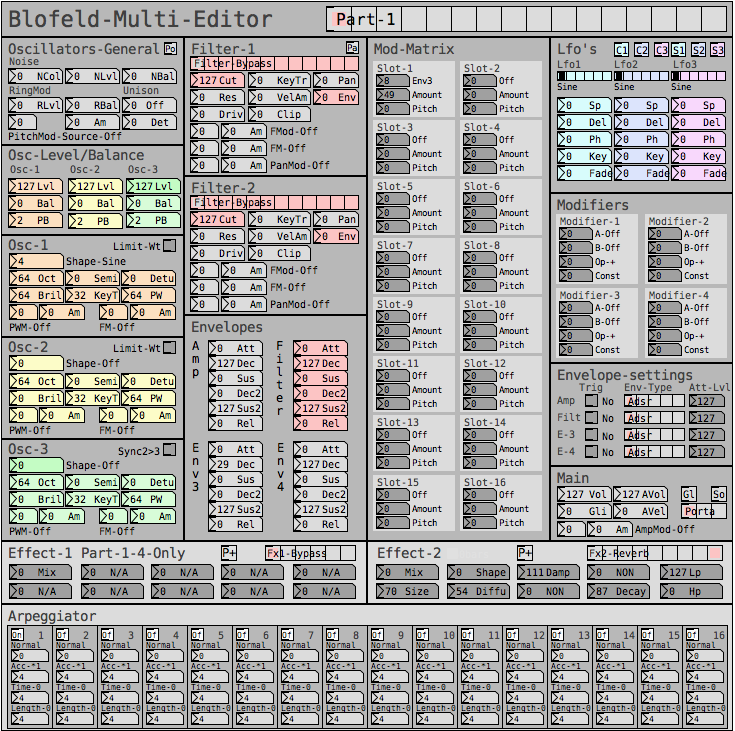
But anyway, here are some snapshots for the Blofeld editor:
Image of the editor as it is now. Blofeld has is 16 part multitimbral, you chose which part to edit with the top selector:
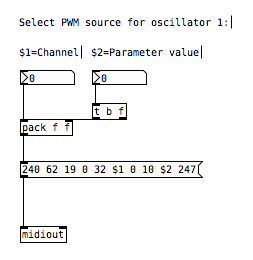
Here is how I send a single sysex parameter to Blofeld:
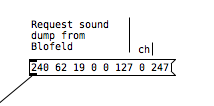
If I want to request a sysex dump of the current selected sound of Blofeld(sound dump) I can do this:
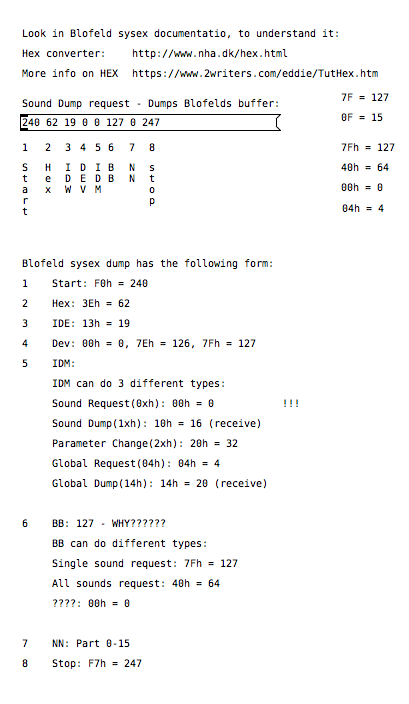
I can then send the sound dump to Blofeld at any times to recall the stored preset. For the sound dump, there are the rules I follow:
For the parameters it was pretty easy, I could just record one into PD and then replace the parameter and channel values with $1 & $2.
For sound dumps I had to learn a bit more, cause I couldn't just record the dump and replace values, I actually had to understand what I was doing. When you do a sysex sound dump from the Blofeld, it does not actually send back the sysex string to request the sound dump, it only sends the actual sound dump.
I am not really a programmer, so it took a while understanding it. Not saying i fully understand everything but parameters are working, hehe
So making something in Lua would be a big task, as I don't know Lua at all. I know some C++, from coding Axoloti objects and VCV rack modules, but yeah. It's a hobby/fun thing I think i would prefer to keep it all in Pure Data, as I know Pure Data decently.
So I do see this as a long term project, I need to do it in small steps at a time, learn things step by step.
I do appreciate the feedback a lot and it made me think a bit about some things I can try out. So thanks
 posted in technical issues
Question about Pure Data and decoding a Dx7 sysex patch file....
@jaffasplaffa I think your biggest problem will be routing the info of the various parameters to the appropriate locations. I guess the way to do it might be to have a giant [route] with a counter, for each type of sysex? basically you need a state machine with a counter that counts how many parameters have been received, and changes the routing depending on the values of previous received values
if you want to do the 32-patch sysexs you will need to do some bitshifting of some of the inputs for a few parameters too.
tihs type of thing is really better accomplished in a text format I think, perhaps look into pdlua or py/pyext or pdjs.
if you use one of these you might be able to simplify things by having an array with the name of a recieve, so you can just count the parameters and send to an appropriate receive by reading the right value from the array.
another way to do it would be to have each receive follow a specific naming format (like $0-param0, $0-param1 etc.) and then look up the appropriate number in an array for the different types of sysex. Then you can just change the send name depending on which parameter is being sent using pd's built-in message formatting with $1 etc.
how did you do it with individual sysex parameters?
 posted in technical issues
Question about Pure Data and decoding a Dx7 sysex patch file....
Here is some info on the sysex format, which I grabbed from the free Dexed Dx7 vst's github page:
sysex-format.txt
Here is a sysex file for a bass sound patch:
BASS001.SYX
After looking a bit into it, I am pretty sure it's doable, just going to take a while to completely understand it. But I think it's doable
posted in technical issues
Question about Pure Data and decoding a Dx7 sysex patch file....
Hello
I have been using the Really Useful Tutorials DX7 patch for a while now and it's really cool.
I was thinking if it would be possible to take it to a next level, by implementing sysex compatibility, so the Really Useful Dx7 synth could load the thousands and thousands of sysex DX7 files that can be found on the web?
I have used sysex message i PD before, for a Waldorf Blofeld editor, with success, but not like this. For that editor, I used sysex for individual parameters, which is something completely different.
How would one go about loading a sysex patch file in Pure Data and then get the individual parameters(is that called decoding a sysex file?) from that sysex file and set the values to the correct parameters in the Really Useful Dx7 Pure Data synth?
If possible at all......
Thanks in advance!
Jakob
posted in technical issues
Few questions about oversampling
Hi,
About a year ago I started to learn a bit pure data in order to create a patch that would act as a groovebox and that should perform on limited cpu resources since I want it to run on a raspberry pi. First I tried to make somekind of fork of the Martin Brinkmann groovebox patch, even if it allowed me to learn a lot about data flow I didn't went to the core of the patch tweaking with sound generation. This led me to end this attempt at forking MNB groovebox patch because even if I could seperate GUI stuff from sound generation and run it on different thread ect... I couldn't go further in optimization in order to reduce the cpu use.
Then a few weeks ago I decided to start again from scratch my project and this time I wanted to be more patient and learn anything needed in order to be capable of optimizing my patch as much as possible. After making a functional drum machine which runs at 2/3% of cpu with 8 different tracks, 126 steps sequencer, a bit of fx ect... I tried to find synths that would opperate well aside the drum machine. And I basicly didn't find any patch that wouldn't use massive amount of cpu time. So I created my own synths, nothing incredible but I'm happy with what I got, though I noticed some aliasing. I read a bit the floss manual about anti aliasing and apply the method used in the manual(http://write.flossmanuals.net/pure-data/antialiasing/), it work well but my synths almost trippled their cpu use, even if I put all my oscilators in the same subpatch in order to use only one instance of oversampling.
I didn't tried to oversample it less than 16 time but since oversampling is so cpu intensive I'm wondering if there's no other option in order to get a good sound definition at a lower cpu cost. I'm already using banlimited waveform so I don't know what I could do in order to limit the aliasing, especialy for my fm patch where bandlimited waveform isn't very useful in order to reduce aliasing.
Since I want to have at least 4 synth track with some at least one synth having 5 voice polyphony I want to know what the best thing to do. Letting FM aside for this project and use switch~ for oversampling 2 or 4 time my synths that use bandlimited waveform ? Or should I try to run different instances of pd for each synth and controling it from a gui/control patch with netsend(though it wouldn't bring down the cpu use at least it would provide somekind of multithreading for my patch) ? Or is there another way to get some antiliasing ? Or should I review lower my expectation because there is no solution that could provide a decent antialiasing for 4 or more synth running at the same time with a low cpu use in pure data in 2021.
Thanks to everyone that would read my topic and try to give some advice in order to get the best antialising/low cpu use solution.
 posted in technical issues
JASS, Just Another Synth...Sort-of, codename: Gemini (UPDATED: esp with midi fixes)
JASS, Just Another Synth...Sort-of, codename: Gemini (UPDATED TO V-1.0.1)
jass-v1.0.1( esp with midi fixes).zip
1.0.1-CHANGES:
- Fixed issues with midi routing, re the mode selector (mentioned below)
- Upgraded the midi mode "fetch" abstraction to be less granular
- Fix (for midi) so changing cc["14","15","16"] to "rnd" outputs a random wave (It has always done this for non-midi.)
- Added a midi-mode-tester.pd (connect PD's midi out to PD's midi in to use it)
- Upgrade: cc-56 and cc-58 can now change pbend-cc and mod-cc in all modes
- Update: the (this) readme
INFO: Values setting to 0 on initial cc changes is (given midi) to be expected.
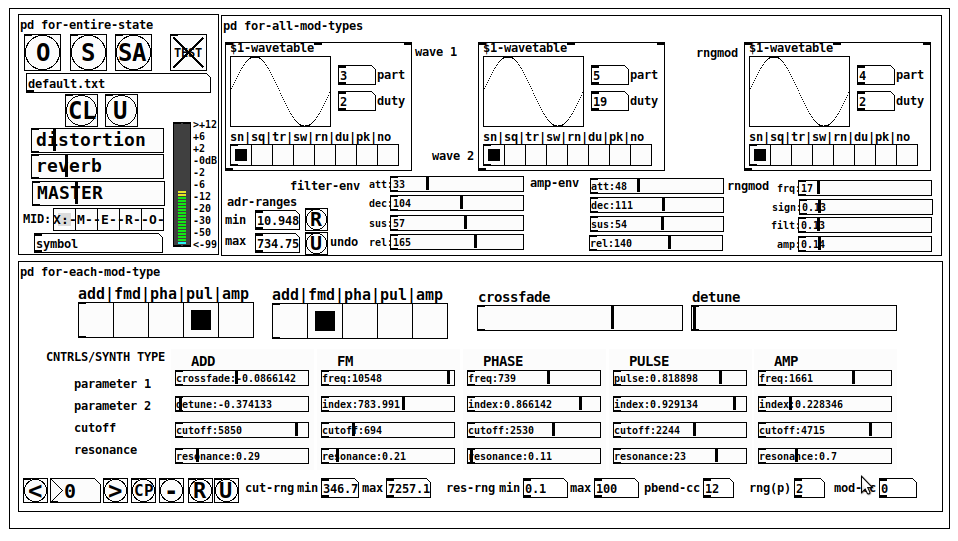
JASS is a clone-based, three wavetable, 16 voice polyphonic, Dual-channel synth.
With...
- The initial, two wavetables combined in 1 of 5 possible ways per channel and then adding those two channels. Example: additive+frequency modulation, phase+pulse-modulation, pulse-modulation+amplitude modulation, fm+fm, etc
- The third wavetable is a ring modulator, embedded inside each mod type
- 8 wave types, including a random with a settable number of partials and a square with a settable dutycycle
- A vcf~ filter embedded inside each modulation type
- The attack-decay-release, cutoff, and resonance ranges settable so they immediately and globally recalculate all relevant values
- Four parameters /mod type: p1,p2, cutoff, and resonance
- State-saving, at both the global level (wavetables, env, etc.), as well as, multiple "substates" of for-each-mod-type settings.
- Distortion, reverb
- Midiin, paying special attention to the use of 8-knob, usb, midi controllers (see below for details)
- zexy-limiters, for each channel, after the distortion, and just before dac~
Instructions
Requires: zexy
for-entire-state
- O: Open preset. "default.txt" is loaded by...default
- S: Save preset (all values incl. the multiple substates) (Note: I have Not included any presets, besides the default with 5 substates.)
- SA: Save as
- TEST: A sample player
- symbol: The filename of the currently loaded preset
- CL: Clear, sets all but a few values to 0
- U: Undo CL
- distortion,reverb,MASTER: operate on the total out, just before the limiter.
- MIDI (Each selection corresponds to a pgmin, 123,124,125,126,127, respectively, see below for more information)
- X: Default midi config, cc[1,7,8-64] available
- M: Modulators;cc[10-17] routed to ch1&ch2: p1,p2,cutoff,q controls
- E: Envelopes; cc[10-17] routed to filter- and amp-env controls
- R: Ranges; cc[10-17] routed to adr-min/max,cut-off min/max, resonance min/max, distortion, and reverb
- O: Other; cc[10-17] routed to rngmod controls, 3 wavetypes, and crossfade
- symbol: you may enter 8 cc#'s here to replace the default [10-17] from above to suit your midi-controller's knob configuration; these settings are saved to file upon entry
- vu: for total out to dac~
for-all-mod-types
- /wavetable
- graph: of the chosen wavetype
- part: partials, # of partials to use for the "rn" wavetype; the resulting, random sinesum is saved with the preset
- duty: dutycycle for the "du" wavetype
- type: sin | square | triangle | saw | random | duty | pink (pink-noise: a random sinesum with 128 partials, it is not saved with the preset) | noise (a random sinesum with 2051 partials, also not saved)
- filter-env: (self-explanatory)
- amp-env: (self-explanatory)
- rngmod: self-explanatory, except "sign" is to the modulated signal just before going into the vcf~
- adr-range: min,max[0-10000]; changing these values immediately recalculates all values for the filter- and amp-env's scaled to the new range
- R: randomizes all for-all-mod-types values, but excludes wavetype "noise"; rem: you must S or SA the preset to save the results
- U: Undoes R
for-each-mod-type
- mod-type-1: (In all cases, wavetable1 is the carrier and wavetable2 is the modulator); additive | frequency | phase | pulse | amplitude modulation
- mod-type-2: Same as above; mod-type-2 May be the same type as mod-type-1
- crossfade: Between ch1 and ch2
- detune: Applied to the midi pitch going into ch2
- for-each-clone-type controls:
- p1,p2: (self-explanatory)
- cutoff, resonance: (self-explanatory)
- navigation: Cycles through the saved substates of for-each-mod-type settings (note: they are lines on the end of a [text])
- CP: Copy the current settings, ie. add a line to the end of the [text] identical to the current substate
- -: Delete the current substate
- R: Randomize all (but only a few) substate settings
- U: Undo R
- cut-rng: min,max[0-20000] As adr-range above, this immediately recalculates all cutoff values
- res-rng: min,max[0-100], same as previously but for q
- pbend: cc,rng: the pitchwheel may be assigned to a control by setting this to a value >7 (see midi table below for possibilities); rng is in midi pitches (+/- the value you enter)
- mod-cc: the mod-wheel may be assigned to a control [7..64] by setting this value
midi-implementation
| name | --- | Description |
|---|---|---|
| sysex | not supported | |
| pgmin | 123,124,125,126,127; They set midi mode | |
| notein | 0-127 | |
| bendin | pbend-cc=7>pitchbend; otherwise to the cc# from below | |
| touch | not supported | |
| polytouch | not supported |
cc - basic (for all midi-configs)
| # | name | --- | desciption |
|---|---|---|---|
| 1 | mod-wheel | (assignable) | |
| 7 | volume | Master |
cc - "X" mode/pgmin=123
| cc | --- | parameter |
|---|---|---|
| 8 | wavetype1 | |
| 9 | partials 1 | |
| 10 | duty 1 | |
| 11 | wavetype2 | |
| 12 | partials 2 | |
| 13 | duty 2 | |
| 14 | wavetype3 | |
| 15 | partials 3 | |
| 16 | duty 3 | |
| 17 | filter-att | |
| 18 | filter-dec | |
| 19 | filter-sus | |
| 20 | filter-rel | |
| 21 | amp-att | |
| 22 | amp-dec | |
| 23 | amp-sus | |
| 24 | amp-rel | |
| 25 | rngmod-freq | |
| 26 | rngmod-sig | |
| 27 | rngmod-filt | |
| 28 | rngmod-amp | |
| 29 | distortion | |
| 30 | reverb | |
| 31 | master | |
| 32 | mod-type 1 | |
| 33 | mod-type 2 | |
| 34 | crossfade | |
| 35 | detune | |
| 36 | p1-1 | |
| 37 | p2-1 | |
| 38 | cutoff-1 | |
| 39 | q-1 | |
| 40 | p1-2 | |
| 41 | p2-2 | |
| 42 | cutoff-2 | |
| 43 | q-2 | |
| 44 | p1-3 | |
| 45 | p2-3 | |
| 46 | cutoff-3 | |
| 47 | q-3 | |
| 48 | p1-4 | |
| 49 | p2-4 | |
| 50 | cutoff-4 | |
| 51 | q-4 | |
| 52 | p1-5 | |
| 53 | p2-5 | |
| 54 | cutoff-5 | |
| 55 | q-5 | |
| 56 | pbend-cc | |
| 57 | pbend-rng | |
| 58 | mod-cc | |
| 59 | adr-rng-min | |
| 60 | adr-rng-max | |
| 61 | cut-rng-min | |
| 62 | cut-rng-max | |
| 63 | res-rng-min | |
| 64 | res-rng-max |
cc - Modes M, E, R, O
Jass is designed so that single knobs may be used for multiple purposes without reentering the previous value when you turn the knob, esp. as it pertains to, 8-knob controllers.
Thus, for instance, when in Mode M(pgm=124) your cc send the signals as listed below. When you switch modes, that knob will then change the values for That mode.
In order to do this, you must turn the knob until it hits the previously stored value for that mode-knob.
After hitting that previous value, it will begin to change the current value.
cc - Modes M, E, R, O assignments
Where [10..17] may be the midi cc #'s you enter in the MIDI symbol field (as mentioned above) aligned to your particular midi controller.
| cc# | --- | M/pgm=124 | --- | E/pgm=125 | --- | R/pgm=126 | --- | O/pgm=127 |
|---|---|---|---|---|---|---|---|---|
| 10 | ch1:p1 | filter-env:att | adr-rng-min | rngmod:freq | ||||
| 11 | ch1:p2 | filter-env:dec | adr-rng-max | rngmod:sig | ||||
| 12 | ch1:cutoff | filter-env:sus | cut-rng-min | rngmod:filter | ||||
| 13 | ch1:q | filter-env:re | cut-rng-max | rngmod:amp | ||||
| 14 | ch2:p1 | amp-env:att | res-rng-min | wavetype1 | ||||
| 15 | ch2:p2 | amp-env:dec | res-rng-max | wavetype2 | ||||
| 16 | ch2:cutoff | amp-env:sus | distortion | wavetype3 | ||||
| 17 | ch2:q | amp-env:rel | reverb | crossfade |
In closing
If you have anywhere close to as much fun (using, experimenting with, trying out, etc.) this patch, as I had making it, I will consider it a success.
For while an arduous learning curve (the first synth I ever built), it has been an Enormous pleasure to listen to as I worked on it. Getting better and better sounding at each pass.
Rather, than say to much, I will say this:
Enjoy. May it bring a smile to your face.
Peace through love of creating and sharing.
Sincerely,
Scott
 posted in patch~
Building a game sound engine for a mobile app : flexible sampler
Hi, I'm building an audio sound engine for a mobile game using libpd and the rjlib library. I want it to be CPU efficient so as to run on lower end android phones too without glitches
My first assumption is that playing back audio is less costly than using synths : is this a fact or am I wrong from the start ?
The idea is to build a flexible sampler with distinct attack, sustain and release parts. I can then load any synth sound I exported from my DAW and play it almost as if it were the original synth (without all the modulations of course). Kind of like the ableton sampler: I could choose the start, the sustain loop portion, and the release part of the sound. That would allow me to add portamento, amplitude, pitch and filter enveloppes, hold notes forever, instantly change the pitch, with no glitches between parts ... It would have to sound like I was playing the original synth preset from my DAW, inside PD !
However this looks a bit trickier than I thought and seems to require a bit of patching. In the end I'm wondering if it's not going to end up costing more resource from the CPU than using a PD synth ?
So before I start building this thing I'm wondering : is it a good idea, or I am missing something here ? And also, does it not already exist ?
I hope I've managed to be somewhat clear, i'd love to hear your feedback !
Cheers
Simon
 posted in technical issues
MIDI CC routing and radio
@Organism Here are the abstractions, it will ignore the first tick from the controller and just highlight the control to be edited and keep the CC value and the slider/numberbox2 up to date with each other so you can edit on the screen or with the controller and avoid all parameter jumps. The help file shows how to use the note data sent by the BeatSteps pads to switch what controls the encoder edits, but that can be switced to a radio or another CC like the tempo knob on the beatstep. As is this is setup to work with relative CCs centered on 64, but it would be simple to change it to work on other values,
@jameslo To my knowledge all of the Arturia controllers and sequencers can be set to send relative CC data, the one caveat is that if you do not have access to a Windows or Mac computer to run their software it can be difficult to change the controllers settings, Arturia has not been good about releasing the sysex for their gear and not all of their devices have had people figure out the sysex and post it on the web. Thankfully it is not hard to figure out the sysex, if you have access to a Windows or Mac machine at least. The regular BeatStep is the only device that I know of which has had someone do the work and publish the full sysex of on the web, I think one of the Keysteps has a good portion of its sysex posted, the rest just have bits and pieces scattered about.
 posted in technical issues
String Machine - Granular
And for those who are interested, an alternative version, with iemguts library. It works differently, using "live" dynamic patching. I might not work on all platforms, depending on the library's versions available.
And here is the patch that I used to automatically generate all the granule~ in the string machine V 1.6
 posted in patch~
How to send a message to all clones whitout s/r
If you are trying to make some polyphony using clone object and you need to find a free voice you can use : [your midi pitch]-[next $1] - [clone synth.cl nr_of_voices]. [next $1] is a message object that will find a free voice for your clone object. "nr_of_voices" is your number of voices for the clone object. "synth.cl" is your abstraction for one voice.
 posted in technical issues