
Soundfiler question [OK I SOLVED IT - maybe there's a nicer way to achieve it?]
I spent a day and a half trying different methods without success. I searched the forum but I can't find an answer to my exact problem.
When I used the method "open samples/xxx.wav, 1" and then "readsf~" to open an audio file chosen randomly between different files (xxx being 0 or 1 or 2 etc etc) all worked fine.
But I have to be able to change the speed of the audio file playing, and the "readsf~" doesn't allow it.
I have to mention that my audio files are quite long and I chosed a length limit of 4min50sec (it seems to be the limit for the audio file to play without issue).
As far as I understand, I need to use "soundfiler" to be able to change the speed of an audio file.
This is working fine with one audio file that is loaded when the patch is getting opened.
But as soon as I want to load automatically a different audio file (chosen randomly in a list of audio files), then it won't work.
SCREENSHOT 1 = If I first chose the file and then read it (adding a delay or not between events), the file will not read, it doesn't appear in the array, it doesn't play.
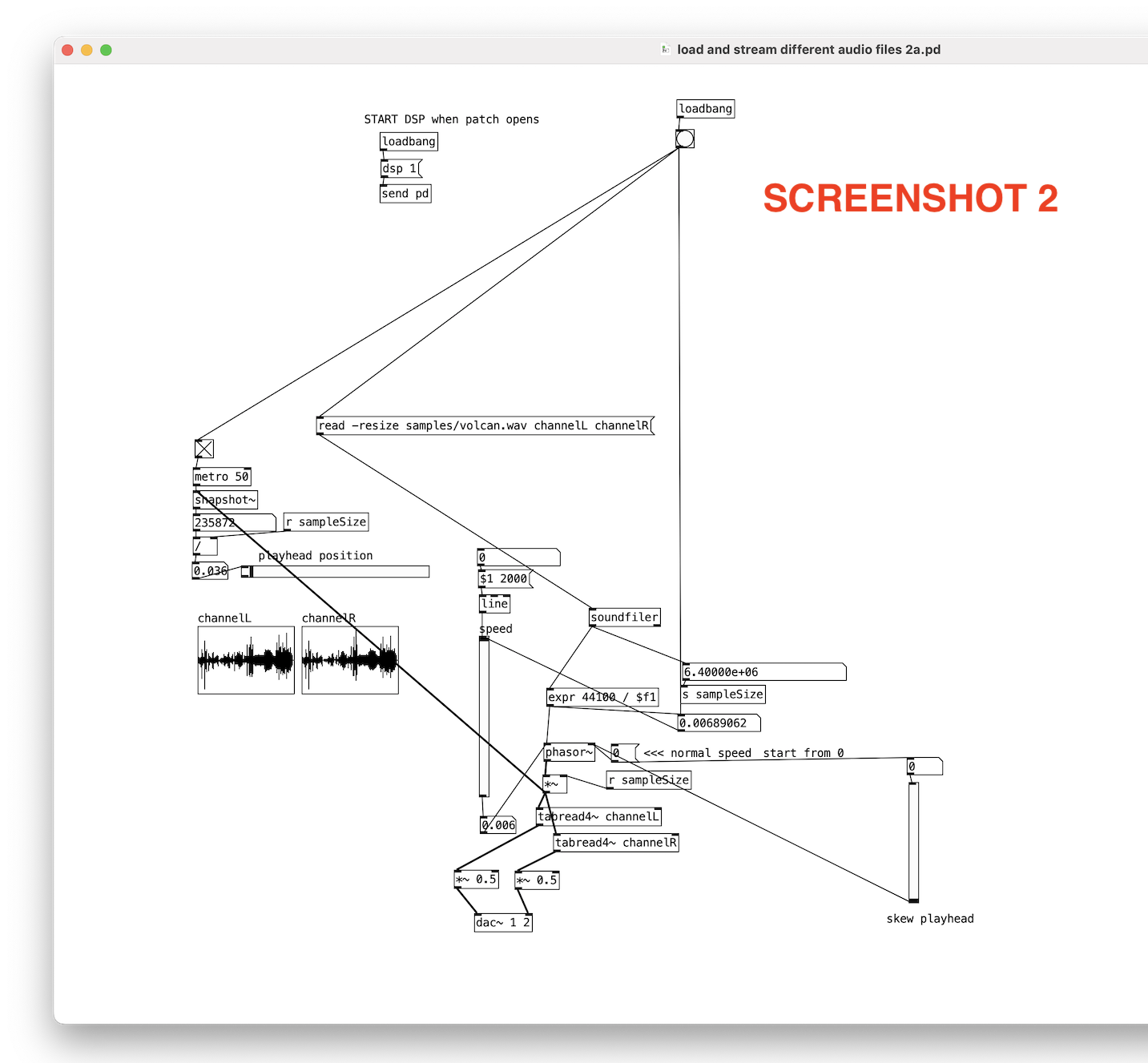
SCREENSHOT 2 = showing that if I don't chose first the file between different files, then it works. Array ok and audio plays.
Is there a solution for what I'm trying to do?
I need to solve SCREENSHOT 1 to be able to develop the patch further.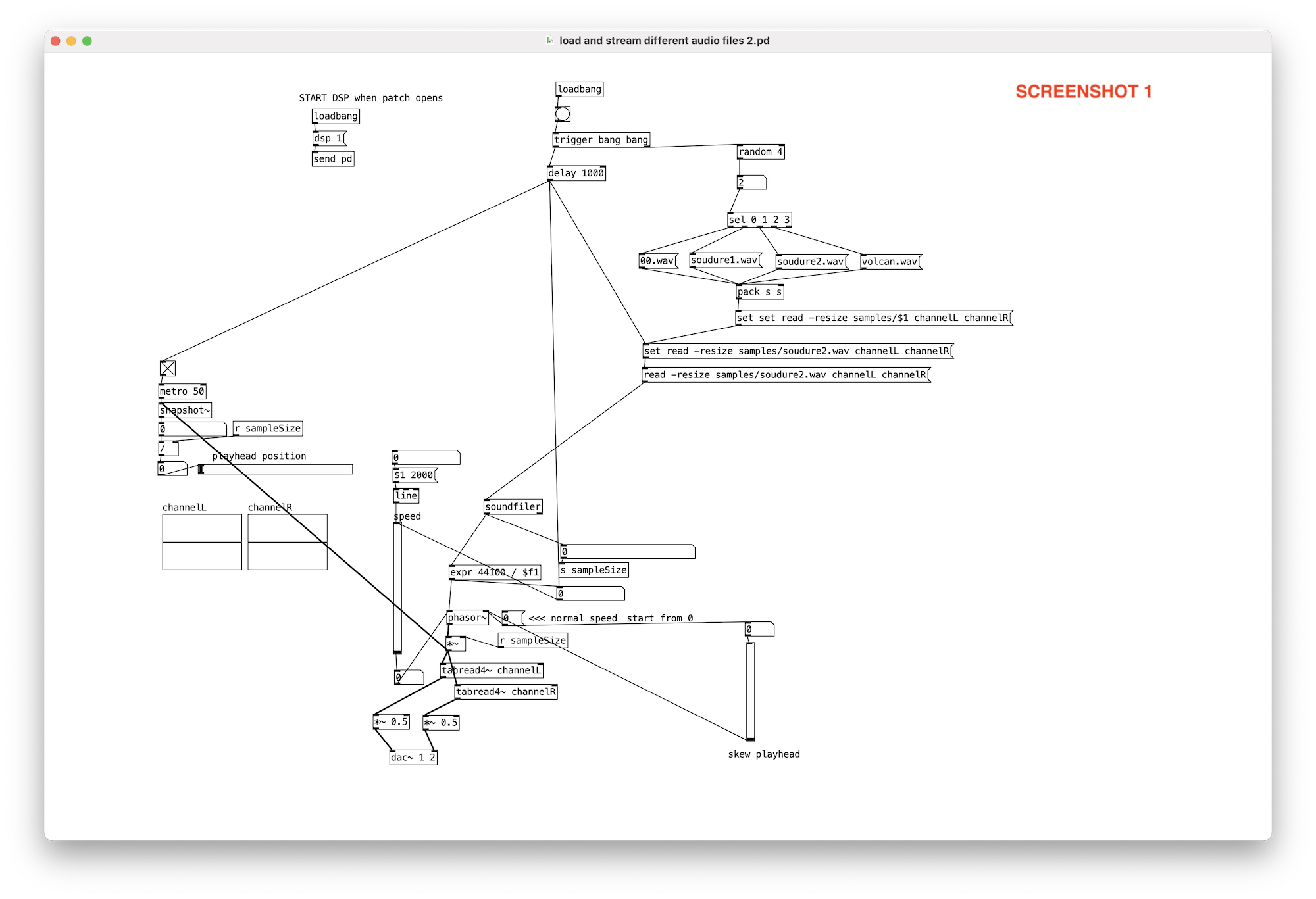
 posted in technical issues
What's the 'delay' in preferences?
delay (msec) is to create the total buffer size. Its important for round trip latency where PD is looping the input to the output - the delay (msec) gets added with the block size (which for compatibility with other patches just keep at 64)
Usually JUCE based programs just give you a "block" of audio, PD is more under the hood about the DSP, the 64 block is a ring buffer that the main patch is at (which is why you have to subpatch to reblock) and the delay msec is padding for the CPU.
Normally you only run into it when you have to up the amount with the sine playing in 'Media, test audio and midi' when you first install PD until it stops sounding scratchy
but also theres another patch in the help browser under 7.stuff/tools/latency you can loop back the output of your audio to the in and play around with lowering it. Either with a loopback function on a dac, or like a wire plugged from out ot line or just have the mic and speakers setup where they could cause feedback if turned up too loud. Tests on the internet for mostly vintage DACS doing round trip latency were actually done in PD.
playing around with it I found Intel macs can go down to 3, and prosumer asio (like an old external edirol dac) can go down to the lowest, 2. Its up to the low level driver to give you the real round trip latency.
usually as long as you can get the sine wave to play in Media.. test audio and midi you are good. Its really only for processing audio in with minimal audible latency - super small delays go off the rails the second you really hit the CPU with polyphony, delay lines, small block sizes.
For a while I had it at as low as it was without being scratchy, but as I got into more complicated (and bloated) synth designs I just kept mine at 50 because when it was having problems more latency than that never helped but less could cause stutters/scratchy sounds.
Linux and Windows are usually set by default to 50 or 100 tho I dont have a problem above 23, offhand I think intel macs were set to 5 or 10. the new arm macs can run into a problem where the old default was too small and should have it higher as well. So the real winners were old intel macs.
use callbacks is only for some older audio drivers in linux
 posted in technical issues
Strategies to create an volume ramp to eliminate clicks and pops when playing a soundfile
Hi,
I am playing a sound file in reverse sometimes in a fast rhythm and I am getting a lot of clicks and pops.
My attempt to eliminate the clicks and pops is not so great.
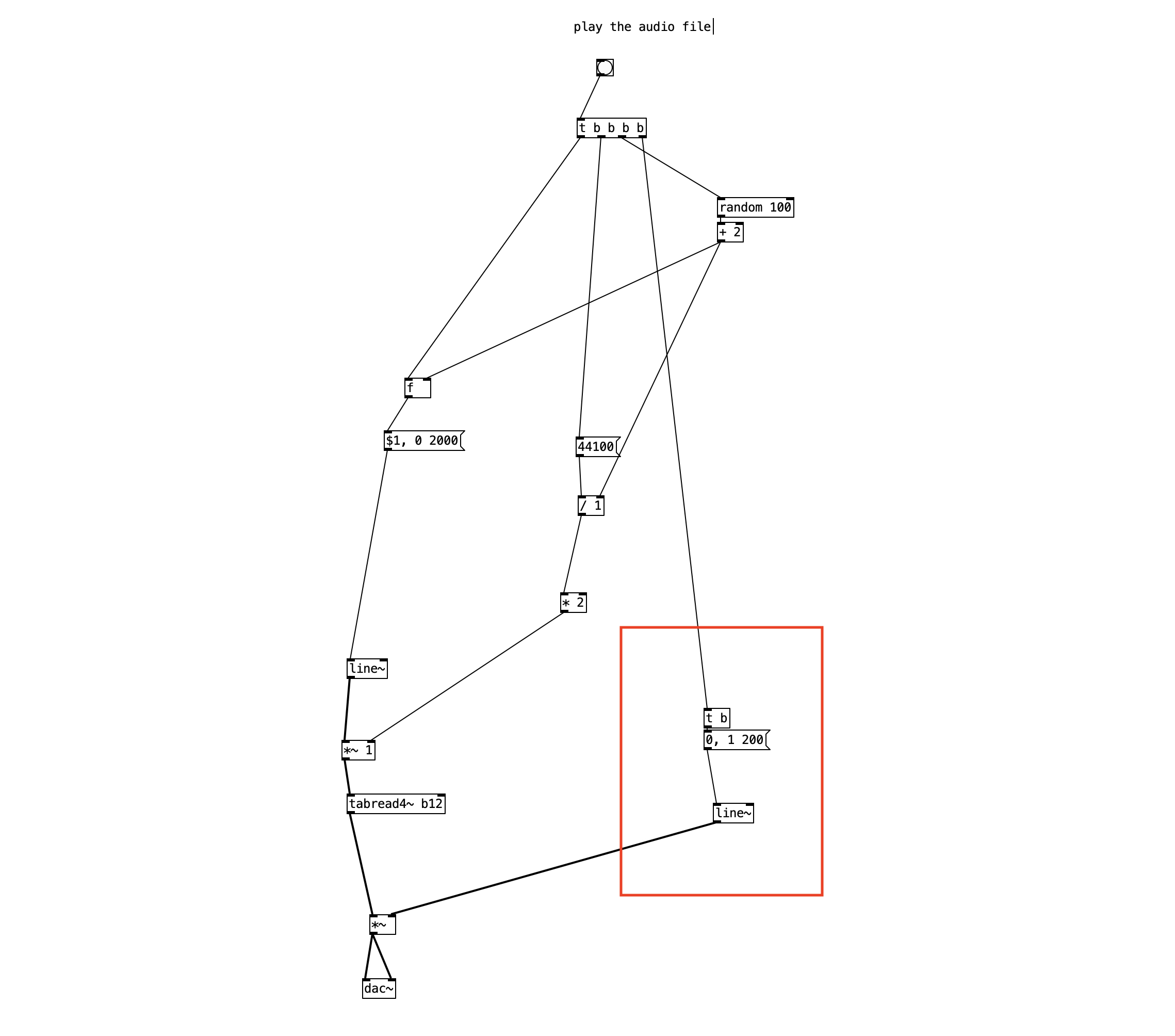
I have a screen shot so you can see what I am doing.
When I bang the button an audio file is played for 2 seconds. If I press the button before the end of the 2 seconds I get a pop because the audio that was playing is cut off and the audio file playback jumps to another location and starts over.
If you see in the red box on my screen shot, I am trying to use line~ to have the volume go to 0 and ramp back up to 1, but it degrades the sound quality at the beginning of the audio file playback. Also, I need to ramp down the volume to 0 first and then ramp the volume back up, and that is what I am missing in my version.
Can anyone please suggest a way to create a silent volume fade at the beginning of when the audio file is played? And it should account for the line~ being interrupted and the file being played again. Let me know if anyone has any suggestions. Thank You.
 posted in technical issues
Looking for advice on using phasor~ to randomize tabread4~ playback
@nicnut said:
Yes line~ would be better, but one thing I am doing is also playing the file for longer periods of time, by lowering the phaser~ frequency, and doing some math the transpose the pitch of the playback that I would like to keep. With line~ I don't know how to separate the pitch and the playback speed.
If I understand you right, separating pitch and playback speed would require pitch shifting...?
With phasor~, you can play the audio faster or slower, and the pitch will be higher or lower accordingly.
With line~, you can play the audio faster or slower, with the same result.
To take a concrete example -- if you want to play 0-10 seconds in the audio file, you'd use a phasor~ frequency of 0.1 and map the phasor's 0-1 range onto 0 .. (samplerate*10) samples. If instead, the phasor~ frequency were 0.05, then it would play 10 seconds of audio within 20 seconds = half speed, one octave down.
With line~, if you send it messages "0, $1 10000" where $1 = samplerate*10, then it would play the same 10 seconds' worth of audio, in 10 seconds.
To change the rate, you'd only need to change the amount of time: 10000 / 0.5 (half speed) = 20000. 10 seconds of audio, over 20 seconds -- exactly the same as the phasor~ 0.05 result.
frequency = 1 / time, time = 1 / frequency. Whatever you multiply phasor~ frequency by, just divide line~ time by the same amount.
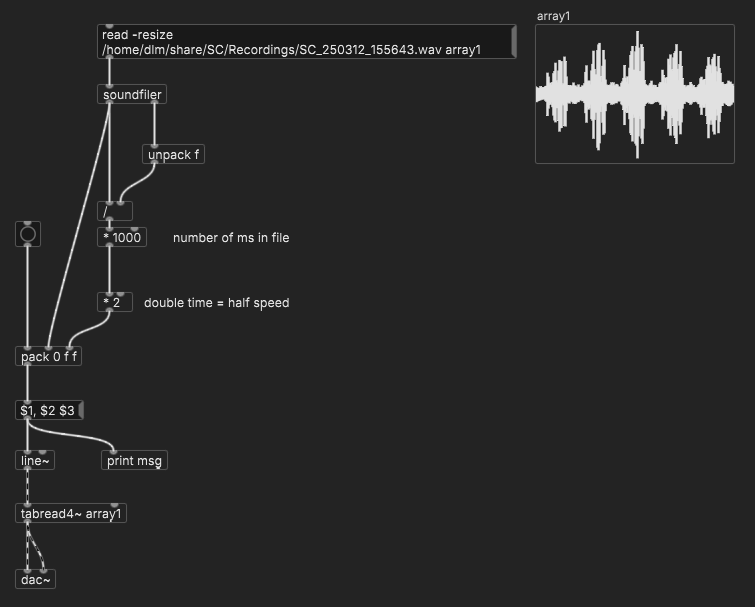
(line~ doesn't support changing rate in the middle though. There's another possible trick for that but perhaps not simpler than phasor~.)
hjh
 posted in technical issues
Help with audio patch on off based on some condition
@ddw_music said:
If the loop is set to zero meaning - no loop; for some reason the track will not play until the end rather will always stop before finished.
Could you explain a little more how you are arriving at this conclusion?
Yes, I loaded a shorter track of 40 seconds to the abstraction and play with it pausing and resuming pausing and resuming. Not a single time the track stops at the end rather always a few milliseconds before - cutting the end of the track.
Now there's no timed envelope and you should get the play~ native pause/resume behavior >without interference (I hope
).
Yes! now iw working perfectly! I wander why is not happen with play~ object?
I have few abstraction for that player (sf-play2~) that I'm loading a file using $0 sign. will it be difficult to change them to fit the way you use to play~ object ?
I will need to do something like this?
if I wrote sf-play2~ audio$0
for each play~ I will need to giver the name play~ audio$0_LEFT and play~ audio$0_RIGHT ? that should make it fine?
Thanks again for your help and explanations!
 posted in technical issues
Help with audio patch on off based on some condition
@KMETE said:
One reason I needed to use the loop 1 message is that the track was always paused for some reason before it ends when no in loop mode.
Ohhhhhh... now I see what it is.
When you ask sf-play(2)~ to play a timed region, it also runs a timed envelope. When you pause / resume, the playback timing doesn't match the envelope timing, so the envelope closes before the end of the source audio.
I'd rather not complicate sf-play(2)~ to allow the envelope to be disabled. But you can back out of one layer of abstraction and use play~ directly.
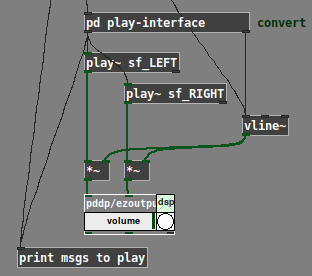
play~ doesn't take "start end rate" lists like sf-play~ does -- but I have a translator object for that. Since there's already a [pd] subpatch to translate "start/resume" messages, I'd just stick the play translator in there:
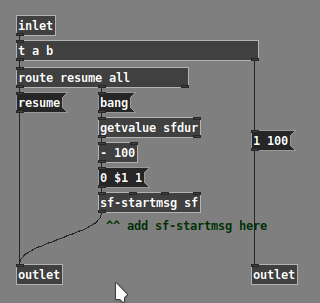
Now there's no timed envelope and you should get the play~ native pause/resume behavior without interference (I hope ).
hjh
posted in technical issues
Help with audio patch on off based on some condition
The idea that it gonna be long track of conversation as part of an installation. it could be that someone will start the track and then go away. I don't want it to run all the 20 minutes so the audio will run in chunks of time. every lets say 60 seconds (not 20) the audio will pause and if someone will press it again within the short time frame (its say 10 seconds) it will resume. if not it will be start from the beginning at next press.
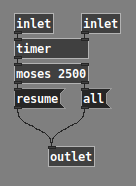
OK, so the "playing" and "paused" timers actually have no interaction -- there are just two rules:
- Play: Stop when user stops, OR after x seconds
- Pause: If paused a short time, resume; if paused a long time, restart (here, btw, the [list store] idea was based on my mistaken understanding that the "resume" vs "start over" behavior depended on the duration of the last segment that was playing. In fact, it depends only on the last pause duration -- which is determined at the moment of play -- so it's a simple [timer] --> [moses] and done)
Here's my solution. (Screenshot omits a [loadbang] --> "loopx 100" -- the patch for download is complete.)
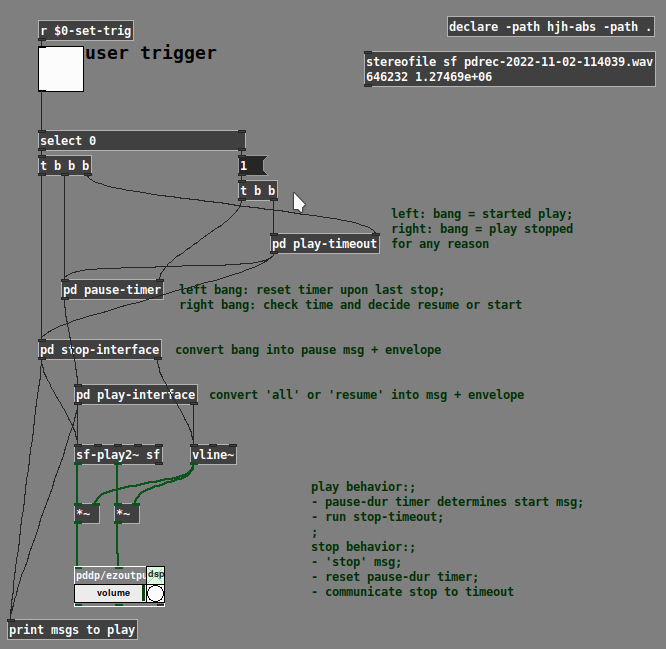
[pd play-timeout]
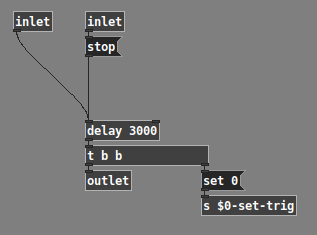
[pd pause-timer]
One other thing I'd like to call attention to is the liberal use of [pd] subpatches. When things get complicated, it's useful to encapsulate parts of the logic, for two reasons:
-
Less stuff in the window to get confused about. (I've seen students think "eh, a busy window is no big deal" but... if you have 10 times as many inlets/outputs visible, that's a hundred times more chances to make a wrong connection.)
-
Programming works better and goes more smoothly when the flow of information is restricted to a smaller number of paths whose meaning can be controlled and understood. It's much much easier to deal with the pause-timer and play-timeout when they are in their own windows, with only the necessary information coming in via inlets.
hjh
posted in technical issues
Help with audio patch on off based on some condition
play~: no method for 'symbol'
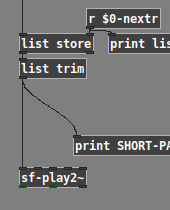
Ohhhhhh... this. The no. 1 most irritating feature of Pd... sometimes you need to mark a leading symbol with the keyword ("symbol" or "list") and sometimes you don't.
Here, the keyword is needed before [list store], but it needs to be removed before [sf-play2~]. I always forget this.
that scenario should resume the playback and not start from the beginning
But this wasn't the functional spec you gave before (at least as it appeared to me).
In the first post of this thread, you said: "What I am trying to add is if the audio is playing more then 60 seconds the audio will stop and will back to the beginning of the file (so when pressed again it will start from beginning)."
This looked like you want LONG-PLAY always to go back to the beginning... but now it seems that isn't what you wanted. Quite difficult to build a patch when the rules are changing, or not communicated clearly.
I also find this a bit confusing: "assuming a situation of long track of 20 minutes... after 30 sec of track playing without any press it will pause."
If you have 20 minutes of audio, why do you want it to stop playing after 30 seconds? In that case, wouldn't you just load 30 seconds into memory, and then use the entire contents in memory (not looping)? At 44.1 kHz, 20 minutes stereo is about 400 megabytes... I hope you're not loading 400 MB into RAM only to want to play 10 MB of that.
So that's one way to stop automatically after x seconds -- simply don't load audio that you don't plan to use.
Otherwise, if you want it to stop playing after x (milli)seconds automatically, then you need [delay].
When you start playing, "bang" the [delay 30000]. At this point, if nothing else happens, then [delay] will output a bang 30 seconds later, and you can use this to stop playback.
If the sensor triggers during that time, according to documentation, you can send a "stop" message to the [delay] and it will cancel the 30-sec later output trigger.
So: [timer] measures the time between actually-occurring triggers (two triggers, reset and measure --> one result). [delay] produces a trigger later (one trigger --> add one result).
hjh
posted in technical issues
Help with audio patch on off based on some condition
Here, I've distilled the trigger and timing logic -- should be easy to re-add sf-play2~ etc. (and substitute the real play-duration in place of "xxxxx" in the messages).
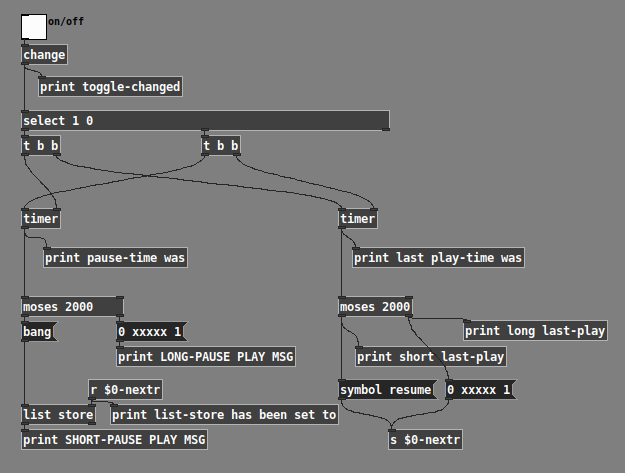
Checking the 4 cases:
Played a long time, then paused a long time:
toggle-changed: 0
last play-time was: 2997.33
long last-play: 2997.33
list-store has been set to: 0 xxxxx 1
toggle-changed: 1
pause-time was: 2348
LONG-PAUSE PLAY MSG: 0 xxxxx 1 -- started from beginning, OK
Played a long time, then paused a short time:
toggle-changed: 0
last play-time was: 3250.67
long last-play: 3250.67
list-store has been set to: 0 xxxxx 1
toggle-changed: 1
pause-time was: 1092
SHORT-PAUSE PLAY MSG: 1092 0 xxxxx 1 -- even though it's a short pause, it starts from the beginning, OK
Played a short time, then paused a short time:
toggle-changed: 0
last play-time was: 1297.33
short last-play: 1297.33
list-store has been set to: symbol resume
toggle-changed: 1
pause-time was: 556
SHORT-PAUSE PLAY MSG: symbol resume -- OK
Played a short time, paused a long time:
toggle-changed: 0
last play-time was: 1553.33
short last-play: 1553.33
list-store has been set to: symbol resume -- short play time planned to resume, but...
toggle-changed: 1
pause-time was: 2125.33
LONG-PAUSE PLAY MSG: 0 xxxxx 1 -- the long pause time overrides "resume" and it starts from the beginning, OK
I'd really suggest to add sf-play2~ to this framework, rather than replacing chunks of it with over-complicated counter mechanisms which you don't need (timer measures time more efficiently).
hjh
posted in technical issues
Help with audio patch on off based on some condition
What I am trying to add is if the audio is playing more then 60 seconds the audio will stop and will back to the beginning of the file (so when pressed again it will start from beginning).
Do you mean like this?
- Pause >= 5 sec:
- Next play should always start from the beginning
- Pause < 5 sec:
- Last audio play time >= 60 sec: play from beginning
- Last audio play time < 60 sec: resume
(It's really helpful to make a tree, or a table, describing the cases. If you just write sentences, it's very easy to overlook patterns.)
One pattern you can see from this is that the "pause >= 5" branch is easy: always from the beginning. So the "all" is fine.
But the "resume" message needs to be either "resume" or "all," depending on the last play duration. The last play duration is measured at the time of the "off" trigger.
This is a common pattern in patching, which has a standard solution: You need a changing message to be sent later, where the contents of the message are determined earlier based on some condition. (When the user lets go of the sensor, you determine at that moment how the next "on" will behave.)
For this, you need:
- A storage object. One of the messages is a list, so, use [list store].
- The "off" trigger sets the value of this storage object using its cold inlet.
- The (later) "on" trigger bangs the hot inlet.
Should be something like this:
1676400706585-talk.pd -- EDIT: but I just realized there's a mistake in here, the [r nextr] should be [r $0-nextr] and then the message-sends to that name should change to a real [s $0-nextr] instead of the message-box shortcut. I can update the patch later but I don't have time right this second.
This usage of a storage object is a pattern that's useful in thousands of contexts -- took me forever to figure it out (which reflects a pedagogy problem).
hjh
posted in technical issues