
tuio and abelton, send midi
@Wabot03 Probably.........
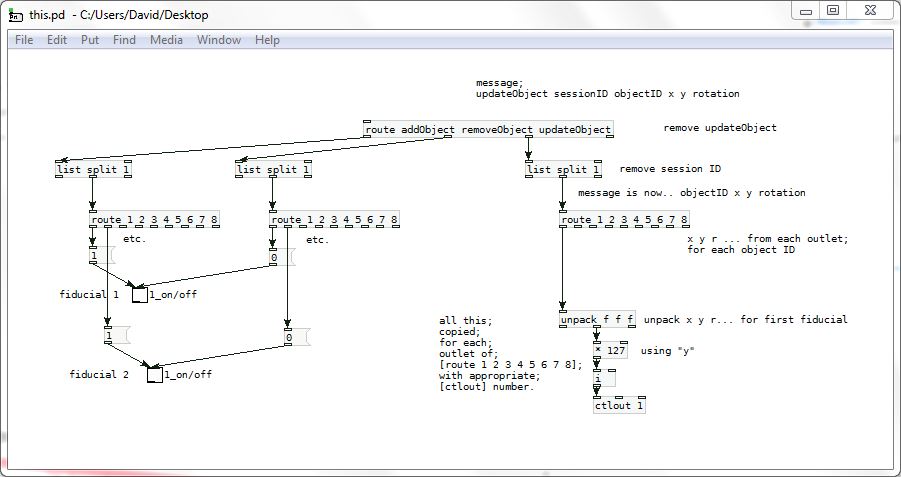
And then of course the toggles connected to Ableton on/off control for each fiducial if it works correctly.
David.
 posted in patch~
tuio and abelton, send midi
ok works, 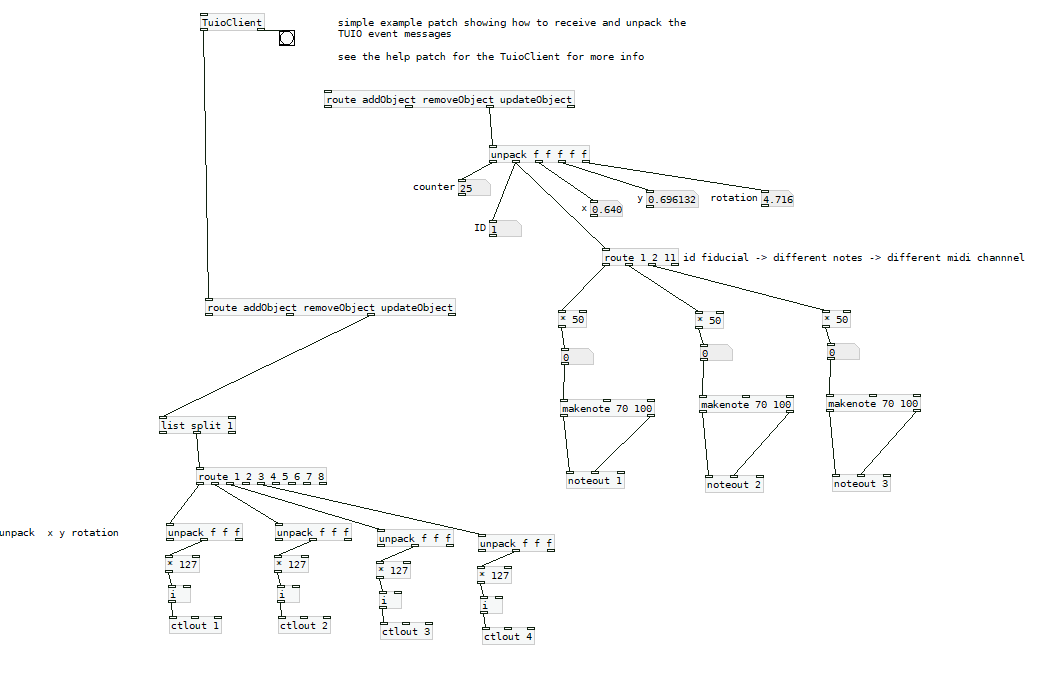
ok midi note ableton 2 ctlout.pd
now i'm trying to connect a fiducial, to an on/off button in ableton
 posted in patch~
tuio and abelton, send midi
I can assign a different note to each fiducial, but I can't assign each ID's Y of each ID to different ctlout."
exemple:
fiducial 1 ID y axis ->to ctlout1
fiducial 2 ID 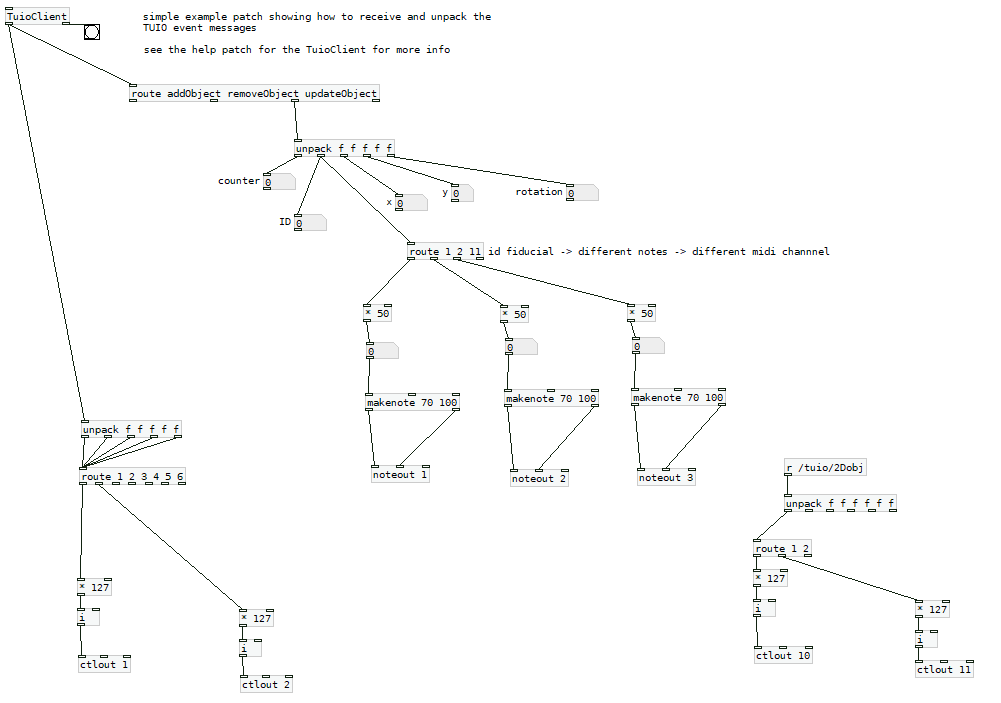 y axis -> to ctlout2...and so on
posted in patch~
tuio and abelton, send midi
@Wabot03 Messing about years ago....... comedy.zip
Open simple.pd
The patch will move a white square on the Gem window for one fiducial.
[unpack f f f f f ] does just what its name suggests ...... each float from a list of floats drops from a separate outlet.
So, trying hard to remember..... first there is a [route updateObject] which strips updateObject from the start of the incoming list and rejects messages that start with some other tag (which will come out of its rightmost outlet).
That is because the messages we are interested in start with updateObject (a symbol)
They are in the format .... updateObject a n x y z
So "a" is the session ID, but I didn't need it, so the leftmost outlet of unpack is not connected. Put a [print] on it if you want to know what it is.
"n" is the object number.... counted from the first fiducial to be in camera shot (starting 0 or 1 I don't remember).
You are going to need that "n".
x y z are xposition, yposition, and angle (rotation) and you might need to scale the values as I have done to suit your midi messages.
So....
After [route updateObject] you will need first a [list split 1] to remove "a" and then feed its right outlet to [route 1 2 3 4 5 6 7 8]
Each output from that [route] will give you x y z for each fiducial.
Then you need [unpack f f f ] to split out x y z from the remaining list.
David.
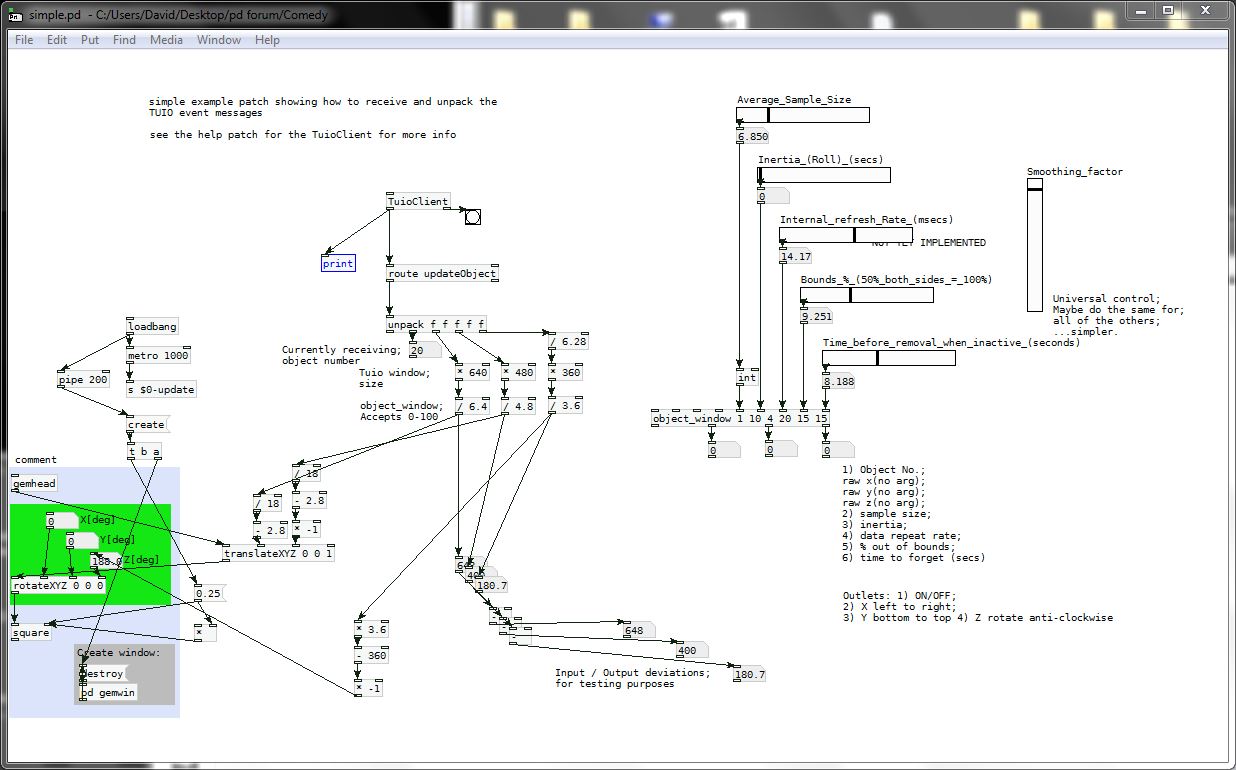
[object_window] was an attempt (it's not connected in the patch) at smoothing the jittery incoming data and deciding whether to forget fiducials that had gone out of shot for a while. You might need that or something like it.
posted in patch~
tuio and abelton, send midi
I use the TUIO patch for Pure Data. I would like to assign 8 different fiducial to each volume fader or clip laucher in Ableton.
I use loopMIDI to connect pure data to abletonTuioDemo.pd
thanks in advance- i cant understand the unpack f f f f f f f
posted in patch~
PD, Tuio, loopmidi and ableton
@Wabot03 said:
this is the patch, The camera recognizes the fiducials, but I can't assign them to different MIDI values in Ableton. That is, each fiducial controls the same fader in Ableton.
- I don't have a TUIO, and I don't have the TuioClient object, so I have no idea how it behaves.
- I don't know the MIDI messages that Ableton is expecting.
- And, the patch you sent doesn't show any MIDI output objects, so I have no idea what you've tried.
So all I can do is (to the best that I can figure out from the available information) clarify what you need to do -- but you need to do the research. You need to figure out what are the messages coming from TUIO, and you need to figure out what MIDI messages should go to Ableton.
I can't do that for you. (Maybe somebody else on the forum could.)
TUIO side: I'd concentrate on the updateCursor messages. These are sending four numbers:
- First #: no idea
- Second #: no idea
- Third and fourth #s: X and Y
BTW your unpack should be [unpack f f f f], NOT $1 $2 $3 $4.
You'll need a chain of [route] objects:
[route updateCursor] // input is "updateCursor a b c d"
|
[route ****] // replace **** with a correct value for "a"
| // input is "a b c d"
[route ++++] // replace ++++ with a correct value for "b"
|
[unpack f f]
^^ and here you have X and Y.
One of those [route] objects will distinguish the different fiducials. Then you can use many fiducial IDs in the same [route]:
[route 1 2 3 4] etc
But "1 2 3 4" will be different depending on the messages coming from TUIO. I have no visibility into that; you will have to find those numbers for yourself.
Then you need to scale those values on to the range 0 to 127 and send by MIDI.
hjh
 posted in technical issues
PD, Tuio, loopmidi and ableton
this is the patch, The camera recognizes the fiducials, but I can't assign them to different MIDI values in Ableton. That is, each fiducial controls the same fader in Ableton.
posted in technical issues
PD, Tuio, loopmidi and ableton
So there's the TUIO <--> Pd communication layer, and the Pd <--> Ableton layer.
My main point of advice is to break the task down -- don't try to handle all of it at once.
The TUIO piece -- I would spend some time [print]-ing messages to understand what are the data coming from the TUIO controller. (I haven't used this patch, so I don't know the data format that a fiducial sends into Pd.)
The Ableton piece -- find out what are the MIDI messages you need to send to Ableton to accomplish the actions you want. Then, test them by hand in Pd by sending those messages to [ctlout] or other MIDI output objects.
At the end of those tests, you should have a clear understanding of the source data from TUIO, and of the MIDI messages that those need to be translated into. At that point, the translation is relatively easy (but, the translation will be hard if you don't have a clear idea of "this message 'xyz, 0.5' needs to translate to controller 58, value 63"). Do the research first, to simplify the final work.
hjh
posted in technical issues
PD, Tuio, loopmidi and ableton
I use the TUIO patch for Pure Data. I would like to assign 8 different fiducial to each volume cursor in Ableton and the Ableton clip launcher. I use loopMIDI and Windows 10.
thanks in advance
posted in technical issues
ambisonic setup
@cfry I doubt that it can be simple unless someone posts an already existing patch.
You can get positional data using fiducial markers and TUIO with a camera and GEM but the tuioclient.dll that I have for Pd is 32-bit so Pd versions before 0.48 and I don't know whether there has been a 64-bit update.
You might find a way using Wi-Fi or Bluetooth data from mobile phones, maybe through an Arduino or similar.
David.
posted in technical issues