
Polyphonic voice management using \[poly\]
The way ADSR is calculated in most midi devices is usually a combination of both the ADSR settings and the length between the note on and note off messages. The note off is typically received before the completion of the envelope and determines when the switch between the sustain and release phase will occur (often, the note on/off determines the minimum time and the sustain setting sets the maximum). Some synthesisers have the ability to switch between a GATE and ENVELOPE mode, and playing with this toggle whilst triggering a string of notes will make the way in which the function works more obvious.
Of course the whole note on/off-ADSR relationship varies with the way the device or algorithm is programmed -- for example, note velocity can also affect the attack phase -- but that's generally how it works.
 posted in tutorials
exponential ADSR envelope using LP filter
Hi. I've played with this method before a bit. A real 1-pole lowpass filter with an impulse passed in is equivalent to multiplying every previous sample by a constant factor to get the next sample, which is also equivalent to an exponential envelope. But you can also add a constant factor for every sample in order to make a linear envelope. So it turns out you can make a variable-slope filter by combining: multiply and add on the previous sample by 2 different factors. If you are interested I have further details in this blog post:
https://sshader.wordpress.com/2014/09/05/programming-an-adsr-envelope/?iframe=true&theme_preview=true
It's not that cpu friendly when you change the settings because you have to take the sample-length-of-the-stageth root or something like that, I haven't looked into it in a while though. However, afterward it simplifies to an add and multiply at every sample
here are the codes: http://forum.pdpatchrepo.info/topic/8490/examp-exponential-envelopes-with-exponential-linear-curve-control
 posted in abstract~
exponential ADSR envelope using LP filter
I've been experimenting with making an exponential envelope using filters rather than lines. Instead of trying to re-process the linear data that [line~] objects make, I'm giving a hard 1 or 0 signal to a LP filter with very low cutoff to take create the curve.
Maybe this is an old trick, but it's new to me and I've been very pleased with the results. It gives nice, varied envelope curves, and it's satisfyingly simple and CPU friendly.
 posted in abstract~
ADSR clips when triggering new note while old one is releasing
I guess what you need is [pipe] and check if a new envelope is triggered before the previous has ended. That's what I did in [hold_sustain], an abstraction that works with [ggee/envegen] in order to hold one point of the envelope (designed mostly to hold the sustain part of an ADSR). You can get it here https://github.com/alexdrymonitis/envelopes check its help patch and the actual abstraction to see if it can help..
 posted in technical issues
Do you know of any good Envelope Patches?
So I've made this module to allow for stochastic variation of dynamic envelopes. It allows you to choose between three envelope types or determine the probability of each occuring. With the "ran"(dom) setting, the envelope lengths can be determined autonomously, or you can input a bang (third inlet) to coordinate the envelopes with other modules.
Depending on the length of the envelope, I can sometimes hear the low "resolution" of the "moderate" and particularly the "sharp" envelope, as they are only a four-point approximation of a curve. I can add more points of course, though, ideally, I should probably add a mechanism that takes the length of the envelope into consideration when determining the amount of points and the proportions of the envelope. Of course, if there are already excellent abstractions out there of which I'm unaware, I'd be happy if you could share them with me, so that I can avoid (further) re-inventing the wheel.
N.B: Open demo.pd to test the module.
P.S. It's possible that I've re-invented the wheel in multiple ways in this module, e.g. in the probability determination found in [dynamics]>[pd envelope_type]>[pd envelope_type_pool_and probability]. Any advice regarding pre-existing objects is appreciated.
EDIT: re-uploaded without [gate] and in .zip format.
envelope.zip
 posted in technical issues
gui externals tutorial ?
@Pierre-Guillot
"make install" does not seem to install anything so I added object files manualy
It compiles but the linker cant seem to find pd stuffs although it is linked with pd...
cc -I"D:/WORK/DSP/pd-0.46-7/src" -Wno-unused-parameter -DPD -DVERSION='"0.0"'  -O6 -funroll-loops -fomit-frame-pointer  -Wall -W -g -o "src/adsr.o" -c "src/adsr.c"
cc   -rdynamic -shared -L"D:/WORK/DSP/pd-0.46-7/src" -L"D:/WORK/DSP/pd-0.46-7/bin" -o "src/adsr.dll" "src/adsr.o"  libCicmWrapper_la-ebox.o libCicmWrapper_la-egraphics.o libCicmWrapper_la-eclass.o libCicmWrapper_la-eobj.o libCicmWrapper_la-ecommon.o libCicmWrapper_la-epopup.o  -lpd
libCicmWrapper_la-ebox.o: In function `ebox_dosave':
/cygdrive/d/WORK/DSP/CicmWrapper/Sources/ebox.c:819: undefined reference to `s__X'
libCicmWrapper_la-ebox.o: In function `ebox_properties':
/cygdrive/d/WORK/DSP/CicmWrapper/Sources/ebox.c:1098: undefined reference to `s_symbol'
/cygdrive/d/WORK/DSP/CicmWrapper/Sources/ebox.c:1113: undefined reference to `s_symbol'
libCicmWrapper_la-eclass.o: In function `eclass_attr_getter':
/cygdrive/d/WORK/DSP/CicmWrapper/Sources/eclass.c:639: undefined reference to `s_float'
/cygdrive/d/WORK/DSP/CicmWrapper/Sources/eclass.c:653: undefined reference to `s_symbol'
libCicmWrapper_la-eclass.o: In function `eclass_attr_setter':
/cygdrive/d/WORK/DSP/CicmWrapper/Sources/eclass.c:753: undefined reference to `s_float'
/cygdrive/d/WORK/DSP/CicmWrapper/Sources/eclass.c:775: undefined reference to `s_symbol'
libCicmWrapper_la-eclass.o: In function `eclass_addmethod':
/cygdrive/d/WORK/DSP/CicmWrapper/Sources/eclass.c:240: undefined reference to `s_float'
/cygdrive/d/WORK/DSP/CicmWrapper/Sources/eclass.c:252: undefined reference to `s_symbol'
 posted in extra~
pd "could'nt load" extra
ok, I removed the chmod a-x and now it is working
has the Makefile been tested for windows ? how can I change it so that instruction is only executed on linux ?
I found it here https://puredata.info/docs/developer/LibraryTemplate
posted in technical issues
Beatmaker Abstract
http://www.2shared.com/photo/mA24_LPF/820_am_July_26th_13_window_con.html
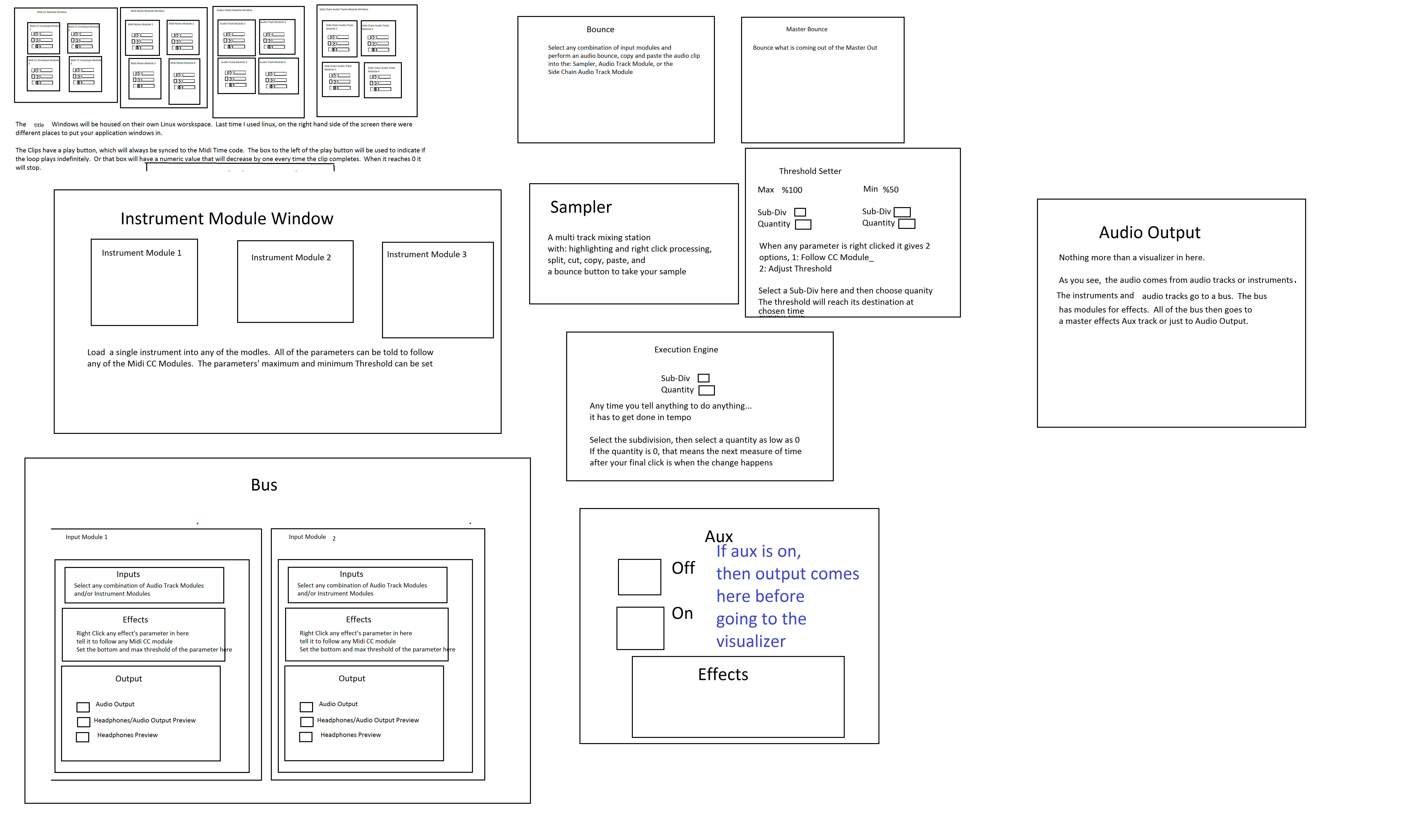
I conceptualized this the other day. The main reason I wanted to make this is because I'm a little tired of complicated ableton live. I wanted to just be able to right click parameters and tell them to follow midi tracks.
The big feature in this abstract is a "Midi CC Module Window" That contains an unlimited (or potentially very large)number of Midi CC Envelope Modules. In each Midi CC Envelope Module are Midi CC Envelope Clips. These clips hold a waveform that is plotted on a tempo divided graph. The waveform is played in a loop and synced to the tempo according to how long the loop is. Only one clip can be playing per module. If a parameter is right clicked, you can choose "Follow Midi CC Envelope Module 1" and the parameter will then be following the envelope that is looping in "Midi CC Envelope Module 1".
Midi note clips function in the same way. Every instrument will be able to select one Midi Notes Module. If you right clicked "Instrument Module 2" in the "Instrument Module Window" and selected "Midi input from Midi Notes Module 1", then the notes coming out of "Midi Notes Module 1" would be playing through the single virtual instrument you placed in "Instrument Module 2".
If you want the sound to come out of your speakers, then navigate to the "Bus" window. Select "Instrument Module 2" with a drop-down check off menu by right-clicking "Inputs". While still in the "Bus" window look at the "Output" window and check the box that says "Audio Output". Now the sound is coming through your speakers. Check off more Instrument Modules or Audio Track Modules to get more sound coming through the same bus.
Turn the "Aux" on to put all audio through effects.
Work in "Bounce" by selecting inputs like "Input Module 3" by right clicking and checking off Input Modules. Then press record and stop. Copy and paste your clip to an Audio Track Module, the "Sampler" or a Side Chain Audio Track Module.
Work in "Master Bounce" to produce audio clips by recording whatever is coming through the system for everyone to hear.
Chop and screw your audio in the sampler with highlight and right click processing effects. Glue your sample together and put it in an Audio Track Module or a Side Chain Audio Track Module.
Use the "Threshold Setter" to perform long linear modulation. Right click any parameter and select "Adjust to Threshold". The parameter will then adjust its minimum and maximum values over the length of time described in the "Threshold Setter".
The "Execution Engine" is used to make sure all changes happen in sync with the music.
IE>If you selected a subdivision of 2, and a length of 2, then it would take four quarter beats(starting from the next quarter beat) for the change to take place. So if you're somewhere in the a (1e+a) then you will have to wait for 2, 3, 4, 5, to pass and your change would happen on 6.
IE>If you selected a subdivision of 1 and a length of 3, you would have to wait 12 beats starting on the next quater beat.
IE>If you selected a subdivision of 8 and a length of 3, you would have to wait one and a half quarter beats starting on the next 8th note.
http://www.pdpatchrepo.info/hurleur/820_am,_July_26th_13_window_conception.png
 posted in abstract~
Line, line~, vline~ and ADSR envelopes
here we go step by step through the basic construction of an ADSR envelope, looking at some functions of line, line~ and vline~ along the way.
http://www.pdpatchrepo.info/hurleur/diy-envelope-tutorial.pd
 posted in tutorials
Line, line~, vline~ and ADSR envelopes
here we go step by step through the basic construction of an ADSR envelope, looking at some functions of line, line~ and vline~ along the way.
http://www.pdpatchrepo.info/hurleur/diy-envelope-tutorial.pd
posted in tutorials