
Purr Data alpha1
The next alpha release of Purr Data (the GUI port of Pd-l2ork) is
now available.
Change log:
- bugs from alpha0 were fixed
- should be up to date with most changes from Pd Vanilla 0.47
Alpha builds should go much more quickly from this point--about one per week.
Lots of changes in this one, so expect-- and please report-- lots of bugs to
git.purrdata.net
Binaries:
OSX: Sorry, the Mac I was using to build died, so I need a Mac Mini or something
to keep building and developing for Macs
Finally:
Someone said there weren't enough cats in the first alpha,
so here's an interactive cat sprite patch (test.pd):
http://www.jonathanwilkes.net/cat_thing.tar.gz
 posted in news
Custom Ubuntu Live Cd and PD
@flextUser Hello....... A custom Ubuntu Live cd will be running Ubuntu on the laptop...... so the fact that it ""was"" a windows machine is irrelevant. The live cd will need to run on that machine........ have all of the video/audio etc. drivers that will work on that particular machine......
Linux is pretty good at that now, but you will need to check on the actual hardware.
Then you might need the drivers for his hardware, soundcard, joystick, etc.
Depending on the complexity of your patch the usb stick will need to be fast enough.
I would try running the basic live cd first, with your patch on another key, and see what needs to be downloaded/added to get it all running (on their machine)....... if it will run straight away then you are lucky.
Yumi....... http://www.pendrivelinux.com/yumi-multiboot-usb-creator/ I have used and it is not bad for getting going with the Linux Ubuntu drive......... from then on you will start to get an idea of the possible problems. Make sure that you take the option to have a writable file on the drive so that you can save setting, preferences etc.
The computer that you are going to boot from the drive will need a bios where you can put "boot from usb drive" (or similar) to the top of the boot order.............
There is a lot of useful help on the left side of the web page that I linked to.........
Ps again! I didn't mention....... but its very important...... that the usb Ubuntu, Pd etc. must not write to the computer hard drive while it is running....... as the windows that is installed will not know about the writes........ and that will risk windows not booting again afterwards when the Ubuntu key is removed and the computer is rebooted normally......
David.
 posted in technical issues
GUI port of Pd-l2ork Alpha 0 release
Hello,
Below are links to the first alpha release of the GUI port of Pd-l2ork.
The GUI has been ported from tcl/tk to nw.js. The biggest visual improvements are ability to zoom in and out of a canvas, smoother animation of canvas objects (like the PacData game), user-friendly editing inside msg/obj boxes, and a more flexible API for visualizing data structures.
I've nicknamed it "Purr Data", because cats.
This is mainly a bug-collecting release. It should be decent enough to do some basic patching for awhile before hitting a bug. Some caveats up front: OSX is missing Gem and PDP, and both OSX and Windows are missing some pd-l2ork-related externals.
Bug tracker is here:
https://puredata.osuosl.org/jwilkes/purr-data/issues
Alpha builds are listed below (I'm abusing gitlab to distribute these, so some may have a zip within a zip):
OSX x_64 - https://puredata.osuosl.org/purr-data-binaries/osx-64-alpha0/repository/archive.zip?ref=master
Ubuntu 15.10 x_64 - https://puredata.osuosl.org/purr-data-binaries/ubuntu-15.10-64-alpha0/repository/archive.zip?ref=master
Ubuntu 14.04 x_64 - https://puredata.osuosl.org/purr-data-binaries/ubuntu-14.04-64-alpha0/repository/archive.zip?ref=master
Ubuntu 14.04 i386 - https://puredata.osuosl.org/purr-data-binaries/ubuntu-14.04-32-alpha0/repository/archive.zip?ref=master
Debian Jessie x_64 - https://puredata.osuosl.org/purr-data-binaries/debian-jessie64-alpha0/repository/archive.zip?ref=master
Debian Jessie i386 - https://puredata.osuosl.org/purr-data-binaries/debian-jessie32-alpha0/repository/archive.zip?ref=master
Windows 32-bit - https://puredata.osuosl.org/purr-data-binaries/win32-alpha0/repository/archive.zip?ref=master
posted in news
Install PD extend on Ubuntustudio
I just installed Ubuntustudio 15.10 Wily Werewolf 32bit on a thinkpad and I am trying to upgrade PD to extend. I am fairly new to linux but it seems like the instructions on https://puredata.info/docs/faq/debian fails.
This is the log from executing the commands. Any suggestions and help will be appreciated
myuser@machine:~$  sudo add-apt-repository "deb http://apt.puredata.info/releases `lsb_release -c | awk '{print $2}'` main"[sudo] password for zoundart:
myuser@machine:~$ sudo apt-key adv --keyserver keyserver.ubuntu.com --recv-key 9f0fe587374bbe81
Executing: gpg --ignore-time-conflict --no-options --no-default-keyring --homedir /tmp/tmp.beJyKhm5Lr --no-auto-check-trustdb --trust-model always --keyring /etc/apt/trusted.gpg --primary-keyring /etc/apt/trusted.gpg --keyserver keyserver.ubuntu.com --recv-key 9f0fe587374bbe81
gpg: requesting key 374BBE81 from hkp server keyserver.ubuntu.com
gpg: key 374BBE81: "Hans-Christoph Steiner <hans@guardianproject.info>" not changed
gpg: Total number processed: 1
gpg:              unchanged: 1
myuser@machine:~$ sudo apt-key adv --keyserver keyserver.ubuntu.com --recv-key D63D3D09C39F5EEB
Executing: gpg --ignore-time-conflict --no-options --no-default-keyring --homedir /tmp/tmp.BDfXAe3l5j --no-auto-check-trustdb --trust-model always --keyring /etc/apt/trusted.gpg --primary-keyring /etc/apt/trusted.gpg --keyserver keyserver.ubuntu.com --recv-key D63D3D09C39F5EEB
gpg: requesting key C39F5EEB from hkp server keyserver.ubuntu.com
gpg: key C39F5EEB: "Launchpad Pure Data" not changed
gpg: Total number processed: 1
gpg:              unchanged: 1
myuser@machine:~$ sudo apt-get update
Hit http://no.archive.ubuntu.com wily InRelease
Get:1 http://no.archive.ubuntu.com wily-updates InRelease [64,4 kB]
Get:2 http://no.archive.ubuntu.com wily-backports InRelease [64,5 kB]
Get:3 http://security.ubuntu.com wily-security InRelease [64,4 kB]
Ign http://apt.puredata.info wily InRelease
Ign http://apt.puredata.info wily Release.gpg
Ign http://apt.puredata.info wily Release
Get:4 http://security.ubuntu.com wily-security/main Sources [17,0 kB]
Get:5 http://no.archive.ubuntu.com wily-updates/main Sources [24,1 kB]
Get:6 http://no.archive.ubuntu.com wily-updates/restricted Sources [3 741 B]
Get:7 http://security.ubuntu.com wily-security/restricted Sources [2 854 B]
Get:8 http://no.archive.ubuntu.com wily-updates/universe Sources [6 112 B]
Get:9 http://no.archive.ubuntu.com wily-updates/multiverse Sources [1 922 B]
Get:10 http://security.ubuntu.com wily-security/universe Sources [3 691 B]
Get:11 http://no.archive.ubuntu.com wily-updates/main i386 Packages [59,3 kB]
Get:12 http://no.archive.ubuntu.com wily-updates/restricted i386 Packages [13,4 kB]
Get:13 http://security.ubuntu.com wily-security/multiverse Sources [1 922 B]
Get:14 http://no.archive.ubuntu.com wily-updates/universe i386 Packages [31,0 kB]
Get:15 http://no.archive.ubuntu.com wily-updates/multiverse i386 Packages [6 052 B]
Get:16 http://security.ubuntu.com wily-security/main i386 Packages [43,4 kB]
Err http://apt.puredata.info wily/main i386 Packages
  404  Not Found
Ign http://apt.puredata.info wily/main Translation-en_US
Get:17 http://no.archive.ubuntu.com wily-backports/main Sources [750 B]
Get:18 http://security.ubuntu.com wily-security/restricted i386 Packages [10,8 kB]
Get:19 http://no.archive.ubuntu.com wily-backports/restricted Sources [28 B]
Ign http://apt.puredata.info wily/main Translation-en
Get:20 http://no.archive.ubuntu.com wily-backports/universe Sources [833 B]
Get:21 http://no.archive.ubuntu.com wily-backports/multiverse Sources [28 B]
Get:22 http://no.archive.ubuntu.com wily-backports/main i386 Packages [606 B]
Get:23 http://security.ubuntu.com wily-security/universe i386 Packages [24,8 kB]
Get:24 http://no.archive.ubuntu.com wily-backports/restricted i386 Packages [28 B]
Get:25 http://no.archive.ubuntu.com wily-backports/universe i386 Packages [714 B]
Get:26 http://security.ubuntu.com wily-security/multiverse i386 Packages [6 052 B]
Get:27 http://no.archive.ubuntu.com wily-backports/multiverse i386 Packages [28 B]
Hit http://no.archive.ubuntu.com wily-backports/multiverse Translation-en
Hit http://no.archive.ubuntu.com wily-backports/restricted Translation-en
Get:28 http://security.ubuntu.com wily-security/main Translation-en [23,2 kB]
Hit http://no.archive.ubuntu.com wily/main Sources
Hit http://no.archive.ubuntu.com wily/restricted Sources
Hit http://no.archive.ubuntu.com wily/universe Sources
Get:29 http://security.ubuntu.com wily-security/multiverse Translation-en [2 536 B]
Hit http://no.archive.ubuntu.com wily/multiverse Sources
Hit http://no.archive.ubuntu.com wily/main i386 Packages
Hit http://no.archive.ubuntu.com wily/restricted i386 Packages
Hit http://no.archive.ubuntu.com wily/universe i386 Packages
Get:30 http://security.ubuntu.com wily-security/restricted Translation-en [2 666 B]
Hit http://no.archive.ubuntu.com wily/multiverse i386 Packages
Hit http://no.archive.ubuntu.com wily/main Translation-en
Hit http://no.archive.ubuntu.com wily/multiverse Translation-en
Hit http://no.archive.ubuntu.com wily/restricted Translation-en
Get:31 http://security.ubuntu.com wily-security/universe Translation-en [15,2 kB]
Hit http://no.archive.ubuntu.com wily/universe Translation-en
Hit http://no.archive.ubuntu.com wily-updates/main Translation-en
Hit http://no.archive.ubuntu.com wily-updates/multiverse Translation-en
Hit http://no.archive.ubuntu.com wily-updates/restricted Translation-en
Hit http://no.archive.ubuntu.com wily-updates/universe Translation-en
Hit http://no.archive.ubuntu.com wily-backports/main Translation-en
Hit http://no.archive.ubuntu.com wily-backports/universe Translation-en
Fetched 496 kB in 7s (70,7 kB/s)
W: Failed to fetch http://apt.puredata.info/releases/dists/wily/main/binary-i386/Packages  404  Not Found

E: Some index files failed to download. They have been ignored, or old ones used instead.
myuser@machine:~$ sudo apt-get install pd-extended
Reading package lists... Done
Building dependency tree
Reading state information... Done
Package pd-extended is not available, but is referred to by another package.
This may mean that the package is missing, has been obsoleted, or
is only available from another source

E: Package 'pd-extended' has no installation candidate
 posted in technical issues
Upgrade tangle
hello
I upgraded to Ubuntu 10.10 a couple of months ago and had some issues I need help in finding the best way to resolve.
I was using Pd 0.41-4extended and upgraded to Pd 0.42.5-extended when I upgraded Ubuntu
I noticed that the Pd .deb installed a '/usr/lib/pd-extended' directory instead of the old '/usr/lib/pd'
of course the Ubuntu upgrade wiped the '/' partition (I have '/' and '/home' on separate partitions) but everything was left intact on my '/home' partition so all my patches and work files were left untouched in '/home/user/pd-externals' dir
I made sure to backup of my old '/usr/lib/pd/' directory with all my externals and docs
but now when I launch Pd it throws errors saying it can't find my libraries:
cyclone: can't load library
zexy: can't load library
creb: can't load library
cxc: can't load library
list-abs: can't load library
mapping: can't load library
markex: can't load library
maxlib: can't load library
memento: can't load library
mjlib: can't load library
motex: can't load library
oscx: can't load library
pddp: can't load library
pdogg: can't load library
pixeltango: can't load library
pmpd: can't load library
rradical: can't load library
sigpack: can't load library
smlib: can't load library
toxy: can't load library
iemlib: can't load library
unauthorized: can't load library
pan: can't load library
hcs: can't load library
jmmmp: can't load library
ext13: can't load library
ggee: can't load library
flib: can't load library
ekext: can't load library
flatspace: can't load library
so my question is:
what is the best way to migrate all my old libraries, externals and docs?
has anyone else encountered this problem?
and if so, what is the easiest way to deal with this *other* than going in and copying everything over to '/usr/lib'pd-externals/docs/' and '/usr/lib'pd-externals/extras/' dirs?
is it as easy as just changing the paths to a new location?
thanks in advance,
kim
 posted in technical issues
Pd-extended - ubuntu 10.04
It could be encouraginig to know it is (now) working in ubuntu 10.04...
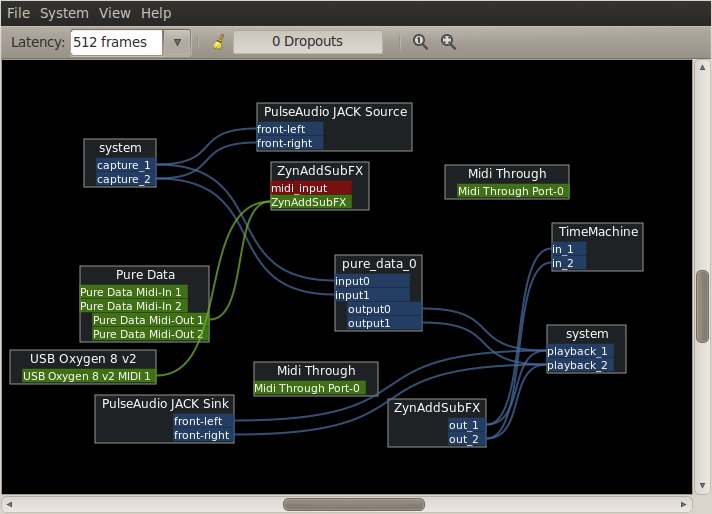
i'm newbie, PD didn't work neither with jack but i followed the steps indicated here (https://help.ubuntu.com/community/UbuntuStudioPreparation), i start jack, pd with the flags -rt -jack -alsamidi and the other softwares, phasex or zynaddsubfx, etc (i can even hear sounds and videos on firefox). i connect them all with Patchage and "en avant la musique"!
maybe an important detail (maybe not, ahem): i start ubuntu 10.04 with the "linux-realtime" from https://launchpad.net/~falk-t-j/+archive/lucid/+index?start=225&batch=75
voila
 posted in technical issues
Pd-extended 0.41.4 released!
Its done and available for download. This release is focused on lots of usability enhancements and bug
fixes. There are some new features as well in the many included
libraries.
http://puredata.org/downloads/
Here's the rough changelog:
-
fixed strict-aliasing build problems with cyclone, iemlib, bsaylor, and sigpack
-
added/fixed "Next Window" menu item and key binding (Cmd-` on Mac OS X)
-
lots of usability fixes and improvements
-
removed all external binaries from package, you can get them here:
http://puredata.info/docs/faq/how-do-i-download-the-flext-binaries-that-used-to-be-included-in-pd-extended -
changed to GPL v3
-
fixed paths that used the same image for Gem examples
-
fixed paths to example images in Gem help
-
libdirs now load properly when using [import]/[declare] to load a
libdir outside of the sys_libdir (i.e. extra) into the canvas-local
namespace -
single [output~] that works everywhere
-
improved Max Text file (.pat) importing and exporting and added
the ability to handle .mxt files, and binary .mxb and .help files -
added cyclone "maxmode" libraries to cyclone. To use them,
load the cyclone, library, then create [maxmode/cyclone] or
[maxmode/maxmode]. -
updated VBAP from 0.9.9 to 1.0.3
-
fixed bug in VBAP that cause CPU spike
-
bug fixes and clean up of [hid]? externals
-
(GNU/Linux) Free Desktop file associations and mime types for
Pd and Max/MSP files -
(GNU/Linux) fixed font size issue when using Tcl/Tk 8.5
-
(GNU/Linux) fixed Help Browser when using Tcl/Tk 8.5
-
(GNU/Linux) built against libv4l on Debian/testing,
Ubuntu/intrepid, Ubuntu/jaunty, and Fedora 9 -
(Debian/Ubuntu) fixed /etc/init.d/pd script to be standards-compliant
-
(Ubuntu) lpia builds for Ubuntu Netbook Remix
-
(Mac OS X) reduced default audio buffers to 20ms
-
(Mac OS X) fixed exit logic
-
(Mac OS X) fixed issue with app builder. You can now create apps without replacing an existing one.
-
(Mac OS X) upgraded to libquicktime 1.1.1 and ffmpeg 0.4.20071217
-
(Windows) moocow/pdstring externals now included
-
(Windows) increased default audio buffer for Window to 100ms since there are some really flaky audio cards in Windows land
KNOWN BUGS
Check http://puredata.info/dev/bugtracker before reporting bugs,
and if you find an existing bug report on the same issue, please
add your information there.
-
Tcl/Tk 8.5 support is a bit rough, and IEM GUI fonts aren't quite right under 8.5
-
Escape, Enter, and Ctrl/Cmd-W don't close the Path and Startup preferences
-
pdp_opengl is alpha and will definitely crash Pd
-
loading pdp_opengl will crash Pd if X11 is not open before trying to load it
-
(Mac OS X) Using Jack can cause extra CPU usage at idle
-
(Windows) installer won't replace existing installs
 posted in news
I've changed to ubuntu ... but met new problem ...
latest news: Ive successfully installed pd-extended on Ubuntu , including Gem and other libraries ,
they all works well !!
thanks Sunji ,radiostarkiller,nestor and my friends Jun.
here's my whole process:
1,download and install the latest Ubuntu 8.10 intrepid , then update system up-to-date
2,download the right version for your sys , for me , choose pd-extended intrepid deb package , and just double click it and install , the deb package could auto-download and install the related files from your install source.
3,after install finished, you could run pd-extend from terminal. but here we met a new problem, cannot load Gem successful. // don't worry, we just leave little half step to rush the finishing line @@)
4,turn on terminal, update apt-get source : sudo apt-get update
5, still terminal : apt-get install gem // pd and Gem would be downloaded from you source ftp , after that , type "pd" in terminal , new pd running out it's window , but none libraries was loaded.(@#$%!@ Holy.!#$%)
6, this situation we met before, similar but actually very different. last time I installed 2 version of pd in different path, and make sys disorder . but this time , the same path. and what I've done is to uninstall pd in terminal : "sudo apt-get remove pd" ,
7, backing to the extended deb package we downloaded before, and install again.
8: run pd ... Gem and other packages loading successful !
conclusion: I guess maybe don't need so complex to work it out, the key point I think is to install Gem from source, and it would install any package that Gem must needed .
that's it
thanks again and enjoy pd@Linux now 
--------------------------- OLD POST -----------------------------------------------
because less user on Mandriva , so I changed my sys to Ubuntu yesterday.
and here I met new prolbem for installing pd-extended for Ubuntu.
before I install pd-extended , I installed these packages first:
libasound2 (>> 1.0.12)
libc6 (>= 2.5-0ubuntu1)
libjack0.100.0-0 (>= 0.101.1)
dep: tcl8.4 (>= 8.4.5)
dep: tk8.4 (>= 8.4.5)
and when I run pd install , both Hardy and Gutsy that showed error here :
Gutsy ; Error:Dependency is not satisfiable: libgsl0
Hardy: Error:Dependency is not satisfiable: liblame0
I searched them in package manager , I thought they were both about the libraries that I've installed above.
thats it
 posted in technical issues
Puredata Under Linux (Ubuntu)
@thesergie said:
Hello!
I installed pd-extended on Ubuntu 8.04, following the instructions here: http://en.flossmanuals.net/PureData/InstallingUbuntu ... but what they suggest doesn't work:
deb http://archive.ubuntu.com/ubuntu/ feisty main restricted
deb-src http://archive.ubuntu.com/ubuntu/ feisty main restrictedSince "feisty" is a pretty old release, the archive is no longer available... so you gotta use the "old-releases" i think:
deb http://old-releases.ubuntu.com/ubuntu/ feisty main restricted
deb-src http://old-releases.ubuntu.com/ubuntu/ feisty main restrictedI hope this helps somehow. pd-extended has all the good stuff installed, unlike pd-vanilla.
Hey,
He is on 8.10 though, Intrepid, not feisty.
 posted in technical issues
Puredata Under Linux (Ubuntu)
Hello!
I installed pd-extended on Ubuntu 8.04, following the instructions here: http://en.flossmanuals.net/PureData/InstallingUbuntu ... but what they suggest doesn't work:
deb http://archive.ubuntu.com/ubuntu/ feisty main restricted
deb-src http://archive.ubuntu.com/ubuntu/ feisty main restricted
Since "feisty" is a pretty old release, the archive is no longer available... so you gotta use the "old-releases" i think:
deb http://old-releases.ubuntu.com/ubuntu/ feisty main restricted
deb-src http://old-releases.ubuntu.com/ubuntu/ feisty main restricted
I hope this helps somehow. pd-extended has all the good stuff installed, unlike pd-vanilla.
 posted in technical issues