
using movie sound with pix_film
@milzyboo Hello.......
You will need to strip the sound from the video with a free tool like http://www.squared5.com/ as of course [pix_film] has no audio component......... and then the next problem is sync between the audio and the video.
Here is a patch I built that should do the job......
You will need to convert the audio track to a wrapper that can be read by Pd... "wav" or?
av-sync.pd
av sync.zip
David.
(p.s. if you are using vanilla then you will need to find another way to set the sample-rate for the audio part of the patch unless you can get the [soundfile_info] object to work.)
 posted in technical issues
Programming Additive Synthesiser
Hi, I am wondering if it is possible to create an additive synthesiser for a verbos harmonic oscillator: https://static1.squarespace.com/static/52cddaa9e4b0999c86f84b8a/t/56145344e4b0e58796be4889/1444172612979/harmonic+oscillator+postcard.pdf
There are two parts to it, namely the oscillator core and the harmonic mixer. For the oscillator core, it has to output saw, square and triangle waves. How do I do that in pd?
 posted in tutorials
GUI port of Pd-l2ork Alpha 0 release
Hello,
Below are links to the first alpha release of the GUI port of Pd-l2ork.
The GUI has been ported from tcl/tk to nw.js. The biggest visual improvements are ability to zoom in and out of a canvas, smoother animation of canvas objects (like the PacData game), user-friendly editing inside msg/obj boxes, and a more flexible API for visualizing data structures.
I've nicknamed it "Purr Data", because cats.
This is mainly a bug-collecting release. It should be decent enough to do some basic patching for awhile before hitting a bug. Some caveats up front: OSX is missing Gem and PDP, and both OSX and Windows are missing some pd-l2ork-related externals.
Bug tracker is here:
https://puredata.osuosl.org/jwilkes/purr-data/issues
Alpha builds are listed below (I'm abusing gitlab to distribute these, so some may have a zip within a zip):
OSX x_64 - https://puredata.osuosl.org/purr-data-binaries/osx-64-alpha0/repository/archive.zip?ref=master
Ubuntu 15.10 x_64 - https://puredata.osuosl.org/purr-data-binaries/ubuntu-15.10-64-alpha0/repository/archive.zip?ref=master
Ubuntu 14.04 x_64 - https://puredata.osuosl.org/purr-data-binaries/ubuntu-14.04-64-alpha0/repository/archive.zip?ref=master
Ubuntu 14.04 i386 - https://puredata.osuosl.org/purr-data-binaries/ubuntu-14.04-32-alpha0/repository/archive.zip?ref=master
Debian Jessie x_64 - https://puredata.osuosl.org/purr-data-binaries/debian-jessie64-alpha0/repository/archive.zip?ref=master
Debian Jessie i386 - https://puredata.osuosl.org/purr-data-binaries/debian-jessie32-alpha0/repository/archive.zip?ref=master
Windows 32-bit - https://puredata.osuosl.org/purr-data-binaries/win32-alpha0/repository/archive.zip?ref=master
 posted in news
Compiled external saying "couldn't create" when being added to PD
Greetings All
I'm having trouble getting my external to work, It compiles with 5 warnings
sineq.c:48: warning: unused variable ‘x’
sineq.c:49: warning: unused variable ‘in1’
sineq.c:50: warning: unused variable ‘in2’
sineq.c:51: warning: unused variable ‘in3’
sineq.c:52: warning: unused variable ‘in4’
It does a "make" successfully but I get this warning message
/usr/bin/ld: warning: cannot find entry symbol xport_dynamic; defaulting to 00000000000007f0
but when I try and add it in PD it says "couldn't create". I've looked at the pan~ tutorial and the d_osc.c file as recommended, which did help. I tried to take pieces from the two which I thought were applicable to my situation but I'm still having some issues.
Here's a link to the workflow (dropbox)
http://dl.dropbox.com/u/6576402/questions/pd/Sine_EQ_Diagram.jpg

Here's a link to the C code online (pastebin)
http://pastebin.com/9rK3szUE
My external is a reproduction of the sinewave equation with 4 inputs and one output my logic is to have 4 inlets one for the frequency,amplitude,phase and vertical offset and an output for the created signal. Granted this isn't the final equation but this will help me understand how to create the full equation once done. If you want to see the full equation I'll be using here's a link to it below. Basically it's a 1 second periodic signal with the sample rate at 44100 which the equation gives me control over the frequency,amplitude,phase and vertical offset.
Another question I have is what do I use for the t (time) for my final equation is that the t_sample object in PD? or do I need to create a for loop counting from 1-44100 for a 1 second 44100 sampled equation?
http://dl.dropbox.com/u/6576402/questions/eq1.txt
PS: I'm compiling on ubuntu 10.04 using gcc
 posted in technical issues
Problem with syncing audio loops
hey guys!
okay, I am using readanysf~ extension to open sound files. I created a looper abstraction.
Then I have created several loopers in a patch. Each looper has an inlet which allows to start playback and stop playback.
Let's say I have two samples: hihats and base drum. Both were recorded at 130 bpm and saved to wav files. In order to sync them on other software I would use something to trigger those files at the same time and they would be in perfect sync forever.
In this patch I've done the same thing - notice the play all button. So I load these two files into two loopers and then trigger them with play all. First 4-5 rounds loops are in sync, but then they begin to go out of sync.
The interesting thing is that if you load same file into different loopers and trigger them - they will NEVER go out of sync.
So I was wondering if I am missing something, maybe some inner workings of Pd which make audio files go out of sync.
Patch attached. Open TapeLoops16.pd
 posted in technical issues
Sysex
Hi,
im having some problems with audio in Pd. Im running extended 0.42.5 in Linux and midi is not working. The midi out test in the "midi and audio test" does not make any sound. This errors ocurrs in the inicialization:
audio I/O error history:
seconds ago error type
2.90 A/D/A sync
2.90 A/D/A sync
2.96 A/D/A sync
2.96 A/D/A sync
2.96 A/D/A sync
2.96 A/D/A sync
2.96 DAC blocked
2.96 A/D/A sync
2.96 unknown
2.96 unknown
does someone knows what is going wrong?
thanks in advance,
 posted in technical issues
\[zerox~\]
Well, the result of that would be equatable to
[phasor 880]
|
[*0.5]
The catch with the sync is that there's basically always a more efficient alternative.
If you want a construct that's equatable to
bang X frequency X times a second
you could use phase-sync.mmb.pd and add two frequency controls that calculate the ratio between the two. Then feed the phasor~ with the first frequency and send the ratio to the *~
so
frequency 1 = 440
frequency 2 = 880
440/880 = 0.5
send frequency 2 to [phasor~] and 0.5 to [*~]
like above
you don't lose anything by driving this construct with control messages or with audio rate control. The considerations are only superficially different than using bang.
It's been a while since I've looked at phase-sync.mmb.pd, so it might do this already.
If you're interested in using sync as an oscillator feature,
if you can understand this, I personally can't digest it:
http://citeseerx.ist.psu.edu/viewdoc/download?doi=10.1.1.65.1036&rep=rep1&type=pdf
otherwise, casio-style is handy:
http://en.wikipedia.org/wiki/File:Casio.CZ101.resonance.png

and if you're okay with the licencing implications, there are objects in extended that offer competent band limited sync. I forget the name, but the group that I'm thinking of has sync saw and a band limited comparator for PWM and square sync.
 posted in technical issues
Korg Monotron emulator
Basically you want to create an oscillator (bandlimited) then feed that through a resonant filter, then to your speakers.
Bear in mind lop~ isn't resonant, other people have created externals that are, or there is the moog~, although this will sound nothing like the monotron filter, from what I remember Korgs might be 12dB/octave (might be wrong!). Good luck in designing your own Analogue modeling filter, I tried and it was solid!
To replicate the monotron ribbon controller, it's probably simplest to control the frequency of the oscillator
create another oscillator (a simple sine wave), this will be your LFO. connect that up to either filter cutoff or amplitude
Amplitude would require you to multiply the output of your main oscillator by the output of LFO
Cutoff would mean multiplying the LFO output by The value you are inputting into your filter cutoff input.
You could incorporate a button switch so you could flick between them like the monotron
It is a very simple synth to emulate, I recommend reading this site to explain the basics of subtractive synthesis in PD , it also mentions bandlimited oscillators, which will stop them aliasing THIS IS VERY IMPORTANT!
http://en.flossmanuals.net/pure-data
A guy from this forum also wrote this site
http://obiwannabe.co.uk/html/music/6SS/six-simple-synthesisers.html
You will soon grow bored of replicating the monotron, and move into doing minimoog replications, and maybe even modular stuff.
I saw a video of someone who did a Swarmatron replication, very impressive. Wish I had that patch...
 posted in technical issues
DJ/VJ scratching system
First my story: (you can skip down to END OF STORY if you want)
Ever since I saw Mike Relm go to town with a DVDJ, I've wanted a system where I could scratch and cue video. However, I haven't wanted to spend the $2500 for a DVDJ. As I was researching, I found a number of different systems. I am not a DJ by trade, so to get a system like Traktor or Serrato with their video modules plus turntables plus hardware plus a DJ mixer, soon everything gets really expensive. But in looking around, I found the Ms.Pinky system and after a little bit, I found a USB turntable on Woot for $60. So I bought it. It was marketed as a DJ turntable, but I knew that it wasn't really serious since it had a belt drive, but it came with a slip-pad and the USB connection meant that I wouldn't need a preamp. And so I spend the $100 on the Ms.Pinky vinyl plus software license (now only $80). This worked decently, but I had a lot of trouble really getting it totally on point. The relative mode worked well, but sometimes would skip if I scratched too vigorously. The absolute mode I couldn't get to work at all. After reading a little more, I came to the conclusion that my signal from vinyl to computer just wasn't strong enough, so I would need maybe a new needle or maybe a different turntable and I didn't really want to spend the money experimenting. I think that the Ms. Pinky system is probably a very good system with the right equipment, but I don't do this professionally, so I don't want to spend the loot on a system.
Earlier, before I bought Ms.Pinky (about two years ago), I had also looked around for a cheap MIDI USB DJ controller and not found one. Well, about a month ago, I saw the ION Discover DJ controller was on sale at Bed, Bath & Beyond for $50. They sold out before I could get one, but Vann's was selling it for $70, so I decided that that was good enough and bought one. I had planned to try to use it with Ms. Pinky since you can hook up MIDI controllers to it. But it turns out that you can hook up MIDI controllers to every control except the turntable, so that was a no go. If I had Max/MSP/Jitter, I could have changed that, but that's also way expensive. So, how should I scratch? My controller came with DJ'ing software and there's also some freeware, like Mixxx, but none of this has video support. So I look around and find Pure Data and GEM.
And I see lots of questions about scratching, how to do it. And there are even some tutorials and small patches out there, but as I look at them, none of them are quite what I'm looking for. The YouTube tutorial is really problematic because it's no good at all for scratching a song. It can create a scratching sound for a small sample, but it's taking the turntable's speed and using that as the position in the sample. If you did that with a longer song, it wouldn't even sound like a scratch. And then there are some which do work right, but none of them keep track of where you are in the playback. So, whenever you start scratching, you're starting from the beginning of the song or the middle.
So, I looked at all this and I said, "Hey, I can do this. I've got my spring break coming up. Looking at how easy PD looks and how much other good (if imperfect) work other people have done, I bet that I could build a good system for audio and video scratching within a week." And, I have.
END OF STORY
So that's what I'm presenting to you, my free audio and video scratching system in Pure Data (Pd-extended, really). I use the name DJ Lease Def, so it's the Lease Def DJ system. It's not quite perfect because it loads its samples into tables using soundfiler which means that it has a huge delay when you load a new file during which the whole thing goes silent. I am unhappy about this, but unsure how to fix it. Otherwise, it's pretty nifty. Anyway, rather than be one big patch, it relies on a system of patches which work with each other. Each of the different parts will come in several versions and you can choose which one you want to use and load up the different parts and they should work together correctly. Right now, for most of the parts there's only one version, but I'll be adding others later.
There's a more detailed instruction manual in the .zip file, but the summary is that you load:
the engine (only one version right now): loads the files, does the actual signal processing and playback
one control patch (three versions to choose from currently, two GUI versions and a MIDI version specific to the Ion Discover DJ): is used to do most of the controlling of the engine other than loading files such as scratching, fading, adjusting volume, etc.
zero or one cueing patch (one version, optional): manages the controls for jumping around to different points in songs
zero or one net patch (one version: video playback): does some sort of add-on. Will probably most commonly be used for video. The net patches have to run in a separate instance of Pd-extended and they listen for signals from the engine via local UDP packets. This is set-up this way because when the audio and video tried to run in the same instance, I would get periodic little pops, clicks, and other unsmoothnesses. The audio part renders 1000 times per second for maximum fidelity, but the video part only renders like 30 or 60 times per second. Pure Data is not quite smooth enough to handle this in a clever real-time multithreading manner to ensure that they both always get their time slices. But you put them in separate processes, it all works fine.
So, anyway, it's real scratching beginning exactly where you were in playing the song and when you stop scratching it picks up just where you left off, you can set and jump to cue points, and it does video which will follow right along with both the scratching and cuing. So I'm pretty proud of it. The downsides are that you have to separate the audio and video files, that the audio has to be uncompressed aiff or wav (and that loading a new file pauses everything for like 10 seconds), that for really smooth video when you're scratching or playing backwards you have to encode it with a codec with no inter-frame encoding such as MJPEG, which results in bigger video files (but the playback scratches perfectly as a result).
So anyway, check it out, let me know what you think. If you have any questions or feedback please share. If anyone wants to build control patches for other MIDI hardware, please do and share them with me. I'd be glad to include them in the download. The different patches communicate using send and receive with a standard set of symbols. I've included documentation about what the expected symbols and values are. Also, if anyone wants me to write patches for some piece of hardware that you have, if you can give me one, I'll be glad to do it.
Keith Irwin (DJ Lease Def)
 posted in patch~
Oscillator & array - discrepancy between frequency & graph
Hi!
I'm quite new to PD and simply played around a little bit when the following question crossed my mind:
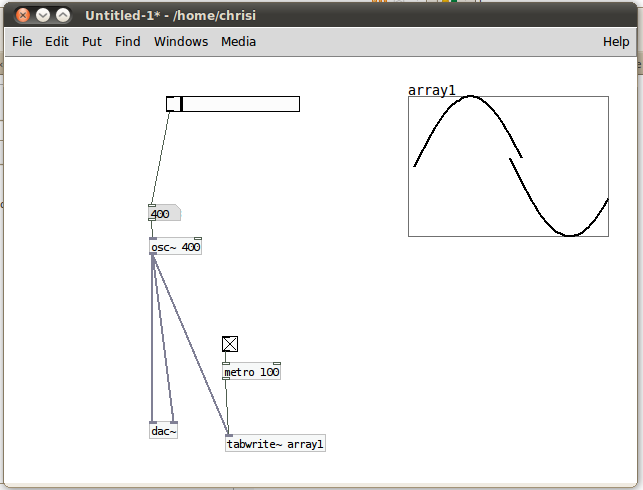
I have an oscillator running at 100Hz and and array which is updated every 100ms. 100Hz means 100 oscillations per second, so one full oscillator swing (from 1 to 1) should last a hundreth of a second = 10ms.
So, if I'm not already wrong at his point, I am supposed to see ten full oscillator circles on the array, no?
What happens with me is that I see one full oscillation at 400Hz. I attached a screenshot of this situation.
What am I getting wrong? 
Thanks for your help!
 posted in technical issues