
REAPER playing MIDI notes sent by Pure Data
Hi!
I'm trying to generate MIDI notes in Pure Data and send them to Reaper for it to play them with a VSTi (say Kontakt). In Pure Data, I send the MIDI values with [udpsend] from the MrPeach library. In the Reaper settings, there is a topic named Control/OSC/Web. I created one through this link:
https://forum.cockos.com/showthread.php?t=97255
This is how I put the settings:
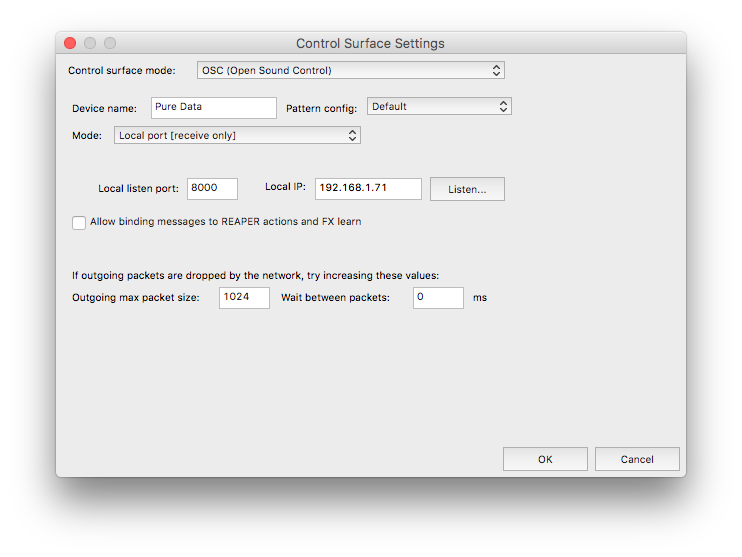
When I click "Listen...", I see that it is receiving the notes that Pure Data is sending:
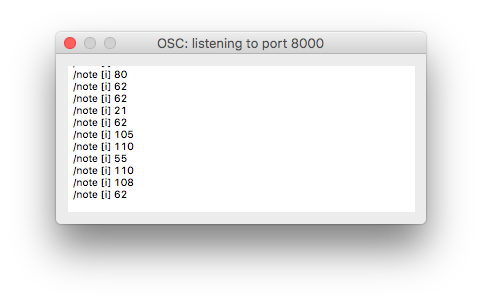
So now I need to know how do I play this MIDI notes on Reaper through a VSTi, to make an effect like the one in this video:
Does anyone know how to make this?
Thank you in advance!
 posted in technical issues
Crackling ASIO on PD Vanilla 0.48 test 2 on 64 bit Windows
Ok...did a quick test of MiniMock, Bulgroz and Castafiore from Camomile 1.0.3 in Reaper 64x. Audiowise everything works fine (there is a little thing wich i don't know yet if it's Reaper or Camonile bug...when looping and the loop go from end to start in Reaper track goes mute as if it is a too much high volume).
But no glitching and audio quality issues.
 posted in technical issues
In C Sequencer (need help adding different instruments)
@juliemus Hi and welcome to the forum.
You've got that right, [noteout] sends midi notes to Pd's midi output device (which can be the IAC driver), so any other program that is set to receive from the IAC driver will play those notes on the respective channels.
I don't use garageband but here are two options:
- Ardour (free and open source) http://ardour.org
- Reaper ($60 but you can download a fully-functional demo version without restrictions) https://www.reaper.fm
 posted in patch~
Camomile : An audio plugin that loads Pure Data patches
Last time I tried with libPd (last summer), I couldn't achieve the creation of a plugin that support multiple instances even using locks. I can't remember precisely of the problem but I think that the libPd implementation is not intended for this purpose. There were a lot of dead locks and when there were not, there were thread concurrencies. So I started to touch libPd files and even pd files and then I realised that it was completely unsustainable and I made my own wrapper:
There are 4 classes:
- "Pd" a class with static methods that manages all the global variables and the lock system.
- "Instance" the counterpart of the pd instance that manages a set of patches (an instance of a plugin for example) and that is thread safe except the send, midi and dsp methods because generally you want to call this methods one behind the other without locking at each call. For example:
lock();
    sendNote(channel, number, velocity);
    send(receiver, value);
    performDsp(nsamples, ninputs, bufferin, noutputs, bufferout);
unlock();
- "Patch" the counterpart of the pd patch that manages a set of object.
- "Gui" the counterpart of the iem GUI.
There is some kind of smart pointer in the classes that avoids the deletion a patch if you are using its objects or the deletion of an instance if you are using one of its patches. And everything should be thread safe (except the functions that I noticed above) and lock free. However, I used it only for my plugin so perhaps in other contexts the approach can be improved. Anyway, the code is open and documented so you can have a look.
PS: the wrapper is in C++, I think it should be better to have a first wrapper in C and then to wrap it again in C++ like libPd.
 posted in news
Wave Editor
Reaper is brilliant, but it costs a little (if you want it to, you can actually use the free version for quite a long time). There's Audacity as well, that's not as powerful as one would like it to be perhaps.
Me and my band actually do our mastering in Reaper.  Its mixer is awesome and the routing matrix is the bomb!
edit: there's no limitations to the free version as far as I know. the only thing being you have to buy it if you want a commercial license. (I think. I'll actually go and check that out and do another edit)
edit2: "Download the full, uncrippled, unexpiring evaluation version of REAPER, and give it a test drive. If it suits you, you'll need a license.
Please see the purchase page for pricing and licensing details."
http://www.reaper.fm/download.php
http://www.reaper.fm/purchase.php
 posted in Off topic
How to Enjoy Your Favorite Videos on Portable Devices at Will For Mac
Are you a Mac user?
Do you still feel frustrated that you can't enjoy your favorite videos on portable devices at will?
Now, a professional software---Aiseesoft Video Converter for Mac(http://www.aiseesoft.com/video-converter-for-mac.html)
can help you to solve all the problems. With it, you can convert between all popular video and audio formats with super fast conversion speed and high output quality, such as AVI, MP4, MOV, MKV, WMV, DivX, XviD, MPEG-1/2, 3GP, 3G2, VOB Video, MP3, AAC, and AC3 Audio etc. In addition, the best video converter for Mac can also extract audio from video file and convert video to MP3, AC3, and AAC...as you want.
OK, let's move to how to use the amazing software.
Step 0: Download and install Aiseesoft Video Converter for Mac.
After a while, you can use the following interface:
http://www.aiseesoft.com/images/guide/dvd-converter-suite-mac/video.jpg
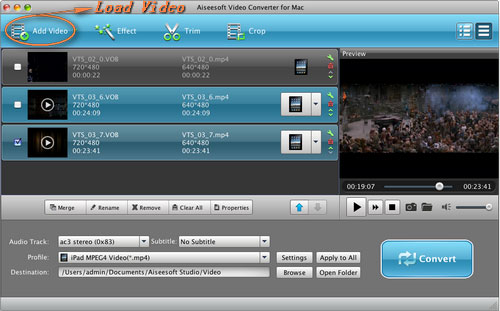
Step 2. Load Video
You can load your video by clicking "Add File" button or clicking "File" button, you can choose "add file" on a drop-down list.
Step 3. Output format and Settings
From the "Profile" drop-down list you can find one format that meets your requirement.
After doing the 3 steps above, you can click "start" button to start conversion.
Wait a minute, the conversion will be soon finished.
Tips:
1. Trim
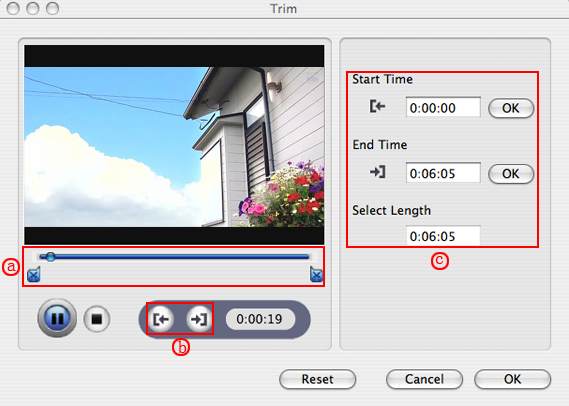
"Trim" function is for you to select the clips you want to convert.
There are 3 ways that you can trim your video.
a. You can drag the buttons(1) to set the start and end time
b. You can preview the video first and when you want to start trim click the left one of the pair buttons(2) when you want to end click the right one.
c. You can set the exact start and end time on the right side of the pop-up window.
It is for you to select the clips you want to convert.
http://www.aiseesoft.com/images/guide/dvd-ripper-for-mac/trim.jpg
2. Crop
Cut off the black edges of the original movie video and watch in full screen using the "Crop" function.
There are 3 ways that you can crop your video.
a. We provide 7 modes on our "Crop Mode"(1)
b. You can set your own mode on the right side of the pop-up window(2)
c. You can drag frame to set your own crop mode(3)
You can cut off the black edges of the original movie video and watch in full screen using the "Crop" function.
http://www.aiseesoft.com/images/guide/dvd-ripper-for-mac/crop.jpg
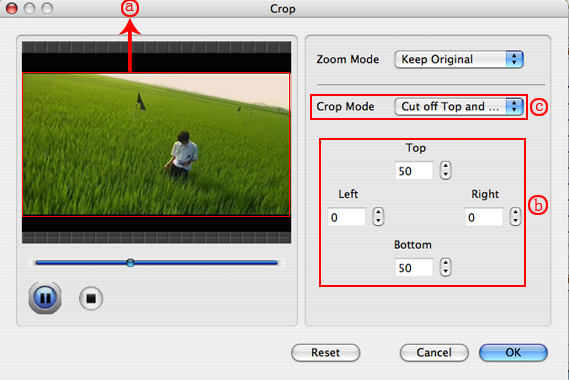
3. Snapshot and merge into one file
If you like the current image of the video you can use the "Snapshot" option. Just click the "Snapshot" button the image will be saved and you can click the "Open" button next to "Snapshot" button to open your picture.
If you want to make several files output as one you can choose "Merge into one file".
If you are windows users, you can go to Aiseesoft Total Video Converter(http://www.aiseesoft.com/total-video-converter.html) to get more information.
 posted in technical issues
Outputting Sound on Windows
This one seems simple but I have had no luck with it as of yet. How do you go about rendering output to a file from within PureData on windows? On linux I always used Jack but have found no comparable solution on windows. I have tried Jack for Windows (http://www.grame.fr/~letz/jackdmp.html) and ReaRoute for Reaper (http://www.reaper.fm/) with no luck at all. Both seem like they would be good solutions but Reaper receives no sound when I try to do it through PureData. I am using the latest stable build of PD-Extended and the most recent version of Reaper.
I have searched around and not found anything. I am sure that there is a very obvious solution I am missing.
Thanks,
Jonathan
 posted in technical issues
Are there externals for ... ?
Hi there everyone.
I advance I'm not a C programmer, but I'm on my learning path.
I would like to know if are there C-only PureData externals for
- OCR
- GUI (like griplib, but in C alone)
- ODE (just function calling - like a wrapper)
- OpenGL (same as above)
And last, but not least, are there ways to export a PureData patch to a C source file?
Please don't reply with suggestions as "write a wrapper" or "do your port by yourself", as I already considered these options but I would be unsure for the results (as I'm still a C language beginner - never worked on a "serious" C project).
Thanks in advance for any help.
<Community greetings goes here>
My name is Ivano and I'm Italian.
I'm interested in programming (mainly for videogames) and various sciences.
I discovered PureData and its beautyes by a few time, but I'm already aazed with its features. (it's impressive, isn't it?)
Bye, Berserk.
.
 posted in extra~