
pushdelay~ - envelope [env~] driven delay line with both delay time and feedback dependent
As I mentioned in a previous post: "idea: "riding the wave"delay length triggered by env~ size (link http://forum.pdpatchrepo.info/topic/10557/idea-riding-the-wave-delay-length-triggered-by-env-size)", I had been wondering about controlling a delay line via the env~.
pushdelay~_sv-help.pd
pushdelay~_sv.pd
My idea had been to mimic the "power" of a wave (akin to what I have been suspecting we will do once we figure out how to harness the power of gravity waves): the larger the amplitude > the further the auditory "ripple" and the longer it lasts.
The abstraction below, pushdelay~, is my incarnation of that idea.
Ciao!
Much merriment thru you and yours.
Scott
-help (from the -help comments):
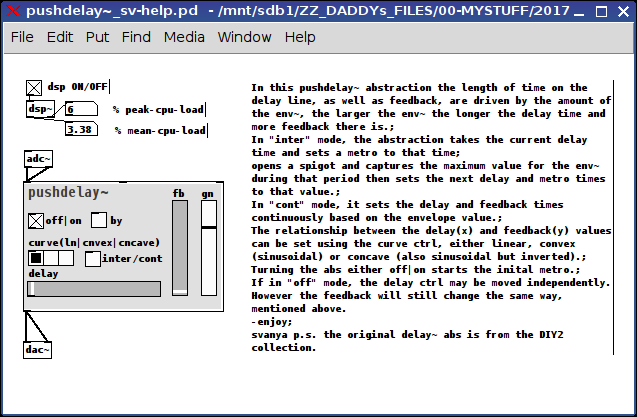
In this pushdelay~ abstraction the length of time on the delay line, as well as feedback, are driven by the amount of the env~, the larger the env~ the longer the delay time and more feedback there is.;
In "inter" (interval) mode, the abstraction takes the current delay time and sets a metro to that time;
opens a spigot and captures the maximum value for the env~ during that period then sets the next delay and metro times to that value.;
In "cont" mode, it sets the delay and feedback times continuously based on the envelope value.;
The relationship between the delay(x) and feedback(y) values can be set using the curve ctrl, either linear, convex (sinusoidal) or concave (also sinusoidal but inverted).;
Turning the abs either off|on starts the inital metro.;
If in "off" mode, the delay ctrl may be moved independently. However the feedback will still change the same way, mentioned above.
-enjoy;
svanya
p.s. the original delay~ abs is from the DIY2 collection.
 posted in abstract~
Phaser / Chorus / Flanger
The flanger uses a single delay line which the delay time is driven by a LFO.
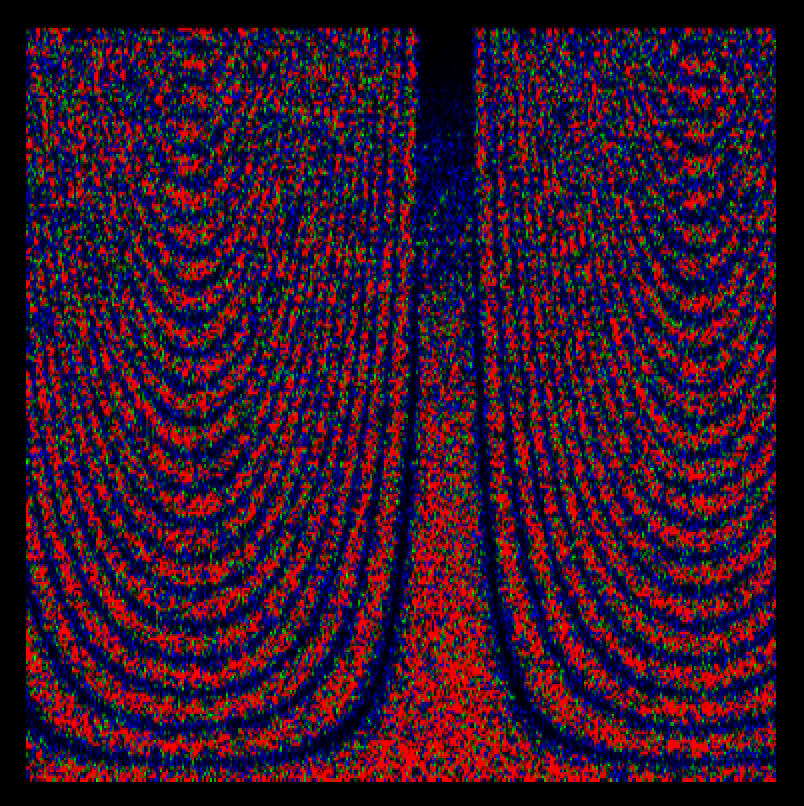
The chorus uses a set of delay lines which the delay times are driven by a LFO.
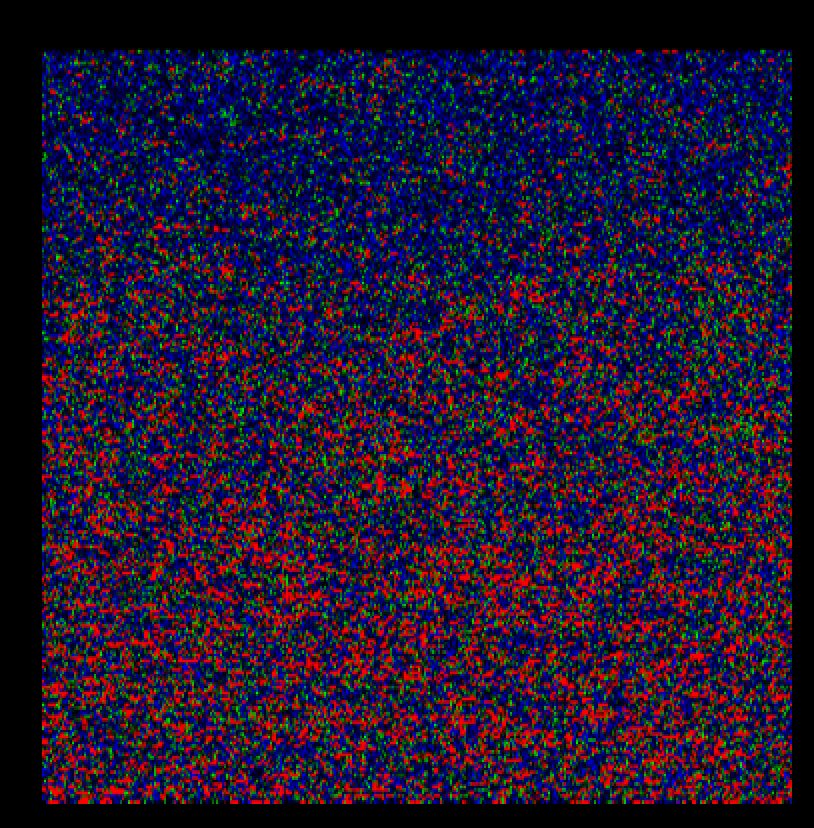
The phaser uses a set of allpass filters which the coefficients are driven by a LFO.
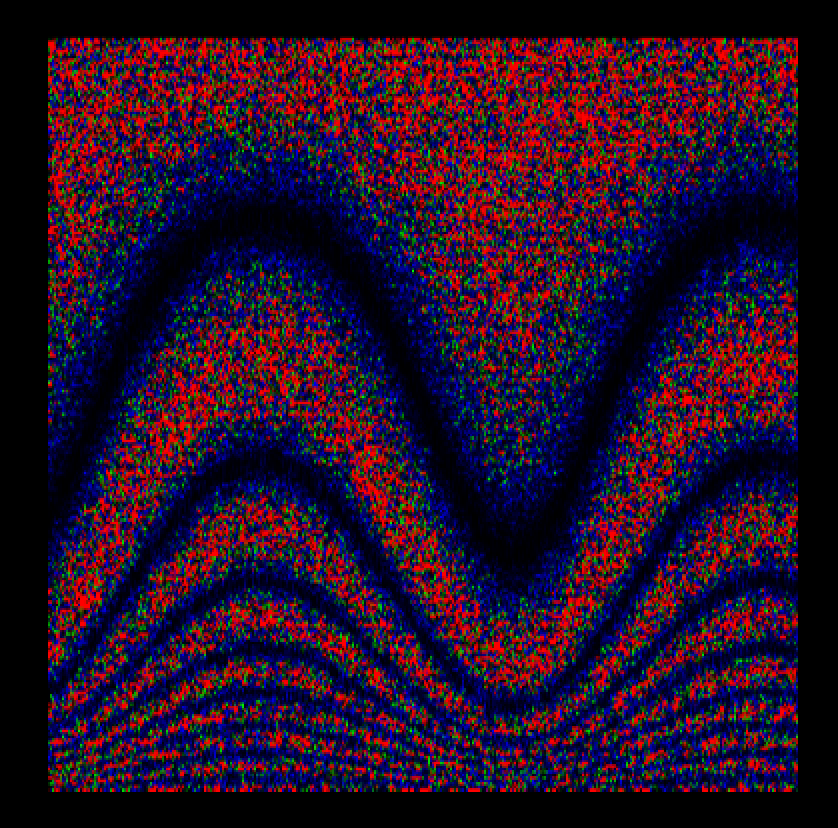
Most of the effects use delay lines (the allpass filter is also a delay line), the difference lies in how to control the delay time range and the feedback.
 posted in patch~
GEM error
I know this has been asked a few hundred thousand times- i know because i've been reading everything i can find. But most of the documentation and posts are apparently outdated, or don't seem to work for me.
I had been learning pure data for a few weeks about a year ago using pd extended, but noticed that the libs haden't been updated for a long time, so when i got back into it yesterday i decided to start with the nonextended version.
At first i didn't realize that Gem isn't a standard library, so downloaded it, installed, eventually found that someone suggested to go to edit/preferences/startup, make a new entry and just type "gem" and add it. I did that, restarted. The log window still shows a lot of error messages, it looks like PD is searching for two files:
gem.dll
Gem.m_i386
There are a lot of lines that indicated tried and failed for both, but eventually i see "succeeded" for gem.dll, but not for Gem.m_i386.
Anyway i 'put' an object called gemwin and two messages, create and destroy and link them both to gemwin after creating a new project, then switch to run mode ctrl-e and click on create. Nothing happens. It should make a black, empty gem window, but it doesn't.
In the log window, there are no entries added after clicking on create/destroy, i don't know what i'm doing wrong, can someone suggest what to do?
I've been reading for hours, a lot of pages suggest where to look, but have dead links, or the suggestion didn't help, any ideas?
I pasted below the full startup log (the full log using the "all" option).
Thanks:)
Rob T
------------------ done with main ----------------------
input channels = 2, output channels = 2
Default font: DejaVu Sans Mono
tried ./Gem.m_i386 and failed
tried C:/Users/me/AppData/Roaming/Pd/Gem.m_i386 and failed
tried C:/Program Files (x86)/Common Files/Pd/Gem.m_i386 and failed
tried C:/Program Files (x86)/pd/extra/Gem.m_i386 and failed
tried ./Gem.dll and failed
tried C:/Users/me/AppData/Roaming/Pd/Gem.dll and failed
tried C:/Program Files (x86)/Common Files/Pd/Gem.dll and failed
tried C:/Program Files (x86)/pd/extra/Gem.dll and failed
tried ./Gem/Gem.m_i386 and failed
tried C:/Users/me/AppData/Roaming/Pd/Gem/Gem.m_i386 and failed
tried C:/Program Files (x86)/Common Files/Pd/Gem/Gem.m_i386 and failed
tried C:/Program Files (x86)/pd/extra/Gem/Gem.m_i386 and failed
tried ./Gem/Gem.dll and failed
tried C:/Users/me/AppData/Roaming/Pd/Gem/Gem.dll and failed
tried C:/Program Files (x86)/Common Files/Pd/Gem/Gem.dll and failed
tried C:/Program Files (x86)/pd/extra/Gem/Gem.dll and succeeded
GEM: Graphics Environment for Multimedia
GEM: ver: 0.93.3
GEM: compiled: Nov 10 2011
GEM: maintained by IOhannes m zmoelnig
GEM: Authors : Mark Danks (original version)
GEM: Chris Clepper
GEM: Cyrille Henry
GEM: IOhannes m zmoelnig
GEM: with help by Guenter Geiger, Daniel Heckenberg, James Tittle, Hans-Christoph Steiner, et al.
GEM: found a bug? miss a feature? please report it:
GEM: homepage http://gem.iem.at/
GEM: bug-tracker http://sourceforge.net/projects/pd-gem/
GEM: mailing-list http://lists.puredata.info/listinfo/gem-dev/
GEM: compiled for SIMD architecture: SSE2 MMX
GEM: using SSE2 optimization
The Pd window filtered 40 lines
The Pd window filtered 41 lines``` posted in technical issues
Audio-controlled filter
@Flipp said:
why is this second "1" in [delay~ 1 1] there?!
The first argument is max delay in samples, and the second argument is the actual delay. If you don't specify the second argument the actual delay must be specified with a message in the right inlet, otherwise it will default to zero. That is what I remember from Max Msp and [delay~] is a cyclone object. In Pd it seems to work the same. So the one-sample delay would be a zero-sample delay otherwise!
Katja
 posted in technical issues
Variable delay patch - need help
Hi,
The attached patch dsdelay is supposed to be a variable delay line with a moving write point. vd~ uses a moving read point which is acceptable for most applications but not what I am working on. I have implemented my moving write point delay line in MATLAB and it works reasonably well. However I am experiencing issues with PD implementation.
The patch uses a table to store the delay line values and is supposed to use a circular delay line method (i.e. the read/write points shift with time instead of the actual elements of the delay line). The intention is that the read point shifts along the delay line by one sample per sample, and the write point does the same whilst the delay is not being altered. The write point uses a simple two point extrapolation to allow writing at fractional table indices.
I'm having two problems:
1. I can't find a satisfactory method of wrapping signal values in an arbitrary range. I want to be able wrap a signal value between 0 and 44100 for example, but using
|
[/~ 44100]
|
[wrap~]
|
[*~ 44100]
|
gives rise to rounding errors which create artifacts in the output. This is why in the current state, the output is intermittent rather than continuous.
2. For some reason the 2 point extrapolation seems to be not working correctly. I'm getting a ring modulation type effect on the output. In MATLAB the addition of the two point extrapolation helped to minimise artifacts when the delay time was being altered. Altering the delay time gives rise to horrible artifacts at the moment though.
Any pointers on how to get this working properly would be greatly appreciated.
Thanks
Ben
 posted in technical issues
Different ways of Implementing Delay Loops
Ta Toxonic - I'll take a look at the patch tonight. Good of you to take the time. Apologies if I've misunderstood though, but I think what you're describing is not quite what I mean: The pitch shift is separated out from the delay time - you're running a pitch shift effect into a separate delay line, which is not going to give the same effect. The delay time will not shorten as the pitch rises. I'll take a look at your patch tonight though as I may have misunderstood what you're getting at.
Maelstorm - thanks also. I understand why the pitch changes on a delay pedal. The pitchshifter patch was a bit of a red herring - though of course it's the same principle. The difference between what you're (both, I think) talking about and what I'm talking about is the way that the pitch changes.
Assuming a stable C tone playing into the delay:
With the standard simple PD delay set up, if you move the read point of a vd~ then you get a glissando as it accellerates, a constant pitch change as it moves at constant speed. So if you turn the knob to change the delay time in the middle of a tone you start with a constant pitch (C), then get a rise of pitch, then it levels out at a new pitch (as you turn then stop turning the knob),
_
___/
If you feed back into the delay, the glissando is repeated as the read speed changed while the write speed was constant:
_ _ _ _
/ |/ |/ |/ |
The effect I'm looking to emulate on the other hand is more akin to changing the speed of a phasor~ reading an array - the pitch change is not a blip, but a stable interval's transposition - eg: you turn the knob, the pitch of the repeats rise by a given interval and stays at that pitch as it repeats (now more quickly):
______
___/
If you play a constant C tone, then speed up the delay until it is a major third higher, you get a major third diad (until the delay dies away), rather than a C tone with a repeating squiggle overlaid.
The effect is the same as you get by speeding up a tape loop delay (though the pedal I'm trying to imitate is a digital delay) which is why I think the rate of the write and read heads are being increased by the same amount.
[edit, just tried to make this clearer and removed a couple of errors]
 posted in technical issues
Different ways of Implementing Delay Loops
It sounds to me like the problem your having is just a result of feeding back into the pitch shifter (or even using a pitch shifter at all). If you just feed it back into the delay, you should get the effect of a delay pedal. The pitch shifting comes because as you shorten the delay line, the delay playback head moves up the delay line, essentially reading it faster for that moment (or vice versa). And of course, reading it faster causes the pitch to go up. If you feed that back into the delay line, that moment of pitching up will repeat until the delay dies out, and it doesn't keep pitching up with each delay. The record head stays at a constant rate.
 posted in technical issues
Different ways of Implementing Delay Loops
I've been trying to emulate a delay pedal I have, but having no luck.
The effect I'm after is a stable interval's pitch change when you change the delay time - you can tune the sound going around the delay loop up or down by a stable number interval by shortening or lengthening the delay time - just as you could tune sample playback by changing the rate of a phasor~ reading an array.
If I use a vd~ reading from a delay line (as in the rotating tape head pitch shifter example, but with added recirculating feedback) I can get pitch change effects (pretty great pitch change effects tbh) but they're unstable - they keep rising or falling in pitch with each circulation as they get pitch shifted each time they go around the loop.
I figured one way to implement the effect would be to change the write speed and the read speed by the same amount (I'd guess this is how the pedal is doing it)- But I have no idea how to change the delay write speed in PD.
I thought of changing sample rate using block~ in a subpatch with the delay line but that doesn't seem to give the desired results (or in fact any sound at all - so I'm guessing you can't upsample a delay line).
Any ideas???
posted in technical issues
How to load libraries in PD
I finally did, how to load libraries in pd, but now there is another problem started
tried D:\\pd\\bin\\cyclone.dll and succeeded
this is cyclone 0.1, 54th alpha build
tried hammer.dll and succeeded
hammer.dll\\hammer.dll: couldn't load (problem)
tried sickle.dll and succeeded
sickle.dll\\sickle.dll: couldn't load (problem)
error (miXed): version mismatch
use a more recent Pd release (or recompile the cyclone).
I am using, pd version 039-2, where as this cyclone library requires 037-038 or higher. that i quite have.
how I can recompile the cyclone? there is a makefile? but dont know how to compile at windows XP.
PROBLEM: I want to load cyclone library to use atan~, sin~ etc objects.
 posted in technical issues
Problem compiling external on Windows
Alberto,
I figured it out. I made a few changes to your makefile, though:
1. added a path to m_pd.h
2. changed "rm -f $*.o ../$*.dll" to "rm -f $*.o $*.dll"
(the .dll file wasn't being removed from the working directory)
3. forced DEST to the pd/extra directory
4. removed CSYM since it's not being used
5. removed "current: pd_win"; changed "pd_win: $(NAME).dll" to "all: $(NAME).dll"
6. removed non-win stuff
7. removed the clean and install targets for right now
Hopefully these changes make it easier for the complete newbie. Anyway, with enormous thanks to AlbertoZ, here's a mini-tutorial for using my makefile.
1. if you're using pd-extended, save this as "m_pd.h" (into the same directory with
helloworld.c). If you're using pd-vanilla, you can skip this step.
2. save this code as "mk.mk" (into the same directory with helloworld.c):
# mk.mk -- invoke with "make -f mk.mk"

      NAME = helloworld
    PDPATH = "c:/Progra~1/pd"
   LDFLAGS = --export-dynamic -shared
WININCLUDE = -I $(PDPATH)/src
 WINCFLAGS = -DPD -DNT -W3 -WX -Werror -Wno-unused          \
             -mms-bitfields -Wno-parentheses -Wno-switch    \
             -O6 -funroll-loops -fomit-frame-pointer

all: $(NAME).dll
.SUFFIXES: .dll
.c.dll:
    gcc $(WINCFLAGS) $(WININCLUDE) -c -o $*.o $*.c
    gcc $(LDFLAGS) -o $*.dll $*.o $(PDPATH)/bin/pd.dll
    strip --strip-unneeded $*.dll
    cp $*.dll $(PDPATH)/extra
    rm -f $*.o $*.dll
2. modify the PDPATH variable if needed to reflect the actual location of pd on your
system (MSYS will interpret c:/Program Files/pd as C:/Program, so use
c:/Progra~1/pd instead)
3. if you're using pd-extended, remove line 6 (WININCLUDE = -I $(PDPATH)/src) and
remove $(WININCLUDE) from line 14.
4. close all pd windows if any are open
5. in MSYS, navigate to the directory with helloworld.c and type: make -f mk.mk
(type make -s -f mk.mk if you want to hide the lengthy shell response)
6. the shell should respond with something like:
gcc -DPD -DNT -W3 -WX -Werror -Wno-unused -mms-bitfields -Wno-parentheses
-Wno-switch -O6 -funroll-loops -fomit-frame-pointer -I "c:/Progra~1/pd"/src -c -o
helloworld.o helloworld.c
gcc --export-dynamic -shared -o helloworld.dll helloworld.o
"c:/Progra~1/pd"/bin/pd.dll
strip --strip-unneeded helloworld.dll
cp helloworld.dll "c:/Progra~1/pd"/extra
rm -f helloworld.o helloworld.dll
7. a new helloworld.dll file should be saved into the pd/extra folder, and you should be
able to create the "helloworld" object in a new pd window.
Good luck!
middlepedal
 posted in extra~