-
-
 jamcultur
posted in output~ • read more
jamcultur
posted in output~ • read moreI downloaded the seismic data from the Loma Prieta earthquake that struck the San Francisco Bay Area on October 17, 1989, and wrote C++ code to transform it into a form that pd can handle. I wrote pd code to sonify it during live performances. Here's a piece where all of the sound is generated from seismic data in pd, Loma Prieta sonification.
-
jamcultur
posted in technical issues • read more
@jameslo I think that you are correct. I verified that there was not a flood of MIDI messages coming in to pd. Something prevented pd from taking messages off the FIFO in a timely manner which caused it to overflow. I think Windows wasn't giving pd enough cycles to keep up. The problem hasn't reoccurred since I raised the priority of pd in Windows, and ensured that all networking was turned off before using pd.
-
jamcultur
posted in technical issues • read more
@jameslo I don't have MIDI messages flooding in. I only have the CC messages sent by the controller when I move a knob or slider. I'm not generating any MIDI messages, just receiving MIDI messages from the controller. There weren't any other applications running. I don't know what, if anything, Windows was doing in the background at the time. I did have wifi turned on at the time, which I don't normally do when I'm playing music. I don't think my patch has significant bursts of activity. Moving a MIDI control just does things like change the volume or speed of playing a wavetable, which I don't think would create a burst of activity in pd.
-
jamcultur
posted in technical issues • read more
@willblackhurst I'm just turning knobs and sliding sliders. I wouldn't think that would send a huge number of MIDI messages to pd. The Midimax has a button that sends the states of all the controls. When I press that button, it sends 59 MIDI messages to pd at the same time. That doesn't cause this problem. I'm not sending any MIDI messages to the Midimax from pd.
When the problem happened, pd not only stopped responding to MIDI messages. It stopped responding to mouse clicks and everything else.
-
jamcultur
posted in technical issues • read more
While using an Akai Midimix controller, PD stopped working, and the message, "warning: MIDI timing FIFO overflowed" appeared on the console. What caused this? How can I prevent it from happening again? I'm using vanilla 0.56.5 on Windows. Most of the time it works fine, but this has happened a couple of times. I've got a live performance coming up in a couple of weeks, and I don't want PD to fail during the performance.
-
jamcultur
posted in technical issues • read more
Someone on reddit asked how to take different actions when an arrow key is pressed, depending on whether the shift key is up or down. Since I can't post a patch there, I'm posting a sample patch here.
-
jamcultur
posted in output~ • read more
@hansr Fascinating sounds!
For some reason, my post with a Bandcamp link doesn't show up here. Does anyone know whether there is a problem with pdpatchrepo.info? This post is the only new post that has shown up in the past 10 days.
-
jamcultur
posted in technical issues • read more
@jameslo Your expr~ version has some interesting properties. When I input a sine wave and set $v2 to an odd integer, the output is a sine wave whose frequency is $v2 times the original frequency. You would never get sine wave output from traditional wavefolding implementations. When $v2 is an even integer, you get odd harmonics (as expected) with a peak at the $v2-1 harmonic. I'll continue to use traditional techniques for wavefolding, but I think your expr~ could be very useful for something else I'm working on. Thanks for posting it!
Edit: I've been experimenting more with this. The behavior I described above occurs when the input sine wave has an amplitude of 1 to -1. If the amplitude is less than that, you get a limited number of harmonics. For example, if the sine wave's amplitude is 0.99 to -0.99, and $v2 is an odd integer, you get a large peak at the $v2 harmonic, small peaks at lower harmonics, and no peaks at higher harmonics.
-
-
jamcultur
posted in technical issues • read more
@kyro This looks interesting. Do you have a sample patch?
-
-
jamcultur
posted in technical issues • read more
@whale-av Thanks. Where would I get concat? It isn't listed in deken. Is there a way to do this in vanilla Pd?
-
jamcultur
posted in technical issues • read more
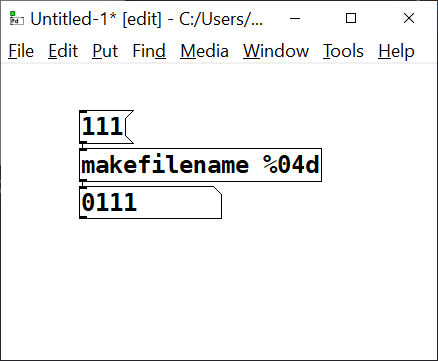
When I put 0111 in a symbol object, or in a symbol message, Pure Data deletes the leading zero. I need the leading zero to be there because it is the start of a file name. How do I get Pure Data to stop deleting the leading zero?
-
jamcultur
posted in technical issues • read more
@mosef123 You're also missing edge~, so you probably need the cyclone library. There are a number of tutorials that tell you how to make your own oscilloscope. Here's one:
-
jamcultur
posted in technical issues • read more
The dashed box around speedlim means that you don't have that object. You should have gotten a message in red on the pd console to indicate that problem. There are several external libraries that include speedlim. You need to decide which one to use. Where did you get the oscilloscope subpatch? It would be a good idea to use the same speedlim that they used.
-
jamcultur
posted in technical issues • read more
@whale-av Thanks! This looks promising. I'll give it a try.
Edit: That worked thanks!
-
jamcultur
posted in technical issues • read more
@Balwyn Your [file cwd] example looks like exactly what I need, but it didn't work with read. Your example with the close, open message works on my system, but when I tried to use the read message to read the file, I got a "can't read" message. Any ideas on how I can make this work? Thanks!
Edit: I opened issue #2888 on github for the problem that [file cwd] doesn't work with read.
-
jamcultur
posted in technical issues • read more
Thank you, @unclewayback and @whale-av for your replies, but that doesn't solve my problem. The example I gave was a simplified version of what I'm doing. I have 129 files in each directory. The file names are the same in all the directories. (There are three directories now, but there will soon be more.) I have a selectable list of file names and I want to be able to open whatever file was selected in the currently selected directory. I'm currently using $1 in the read message to pass in the selected file name, so I can't use it for the directory name. Is there a way to put two variables in the read message?