
Purr Data 2.3.1
Purr Data 2.3.1 is now available:
https://github.com/jonwwilkes/purr-data/releases/tag/2.3.1
Bug fixes in 2.3.1:
- fixed some display bugs in GUI
- fixed display bug with preset_hub
- fixed undefined behavior on x64 systems with the dollar arg parser
- strengthen the testing system
New in 2.3.0:
- added first draft of an external test suite to make sure a majority of external classes can load and instantiate correctly. Previously, the CI runners could register a "successful" build even if build errors kept one or more libraries from building correctly. Now there is a minimum number of objects that must instantiate in the tests or the build will fail. We can build on this to guarantee an exact number of creators for each library, making it much easier (and less risky) to imiprove the build system.
- ported tof/imagebang and allow it to instantiate with no arguments
- added "arch", "platform", and "libdir" methods to [pdinfo] and update help patch
- default loader now uses the "hexmunge" code to find filenames with hex encodings that accommodate object names with special characters
Bugfixes in 2.3.0:
- fixed up external arg types, use static declarations to protect against namespace pollution, fix allocation errors, fix crashers, header problems, fix buggy aliases for externals, fix some makefiles, fix various buffer overflows
- added missing help files for some external aliases (don't think they are used, but they are required by the Makefile)
- handle special case of trailing "/" or "/~" in legacy external alias classnames
- updated zexy, markex, iemmatrix alias files to use the simplified hexmunger
- removed external hexloader loader from default loaded libs now that we have rudimentary hexloading in the main loader
- removed arbitrary limit of 128 characters for classnames that are absolute paths
- fixed harmgen interface to use proper A_GIMME args
- fixed invalid reads in iemmatrix
- bump lyonpotpourri to head to fix missing object name argument
- make [declare -lib] handle absolute paths (and namespace-prefixed paths) consistent with object boxes
- removed references to helpers in fluid~ that got removed
- allow iemlib, unauthorized, lyonpotpourri iem_spec2, bin_ambi, iem_ambi, iem_adaptifilt and mrpeach objects to instantiate without arguments. Try to set sane defaults for these situations, while also outputting a warning. (Might consider changing the warning to an error...)
- allow class_addcreator to register an additional creator with the namespace prefix if one was used
- triage iem16's lack of shared lib with statically declared copy/pasta functions
- remove a bunch of state files from iem16 that somehow got added to the repo at the outset
- remove unnecessary pd files from fluid~
- make all cyclone classes instantiate when no arguments are provided
- switch lyonpotpourri submodule to gitlab mirror. This is needed to make some quick fixes found by the test system (which we can later request to merge upstream)
Report issues here:
 posted in news
mrpeach on Raspberry
Hi there,
Thanks for taking the time. I am getting a little bit frustrated here, so I guess it’s best to ask the community:
How do I get MrPeach to work on 0.47.1? I am using a Raspberry Pi 3 (running Linux version 4.9.20-v7+) and Pure Data 0.47.1.
I installed mrpeach using the “find externals” functionality. Of course I edited the path to “/home/pi/pd-externals” and created a “mrpeach” entry in the startup preferences.
Some background information: I want my Python code to “communicate” with pd but actually I do not care how they do this. OSC-Messages seem to be the easiest solution.
Well, seemed. I am a total beginner to pd
Help much appreciated 
Daniel
By the way here is the log:
tried ./osc/routeOSC.l_arm and failed
tried ./osc/routeOSC.pd_linux and failed
tried ./osc/routeOSC/routeOSC.l_arm and failed
tried ./osc/routeOSC/routeOSC.pd_linux and failed
tried ./osc/routeOSC.pd and failed
tried ./osc/routeOSC.pat and failed
tried ./osc/routeOSC/osc/routeOSC.pd and failed
tried /home/pi/pd-externals/osc/routeOSC.l_arm and failed
tried /home/pi/pd-externals/osc/routeOSC.pd_linux and succeeded
tried ./mrpeach.l_arm and failed
tried ./mrpeach.pd_linux and failed
tried ./mrpeach/mrpeach.l_arm and failed
tried ./mrpeach/mrpeach.pd_linux and failed
tried ./mrpeach.pd and failed
tried ./mrpeach.pat and failed
tried ./mrpeach/mrpeach.pd and failed
tried /home/pi/pd-externals/mrpeach.l_arm and failed
tried /home/pi/pd-externals/mrpeach.pd_linux and failed
tried /home/pi/pd-externals/mrpeach/mrpeach.l_arm and failed
tried /home/pi/pd-externals/mrpeach/mrpeach.pd_linux and failed
tried /home/pi/pd-externals/mrpeach.pd and failed
tried /home/pi/pd-externals/mrpeach.pat and failed
tried /home/pi/pd-externals/mrpeach/mrpeach.pd and failed
mrpeach: can't load library
 posted in technical issues
Load Libraries, plug-ins
@Balwyn I've follow your steps but still nothing this is what i got in the console:
'pd-gui' connecting to 'pd' on localhost 5400 ...
------------------ done with main ----------------------
Default font: DejaVu Sans Mono
tried ./Gem.m_i386 and failed
tried ./Gem.dll and failed
tried ./Gem/Gem.m_i386 and failed
tried ./Gem/Gem.dll and failed
tried ./Gem.pd and failed
tried ./Gem.pat and failed
tried ./Gem/Gem.pd and failed
tried C:/Users/Jose/pd-externals/Gem.m_i386 and failed
tried C:/Users/Jose/pd-externals/Gem.dll and failed
tried C:/Users/Jose/pd-externals/Gem/Gem.m_i386 and failed
tried C:/Users/Jose/pd-externals/Gem/Gem.dll and succeeded
C:\Users\Jose\pd-externals\Gem\Gem.dll: couldn't load
tried C:/Users/Jose/pd-externals/Gem.pd and failed
tried C:/Users/Jose/pd-externals/Gem.pat and failed
tried C:/Users/Jose/pd-externals/Gem/Gem.pd and failed
tried C:/Users/Jose/pd-externals/Gem/Gem.m_i386 and failed
tried C:/Users/Jose/pd-externals/Gem/Gem.dll and succeeded
C:\Users\Jose\pd-externals\Gem\Gem.dll: couldn't load
tried C:/Users/Jose/pd-externals/Gem/Gem.pd and failed
tried C:/Users/Jose/pd-externals/Gem/Gem.pat and failed
tried C:/Users/Jose/pd-externals/Gem/Gem/Gem.pd and failed
Gem: can't load library
Loading plugin: C:/Program Files (x86)/Pd/tcl/pd_deken.tcl
The Pd window filtered 26 lines
The Pd window filtered 27 lines
 posted in extra~
How to install externals, libraries, gui plug-ins, etc.
Hello, having trouble installing external libraries in pd, I'm in Xubuntu, so I'm new to Pd and Linux both.
tried almost everything in posts but there's not a lot of information on the topic, thanks in advance
I have three folder containing one sample library (according to pd web site and other resources these are standard folders for external libraries)
~/Pd-externals/moonlib; /usr/local/lib/pd-externals/moonlib; and /usr/lib/pd/extra/moonlib
My path config in Pd is: ~/Pd-externals; /usr/local/lib/pd-externals; and /usr/lib/pd/extra
I've tried the next Startup configs (and every other logic folder variation):
-helppath ~/Pd-externals
-stdpath ~/Pd-externals
Console print at startup:
tried /home/sosimicro/Pd-externals and failed /home/sosimicro/Pd-externals: can't open
Console prints a long list of errors when I try to create a library object like [mkob]
I'm in a dead end, I really don't want to install pd-extended, there must be a way
 posted in tutorials
Compiling Pd-extended on Windows
Hello,
I created a new thread as the older post [Problem compiling on windows] (http://forum.pdpatchrepo.info/topic/967/problem-compiling-external-on-windows/16) seems to have ended and my problem has a different nature.
Moreover. I have not been able to find an answer on the puredata sites (puredata.info or puredata.org).
My problem:
My end goal is to play with the 'grid' external in pd-extended/externals/unauthorized/grid but since I do not get this one working and I have never compiled an external before I started with the simpler tutorials in Pd/doc/6.externs.
My steps and error are as follows:
**1. **Adap path in 'makefile' in Pd/doc/6.externs to 'C:\Program Files (x86)\Microsoft Visual Studio 9.0\VC'
(this path contains a /lib folder with .lib and .obj files on my machine)
**2. **Start ( Admin) Visual C++ 2008 64-bit command prompt
**3. **Locate directory Pd/doc/6.externs
**4. ** run 'nmake pd_nt' command
**5. ** gives error in locating the libc.lib file
(LINK: fatal error LNK1181: cannot open input file 'C:...\VC\lib\libc.lib'
When I remove this instruction from the makefile, I does not find the kernel32.lib file also.
When I finally remove the former instruction, I get an error creating the library obj1,lib and object obj1,exp as I have 6 unresolved external symbols ex. obj1.ob : error LNK2019: unresolved external symbol __imp_post referenced in function obj1_float
Could someone help me solve these issues and help me succeed in making this external work?
Then, any additional explanation in getting grid to work afterwards?
Any additional info regarding Pd's treatment of externals/libraries etc is appreciated as well.. I just can't get a grip on it,
 posted in technical issues
Newb can't use GEM
Hi, thought I'd post here even thought the thread is old before starting a new topic because my problem is exactly that as described here, though none of the suggestions have help and no one seems to have my exact error console output, which is as follows:
WARNING: Font family 'Courier' not found, using default (DejaVu Sans Mono)
tried ./gem.l_i386 and failed
tried /usr/lib/pd/extra/Gem/gem.l_i386 and failed
tried /usr/lib/puredata/extra/gem.l_i386 and failed
tried /home/digithree/pd-externals/gem.l_i386 and failed
tried /usr/local/lib/pd-externals/gem.l_i386 and failed
tried /usr/lib/puredata/extra/gem.l_i386 and failed
tried /usr/lib/pd/extra/gem.l_i386 and failed
tried ./gem.pd_linux and failed
tried /usr/lib/pd/extra/Gem/gem.pd_linux and failed
tried /usr/lib/puredata/extra/gem.pd_linux and failed
tried /home/digithree/pd-externals/gem.pd_linux and failed
tried /usr/local/lib/pd-externals/gem.pd_linux and failed
tried /usr/lib/puredata/extra/gem.pd_linux and failed
tried /usr/lib/pd/extra/gem.pd_linux and failed
tried ./gem/gem.l_i386 and failed
tried /usr/lib/pd/extra/Gem/gem/gem.l_i386 and failed
tried /usr/lib/puredata/extra/gem/gem.l_i386 and failed
tried /home/digithree/pd-externals/gem/gem.l_i386 and failed
tried /usr/local/lib/pd-externals/gem/gem.l_i386 and failed
tried /usr/lib/puredata/extra/gem/gem.l_i386 and failed
tried /usr/lib/pd/extra/gem/gem.l_i386 and failed
tried ./gem/gem.pd_linux and failed
tried /usr/lib/pd/extra/Gem/gem/gem.pd_linux and failed
tried /usr/lib/puredata/extra/gem/gem.pd_linux and failed
tried /home/digithree/pd-externals/gem/gem.pd_linux and failed
tried /usr/local/lib/pd-externals/gem/gem.pd_linux and failed
tried /usr/lib/puredata/extra/gem/gem.pd_linux and failed
tried /usr/lib/pd/extra/gem/gem.pd_linux and failed
gem: can't load library
input channels = 2, output channels = 2
audio buffer set to 25
opened input device name hw:0
configuring sound input...
Sample width set to 2 bytes
configuring sound output...
Sample width set to 2 bytes
tried but couldn't sync A/D/A
So I've added the word "gem" (with no quotes) to the Startup list, and the external library locations (whose paths can be seen in the above output) yet it doesn't work.
Any ideas? I've verified that both pd and gem are installed and at the lastest version. I'm using Ubuntu 11.10
Thanks
 posted in pixel#
Pd-Extended for Debian
** EDIT ** I created an UPDATED version on this wiki page with steps to follow. Here:
http://puredata.info/docs/developer/DebianWheezyAmd64
Hi Nicola,
@bamboomusic said:
Hi, I've just installed Debian Wheezy amd64, but I can't be able to find a compiled Pd-Extended version for Debian 64-bit.
I checked in:
http://puredata.info/community/projects/software/pd-extended
http://autobuild.puredata.info/auto-build/and in the puredata repo, but I only found i386 versions.
Am I missing something?
I think simply there is no packaged version.
I actually managed to build the source partly following the instructions found here:
http://puredata.info/docs/developer/Debian and thanks to the script in the scripts directory in the source package - credit really goes to the authors of these 
with some modifications and additions:
---- WARNING. Pretty much untested. Pd starts, no libraries complain, audio and a bunch of patches I have work with alsa and jack ----
-
Add the debian multimedia repository as explained directly on their page:
http://debian-multimedia.org/ -
Do the build-dep as explained but with a slight modification
apt-get build-dep puredata gem pd-pdp
(notice pd-pdp non not pdp)
-
Install the following packages not listed on that page:
apt-get install libmp3lame0 libmp3lame-dev ladspa-sdk dssi-dev libimlib2-dev libtheora-dev
-
Install libquicktime1 and libquicktime-dev from the official main packages *not* with apt. The links:
http://packages.debian.org/testing/libs/libquicktime1
http://packages.debian.org/wheezy/libquicktime-dev -
Get the source of Pd-extended, unpack anywere as explained in other places..
-
from the main source directory go to source dir for pidip:
cd externals/pidip/
-
configure and make pidip with the following switches:
./configure --with-pd=../../pd --with-pdp=../pdp
make -
chdir to scripts/auto-build/ from the source dir:
cd scripts/auto-build/
-
Start the ./pd-extended-auto-builder.sh script:
./pd-extended-auto-builder.sh
-
Wait...
-
Cross fingers...
-
Ignore some scary messages...
If everything went well there should be a message saying you have a deb in dir ./packages/linux_make/Pd-0.42.5-extended.deb (still from the source root): -
cd there:
cd ../../packages/linux_make/
-
Finally install:
dpkg -i Pd-0.42.5-extended.deb
By the way I got a nice .deb so maybe I could put it up somewhere, not sure about the dependencies though.
Hope this helps,
Lorenzo
 posted in this forum
Bad lib path? on Gentoo,cant run Androidome/MLR tutorial due to libs.
Hi all,
posted this to the list, but no answer -- no discussion! decided to repost here.
I added pd-overlay from layman, and have installed the following:
[ebuild R ] puredata-base/pd-extended-0.42.5 USE="adaptive alsa
bassemu boids bsaylor creb cxc cyclone earplug ekext ext13 flashserver
flatspace flib freeverb gem2pdp ggee hcs hid iem16 iem_adaptfilt
iem_ambi iem_bin_ambi iem_delay iem_matrix iem_roomsim iem_spec2
iem_tab iemgui iemlib iemmatrix iemxmlrpc jasch_lib loaders mapping
markex maxlib mjlib moocow moonlib motex mrpeach oscx pan pdcontainer
pddp pdogg pdp pdp_opengl pidip pmpd postlude sigpack smlib tof toxy
unauthorized vanilla vbap windowing zexy -debug -fftw -jack
-portaudio" 0 kB [1]
Why the article at gentoo wiki tells me to remove oscx&zexy flags from build? I didn't listened to it though.
With a few tricks, a working alsa/timidity++/puredata chain was set up
and running, to reference for other newcomers:
pdextended -alsa -alsamidi -stderr -verbose -d (config at pastebin:
http://pastebin.com/8p0rcd41 )
The following files were installed to my system: (filelist with paths:
http://pastebin.com/F9yymAPH )
Now, wanted to install Androidome's script,
http://androidome.googlecode.com/files/AndroidomeRouter.pd
Multiple errors came about missing functions (like mrpeach/udpsend),
and in the UI they were outlined in red.
Also the debug log shown that search under multiple paths (none
included /usr/lib/pdextended/extra/mrpeach)
was failed for that functions.
Looks like http://www.mail-archive.com/pd-dev@iem.at/msg04901.html,
but checks more paths.
 udpreceive 8080
... couldn't create
tried /usr/local/lib/pd-externals/sprintf.l_ia64 and failed
tried /usr/lib/pd-extended/extra/sprintf.l_ia64 and failed
tried /usr/local/lib/pd-externals/sprintf.pd_linux and failed
tried /usr/lib/pd-extended/extra/sprintf.pd_linux and failed
tried /usr/local/lib/pd-externals/sprintf/sprintf.l_ia64 and failed
tried /usr/lib/pd-extended/extra/sprintf/sprintf.l_ia64 and failed
tried /usr/local/lib/pd-externals/sprintf/sprintf.pd_linux and failed
tried /usr/lib/pd-extended/extra/sprintf/sprintf.pd_linux and failed
tried /usr/local/lib/pd-externals/sprintf.pd and failed
tried /usr/lib/pd-extended/extra/sprintf.pd and failed
tried /usr/local/lib/pd-externals/sprintf.pat and failed
tried /usr/lib/pd-extended/extra/sprintf.pat and failed
 sprintf connect %s 8080
... couldn't create
tried /usr/local/lib/pd-externals/mrpeach.l_ia64 and failed
tried /usr/lib/pd-extended/extra/mrpeach.l_ia64 and failed
tried /usr/local/lib/pd-externals/mrpeach.pd_linux and failed
tried /usr/lib/pd-extended/extra/mrpeach.pd_linux and failed
tried /usr/local/lib/pd-externals/mrpeach/mrpeach.l_ia64 and failed
tried /usr/lib/pd-extended/extra/mrpeach/mrpeach.l_ia64 and failed
tried /usr/local/lib/pd-externals/mrpeach/mrpeach.pd_linux and failed
tried /usr/lib/pd-extended/extra/mrpeach/mrpeach.pd_linux and failed
error: [import]: can't load library in 'mrpeach'
... you might be able to track this down from the Find menu.
Which declare's should be added to ~/.pdextended to allow search in
/usr/lib/pdextended/extra/mrpeach and other directories?
Also it seems that
http://docs.monome.org/doku.php?id=dev:pd:simple_mlr uses an old
version of OSC (guess I name the things correctly and dont call fish an aardvark api), function names in code are like dumpOSC instead of packOSC; how to run the script at the link above with 0.42.5, can anyone tell here? (will also bug monome's list).
http://www.pdpatchrepo.info/hurleur/2010-12-28-171813_473x410_scrot.png
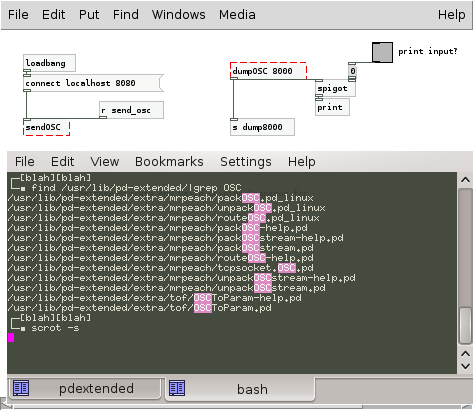
 posted in technical issues
Bad lib path? on Gentoo,cant run Androidome/MLR tutorial due to libs.
Hi all,
posted this to the list, but no answer -- no discussion! decided to repost here.
I added pd-overlay from layman, and have installed the following:
[ebuild R ] puredata-base/pd-extended-0.42.5 USE="adaptive alsa
bassemu boids bsaylor creb cxc cyclone earplug ekext ext13 flashserver
flatspace flib freeverb gem2pdp ggee hcs hid iem16 iem_adaptfilt
iem_ambi iem_bin_ambi iem_delay iem_matrix iem_roomsim iem_spec2
iem_tab iemgui iemlib iemmatrix iemxmlrpc jasch_lib loaders mapping
markex maxlib mjlib moocow moonlib motex mrpeach oscx pan pdcontainer
pddp pdogg pdp pdp_opengl pidip pmpd postlude sigpack smlib tof toxy
unauthorized vanilla vbap windowing zexy -debug -fftw -jack
-portaudio" 0 kB [1]
Why the article at gentoo wiki tells me to remove oscx&zexy flags from build? I didn't listened to it though.
With a few tricks, a working alsa/timidity++/puredata chain was set up
and running, to reference for other newcomers:
pdextended -alsa -alsamidi -stderr -verbose -d (config at pastebin:
http://pastebin.com/8p0rcd41 )
The following files were installed to my system: (filelist with paths:
http://pastebin.com/F9yymAPH )
Now, wanted to install Androidome's script,
http://androidome.googlecode.com/files/AndroidomeRouter.pd
Multiple errors came about missing functions (like mrpeach/udpsend),
and in the UI they were outlined in red.
Also the debug log shown that search under multiple paths (none
included /usr/lib/pdextended/extra/mrpeach)
was failed for that functions.
Looks like http://www.mail-archive.com/pd-dev@iem.at/msg04901.html,
but checks more paths.
 udpreceive 8080
... couldn't create
tried /usr/local/lib/pd-externals/sprintf.l_ia64 and failed
tried /usr/lib/pd-extended/extra/sprintf.l_ia64 and failed
tried /usr/local/lib/pd-externals/sprintf.pd_linux and failed
tried /usr/lib/pd-extended/extra/sprintf.pd_linux and failed
tried /usr/local/lib/pd-externals/sprintf/sprintf.l_ia64 and failed
tried /usr/lib/pd-extended/extra/sprintf/sprintf.l_ia64 and failed
tried /usr/local/lib/pd-externals/sprintf/sprintf.pd_linux and failed
tried /usr/lib/pd-extended/extra/sprintf/sprintf.pd_linux and failed
tried /usr/local/lib/pd-externals/sprintf.pd and failed
tried /usr/lib/pd-extended/extra/sprintf.pd and failed
tried /usr/local/lib/pd-externals/sprintf.pat and failed
tried /usr/lib/pd-extended/extra/sprintf.pat and failed
 sprintf connect %s 8080
... couldn't create
tried /usr/local/lib/pd-externals/mrpeach.l_ia64 and failed
tried /usr/lib/pd-extended/extra/mrpeach.l_ia64 and failed
tried /usr/local/lib/pd-externals/mrpeach.pd_linux and failed
tried /usr/lib/pd-extended/extra/mrpeach.pd_linux and failed
tried /usr/local/lib/pd-externals/mrpeach/mrpeach.l_ia64 and failed
tried /usr/lib/pd-extended/extra/mrpeach/mrpeach.l_ia64 and failed
tried /usr/local/lib/pd-externals/mrpeach/mrpeach.pd_linux and failed
tried /usr/lib/pd-extended/extra/mrpeach/mrpeach.pd_linux and failed
error: [import]: can't load library in 'mrpeach'
... you might be able to track this down from the Find menu.
Which declare's should be added to ~/.pdextended to allow search in
/usr/lib/pdextended/extra/mrpeach and other directories?
Also it seems that
http://docs.monome.org/doku.php?id=dev:pd:simple_mlr uses an old
version of OSC (guess I name the things correctly and dont call fish an aardvark api), function names in code are like dumpOSC instead of packOSC; how to run the script at the link above with 0.42.5, can anyone tell here? (will also bug monome's list).
http://www.pdpatchrepo.info/hurleur/2010-12-28-171813_473x410_scrot.png
posted in technical issues
Fedora 10 : Gem: can't load library
hi there,
I've got pd running fine for sounds but I'ld like Gem (for a reactable); but I've got this error at pd startup :
Gem: can't load library
I am with Fedora 10,
kernel :
$ uname -a
Linux hal 2.6.27.37-170.2.104.fc10.i686 #1 SMP Mon Oct 12 22:01:53 EDT 2009 i686 i686 i386 GNU/Linux
pd version :
$ yum info pd
Loaded plugins: refresh-packagekit
Available Packages
Name : pd
Arch : i386
Version : 0.39.3
Release : 1.cvs.07.07.23.fc10.ccrma
Size : 5.9 M
Repo : planetccrma
Summary : Real-time patchable audio and multimedia processor.
URL : http://pure-data.sourceforge.net/
License : GPL
Description: Pd gives you a canvas for patching together modules that analyze,
: process, and synthesize sounds, together with a rich palette of
: real-time control and I/O possibilities. Similar to Max
: (Cycling74) and JMAX (IRCAM). A related software package named Gem
: extends Pd's capabilities to include graphical rendering.
Here is what pd tells when started with "pd" :
[import] $Revision: 1.2 $
[import] is still in development, the interface could change!
compiled against Pd version 0.41.4
couldn't open MIDI input device 0
couldn't open MIDI output device 0
opened 0 MIDI input device(s) and 0 MIDI output device(s).
libdir loader $Revision: 1.8 $
compiled on Oct 27 2009 at 17:32:35
compiled against Pd version 0.41.4.extended
Gem: can't load library
libdir_loader: added 'cyclone' to the global objectclass path
libdir_loader: added 'zexy' to the global objectclass path
libdir_loader: added 'creb' to the global objectclass path
libdir_loader: added 'cxc' to the global objectclass path
libdir_loader: added 'iemlib' to the global objectclass path
libdir_loader: added 'list-abs' to the global objectclass path
libdir_loader: added 'mapping' to the global objectclass path
libdir_loader: added 'markex' to the global objectclass path
libdir_loader: added 'maxlib' to the global objectclass path
libdir_loader: added 'memento' to the global objectclass path
libdir_loader: added 'mjlib' to the global objectclass path
libdir_loader: added 'motex' to the global objectclass path
libdir_loader: added 'oscx' to the global objectclass path
libdir_loader: added 'pddp' to the global objectclass path
libdir_loader: added 'pdogg' to the global objectclass path
libdir_loader: added 'pixeltango' to the global objectclass path
libdir_loader: added 'rradical' to the global objectclass path
libdir_loader: added 'sigpack' to the global objectclass path
libdir_loader: added 'smlib' to the global objectclass path
libdir_loader: added 'toxy' to the global objectclass path
libdir_loader: added 'unauthorized' to the global objectclass path
libdir_loader: added 'pan' to the global objectclass path
libdir_loader: added 'freeverb' to the global objectclass path
libdir_loader: added 'hcs' to the global objectclass path
libdir_loader: added 'jmmmp' to the global objectclass path
libdir_loader: added 'ext13' to the global objectclass path
libdir_loader: added 'ggee' to the global objectclass path
libdir_loader: added 'flib' to the global objectclass path
libdir_loader: added 'ekext' to the global objectclass path
libdir_loader: added 'flatspace' to the global objectclass path
pdp: can't load library
pidip: can't load library
And here is part of what pd tells when started with "pd -verbose" :
libdir loader $Revision: 1.8 $
compiled on Oct 27 2009 at 17:32:35
compiled against Pd version 0.41.4.extended
tried ./Gem.l_i386 and failed
tried /usr/share/fonts/bitstream-vera/Gem.l_i386 and failed
tried /usr/lib/pd/extra/cyclone/Gem.l_i386 and failed
tried /usr/lib/pd/extra/zexy/Gem.l_i386 and failed
tried /usr/lib/pd/extra/creb/Gem.l_i386 and failed
tried /usr/lib/pd/extra/cxc/Gem.l_i386 and failed
tried /usr/lib/pd/extra/iemlib/Gem.l_i386 and failed
tried /usr/lib/pd/extra/list-abs/Gem.l_i386 and failed
tried /usr/lib/pd/extra/mapping/Gem.l_i386 and failed
tried /usr/lib/pd/extra/jmmmp/Gem.l_i386 and failed
tried /usr/lib/pd/extra/maxlib/Gem.l_i386 and failed
tried /usr/lib/pd/extra/memento/Gem.l_i386 and failed
tried /usr/lib/pd/extra/mjlib/Gem.l_i386 and failed
tried /usr/lib/pd/extra/markex/Gem.l_i386 and failed
tried /usr/lib/pd/extra/oscx/Gem.l_i386 and failed
tried /usr/lib/pd/extra/pddp/Gem.l_i386 and failed
tried /usr/lib/pd/extra/pdogg/Gem.l_i386 and failed
tried /usr/lib/pd/extra/motex/Gem.l_i386 and failed
tried /usr/lib/pd/extra/pmpd/Gem.l_i386 and failed
tried /usr/lib/pd/extra/rradical/Gem.l_i386 and failed
tried /usr/lib/pd/extra/sigpack/Gem.l_i386 and failed
tried /usr/lib/pd/extra/pixeltango/Gem.l_i386 and failed
tried /usr/lib/pd/extra/toxy/Gem.l_i386 and failed
tried /usr/lib/pd/extra/unauthorized/Gem.l_i386 and failed
tried /usr/lib/pd/extra/pan/Gem.l_i386 and failed
tried /usr/lib/pd/extra/smlib/Gem.l_i386 and failed
tried /usr/lib/pd/extra/hcs/Gem.l_i386 and failed
tried /usr/lib/pd/extra/freeverb/Gem.l_i386 and failed
tried /usr/lib/pd/extra/ggee/Gem.l_i386 and failed
tried /usr/lib/pd/extra/ext13/Gem.l_i386 and failed
tried /usr/lib/pd/extra/flib/Gem.l_i386 and failed
tried /usr/lib/pd/extra/ekext/Gem.l_i386 and failed
tried /usr/lib/pd/extra/Gem.l_i386 and failed
tried /usr/lib/pd/extra/flatspace/Gem.l_i386 and failed
tried /home/zbl/pd-externals/Gem.l_i386 and failed
tried /usr/local/lib/pd-externals/Gem.l_i386 and failed
tried /usr/lib/pd/extra/Gem.l_i386 and failed
tried ./Gem.pd_linux and failed
tried /usr/share/fonts/bitstream-vera/Gem.pd_linux and failed
tried /usr/lib/pd/extra/cyclone/Gem.pd_linux and failed
tried /usr/lib/pd/extra/zexy/Gem.pd_linux and failed
tried /usr/lib/pd/extra/creb/Gem.pd_linux and failed
tried /usr/lib/pd/extra/cxc/Gem.pd_linux and failed
tried /usr/lib/pd/extra/iemlib/Gem.pd_linux and failed
tried /usr/lib/pd/extra/list-abs/Gem.pd_linux and failed
tried /usr/lib/pd/extra/mapping/Gem.pd_linux and failed
tried /usr/lib/pd/extra/jmmmp/Gem.pd_linux and failed
tried /usr/lib/pd/extra/maxlib/Gem.pd_linux and failed
tried /usr/lib/pd/extra/memento/Gem.pd_linux and failed
tried /usr/lib/pd/extra/mjlib/Gem.pd_linux and failed
tried /usr/lib/pd/extra/markex/Gem.pd_linux and failed
tried /usr/lib/pd/extra/oscx/Gem.pd_linux and failed
tried /usr/lib/pd/extra/pddp/Gem.pd_linux and failed
tried /usr/lib/pd/extra/pdogg/Gem.pd_linux and failed
tried /usr/lib/pd/extra/motex/Gem.pd_linux and failed
tried /usr/lib/pd/extra/pmpd/Gem.pd_linux and failed
tried /usr/lib/pd/extra/rradical/Gem.pd_linux and failed
tried /usr/lib/pd/extra/sigpack/Gem.pd_linux and failed
tried /usr/lib/pd/extra/pixeltango/Gem.pd_linux and failed
tried /usr/lib/pd/extra/toxy/Gem.pd_linux and failed
tried /usr/lib/pd/extra/unauthorized/Gem.pd_linux and failed
tried /usr/lib/pd/extra/pan/Gem.pd_linux and failed
tried /usr/lib/pd/extra/smlib/Gem.pd_linux and failed
tried /usr/lib/pd/extra/hcs/Gem.pd_linux and failed
tried /usr/lib/pd/extra/freeverb/Gem.pd_linux and failed
tried /usr/lib/pd/extra/ggee/Gem.pd_linux and failed
tried /usr/lib/pd/extra/ext13/Gem.pd_linux and failed
tried /usr/lib/pd/extra/flib/Gem.pd_linux and failed
tried /usr/lib/pd/extra/ekext/Gem.pd_linux and failed
tried /usr/lib/pd/extra/Gem.pd_linux and failed
tried /usr/lib/pd/extra/flatspace/Gem.pd_linux and failed
tried /home/zbl/pd-externals/Gem.pd_linux and failed
tried /usr/local/lib/pd-externals/Gem.pd_linux and failed
tried /usr/lib/pd/extra/Gem.pd_linux and failed
tried ./Gem/Gem.l_i386 and failed
tried /usr/share/fonts/bitstream-vera/Gem/Gem.l_i386 and failed
tried /usr/lib/pd/extra/cyclone/Gem/Gem.l_i386 and failed
tried /usr/lib/pd/extra/zexy/Gem/Gem.l_i386 and failed
tried /usr/lib/pd/extra/creb/Gem/Gem.l_i386 and failed
tried /usr/lib/pd/extra/cxc/Gem/Gem.l_i386 and failed
tried /usr/lib/pd/extra/iemlib/Gem/Gem.l_i386 and failed
tried /usr/lib/pd/extra/list-abs/Gem/Gem.l_i386 and failed
tried /usr/lib/pd/extra/mapping/Gem/Gem.l_i386 and failed
tried /usr/lib/pd/extra/jmmmp/Gem/Gem.l_i386 and failed
tried /usr/lib/pd/extra/maxlib/Gem/Gem.l_i386 and failed
tried /usr/lib/pd/extra/memento/Gem/Gem.l_i386 and failed
tried /usr/lib/pd/extra/mjlib/Gem/Gem.l_i386 and failed
tried /usr/lib/pd/extra/markex/Gem/Gem.l_i386 and failed
tried /usr/lib/pd/extra/oscx/Gem/Gem.l_i386 and failed
tried /usr/lib/pd/extra/pddp/Gem/Gem.l_i386 and failed
tried /usr/lib/pd/extra/pdogg/Gem/Gem.l_i386 and failed
tried /usr/lib/pd/extra/motex/Gem/Gem.l_i386 and failed
tried /usr/lib/pd/extra/pmpd/Gem/Gem.l_i386 and failed
tried /usr/lib/pd/extra/rradical/Gem/Gem.l_i386 and failed
tried /usr/lib/pd/extra/sigpack/Gem/Gem.l_i386 and failed
tried /usr/lib/pd/extra/pixeltango/Gem/Gem.l_i386 and failed
tried /usr/lib/pd/extra/toxy/Gem/Gem.l_i386 and failed
tried /usr/lib/pd/extra/unauthorized/Gem/Gem.l_i386 and failed
tried /usr/lib/pd/extra/pan/Gem/Gem.l_i386 and failed
tried /usr/lib/pd/extra/smlib/Gem/Gem.l_i386 and failed
tried /usr/lib/pd/extra/hcs/Gem/Gem.l_i386 and failed
tried /usr/lib/pd/extra/freeverb/Gem/Gem.l_i386 and failed
tried /usr/lib/pd/extra/ggee/Gem/Gem.l_i386 and failed
tried /usr/lib/pd/extra/ext13/Gem/Gem.l_i386 and failed
tried /usr/lib/pd/extra/flib/Gem/Gem.l_i386 and failed
tried /usr/lib/pd/extra/ekext/Gem/Gem.l_i386 and failed
tried /usr/lib/pd/extra/Gem/Gem.l_i386 and failed
tried /usr/lib/pd/extra/flatspace/Gem/Gem.l_i386 and failed
tried /home/zbl/pd-externals/Gem/Gem.l_i386 and failed
tried /usr/local/lib/pd-externals/Gem/Gem.l_i386 and failed
tried /usr/lib/pd/extra/Gem/Gem.l_i386 and failed
tried ./Gem/Gem.pd_linux and failed
tried /usr/share/fonts/bitstream-vera/Gem/Gem.pd_linux and failed
tried /usr/lib/pd/extra/cyclone/Gem/Gem.pd_linux and failed
tried /usr/lib/pd/extra/zexy/Gem/Gem.pd_linux and failed
tried /usr/lib/pd/extra/creb/Gem/Gem.pd_linux and failed
tried /usr/lib/pd/extra/cxc/Gem/Gem.pd_linux and failed
tried /usr/lib/pd/extra/iemlib/Gem/Gem.pd_linux and failed
tried /usr/lib/pd/extra/list-abs/Gem/Gem.pd_linux and failed
tried /usr/lib/pd/extra/mapping/Gem/Gem.pd_linux and failed
tried /usr/lib/pd/extra/jmmmp/Gem/Gem.pd_linux and failed
tried /usr/lib/pd/extra/maxlib/Gem/Gem.pd_linux and failed
tried /usr/lib/pd/extra/memento/Gem/Gem.pd_linux and failed
tried /usr/lib/pd/extra/mjlib/Gem/Gem.pd_linux and failed
tried /usr/lib/pd/extra/markex/Gem/Gem.pd_linux and failed
tried /usr/lib/pd/extra/oscx/Gem/Gem.pd_linux and failed
tried /usr/lib/pd/extra/pddp/Gem/Gem.pd_linux and failed
tried /usr/lib/pd/extra/pdogg/Gem/Gem.pd_linux and failed
tried /usr/lib/pd/extra/motex/Gem/Gem.pd_linux and failed
tried /usr/lib/pd/extra/pmpd/Gem/Gem.pd_linux and failed
tried /usr/lib/pd/extra/rradical/Gem/Gem.pd_linux and failed
tried /usr/lib/pd/extra/sigpack/Gem/Gem.pd_linux and failed
tried /usr/lib/pd/extra/pixeltango/Gem/Gem.pd_linux and failed
tried /usr/lib/pd/extra/toxy/Gem/Gem.pd_linux and failed
tried /usr/lib/pd/extra/unauthorized/Gem/Gem.pd_linux and failed
tried /usr/lib/pd/extra/pan/Gem/Gem.pd_linux and failed
tried /usr/lib/pd/extra/smlib/Gem/Gem.pd_linux and failed
tried /usr/lib/pd/extra/hcs/Gem/Gem.pd_linux and failed
tried /usr/lib/pd/extra/freeverb/Gem/Gem.pd_linux and failed
tried /usr/lib/pd/extra/ggee/Gem/Gem.pd_linux and failed
tried /usr/lib/pd/extra/ext13/Gem/Gem.pd_linux and failed
tried /usr/lib/pd/extra/flib/Gem/Gem.pd_linux and failed
tried /usr/lib/pd/extra/ekext/Gem/Gem.pd_linux and failed
tried /usr/lib/pd/extra/Gem/Gem.pd_linux and failed
tried /usr/lib/pd/extra/flatspace/Gem/Gem.pd_linux and failed
tried /home/zbl/pd-externals/Gem/Gem.pd_linux and failed
tried /usr/local/lib/pd-externals/Gem/Gem.pd_linux and failed
tried /usr/lib/pd/extra/Gem/Gem.pd_linux and failed
tried ./Gem/Gem-meta.pd and failed
tried /usr/share/fonts/bitstream-vera/Gem/Gem-meta.pd and failed
tried /usr/lib/pd/extra/cyclone/Gem/Gem-meta.pd and failed
tried /usr/lib/pd/extra/zexy/Gem/Gem-meta.pd and failed
tried /usr/lib/pd/extra/creb/Gem/Gem-meta.pd and failed
tried /usr/lib/pd/extra/cxc/Gem/Gem-meta.pd and failed
tried /usr/lib/pd/extra/iemlib/Gem/Gem-meta.pd and failed
tried /usr/lib/pd/extra/list-abs/Gem/Gem-meta.pd and failed
tried /usr/lib/pd/extra/mapping/Gem/Gem-meta.pd and failed
tried /usr/lib/pd/extra/jmmmp/Gem/Gem-meta.pd and failed
tried /usr/lib/pd/extra/maxlib/Gem/Gem-meta.pd and failed
tried /usr/lib/pd/extra/memento/Gem/Gem-meta.pd and failed
tried /usr/lib/pd/extra/mjlib/Gem/Gem-meta.pd and failed
tried /usr/lib/pd/extra/markex/Gem/Gem-meta.pd and failed
tried /usr/lib/pd/extra/oscx/Gem/Gem-meta.pd and failed
tried /usr/lib/pd/extra/pddp/Gem/Gem-meta.pd and failed
tried /usr/lib/pd/extra/pdogg/Gem/Gem-meta.pd and failed
tried /usr/lib/pd/extra/motex/Gem/Gem-meta.pd and failed
tried /usr/lib/pd/extra/pmpd/Gem/Gem-meta.pd and failed
tried /usr/lib/pd/extra/rradical/Gem/Gem-meta.pd and failed
tried /usr/lib/pd/extra/sigpack/Gem/Gem-meta.pd and failed
tried /usr/lib/pd/extra/pixeltango/Gem/Gem-meta.pd and failed
tried /usr/lib/pd/extra/toxy/Gem/Gem-meta.pd and failed
tried /usr/lib/pd/extra/unauthorized/Gem/Gem-meta.pd and failed
tried /usr/lib/pd/extra/pan/Gem/Gem-meta.pd and failed
tried /usr/lib/pd/extra/smlib/Gem/Gem-meta.pd and failed
tried /usr/lib/pd/extra/hcs/Gem/Gem-meta.pd and failed
tried /usr/lib/pd/extra/freeverb/Gem/Gem-meta.pd and failed
tried /usr/lib/pd/extra/ggee/Gem/Gem-meta.pd and failed
tried /usr/lib/pd/extra/ext13/Gem/Gem-meta.pd and failed
tried /usr/lib/pd/extra/flib/Gem/Gem-meta.pd and failed
tried /usr/lib/pd/extra/ekext/Gem/Gem-meta.pd and failed
tried /usr/lib/pd/extra/Gem/Gem-meta.pd and failed
tried /usr/lib/pd/extra/flatspace/Gem/Gem-meta.pd and failed
tried /home/zbl/pd-externals/Gem/Gem-meta.pd and failed
tried /usr/local/lib/pd-externals/Gem/Gem-meta.pd and failed
tried /usr/lib/pd/extra/Gem/Gem-meta.pd and failed
Gem: can't load library
I can't locate files like Gem-meta.pd or Gem.pd_linux on the computer;
I keep investigating, but any hint is welcome, thanks
 posted in technical issues