
[gme~] / [gmes~] - Game Music Emu
Allows you to play various game music formats, including:
AY - ZX Spectrum/Amstrad CPC
GBS - Nintendo Game Boy
GYM - Sega Genesis/Mega Drive
HES - NEC TurboGrafx-16/PC Engine
KSS - MSX Home Computer/other Z80 systems (doesn't support FM sound)
NSF/NSFE - Nintendo NES/Famicom (with VRC 6, Namco 106, and FME-7 sound)
SAP - Atari systems using POKEY sound chip
SPC - Super Nintendo/Super Famicom
VGM/VGZ - Sega Master System/Mark III, Sega Genesis/Mega Drive,BBC Micro
The externals use the game-music-emu library, which can be found here: https://bitbucket.org/mpyne/game-music-emu/wiki/Home
[gme~] has 2 outlets for left and right audio channels, while [gmes~] is a multi-channel variant that has 16 outlets for 8 voices, times 2 for stereo.
[gmes~] only works for certain emulator types that have implemented a special class called Classic_Emu. These types include AY, GBS, HES, KSS, NSF, SAP, and sometimes VGM. You can try loading other formats into [gmes~] but most likely all you'll get is a very sped-up version of the song and the voices will not be separated into their individual channels. Under Linux, [gmes~] doesn't appear to work even for those file types.
Luckily, there's a workaround which involves creating multiple instances of [gme~] and dedicating each one to a specific voice/channel. I've included an example of how that works in the zip file.
Methods
- [ info ( - Post game and song info, and track number in the case of multi-track formats
- this currently does not include .rsn files, though I plan to make that possible in the future. Since .rsn is essentially a .rar file, you'll need to first extract the .spc's and open them individually.
- [ path ( - Post the file's full path
- [ read $1 ( - Reads the path of a file
- To get gme~ to play music, start by reading in a file, then send either a bang or a number indicating a specific track.
- [ goto $1 ( - Seeks to a time in the track in milliseconds
- Still very buggy. It works well for some formats and not so well for others. My guess is it has something to do with emulators that implement Classic_Emu.
- [ tempo $1 ( - Sets the tempo
- 0.5 is half speed, while 2 is double. It caps at 4, though I might eventually remove or increase the cap if it's safe to do so.
- [ track $1 ( - Sets the track without playing it
- sending a float to gme~ will cause that track number to start playing if a file has been loaded.
- [ mute $1 ... ( - Mutes the channels specified.
- can be either one value or a list of values.
- [ solo $1 ... ( - Mutes all channels except the ones specified.
- it toggles between solo and unmute-all if it's the same channel(s) being solo'd.
- [ mask ($1) ( - Sets the muting mask directly, or posts its current state if no argument is given.
- muting actually works by reading an integer and interpreting each bit as an on/off switch for a channel.
- -1 mutes all channels, 0 unmutes all channels, 5 would mute the 1st and 3nd channels since 5 in binary is 0101.
- [ stop ( - Stops playback.
- start playback again by sending a bang or "play" message, or a float value
- [ play | bang ( - Starts playback or pauses/unpauses when playback has already started, or restarts playback if it has been stopped.
- "play" is just an alias for bang in the event that it needs to be interpreted as its own unique message.
Creation args
Both externals optionally take a list of numbers, indicating the channels that should be played, while the rest get muted. If there are no creation arguments, all channels will play normally.
Note: included in the zip are libgme.* files. These files, depending on which OS you're running, might need to accompany the externals. In the case of Windows, libgme.dll almost definitely needs to accompany gme(s)~.dll
Also, gme can read m3u's, but not directly. When you read a file like .nsf, gme will look for a file that has the exact same name but with the extension m3u, then use that file to determine track names and in which order the tracks are to be played.
 posted in extra~
markovGenerator: A music generator based on Markov chains with variable length
Edit: There is a general [markov] abstraction now at https://forum.pdpatchrepo.info/topic/12147/midi-into-seq-and-markov-chains/45
This is one of the early projects by @Jona and me. Happy to finally release it. 
markovGenerator
Generates music from learned material using Markov chains. It is polyphonic, plays endlessly and supports Markov chains with variable length.
markovGenerator.zip (updated)
Usage:
- Record midi notes or load midi files
- Make Markov system
- Play
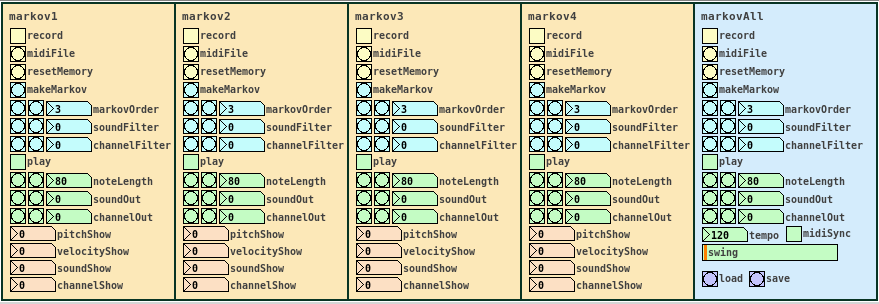
-
Record midi notes or load midi files
Until you reset the memory, each new recording will be added to the memory. The recorded material is seen as a loop, so that the last note is followed by the the first note, for endless play. markovGenerator handles recording midi and loading midi files differently: When you record midi, it will record notes according to the midi clock every sixth midi tick. This is defined in the counter in [pd midiclock]. So that way, breaks are being recorded and the rhythm is preserved. When loading midi files, no breaks are being recorded, the notes are just recorded in order, so the rhythm will be lost. In any case, simultaneous notes will be recorded as chords, so polyphony is preserved. -
Make Markov system
Set markovOrder to specify the length of the Markov chain. The higher the order, the more musical information will be kept, the lower the order, the more random it gets. You can use soundFilter and channelFilter to only use notes of the specified sound or channel. This is especially useful when working with midi files. Note that if there are no notes of the specified sound or channel, the Markov system will be empty and nothing will be played. Set the filters to zero to disable them. If you change the settings for the Markov system, click makeMarkov again for them to take effect. You can make new Markov systems with different settings out of the same recorded material over and over again, even when playing. If you record additional notes, click makeMarkov again to incorporate them into the Markov system. -
Play
While playing, you can change the note length, sound and midi out channel. Set soundOut and channelOut to zero to use the sound and channel information of the original material. Playing starts with the Markov chain of the last recorded notes, so the first note might be played first.
Use the markovAll section on the right to control all Markov channels at once. Here you can also set tempo, swing and midiSync, and you can save the project or load previous projects.
Have fun!
If it does not play, make sure that
- you recorded some notes,
- you hit the makeMarkov button,
- soundFilter and channelFilter are not set to values where there are no notes. Try setting the filters to zero and hit makeMarkov again.
About the Markov system:
You can see the Markov system of each Markov channel in [text define $0markov]. Notes are stored as symbols, where the values are joined by "?". A note might look like 42?69?35?10 (pitch?velocity?sound?channel). Chords are joined by "=". A chord of two notes might look like 40?113?35?10=42?49?35?10. Notes and chords are joined to Markov chains by "-". The velocity values are not included in the chains. Sound and midi channel values are only included, if soundFilter or channelFilter are off, respectively. Markov chains of order three may look like 42?35?10-36?35?10=42?35?10-60?35?2 with filters off and simply like 42-37-40 with both filters active, only using the pitch value.
Requires Pd 0.47.1 with the libraries cyclone, zexy and list-abs.
 posted in patch~
to~ "a settable throw~ that allows more than one receive~"
limitations
- uses dynamic patching (can cause audio glitches).
- while creating new abstractions the connection can be lost and has to be reset manually by clicking the reset bang.
- still sends errors to the console /( anyone have any ideas on how to get rid of these? )
 posted in abstract~
how does [list drip] actually work?
Hi folks,
This is going to be a weird and long post, because I am walking through my thinking as much as I am asking questions. Sorry for the length in advance.
I've recently become fascinated with the many possibilities afforded by the list-abs library, and what strikes me at is that [list-drip] seems to be at the heart of most of them. For those of you who don't know, [list-drip] works by separating (aka "dripping") an incoming list into its individual elements (atoms?). This allows you to do a bunch of operations on these elements before repacking them into a new list. For example, [list-compare] functions like [==] but for lists by checking each list's elements against each other to give out a binary yes or no answer. And of course, [list-drip] is at the core here.
I would like to really figure out the logic behind [list-drip], but the help file (well, really the abstraction itself) is deceptively simple. This is because [list-drip] itself is but an abstraction based on the clever use of [list-split] (which is not an abstraction but an external) and some strange binary math and triggering mechanisms that I don't understand.
Here's the [list-drip] extraction itself:
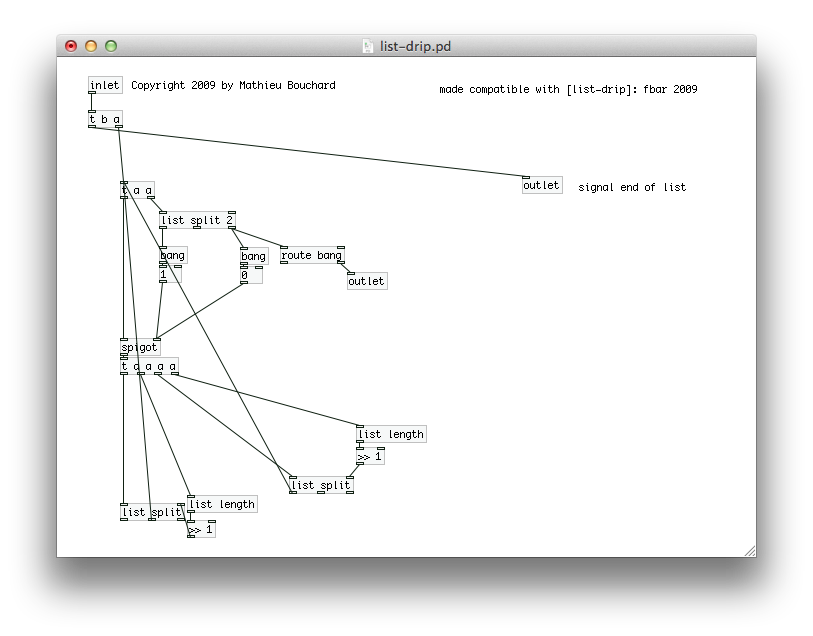
I'll just talk about this abstraction and ask questions along the way.
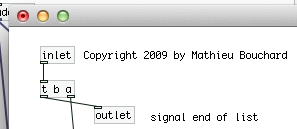
Here's the first part. Pretty simple. [trigger] is passing the entire list on, and then sending a bang. This seems weird but I've heard that pd will take care of all the operations starting at the right outlet of trigger first, so the bang is guaranteed to come after the list has been "dripped."
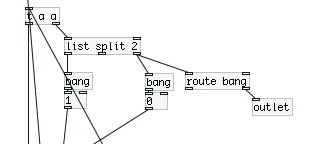
Here's the second part, where we have [list split] doing a binary "less than" operation on the list. "If the list is less than 2 elements long, it gets sent to the outlet and the [spigot] closes, else, open the spigot." This [trigger] then passes a copy of the list onto [spigot] which is either open or closed based on the above result.
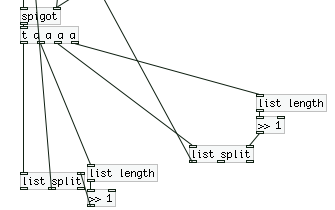
Ok now here is where things start to get crazy. The list is now fed into two identical [list split] mechanisms with some weird math going on, which are also feeding back into the top of the second [trigger].
Let's break this down really quick:
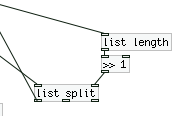
First, we get the length of the list, then we feed it into [>> 1]. With some research in pd and the on the web, I come to the conclusion that we are basically dividing (integer division) by 2. This is setting the point for where [list split] outputs a list with only a certain number (but always half) of elements (using the first outlet). As I said before, this result is being fed back into the second [trigger].
So I think basically what's happening is this:
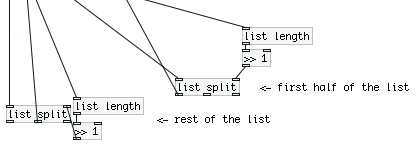
...where the rest of the list is either exactly half the total list length (if it's an even number) or half + 1 (if the total length is an odd number of elements).
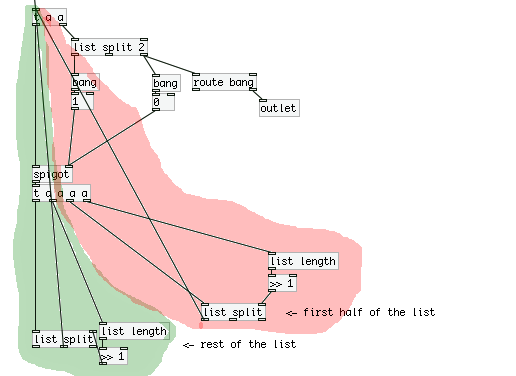
So we have two "loops" going on here, where on operates on the first half of the list (will call this the "red" loop, and the other operates on the second "green loop".
Now in terms of trigger ordering, what is happening here? Are we constantly triggering the red loop until there are no more operations, and then moving on the green loop? And what does this mean in the context of the patch? I'm confused about how [trigger] acts in these situations with many nested loops.
To troubleshoot, I attached a print the outlets of both the red and green **[list split]**s, and sent the list [a b c d 1 2 3 4( to [list drip]. Here's the output from the console:
first half: symbol a
second half: symbol b
first half: list a b
first half: symbol c
second half: symbol d
second half: list c d
first half: list a b c d
first half: 1
second half: 2
first half: 1 2
first half: 3
second half: 4
second half: 3 4
second half: 1 2 3 4
To me this output looks like it was printed backwards. Is there some weird interaction between [trigger] and [print] going on?
Furthermore, how is the output of [list drip] organized so that each element is output in it's sequential order? How does the green loop know to wait for the red loop to finish?
 posted in technical issues
DIY2 - Effects, Sample players, Synths and Sound Synthesis.
@unstable said:
Hey I got a question. in the compression patches I can kind of get my head around the amp factor section. But I don't get any of the att/rel section. Can anyone explain what that sgn~ (signum) is/does ? Secondly I can see the table is effected by the release but not really on the attack. I can hear the attack. The block size is 2. I'm guessing if the default block size is 64 samples then 2 means 128?? Or is it actually 2 ? This outputs a frequency between 0.019 and 57 into a VCF along withe the original amp factor. Any advice ?
ok, so the [amp-factor] stage is giving the amplitude of the signal, scaled according to our threshold and ratio settings. This will either be positive if the amplitude is rising, or negative if it's falling.
next we go into the [att-rel-filtering] section, where we separate the attacks (positive) from the releases (negative)
[block 2] really does mean that the blocksize is only 2 samples. This is so that the [tabsend~] and [tabreceive~] objects deal with packets of two samples at a time,
giving us a sample delay between the input signal and the signal received by [tabreceive~]. If the blocksize were the default of 64, then we would have a 64 sample delay, and our compressor would not work at all well.
sgn~ just gives the sign of the signal, so -1 for negative numbers and 1 for positive ones. note that we are dealing now with just the AMPLITUDE of the signal, which has been scaled in the [amp-factor] section so that rising amplitude (ie, attack) is positive and falling amplitude (release) is negative.
that is then split apart using [max~ 0] with attack sent to the left outlet and release sent to the right outlet. The attack and release stages are both scaled separately (attack scaled by 0.019 to 57, and release by, i think, 0.00019 to 5.7) (and i don't know exactly WHY 57 was chosen, i'm sure the patch would work just as well with 50 or 60)
then we go through the [vcf~]. Although vcf~ is normally used to shape the frequency content of a wavform, in this case, it has a different use. It is smoothing the amplitude signal. So, if we set a fast attack, then the vcf~ will have a cutoff of 57hz, and our compressor will attack within 20ms. if we set a slow attack, then the vcf~ will have a frequency of 0.019hz, and the compressor will take a few seconds to fully attack.
finally, the original signal is multiplied by the compression factor, and sent along its way.
There are some quick mods you can do to this patch, too. A sidechain compressor, essential for any sort of 'french' electro sound, can be made by adding another inlet~ for a second audio signal, and taking the inverse of the compression factor, like this:
[pd att-rel-filtering]
|
[-~ 1]
|
[*~ -1]
and then multiply your second signal by that.
also, it is fun to take the compression factor output to its own [outlet~] and use it as a modulation source for filter cutoffs for synth sounds, etc.
anyway, hope that clears things up a bit?
have fun!
 posted in patch~
Customizing receive through signal
Hi.
I've been searching for a solution for quite a while, but I cannot find a way to solve this in PD...
In Max, it is possible to create a receive without an argument, and then receive has an inlet, where you can pass the name of the variable we wish to receive.
However, I cannot find an equivalent in PD. I've gotten so far, that it is possible, to create in an abstraction (say myab.pd) a
[receive $1-p]
for instance; however, I cannot pass to receive through a _signal_ the parameter I want. That is, the only way I can get the abstraction to receive from 1-p, 2-p etc. is to make each abstraction [myab 1], [myab 2] etc.. I would however like to somehow pass the receives through a changing signal, eg. a timer.
(Basically I would like to avoid creating millions of receives/abstractions if I have to count up to a million...)
Or rephrasing again the question; is it possible to pass to an abstraction a parameter through a signal? (signal->inlet->$1 where $1 is local to the abstraction)
Anyone any ideas? I would be really grateful, I've been searching for this for quite a while now...
Cheers
 posted in technical issues
Play Koassilator Pro from midi keyboard
My goal is to play the notes of the Kaossilator Pro from an external midi keyboard.
The problem is that the Kaossilator Pro (Korg) can receive CC messages ONLY for the PadX - PadY controls. It does not understand midi notes.
So I decided to try to face that problem with puredata (it is my very first patch...)
I want to receive the midi in notes from my keyboard and convert them to the corresponding CC values and send them to the kaos pro.
In my settings, the kaos receives pad X values on CC#26. So, in order to play the notes, I have to send the following values:
1st note: 0, 2nd note: 10, 3rd note: 19, 4th note: 27, 36, 44, 53, 61, 70, 78, 87, 95, 104, 112 and 121, for the last note (with a 2 octaves scheme set on the kaos).
If I set the kaos in C major, the notes would be:
C4: 0, D4: 10, E4: 19, F4: 27, G4: 36, A4: 44, B4: 53,
C5: 61, D5: 70, E5: 78, F5: 87, G5: 95, A5: 104, B5: 112
C6: 121
The algorithm (in C++ style) is easy:
switch(midi note received from keyboard on Channel 1)
{
case 60: // Note 1 = C octave4 (in C major)
send value 0 to CC#26 on Channel 1;
break;
case 62: // Note 2 = D octave4 (in C major)
send value 10 to CC#26 on Channel 1;
break;
case 64: // Note 3 = E octave4 (in C major)
send value 19 to CC#26 on Channel 1;
break;
case 65: // Note 4 = F octave4 (in C major)
send value 27 to CC#26 on Channel 1;
break;
case 67: // Note 5 = G octave4 (in C major)
send value 36 to CC#26 on Channel 1;
break;
[...]
case 84: // Note 15 = C octave 6 (in C major)
send value 121 to CC#26 on Channel 1;
break;
default:
do nothing;
}
send midi note velocity to CC#27 on channel 1;
The problem I face is with the velocity.
For example, if I play one note on the keyboard, the patch sends the correct value to CC26 and also sends the velocity to CC27. If I release, velocity is set to zero (on CC27) and the sounds stops. That's OK.
BUT if I play one note(let's say a C), hold it, play another one (let's say D), then release C (and keep D on), the release of C will send a zero velocity signal on CC27 and sound will stop, even if D is still pressed... as a newbie with puredata, I don't really know how to face that issue. Does anyone have a solution for that?
use a counter maybe?
Furthermore, I have absolutely no idea whether there is a much easier way to implement a switch/case statement with puredata or if what I did is OK. The patch is attached.
Thanks in advance!
 posted in technical issues
BECAUSE you guys are MIDI experts, you could well help on this...
Dear Anyone who understands virtual MIDI circuitry
I'm a disabled wannabe composer who has to use a notation package and mouse, because I can't physically play a keyboard. I use Quick Score Elite Level 2 - it doesn't have its own forum - and I'm having one HUGE problem with it that's stopping me from mixing - literally! I can see it IS possible to do what I want with it, I just can't get my outputs and virtual circuitry right.
I've got 2 main multi-sound plug-ins I use with QSE. Sampletank 2.5 with Miroslav Orchestra and Proteus VX. Now if I choose a bunch of sounds from one of them, each sound comes up on its own little stave and slider, complete with places to insert plug-in effects (like EQ and stuff.) So far, so pretty.
So you've got - say - 5 sounds. Each one is on its own stave, so any notes you put on that stave get played by that sound. The staves have controllers so you can control the individual sound's velocity/volume/pan/aftertouch etc. They all work fine. There are also a bunch of spare controller numbers. The documentation with QSE doesn't really go into how you use those. It's a great program but its customer relations need sorting - no forum, Canadian guys who wrote it very rarely answer E-mails in a meaningful way, hence me having to ask this here.
Except the sliders don't DO anything! The only one that does anything is the one the main synth. is on. That's the only one that takes any notice of the effects you use. Which means you're putting the SAME effect on the WHOLE SYNTH, not just on one instrument sound you've chosen from it. Yet the slider the main synth is on looks exactly the same as all the other sliders. The other sliders just slide up and down without changing the output sounds in any way. Neither do any effects plugins you put on the individual sliders change any of the sounds in any way. The only time they work is if you put them on the main slider that the whole synth. is sitting on - and then, of course, the effect's applied to ALL the sounds coming out of that synth, not just the single sound you want to alter.
I DO understand that MIDI isn't sounds, it's instructions to make sounds, but if the slider the whole synth is on works, how do you route the instructions to the other sliders so they accept them, too?
Anyone got any idea WHY the sounds aren't obeying the sliders they're sitting on? Oddly enough, single-shot plug-ins DO obey the sliders perfectly. It's just the multi-sound VSTs who's sounds don't individually want to play ball.
Now when you select a VSTi, you get 2 choices - assign to a track or use All Channels. If you assign it to a track, of course only instructions routed to that track will be picked up by the VSTi. BUT - they only go to the one instrument on that VST channel. So you can then apply effects happily to the sound on Channel One. I can't work out how to route the effects for the instrument on Channel 2 to Channel 2 in the VSTi, and so on. Someone told me on another forum that because I've got everything on All Channels, the effects signals are cancelling eachother out, I can't find out anything about this at the moment.
I know, theoretically, if I had one instance of the whole synth and just used one instrument from each instance, that would work. It does. Thing is, with Sampletank I got Miroslav Orchestra and you can't load PART of Miroslav. It's all or nothing. So if I wanted 12 instruments that way, I'd have to have 12 copies of Miroslav in memory and you just don't get enough memory in a 32 bit PC for that.
To round up. What I'm trying to do is set things up so I can send separate effects - EQ etc - to separate virtual instruments from ONE instance of a multi-sound sampler (Proteus VX or Sampletank.) I know it must be possible because the main synth takes the effects OK, it's just routing them to the individual sounds that's thrown me. I know you get one-shot sound VSTi's, but - no offence to any creators here - the sounds usually aint that good from them. Besides, all my best sounds are in Miroslav/Proteus VX and I just wanted to be able to create/mix pieces using those.
I'm a REAL NOOOB with all this so if anyone answers - keep it simple. Please! If anyone needs more info to answer this, just ask me what info you need and I'll look it up on the program.
Yours respectfully
ulrichburke
 posted in Off topic
Visualizing the connection-order!!..
Hey,
I want to build a little "patch-analyser" (in pd since I don't know about "deeper" programming in C and so on). Mainly because I dislike the [trigger]'s & I just want to avoid using them.
It never ever happend that the order of objects being computed suddenly changed without triggers, but triggers slow things down alot. <- Just measure the "[realtime]" of banging e.g. "[until]" 100000 with and without [trigger]'s...
So as far as I can see there "technically" is no need for those triggers.
The order is saved within the save-file!
They just help visualizing the processing-structure! Some people consider using triggers as rather clean which may be true for looking at the patch but not for processing it.
..in short: without trigger's I build patches from right to left (because right inlets are the passive ones most of the time) so that most right objects (the ones you placed first) are computed at first!
It's different with "audio"-data (the vectors). There an object's output only is computed after all inlets have received data... (this makes sense sice each element of one vector can "interact" with each element of another vector & they are connected to the sample-rate)
Anyways, not using triggers but trying to keep a clear visual structure may "uglify" the appearance of the patch sometimes, or just doesn't work (more than one active inlet and so on..)
...Sooo the easiest way to keep the information about the order visualized is "on demand".
Imagine this: You select an object (msg etc.) and its outgoing (and incomming) connections get numbers written next to them according to the order they are processed.
This can be programed in pd itself since pd is capable of creating object's via text (msg) & saves the processing-order with the save-file (hopefully even before)
Next step would be beeing able to change the processing-order just by changing those numbers (helps alot with multiple connections & even [trigger]'s are not comfortable in this situation..) ... but that's far future...
What do you think of this?!
-Or an switchable extra graphical-layer containing those numbers for all objects (at once)... I gonna upload a patch that demonstrates this soon...
Now here comes the important part (still reading?!  ):
):
Does anyone know if and where data (e.g. a pre-savefile) is stored as long as it's not saved???!!! I ask because I managed to analyse the text of save-files somehow, just by reading out the file with some textread-objects in pd... but I don't know where to find data of unsaved patches. (and it's a little annoying to save your patch every time just to analyse the connection-order)
Aaand is there a method to identify a selected object?? (For now I use a unique message that is sent to the object I want to "select" and then trace that connection in the save-file)
Actually I found something like this (just have to look where that was..), but actually it didn't work since it was made for earlier versions and it had to change some pd-dll's (yep -Windows..).
As usual don't hesitate to correct me if I'm wrong.
And please respond even if you just like or dislike this idea...
Bye Flipp
 posted in technical issues
Arrays of symbols, lists, messages
mpf... can you - briefly - explain, how?
Or, better maybe, I explain, what I want to do.
I want to "parse" incoming MIDI messages.
for example: a midi controller message (ctlin) of #99 (NRPN# MSB) on channel#15, followed by a cc#98 (NRPN# LSB) on channel#15, followed by a cc#06 (value MSB) on channel#15, followed by cc#38 (value LSB) should send a message "NRPN#(msb*128+lsb) value (valueMSB*128+LSB).
Thus, I need to store up to 4 ctlin messages and compare their cc# for the right order (99, 98, 6, 38) and wether they are send on the same channel.
I did this using [ctlin]-[pack f f f]->[list-prepend]->[list-split]->feedback to list-prepend, so an incoming ctlin-messages is stored in the first place of a "buffer" of 4 ctlin-messages, whereas the previous ctlin-messages are shifted right out of the buffer.
problem is: the ctlin-messages could be send with different channels, so that a "NRPN-message" (cc#99,cc#98,cc#6,cc#38) could be interrupted by another cc# on another channel.
So, I need to have a buffer for ctlin-messages of each MIDI channel, and not only one buffer for all incoming ctlin-messages.
Now, if I could store lists per channel in a table of lists...
 posted in technical issues