
Multiple MIDI In with Bitwig as MIDI Source not Working
The IAC bus shouldn't be the problem here. To explain why, it's helpful to understand what the status byte is.
In a MIDI message, thestatus byte differentiates the various message types, with a leading 1 to indicate that it's a status byte, a 3-bit code for the message type and, for messages that apply to channels, a 4-bit channel code, packed together into one byte.
Binary 1 001 zzzz = hexadecimal 0x9z = note on
Binary 1 000 xxxx = hex 0x8z = note off
Etc (https://www.recordingblogs.com/wiki/status-byte-of-a-midi-message)
Note on messages on channel 1 should be encoded as 0x90 (decimal 144), on channel 2 as 0x91 (145), up to 0x9F (159) for channel 16.
So the MIDI channel information that pd receives is encoded into the message contents. The IAC bus, of course, shouldn't modify message contents! So the IAC bus is vanishingly unlikely as the cause of the problem.
Bitwig is responsible for encoding its outgoing MIDI messages, so if a wrong channel is being encoded, that's where it's happening. I'd suggest to doublecheck the outgoing MIDI channel assignment in the MIDI tracks in Bitwig. Also, in some DAWs, MIDI notes can have their own MIDI channel data; the track-level MIDI channel setting might override the note-level setting, or vice versa. You'd have to check documentation on that.
hjh
 posted in technical issues
Multiple MIDI In with Bitwig as MIDI Source not Working
I can get one MIDI channel out from Bitwig to work. And I know it works for the one as I just ordered the notes from C3 (MIDI note 60) to G3 (MIDI note 67). I can change the notes and have it reflected in the notes received from the patch on channel 1. But if I add more than one MIDI channel, it always routes it to the same channel. I cannot change the IAC Driver to change MIDI channels, even if I add another bus. I even try changing the MIDI channel output on the track in Bitwig. If it sends it out, it all gets sent to the channel 1 Notein.
 posted in technical issues
Audio rate flipflop/toggle
I'm trying to extract level crossings between 2 signals, [...] and use that to switch signals.
the patch i posted above does this. However, it doesn't generate a trigger (one sample impulses?) from each crossing...
I do think it's very similar to what [max~ ] is doing, unless I'm misunderstanding?
mh i don't know. It depends on what you do with [max~], which is not clear to me.
For my purposes, I'll need a stream of triggers to gate a trigger (vs gate) stream that I'm going to gate with another process so that trigger signals only pass when the other process opens to gate the level crossing triggers. The problem is, then I need a flipflop/toggle...
This works, for reference:
...
looks like you found a solution(?) I'm wondering if you even need to generate/process a stream of audio rate triggers to achieve your goals. I know supercollider uses audio rate triggers, but in pd it is a bit tricky to work with this concept.
 posted in technical issues
PurrData on new Mac M4 Max : ~adc not delivering audio!
Previously been using an older MacBook Pro with OSX 10.10, and PurrData, all good.
New MacBook Pro M4 Max, and PurrData v2.19.3 from here... (2.20 was reported as damaged by the OS)...
https://github.com/agraef/purr-data/releases
PurrData v2.19.3 and v2.19.2 work fine, but there's no audio coming in from ~adc.
Opened a DAW, Reaper, set the input channels correctly, and there's audio coming in - to my new MacBook Po M4 Max. So the audio interface - a MOTU, is fine, and set up correctly ...it's just PurrData - there's nothing coming in from ~adc (I tried hooking up all input channels ~adc 1 2 3 4 5 6 7 8, and still nothing). Otherwise midi flows back and forth ok, and audio is sent out to the audio interface (via ~dac), but ~adc is dead ...and just to reiterate Reaper hears the input on those channels fine - but PurrData doesn't.
The audio properties in PurrData are set up fine, the audio interface selected, and multiple channels - so all good there (and I've using PD for many many years).
Anyone come across this - what to do?
 posted in technical issues
[vline~] may not start at block boundaries
@porres Thanks for your interest! This is an envelope generator that is trying to copy and improve on an effect I used in a piece way back in the '90s. It was originally done with a Valley People Gatex, which I'm about to give away to the friend who turned me on to them. Anyway, if I set the Gatex to 0.2s release time, a 60dB range, and then ride the threshold to constantly trigger on an external key (for which I usually used speech so it would be fast and unpredictable), I'd get a pleasing chattering sound with a consistent soft click on the attack. Even though the release is so short, the triggers are coming awfully fast so the gate is retriggering before it has had a chance to fully close.
I made some recordings of the Gatex and tried to measure what it was doing, but as these things often go, I found that the Pd simulation sounded more true to the original with parameters that didn't quite match what I had measured. The release curve I'm using is much steeper at the beginning, release time much longer, and the attack curve is longer and logarithmic. I kept the 20ms sustain time as is. I found that if I retriggered the same [vline~] before it had had a chance to fully release, it would either pop too much (if I made it jump to 0 first), or had inconsistent attacks (if the new attack didn't start from 0), so that's why there's two of them computing the ramps and hold. I'm outputting whichever one is higher at any given moment. When a new trigger comes in, I look to see which EG is lower (and thus not seen on the output) and route the new trigger to it. It first jumps to 0, but you don't hear it click because I'm outputting the other one at that instant.
To control the curvature of the attack and release, I use [vline~] again to synchronize the values used to shape the attack and release via [pow~]. Finally, I noticed that the Gatex had a unpredictable amplitude variation, probably based on the key signal at the moment the trigger was detected. That's what the randomized volume stuff is for, although the Gatex's actual variation is only 3 dB, if that. I'm not trying to copy their detection algorithm because for my music there's usually been no correlation between the main channel and the side chain, so I just use randomized [delay]s to trigger it, which is how my troubles began. Without the intervening [vline~], the unsynchronized random volume part added unpredictable discontinuities, especially when the trigger density was high.
Here's some sound: jittery gate demo.mp3
 posted in technical issues
Puredata, Jack and multi channel audio (only 2 channels showing, not 4)
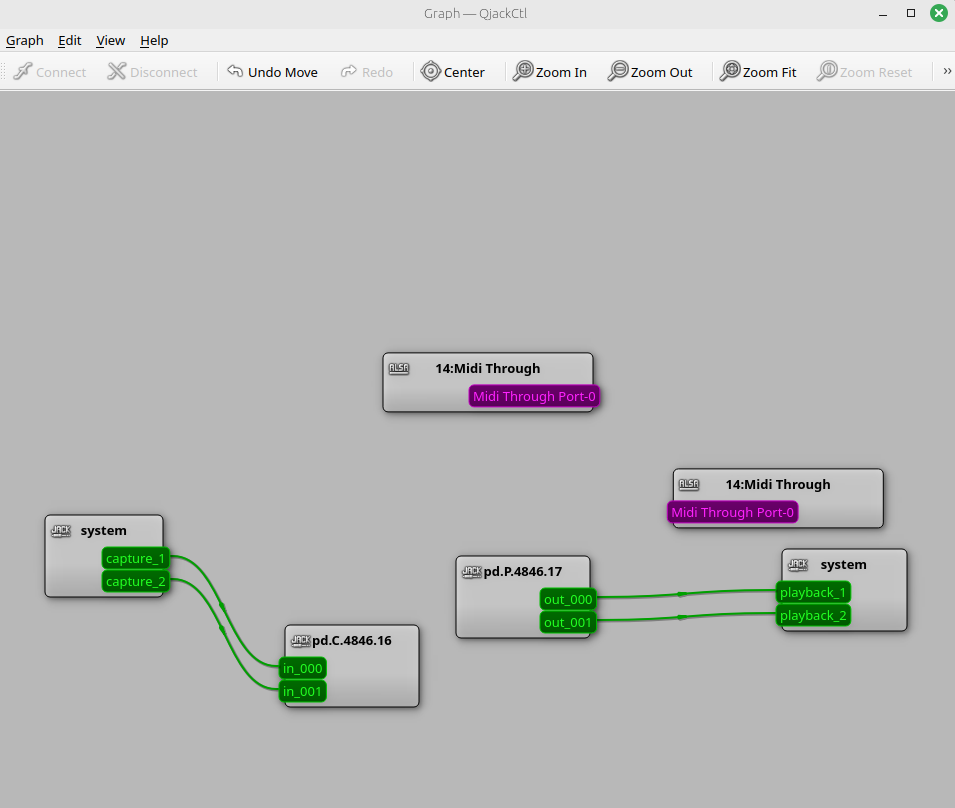
I am trying to get the four channels available from puredata into the Jack audio server. I have selected 4 channels in the audio output settings.
For some reason, Jack only appears with 2. Anyone know why this is the case and how I might go about getting the other two channels appear? I am trying to achieve this so I can send audio from puredata to different speakers in a bluetooth syste (two seperate bluetooth modules, with a stereo channels).
The same thing happens with pipewire- only two channels are available in the virtual audio stream. Ive also attached photos for both of these audio servers. Help would be greatly appreciated.
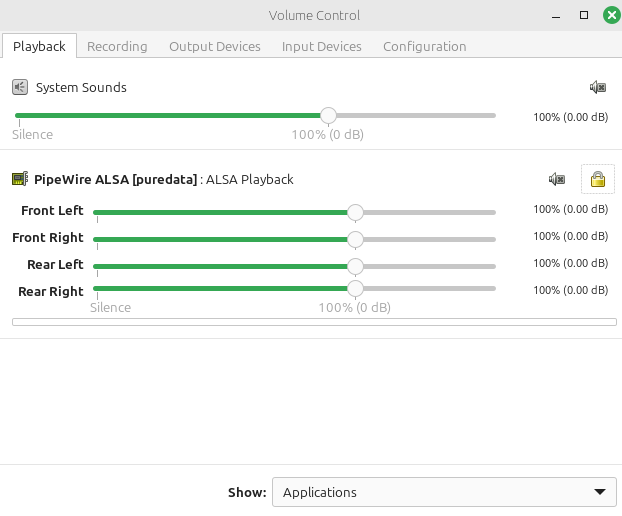
The channels DO appear in pulseaudio however, and I have included pictures of this
Thanks for your help. Below photos demonstrating some of the settings. I am running linux mint
pd media settings
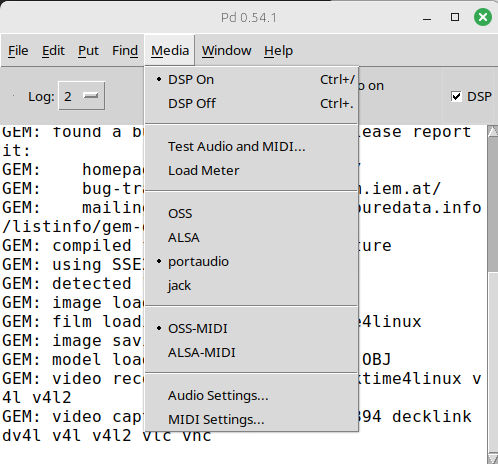
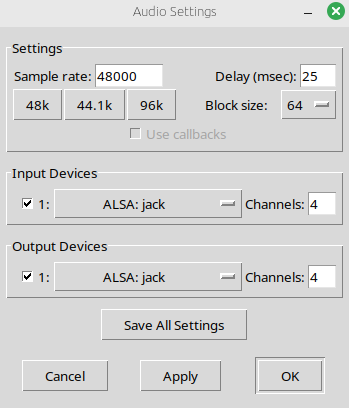
the four channels setup to go to ALSA: jack
there are only two channels appearing in Jack from puredata, not four
however, the channels do appear in pulseaudio volume control
but also does not appear in pipewire
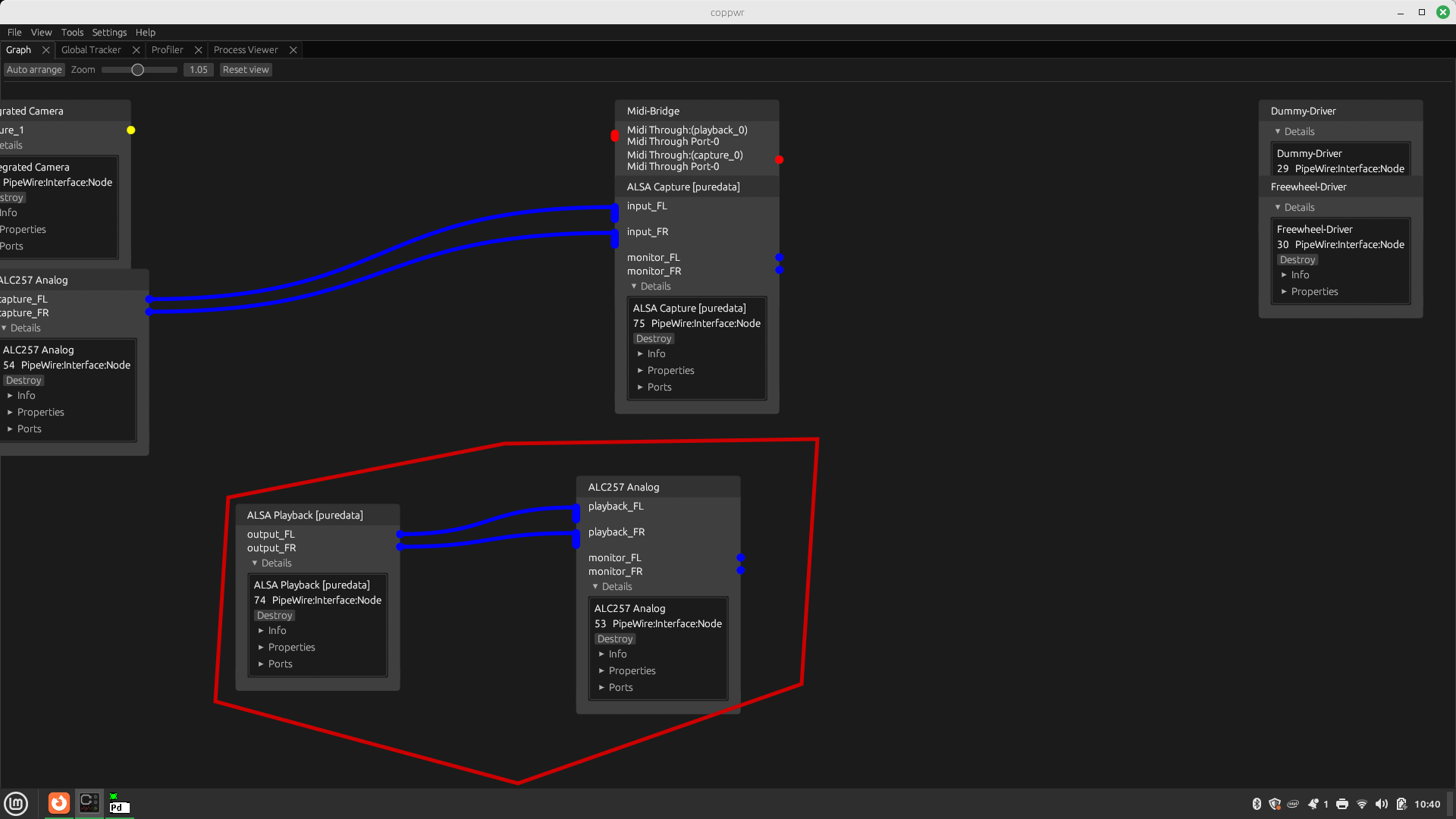
 posted in technical issues
how can I track a specific sequence of numbers output in a number box by a random object?
another question now... Once this sequence is detected, I want to play a specific tonal sequence (so in my patch it comes down to a specific series of numbers written one after the other in one specific number box).
I tried to use the trigger object, but the issue there is that trigger outputs it instantly in human-perceived time. Whereas what I need is each number being messaged into the number box following a specific bpm which I get constant triggers of from somewhere else in my patch (it also is not possible to divert from it by using a specific metro object as my bpm subpatch has a constant evolution with an LFO varying with another LFO to have a constant organic BPM change).
Basically I wonder if there is a way to use something such as a trigger object that orders the messages to send, but does it following the trigger it receives and not all of them from one trigger.
 posted in technical issues
Distance sensor in Bela Board
@lacuna said:
For me it is hard to know because information is missing:
This part I don't understand:and also to trigger this sample as soon as there is something echoing the trigger at a distance inferior of 15cm using a Threshold~ object
but this works already, doesn't it?
In which condition you want the sample to stop?
What kind of sensor?
What is attached to pins 11 and 12?
What data does [adc~ 12] output when moving hand?
Is [print Distance (cm) : ] about correct?
Which Bela tutorial are you referring to?[rzero~ 1] does some integration, I think. [dac~ 11] outputs ultrasonics? [line~] till 1000 and [adc~ 12] going into [samphold~] measures the time untill the reflected ultrasound is detected or sth like that?
Generally speaking, when developing something it is important to understand what is going on instead of blind copy&paste. And when asking, to provide all information you have to make it easy / possible to answer.
Hello, thanks for taking the time to answer my question, I really appreciate it; and sorry for having missed some important information.
This patch works as it will start playback when I put my hand on the sensor, but it won't stop playback when I remove my hand from the sensor range, and I'm still figuring out how to work this out. When I remove my hand the distance keeps going up, and thus the volume, until it reaches 25cm which is the limit I've put with [min25]. Your fade out patch makes sense but I still need something to bang it when I remove the hand from the sensor, putting a Threshold at 24cm for example kind of works, but it's not completely natural; imagine you're at 5cm and remove your hand, so the volume goes up to 24cm and then stops playback...
The sensor is the HC-SR04, pin 11 send triggers to ultrasonics every 60ms, echo receives feedback and sends it to pin 12, which with a time equation calculates distance. What [adc~ 12] outputs is a good question, I try to figure it out myself too, but it doesn't work with normal [print] command, not till it reaches [snapshot~] so then it outputs the distance in cm again. The distance is quite accurate, I think the real distance is a bit longer than the printed in console. The Bela tutorials are the official ones at https://learn.bela.io/tutorials/pure-data/sensors/distance-sensor/
What I've done at the moment is sample holding and snapshotting the distance so it stays in place, so if I want to "stop" the sample I just bring the distance near 0 with my hand very close bringing the volume near 0 and nearly unnoticeable, but the playback starts from the beginning with a [loadbang] is just that at any distance you'll put your hand the volume will go up. This works well in this case as the samples are standing notes, but it would be cooler if it starts from the beginning. I know there is some way to use this sensor as a trigger but I can't find any information.
 posted in I/O hardware diy
pure data in multicore
@Spyros said:
- In the abstraction I replaced all the inlets to [receive] and [send] from the main, the [inlet~]s to [receive~] and [send~] from the main and the [outlet~] to [dac~]
Almost right. You convert the inlets to [receive] but in main you don't [send] to them, you send a message to the left-most inlet of [pd~] prefixed with the name of the receive. So if you originally had an inlet that accepted the message [go bears( and converted that to a [receive cheers], you would send the message [cheers go bears( to the left-most inlet of [pd~].
Similarly, you can't [send~] in main to a [receive~] in the subprocess patch. In the subprocess patch you replace all [inlet~] with [adc~] and in main you configure [pd~] ninsig to match the number of adc~ channels. Those channels become inlet~s on the [pd~] object itself.
- in the main I created [pd~] and I am sending a message <pd~ start pd~-button.pd> calling the abstraction button.pd. But I get an error: "pd~-button.pd: can't open" (in a separate instance of Pd). The weird thing is that when I go to help of [pd~] and click on the message <pd~ start pd~-subprocess.pd> I don't get the error when I copy and past the help in my main.pd I get an error: "pd~-subprocess.pd: can't open".
The message should contain the name of your abstraction, "button.pd" not "pd~-button.pd". In the help example, the name of the subprocess patch has that "pd~-" prefix, but that's just how they chose to name it.
- In the button abstraction I have more abstractions. Will they run in the new separate instance of Pd as well?
Yes, provided the Pd subprocess can find them. That's what failed in 2)--you copied the main patch in help but didn't move the subprocess patch to your local directory.
Here's another example you can study: two subprocesses.zip
posted in technical issues
Snake~ uses
I don't understand why [send~] needs the channel count specified while other audio objects just "know"... that seems strange.
The reason is that a matching [receive~] might be scheduled before the [send~]. At this point, the [send~]'s "dsp" method wouldn't have been called yet, but [receive~] already needs to know the channel count. Note that you can still change the channel count dynamically with the "channels" message.
As a side note: with [throw~] and [catch~] the relationship is reversed: [throw~] does not require a channel count, but [catch~] does.
There are still bugs in multichannel though.
What about reporting them?
 posted in technical issues