
[makenote] duration: Can use tempo?
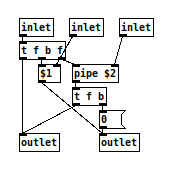
@ddw_music This quick and untested sketch is a recreation of [makenote] using [pipe]. It should work the same as [makenote], but i don*t know if the behavior is different when the duration is changed and notes are still in the pipe.
So with this it could maybe be possible to add the time conversion you want and have the [makenote] you need. Another object worth looking at might be [text sequence], which has some kind of scheduler build in. 
 posted in technical issues
[makenote] duration: Can use tempo?
My question is simpler than that.
Does the duration inlet of [makenote] only accept milliseconds, or does it do tempo conversion in the same way that [delay] does?
This has nothing to do with [delay] -> [makenote].
hjh
 posted in technical issues
[text sequence] access wait times in 'auto' mode?
@whale-av Ah, right -- I didn't explain clearly. So maybe it's time to "begin at the beginning."
Where I'm coming from: In SuperCollider, it's easy to express the idea of an event now, with a duration of 100 ms (time until the next event), with the gate open for the first 40% of that time:
(midinote: 60, dur: 0.1, legato: 0.4)
... producing control messages (0.04 is indeed 40% of 0.1 sec):
[ 0.0, [ 9, default, 1000, 0, 1, out, 0, freq, 261.6255653006, amp, 0.1, pan, 0.0 ] ]
[ 0.04, [ 15, 1000, gate, 0 ] ]
That is, an event is conceived as a span of time, with the action occurring at the beginning of the time span.
By contrast:
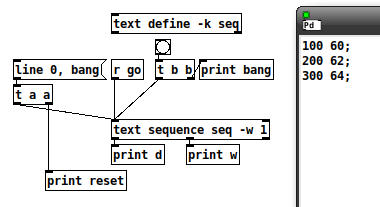
reset: line 0
reset: bang
w: 100
What is the data point that should occur at the beginning of this 100 ms span?
OK, never mind, continuing...
bang: bang
d: 60
w: 200
Ohhhh... it's really 200 ms for midinote 60. But you didn't know that at the time the data came out of the left outlet. Normally we assume right to left, but at the moment of requesting the next data from the sequencer, it's actually left to right.
bang: bang
d: 62
w: 300
bang: bang
d: 64
And... (the really unfortunate flaw in this design) -- how long is 64's time span? You... don't know. It's undefined. (You can add a duration without a data value at the end -- and I'll do that for the rest of the examples -- but... I'm going to have to explain this to students in a couple of days... if there are any clever ones in the lot, they will ask "Why is this note's duration on the next line? Why do we need an extra line?")
Let's try packing them:
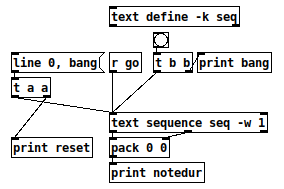
reset: line 0
reset: bang
bang: bang
notedur: 60 100
bang: bang
notedur: 62 200
bang: bang
notedur: 64 300
bang: bang
notedur: 64 400  (this is with "400;" at the end of the seq)
bang: bang
Now, that "looks" like what I said I wanted -- but it's misleading, because the actual amount of time between 60 100 and 62 200 is 200 ms. The notes will be too short.
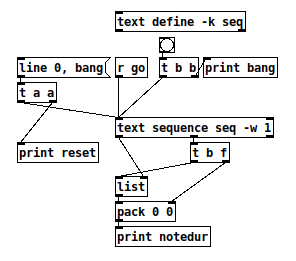
reset: line 0
reset: bang
notedur: 64 100  -- "64" is leftover data
bang: bang
notedur: 60 200  -- OK, matches sound
bang: bang
notedur: 62 300  -- OK
bang: bang
notedur: 64 400  -- OK
bang: bang
So the last version is closer -- just needs a little logic to suppress the first output (which I did in the abstraction).
Then, to run it as a sequence, it just needs [t b f f] coming from the wait outlet, and one of the f's goes to [delay] --> [s go]. So the completed 40% patch (minus first-row suppression) looks like this:
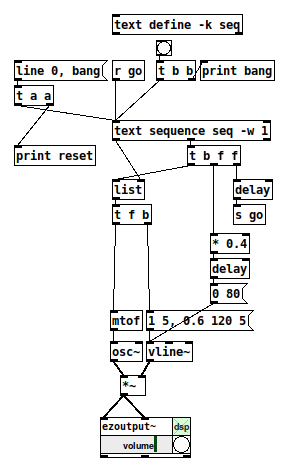
I guess part of my point is that it took me almost two hours to work this out yesterday... but sequencing is a basic function of any music environment... isn't there some way to make it simpler to handle the very common musical conception of a note with a (subsequent) duration? (Pd already has exactly that conception -- [makenote] -- so, why is the sequencer at odds with [makenote]?)
hjh
posted in technical issues
[text sequence] access wait times in 'auto' mode?
Hm, what's the best way to handle this?
Bang --> [text sequence] outputs a data point (left outlet) and then the wait time until the next event (middle outlet).
Now let's say I want to play this note (the most recent data point) for 50% of the wait time until the next event, let's say, using [makenote]. So I need to multiply the wait time by half and put it into [makenote]'s right inlet first, before passing the note number into the left inlet. But the wait time comes out of the middle outlet second.
So I suppose it needs to be data --> list box cold inlet, then the wait time --> [t b f] to push out the wait time first and then bang the data list? That'll work assuming it's always alternating wait, data, wait, data (and the first output value will be invalid, have to suppress it).
Or is there another trick?
A concrete problem here is that you don't know how long the last event would be. I was prepared to accept pd's design here, but I think e.g. SuperCollider's concept of an event, binding up arbitrary data with a time delta until the next event, is better (whereas [text sequence] binds the data to a wait time preceding the data).
hjh
posted in technical issues
Convert a reed organ to be MIDI controlled
@Pemega Sounds reasonable. But if you were to drive the solenoid both ways... on and off..... and add some mechanical hysteresis.... then you can bypass the problem completely. There was a patent in 1972 http://www.google.com/patents/US3683239 for this.
If they do not exist then all you would need to do (I know, it is never "that" easy) is to glue a small permanent magnet to the "on".... "down" side of the solenoid.
But they do exist...... try Googling "latching solenoid".......
If 1Kgf holding force and 10mm stroke will suffice........ https://www.ebay.co.uk/itm/BLP-Latching-Pull-Action-DC-D-Frame-Solenoid-10mm-stroke-12W-12Vdc-A1-3002500798/322919540231?hash=item4b2f812607:g:GLoAAOSwTf9ZWmss
The magnet needs to be powerful enough to "hold" the key return spring, and you might
need a sound damping buffer at the "stop"...... so a little more powerful again.
Repeat attempts at demagnetisation by the solenoid will mean that you need a permanent (nickel?) magnet..... something like what is used in a loudspeaker......
David
 posted in technical issues
IAC Driver
Ok I took a cursory look at the patch, and the first thing I notice is that you appear to be connecting your makenote objects to the raw midiout objects. The first and second outputs from makenote (note number, note velocity) are supposed to be connected to the first and second inputs (respectively) of the noteout object. The current arrangement of your patch will most likely not send anything (at least, not anything an external midi device or application will recognize). Check the help files for the proper use of the midi objects.
 posted in I/O hardware diy
How to control when MIDI notes are sent?
Hi.
I am working on the project where I need to transpose a sound file to MIDI and adc~ input(piezo) to detect a hit and from that play the currently active note. Like you have a MIDI track running silently and you make the note sound when you hit a trigger.
I have been successful with the transposing part using fiddle~ and could make a trigger with bonk~ but I am not able to find a way to switch the notes on/off. So far the notes are played as soon they are arriving from makenote~.
So how to put a switch between makenote~ and noteout~?
If I could get an advise for detecting piezo peacks as well. Piezo is a bit tricky device. It rings like a bell when hit and some kind of accumulative value to make a trigger would be ideal.
 posted in technical issues
\[makenote\] bug?
ok, so i downloaded MIDI monitor, and got it going fine.
[makenote] has 2 outlets.
[noteout] has 3 inlets.
if i connect it correctly, ie the left outlet of [makenote] to the left inlet of [makenote] and then the right outlet of [makenote] to the middle inlet of [noteout], it works fine as it should.
i can force two noteoffs by connecting it the wrong way. if i connect the right outlet of [makenote] to the 3rd inlet of the [noteout] it gives me 2 note off's. is that what you're doing?
 posted in technical issues
Fiddle~ - signal to midi - better way to generate midi note durations?
Hi Maelstorm,
Thank you for the idea....but excuse my ignorance, how do you send a note-off message to [makenote]?
note-ons seem to be generated automatically when there is a midi note number, velocity, and duration, thus the three ports on top of [makenote]. Would I just be making note-ons and note-offs ( and velocities) and not worry about generating specific durations?
Thank you for your future help!
dkeller
 posted in technical issues
Howto create f , f message
Hi.
I need a simple piece of patch that receives a midi number, add another value to it and both values are sent to [makenote].
It is a way to build a simple ptich shifter. What can I do?
(I tried [pack f f] but is necessary a comma between them to [makenote] play them as a bichord.)
Regards,
a r s
 posted in technical issues