
Notein-noteout
@atux The keyboard sends (note velocity) when you press the key, and (note 0) when you lift the key.
So [makenote] sends [note 60 1000] when you press and [note 60 1000] when you lift the key because you have only connected the "note" outlet of [notein] to [makenote] and so you have dropped the velocity data.
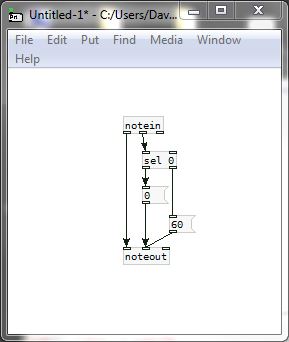
To have the note play continuously while the key is pressed you need to send (note velocity) when you press and (note 0) when you lift.... directly to [noteout]
You cannot use [makenote] because it sets a duration.
If you always want a velocity of 60 then I think you need to do this...
David.
 posted in technical issues
Notein-noteout
Hi, I'm trying to make a patch: MIDI keyboard => puredata => FluidSynth.
(FluidSynth is a real-time software synthesizer, I use it as output with the "Qsynth" GUI interface.)
I use puredata on Linux.
These are the connections in Jack:
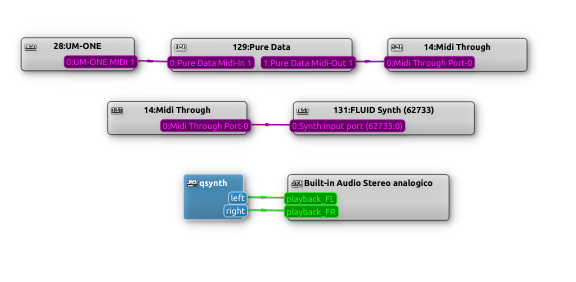
This is the patch:
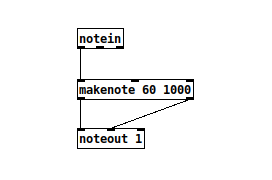
Playing my MIDI keyboard, I hear the sounds correctly.
But there are two things I need to understand:
-
Why does it also sound at the instant I lift the key?
-
In [makenote] I set a duration of 1000: how can I make the sound last for as long as I hold down the keyboard key?
Thank you,
a.
 posted in technical issues
OSChook error. oscparse: unknown tag 'h' (104)
@patricio.tics You probably need to ask the app developer.
I have used this one in the past without issues...... https://apkcombo.com/kontrolleur/processing.test.kontrolleur/
... but it was a while ago so.....?
Or you could try using the MrPeach library instead of the vanilla osc objects..... it is generally more user friendly..
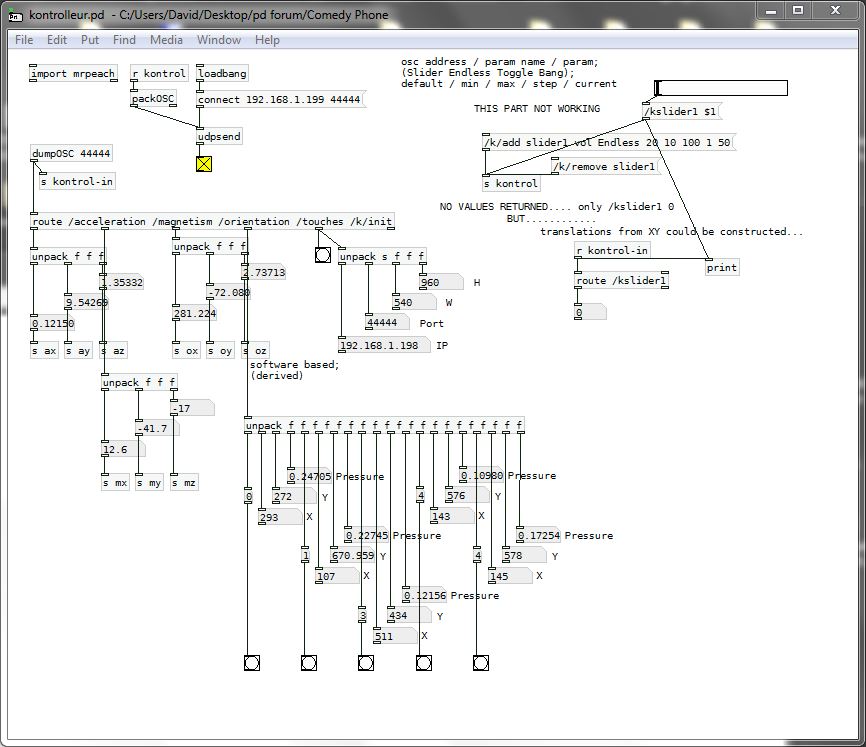
Here is a patch for routing the kontrolleur app data using MrPeach...... which could be useful anyway with [oscparse]....... kontrolleur.zip
5-point touch
Acceleration
Magnetism
Orientation
David.
posted in technical issues
Best method to get velcity paieed with note ( midi)
@gentleclockdivider Unless there is a bug in purr data that is not possible (looking of course only at a screenshot).
To be double double sure.... you can pass the note and velocity into [makenote] as a list (see the help file)... so for example...
[spigot]
|
[36 68(
|
[makenote]
David.
posted in technical issues
semicolon in subpatch name?
@oid  ...then I wonder if you would regard the tempo message to be documented for [makenote]? https://forum.pdpatchrepo.info/topic/13062/makenote-duration-can-use-tempo
 posted in technical issues
Midi out problem
@Dog-Voodoo That is strange because the midi test is working.
You will need to click the 100 and 1000 messages before you start sending in notes or they will all be velocity 0 and duration 0.
Otherwise if the notes will always be the same duration and velocity then you could use one of these......
The example on the right is better.
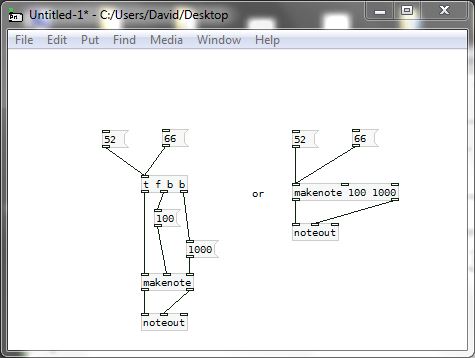
Or you can send messages like [52 100 1000( or [66 127 2000( into [makenote] to get different velocity and duration.
David.
posted in technical issues
MIDI Chord sequencer
Another possible choice is to use [makenote] instead of [pipe], although 1 millisecond needed to be added to the bang delay.
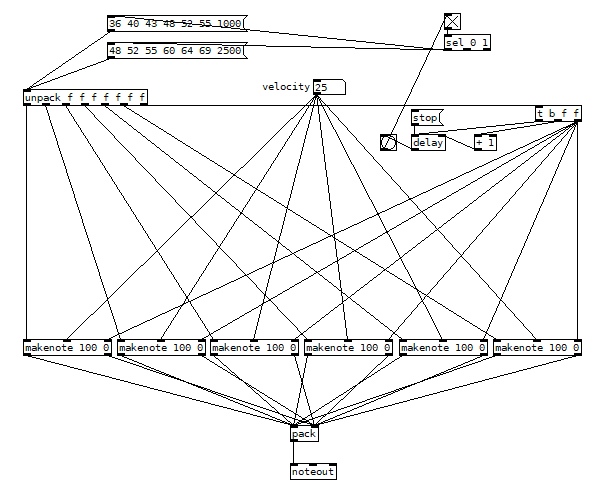 chord-loop.pd
 posted in technical issues
How to make the outlet port "hot area" a bit larger?
@ddw_music said:
Does anyone know offhand where to hack the hot zone size, so that maybe one does not have to have superhuman precision?
searching sources for
mouse
I found in https://github.com/pure-data/pure-data/blob/20334410c20948f14f5c1d8ae5ed992717b83291/tcl/pd-gui.tcl
# mouse cursors for all the different modes
[...]
set ::cursor_editmode_connect "circle"
.
Then searching for
cursor_editmode_connect
I found probably relevant
https://github.com/pure-data/pure-data/blob/c4ae1bd8df436de15c0a80f303ae33b5f3569088/src/g_editor.c
  /* look for an outlet */
            else if (hitobj && (noutlet = obj_noutlets(hitobj)) &&
                ypos >= y2 - (OHEIGHT*x->gl_zoom) + x->gl_zoom)
            {
                int width = x2 - x1;
                int iow = IOWIDTH * x->gl_zoom;
                int nout1 = (noutlet > 1 ? noutlet - 1 : 1);
                int closest = ((xpos-x1) * (nout1) + width/2)/width;
                int hotspot = x1 +
                    (width - iow) * closest / (nout1);
                if (closest < noutlet &&
                    xpos >= (hotspot - x->gl_zoom) &&
                    xpos <= hotspot + (iow + x->gl_zoom))
                {
                    if (doit)
                    {
[...]
/* not in an outlet; select and move */
...Searching the sources for IOWITH
or better OHEIGHT
has this result among others:
https://github.com/pure-data/pure-data/blob/5462d1eae0ad9f139997d56d459c212e797d96be/src/g_canvas.h
* --------------------- geometry ---------------------------- */
#define IOWIDTH 7       /* width of an inlet/outlet in pixels */
#define IHEIGHT 3       /* height of an inlet in pixels */
#define OHEIGHT 3       /* height of an outlet in pixels */
#define IOMIDDLE ((IOWIDTH-1)/2)
#define GLIST_DEFGRAPHWIDTH 200
#define GLIST_DEFGRAPHHEIGHT 140

#define GLIST_DEFCANVASXLOC 0
#ifdef __APPLE__
#define GLIST_DEFCANVASYLOC 22
#else
#define GLIST_DEFCANVASYLOC 50
#endif
.
(Not sure how the apparently different size of inlets and outlets hot area is coded? Inlets appear to be 'magnetic'. )
Wish there was a shortcut to open objects-help.
Could belong here:
https://github.com/pure-data/pure-data/blob/90ad8005199605095e49dbbf1daf4f032211b7f4/tcl/pd_bindings.tcl
 posted in technical issues
No sound on Win10 -- noob question
@CrouchingPython In your first patch you need to click the message boxes you connected for velocity and duration.
It is only when you click them that they send their values into [makenote].
You can also send all the information for every note separately with a message like [62 127 500( or [61 120 1000( into the left inlet of [makenote]
When starting out with Pd it is a really good idea to find out how it works "under the hood".
In the "doc" folder of your Pd installation there is a manual.
x2.htm in that folder explains what happens with messages and audio in your patch.
There is a lot of help and examples in the doc folder...... it is great bedtime reading... and you will start to feel like an expert very quickly.........!
David.
posted in technical issues
No sound on Win10 -- noob question
Thanks for that reply, and I'll look into that.
In the meantime, I got it working by initializing the velocity and duration in the makenote object, as shown in the attached file.
I'm happy that it works, but this makes absolutely no sense to me. If I put the velocity and duration in message boxes and hook them up, no sound. In the makenote object, voila. 
 posted in technical issues