
playing video in pd and internal midi sound
@ddw_music said:
@KMETE said:
In Max MSP when using Mac/pc the [makenote] object is using the internal sound engine of the computer(?)
It might be easier to roll your own note player in Pd.
Any example for a simple midi player in Pd?
Is there any transport and tempo object in PD same as in max?
 posted in technical issues
playing video in pd and internal midi sound
@KMETE said:
In Max MSP when using Mac/pc the [makenote] object is using the internal sound engine of the computer(?)
No, [makenote] doesn't send any MIDI information out. It only generates data internally, inside Pd/Max.
It's [noteout] which uses some device. So this is what you would configure for the desired MIDI output.
But you'd also need to run something in Linux to play the MIDI sounds. There's no default "GS wavetable" in Linux. For that, I don't know, I always avoided default MIDI playback in Mac/PC. It might be easier to roll your own note player in Pd.
hjh
 posted in technical issues
playing video in pd and internal midi sound
@whale-av said:
@KMETE Midi objects are part of Pure Data...... it has [makenote] even.
In Max MSP when using Mac/pc the [makenote] object is using the internal sound engine of the computer(?) and therefore playing a sound. do you know if this will be the same with Raspberry pi 2 ?
posted in technical issues
playing video in pd and internal midi sound
@KMETE Midi objects are part of Pure Data...... it has [makenote] even.
To play video you will need an external library.
The options are Gem (simple to use) and ofelia (powerful but you might need to write lua scripts to achieve what you want).
They can be downloaded and installed by going to "Help" "Find Externals" in the PD top menu.
In Gem you will need the [pix_film] object to play the video. It has a frame input.
Right-click the object and select help and you will have a working video player in Pd.
David.
 posted in technical issues
playing video in pd and internal midi sound
I have a max patch that I would like to transfer to pd and to run it on Raspberry pi.
The max patch is playing a video file that is manipulated ( its rate of playing and jumping frames) based on an input from an external mic). in addition to a midi voice that is playing via the internal sound engine of the computer using [makenote] object.
Is the two things above (playing and manipulating video and playing midi sounds) are possible on pd?
What should I look for?
Thanks
posted in technical issues
: delay between triggers of a number/note
hi! newbie here.
I am using gemwin - gemmouse to get my mouse x coordinate. After a small expression, I am using the number object of my coordinate to create a midi note (using makenote object). The problem is that the values of the X are coming constantly (very fast) and as a result the sound isn't clear.
I am looking for a way to add a delay between each triggered note, making it smoother to use, but i want the value of my X not to be altered.
Are there any ideas?
Thank you in advance
 posted in technical issues
phasor-makenote connection
here is the answer to your question - makenote sends the note on the left and the velocity on the right as midi 1-127, then waits the delay and sends the note again with 0 to make the note off, so you can just use that to make a cheap envelope using [*~ ] after the phasor where 1 is on and 0 is off
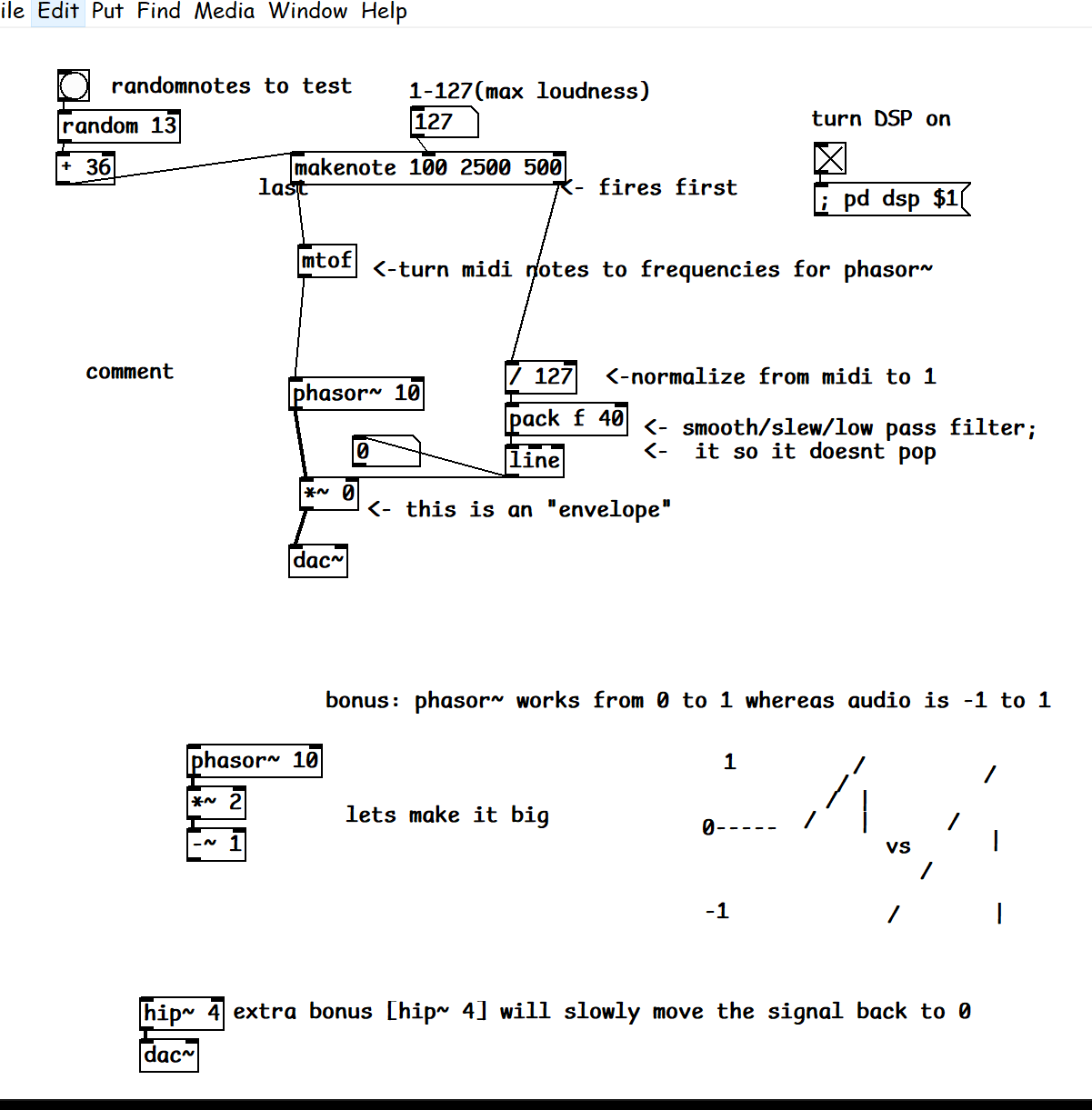
feel free to play around with it howtoDonkaDonk.pd
 posted in technical issues
phasor-makenote connection
@mkdewolf I recommend you take a step by step approach from the bottom up rather than from the top down because the first way you only have to learn one small thing at a time whereas the second way you have to learn many things at once. If you approach it this way then if something goes wrong at one of those small steps, you can just examine the few things you added or changed to find where the problem is.
Start by simply controlling [phasor~] with a frequency slider. Put a number display box between your slider and the phasor so you can see what's going on. You will immediately notice that frequency is different than pitch, and that a frequency of 10 sounds more like a beat than a tone. Next you could look for a way to convert a pitch number (i.e. MIDI) to a frequency. @nicnut suggested something you could use. Next take a look at that tutorial I suggested in your other topic, A02.amplitude.pd. The key insight here is that you can make the note turn on by taking the volume from 0 to some positive value, and the positive value it ends up on represents velocity. Conversely, you can make the note turn off by turning the volume back down to 0. The timing between when the note turns on and when it turns off is your duration, so you would next need a way to automate that. A delay from when the note turns on is one possibility, but you've already discovered [makenote], so that's another way. @nicnut's suggestion, setting the frequency to 0 after some delay, is another possibility for note off but I'd bet that it has side effects you wouldn't like. (Or maybe you would--that's up to you!)
Even if you do all these steps, the result will still be pretty crude, but you can continue refining one bit at a time and get closer and closer to something good at each step. You can get ideas about how to refine your patch by looking at some of the other tutorials, e.g. C10.monophonic.synth.pd and J08.classicsynth.pd. Once you have something that you like well enough, then you can add note-velocity-duration sequences (maybe using [text] as @whale-av suggested in your other topic), and finally, you can work on generating sequences that are serialized.
PS: if you're really only interested in serialization (and don't really care about making a synth from scratch) then there are other options available to you. Reply if so and then I or someone else can suggest alternatives.
 posted in technical issues
phasor-makenote connection
I think makenote outputs a midi note number out of the leftmost outlet, and phasor~ needs a frequency value. So I suggest putting a mtof object between them.
I don't know how you can get the velocity to a phasor, maybe it can be scaled to a volume control.
For the duration, maybe send that to a delay object, and when the delay object is triggered it can send a 0 frequency into the phasor. I hope this helps
 posted in technical issues
phasor-makenote connection
How can I transfer my makenote velocity and duration to phasor's signal?
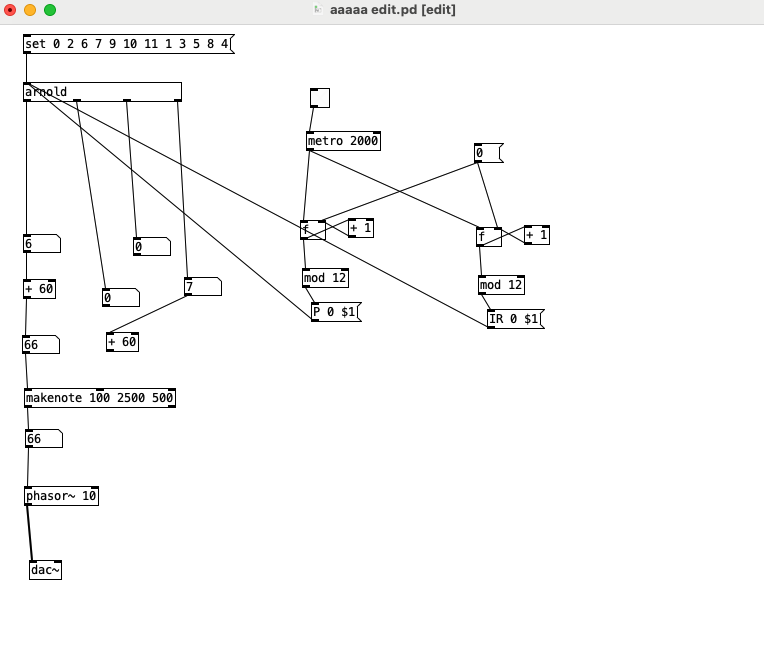
 posted in technical issues