
Raspberry Pi Audio Interfaces....
Hi,
What are everyone's favorite sound card or audio interface for Raspberry Pi? I'm on a Raspberry Pi 3, but I'm curious about any interface. I have the IQaudio Pi Dac+. It is really great, but it doesn't have audio input. I would love to get something with RCA, 1/4 inch or XLR audio input. Does that even exist? any suggestions are appreciated. Thanks.
 posted in I/O hardware diy
Help?! Implementing Pd into a hardware device
@whale-av yeah, being a portable effects processor for instruments, it needs to be very small and self-contained (in the sense that no peripherals should be sticking out like keyboards or audio interfaces) which is why I was wondering about implementing adc and dac with physical inputs and outputs into the actual thing instead of using peripherals.
@bmd the Axoloti core looks like pretty much exactly what I was going for with hardware! Although missing an extra input and output. That said, I plan on dealing with two mono signals so perhaps I could use the single stereo input and then separate left and right into input 1 and input 2... Having a quick look at this though http://www.axoloti.com/axoloti-patcher/ suggests that it isn't as versatile as Puredata with not many objects available but maybe I'm wrong again. Definitely going to research more into this. It also sounds like it has an easier solution to my problem of not knowing how to physically implement my patch onto some hardware. Thanks for showing me that.
Seeing as Raspberry Pi/Arduino/Puredata has a lot more support around it, plus the fact I wouldn't have to learn a whole new programming software for Axoloti, do you think I'd be able to make something very similar to the Axoloti Core using a Rasperry Pi? Or is this just overcomplicating things to the point where I might as well just learn how to use Axoloti? I'm struggling to find any appropiate ADC for the Raspberry Pi, but I'm sure there's got to be something high quality around, I mean, I find it hard to believe nobody has made a Raspberry Pi with at least 16 bit 44,1kHz audio input and output.
Also, @whale-av made me think... If I'm not having any peripherals sticking out of my signal processor, a touchscreen might be a reasonable idea for this to simplify things and not take up space. It looks a lot more difficult to do this on Axoloti than Raspberry Pi who have their own touchscreens conveniently available, or the Odroid @alexandros mentioned which has a HDMI port. A touchscreen might not be totally necessary but now I've considered it I kinda want it.
 posted in I/O hardware diy
No sound from raspberry
@Congarou Do you get sound in other circumstances? If not then this might help........
http://www.nodepond.com/blog/758-puredata-on-raspberry-pi-useful-hints-and-links as it might be sending to the hdmi audio out......
Otherwise......https://www.raspberrypi.org/forums/viewtopic.php?f=66&t=19155
or you could try Miller's optimised Vanilla.......https://guitarextended.wordpress.com/2014/03/23/update-on-running-pd-on-the-raspberry-pi/
David.
 posted in technical issues
Join our kickstarter for the PiShield, a sensor interface for Raspberry Pi
We’d like to invite you to join our kickstarter campaign for the PiShield, which allows you to easily connect up to 8x analog 5V sensors and 4x digital I2C devices to the Raspberry Pi. See https://www.kickstarter.com/projects/infusion/pishield-sensor-interface-board-for-raspberry-pi
If you’re interested in this new way of working with sensors on the Raspberry Pi, please join in and help us make the PiShield a success !
Thanks for your support,
I-CubeX
 posted in I/O hardware diy
GPIO RASPBERRY P3 AND PURE DATA
@sylvain Hello Sylvain.....
I have to admit to being unsure.....
Wiring Pi allows you to address the pins, and there is a webIOpi web interface that allows remote control of the pins (switching them from out to in) and a serial control page that (presumably) can communicate with the uart......... but........ I am not sure that it has ben updated for the pi3.
You can find an external for Pd that claims to talk to the pins from Pd here.......
http://nyu-waverlylabs.org/rpi-gpio/
and there is a (very) short conversation on the pdlist about this........
https://lists.puredata.info/pipermail/pd-list/2013-04/102172.html which suggests that wiringPi is necessary.
Millers coding of Pure Data for the Pi (which contains an object for talking to the gpio pins) can be found here......
http://msp.ucsd.edu/software.html
and there is some very useful discussion that points to that here.............
https://guitarextended.wordpress.com/2014/03/23/update-on-running-pd-on-the-raspberry-pi/
The post suggests that Pd-L2Ork could be a more useful version of Pd for you.......
My Pi is working well with dmx lighting control through a usb interface in Pd (using comport) and I control the GPIO pins through an Android remote app for my home entertainment........
But for PD to gpio I am unfortunately a noob......
David.
posted in I/O hardware diy
udpsend and receive
GNU nano 2.2.6 File: /etc/network/interfaces
interfaces(5) file used by ifup(8) and ifdown(8)
Please note that this file is written to be used with dhcpcd
For static IP, consult /etc/dhcpcd.conf and 'man dhcpcd.conf'
Include files from /etc/network/interfaces.d:
source-directory /etc/network/interfaces.d
auto lo
iface lo inet loopback
iface eth0 inet manual
#allow-hotplug wlan0
#iface wlan0 inet manual
#wpa-conf /etc/wpa_supplicant/wpa_supplicant.conf
allow-hotplug wlan0
iface wlan0 inet static
address 10.1.1.101
netmask 255.255.255.0
network 10.1.1.0
broadcast 10.1.1.255
gateway 10.1.1.1
wpa-conf /etc/wpa_supplicant/wpa_supplicant.conf
allow-hotplug wlan1
iface wlan1 inet manual
wpa-conf /etc/wpa_supplicant/wpa_supplicant.conf
 posted in technical issues
udpsend and receive
@toddak Ah!......... so I am sorry toddak, but I have a lot of questions......
So you still want to use the touch screens, and as you have a few Pi's you have backup cards so you have managed to get back to where you were before the update disaster? I hope so as that would make me feel much better!
You do not really want to use netsend and netreceive but in fact OSC objects (so you don't need MrPeach....... and a later vanilla will be ok as Alexandros suggested)? However, extended has many useful objects!
You are using an extra Pi as a router and you want to use [netsend] and [netreceive] on that?
I would think you would be better off with a dedicated router. I just bought another wrt54 on ebay for 99 uk pence.
Are you planning to stream audio to these 4 Pi's (in which case you will need extended) or are you just sending osc messages from them, or just receiving osc messages so as to start/stop playback?
I have not managed to make audio streaming to a Pi work reliably yet without occasional dropouts, and the sound will not work well at all unless you give Pd root privileges............. so remember.... for later...
sudo chmod 4755 /usr/bin/pd-extended
For audio on a Pi it should be run headless, so you should drop your touch screens in that case.
If you are using the Pi's with touch screens just to send osc messages you would be better off with some £40 android 7" tablets running TouchOSC (one licence for all of the android devices you own).
If they are receiving Osc to control their local playback then why do they have touch screens. Is it the touch screens that would not work with Jessie, or some other screen?
Jessie is not very different from Wheezy (it is not a huge update) but it is exclusively armhf. If the touch screens are needed and will not work with Jessie then you are stuck with the current wheezy that you have installed.
If you need to stay with armel then on one of your working Pi,s (armel) you should try this http://puredata.info/downloads/pd-extended-rpi version of extended and install pulse audio and the fonts (manually or with an apt-get) first. A lot of information you can find from here http://puredata.info/docs/raspberry-pi/?searchterm=raspberry
But if you have Rpi B2 (or anything other that an A or a Zero) you should really be running an armhf distribution.
David.
posted in technical issues
Pd doesn´t run when connecting an external audio interface.
Hello,
I have been using Pd for a while, and now I am working on some patches with an external audio interface to get audio input from a guitar. However, I am experiencing a problem with one of my audio interfaces.
I have the Alesis io4 audio card. I can connect it to my computer and use it with other software without any problems. However, when I try to launch Pd with this interface connected, Pd suddenly crashes without reporting any error. I have tried to use another interface (Scarlet 2i2) and Pd opens succesfully.
I would like to know if someone have experienced this problem with an external audio device, and if so, if you have any idea about how to solve it. Maybe is there any configuration i should do before the software can recognize the device?
Thanks for your attention,
cheers
inioms
 posted in technical issues
Cubie pd pedal
Hi there,
I've been working on that for nearly two years and now it is done I find it soooo 2014 that the previous intentions to make a full wiki page seem now silly. Anyway this could give ideas to other people so here is an abstract.
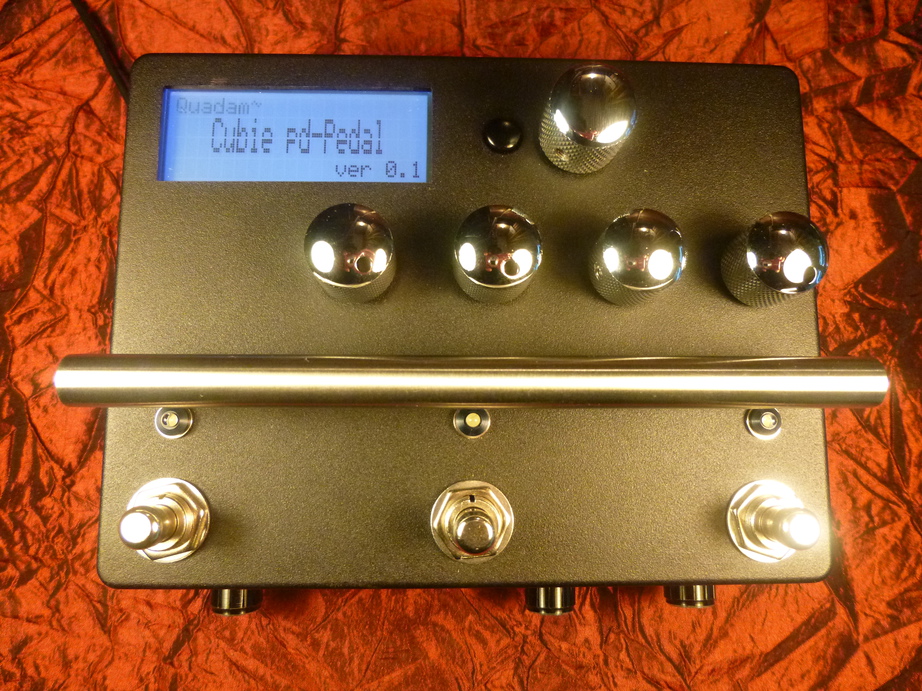
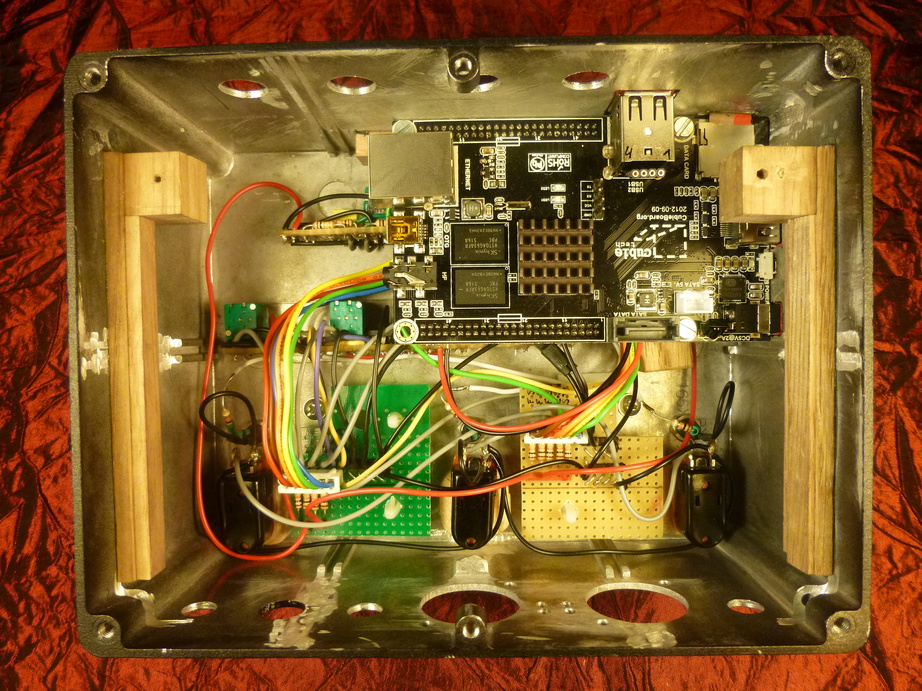
This is basically a lame-electronics simple-aggregate-of-common-parts version of a guitar pedal that hosts pd extended patches as effects. It's based on a cubieboard 2, connected to an el-cheapo (this was intended as a proof of concept hardware) soundcard through usb, internally. It boots a rt-patched version of debian from microSD card (never managed to flash sdram) in ... 50seconds  , with autologin so no keyboard is needed. After this time it behaves like a floor pedal, pd runs the stored patches responding to its hardware interface. Anyway a keyboard, a mouse and a display can be plugged in and it behaves like a linux desktop, it's easy to edit patches on the fly.
The interface consists of three footswitches, three leds, a button switch, a clickable rotary encoder, four clickable potentiometers and a 4x20 lcd display. The pots and the display communicate with the gpio pins (all of them digital) through i2c, the pots being read by a quadruple i2c adc.
I called it a pd pedal, but I have to confess it cannot be directly connected to a guitar amp, as the IO are two preamplified instrument inputs, two line in, two line out and a headphone stereo jack. This can be solved when you have a digital pedal in your pedalboard that have line inputs. Of course I knew it from the beginning, and could never work it around later as it would have taken more space and would have been tedious to implement for a beginner electronics fan like me  .
.
I also wanted from the beginning to make a relatively small footprint on my pedalboard so it is rather tall (aluminium box is 160x125x76). What a challenge to stack these components in such a box it has been, especially when it came with holes positioning, elements fixture, internal aluminium rounded edges to mill and file down...
The 1 ghz dual-core with 1 gb ram allows for decent dsp patches.
The pedal automatically runs a predefined patch but interface allows for patch selection. (statically coded so far)
I initially wrote several externals that allow for interface i/o, but never got rid of audio artifacts when the interface was trigged. As a workaround I now make the readings from outside pd, with a well-choosen rt priority and send values to pd using pdsend. The workaround is only half of what it should be, as for outputting data (writing things on the display) I still rely on a homebrew pd external (too much work for me to take it out of pd). The result is uncorrupted audio only when lcd display is not used, which is unreasonable (every pot controls a patch parameter and I love to see the values updated on the lcd). But when the pedal is left untouched the audio is clean.
Here are two pics, one of the inside before the audio card is stacked and the other one showing it outside look.
Thanks,
Nau
 posted in I/O hardware diy
Randomzed noise drone
Hello andand,
impressive job as first patch! Simple approach but very effective in output! I definitely like it!!!
@andand said:
if there is a link you can share on pointing me toward some front interface design methods (how do you hide all wires, etc?)
I don't think you'll find a lot about GUI desing in pd. Best you can do is look at other people patches an
"assimilate" the different desing techniques. In any case, the "graph on parent" feature of an abstraction will help you in hiding patch cords.
Otherwise, if you don't like the Tk interface given by pd you can do your interface in processing for example, (by using OSC comminucation)
or even in GEM. BTW, by looking at the current interface it seems you're on the good track.
Nice! nice!
Alberto
 posted in patch~