
newbie: can i do this?
@emens 1. https://guitarextended.wordpress.com/2012/11/03/make-python-and-pure-data-communicate-on-the-raspberry-pi/
- Yes.
- Yes. The vst instruments can be CHOSEN...... a decision as to which one you want to control. But the objects [vst~ myplugin] will need to match the vst executable (32/64bit) and the Pd version bits and the os. I know that it works for 32bit.
[vst~plugin] has been built for 64bit........ https://forum.pdpatchrepo.info/topic/11953/vstplugin-v0-1-0-released
You will need [vst~_help] for the 32-bit [vst~]....... https://forum.pdpatchrepo.info/topic/9319/how-to-use-vst-object/2
You should look at this........ https://forum.pdpatchrepo.info/topic/11096/making-an-audio-vst-for-raspberry-pi
This...... https://forum.pdpatchrepo.info/topic/11605/loading-3rd-party-plug-in-problems
You can open (SET) just the vst that you name in python but you will need to understand dynamic patching for that........ unless the new [vst~plugin] can call different vst's.
Not sure what you want to achieve. Some want to use Python to create pretty graphics, but the vst plugins already are much prettier than anything you can easily create in Pd.
If you want to save and recall presets then you can do that in Pd.
David.
 posted in technical issues
How to use Enttec DMX Usb Pro with PD on Raspberry Pi
I am trying to build a lightning rig controlled via OSC to a Raspberry Pi running PD.
Then I want to output dmx from the Raspberry Pi to my Enttec Enttec DMX Usb Pro.
Does anyone know a way to do this? The website does say it is supported by Raspberry Pi but I do not know how to communicate with it from PD.
https://www.enttec.com/product/controls/dmx-usb-interfaces/dmx-usb-interface/
Would be super happy for all help 
 posted in technical issues
PD block size vs audio interface buffer size
I recently noticed that on Windows, the USB audio interfaces I use have adjustable buffer sizes analogous to PD's block size (I don't see a corresponding control in OS X though). The default value varies from 64 for the Yamaha/Steinberg USB driver to 512 for the MOTU Audio Console. I wrote a PD patch that does nothing except pass input to output and verified that smaller audio interface buffer sizes for the MOTU result in a proportionally lower input to output latency. It looks like that latency contains some additional overhead (~7mS) not accounted for by the PD delay, PD block size, and audio interface buffer size. What accounts for the additional overhead? Is there any interaction between PD block size and audio interface buffer size? Is there a better way to choose the optimal audio interface buffer size than trial and error? Does that size depend on the specifics of your PD patch?
 posted in technical issues
how do i close ofelia render window?
@youaresound Yes, that's a RPi specific issue.
I think it happens because OF doesn't use X11 windowing system on the RPi as a default.
https://forum.openframeworks.cc/t/program-window-on-raspberry-pi-doesnt-behave-like-windows-on-other-platforms
However, I think there's a solution to make it use X11 by recompiling OF using different setting.
https://forum.openframeworks.cc/t/raspberry-x11-window
I will try this later and see if I can fix it.
 posted in technical issues
how to control 40-pin extended GPIO on rasberry Pi 3
@davidborrao Use the help file for comport (right click the object..... then help) and click [devices( to get a list of available ports on the RPI.
But I have misled you..... comport can be used to send and receive data on the gpio serial port pins.
What you want could be done in python. The pin states can be retrieved with digitalRead([pin] ...https://learn.sparkfun.com/tutorials/raspberry-gpio
and you would have to write some code to send the info through a local port to a [netreceive] object in your patch.....
There is some help with that here....... https://guitarextended.wordpress.com/2012/11/03/make-python-and-pure-data-communicate-on-the-raspberry-pi/
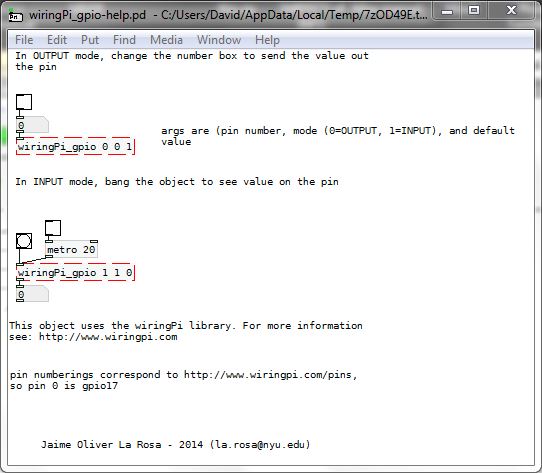
There is just a chance though that you could make this work......... http://nyu-waverlylabs.org/rpi-gpio/ by compiling it for your rpi. There is a readme in the download about compiling.
If that works it would give you direct read and write access to the pins without Python, and be by far the easiest solution.
David.
posted in technical issues
audio in not working
@MrKoggs1 Have you used the interface without Pure Data?
If you want low latency then asio will be the only way to work with windows.
Maybe the M-audio drivers will only work with asio?
If you select "ASIO (via PortAudio)" in the Pd "Media" tab then when you open the tab below for "audio settings..." to select the interface you will see that it now lists the "Asio" drivers.
If you want to use the built-in interface as well then it will be best to use Asio4All..... which can build an aggregate device for all of your sound interfaces (better than Pd can manage).
You will need to set up the asio driver (Asio4All or the M-Audio driver) to match Pd Audio settings...
64bit buffer.
44100 or 48000Hz
and set Pd to 2 or 3ms in the "Delay (mSecs)" box (more if it doesn't work).
Ticking the "use Callbacks" box is a good idea.
In Asio4All....
For Vista you will need to tick the "Allow Pull Mode (WaveRT)" box.
Set the "ASIO Buffer Size" to 64 samples.
Sometimes you will need to try (re-open) Pd a few times before everything talks properly.
I might have forgotten something!
David.
posted in technical issues
Interface abstraction for Alesis V49
Hi all,
I created a little interface abstraction for my new Alesis V49 and I thought that perhaps someone else out there might also have some use for this. The send names are listed on the help file.
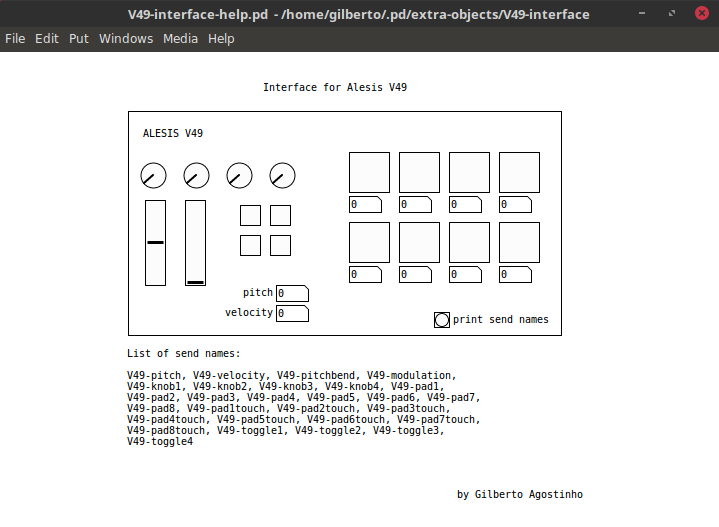
Download: V49-interface.zip or https://github.com/gilbertohasnofb/pd-abstractions-and-libraries.
Cheers,
Gilberto
 posted in abstract~
Making an audio vst for raspberry pi
Hi everyone,
I've been learning and using pd lately cause I want to make with the raspberry pi a portable sampler and audio processor. The patch works pretty good manually triggered inside the patch but I want to make an external program for the raspberry pi with a nice user interface to be able to control the patch and make nice visual elements for it.
I've been reading about libpd and seems to be a good solution to make the program in c++ or python including the puredata in it as a library with libpd, but I didn't found specific tutorials aiming to the raspberry pi...
Has anyone made this on the raspberry pi? Any tips, tutorials or resources?
Thank you!
 posted in libpd / webpd
Solo button on interface inputs
First of all: Hi to everyone, i'm a bit of a newbie to PD, did some MAX/MSP back in the day, but still i'm no pro. Now I work as a sound technician and designer. Now I want to design an interface from which I can monitor my wireless transmitters and see the input on some VU meters.
Basically I need to make an input routing from each of the interface inputs that goes to a VU meter and ends at a solo button. After this the signal will be send to a interface stereo or mono output on the interface.
I think it's not that complex but i need a little help on the way, some tips and tricks or links to helpful topics.
I hope you can help me, it would be great!
 posted in technical issues
Issue Attaching Audio Interface
Issue with Attaching Audio Interface to PureData
So I am having issues with attaching my Audio Interface (Fasttrack) to PureData. When I process the adc~ signal it goes through my dynamic microphone to my computer no problem. Even with Logic Pro X the microphone processes through. However, when I plug it into Pure Data, I change the settings to (Fasttrack USB) and (Input 2) and the signal does not process through Puredata.
My connection set up is:
- USBC-> Shark USB Hub
- Shark USB Hub -> Fasttrack Audio Interface
- Fasttrack-> Dynamic Microphone
So I have an:
- OS Sierra
- Macbook Pro
- Fasttrack USB Audio Interface
- Shark USB Mic and Headphones attached to a USC-C Converter
- Dynamic Microphone (XLR->Quarter-inch)
Help? Suggestions?
 posted in technical issues