
Makefile.gnu Linux Compiling Question
Ok. I don't have a ton of linux experience, or experience building pure data on a raspberry pi. I would think that the install directions would include full directions on how to achieve building pure data on a linux machine, which would include installing the libasound2-dev files.
I've been taking an approach to learning raspberry pi and linux and building pure data from a non-automated perspective. I'd like to learn about each process by doing the manual installs and commands instead of relying on automated build chains and tools at this point. If possible, could you please provide instructions on how to install the libasound2-dev dependency? I've downloaded a debian file https://packages.debian.org/bookworm/arm64/libasound2-dev/download but can't seem to install it on my raspberry pi. I get an error when trying to install that .deb file. Thanks 
 posted in technical issues
midi and "hid" joystick options for pd - probably on linux. I found korg nanopad2 works. know of anything else?
@willblackhurst A million years ago I tried to interface a Wacom tablet to Pd and remember trying to find a version of [hid] that would work for my machine without success. I've never heard of a nanopad2 until now, but if I needed an x/y interface for a show that was breathing down my neck, I'd jump on it for $79 and its simple MIDI interface, Everything has a cost; it's either your money, or your time. Or both. That said, I'd be happy to be schooled on how to use [hid].
 posted in technical issues
"Return to caller" (followup from "symbols explicit")
@porres No help file, usage notes in asStream.pd, this thread is the documentation. If I ever get it to the point where I don't think there will be any major changes I will upload it with help files over in Abstractions. But a new version, reworked it as an array object since that is what it really is. Also added looping. Still needs lots of work to be a useful abstraction for more than learning from, it is kind of fun though and eventually I will develop it more.
@ddw_music said:
Though this means that your approach could be used only in self-timed situations,
Just need to change [obj 10 10 stream $1 $2 $3...( to [obj 10 10 $1 $2 $3...( and add in some simple logic and now asStream can load the abstraction you specify through methods/arguments. As I said earlier, you design the interface and the protocol which is what those sends and receives and values and dollar arguments in asStream are, an interface and protocol for communicating with the stream.pd abstraction or any other abstraction designed to work with that interface. Object names themselves can also be filled in through arguments, [$1 $2] can be either a metro or a receive or anything else but [$1 $2 ....] are actually [list]s so they only give you two inlets and one outlet, if you need more than that you need to resort to editing the abstraction in a text editor, patch it together with any object with suitable io and then open it in a text editor and edit that object into $1 $2... And there is plain old dynamic patching to programmatically create the required patch. Lots of option and they can all be mixed.
 posted in technical issues
pure data OSC and OLED
@impression As I said in your other thread, if you use an OLED which has a frame buffer driver for it you will be fine, you just need to load the driver and it will act like a normal display. Here is one for the pi: https://github.com/foldedtoad/raspberry-pi-oled but if you can find an OLED that uses the same chip or one of the others that driver supports and a normal I2C interface instead of the pi bonnet it will probably work just fine with bela. There are probably others but that is just the first I found, did not dig. Could also make the pi bonnet work withh bela without much work, just would have to connect it with wires/jumpers instead of plugging it right in like you can on the pi.
Why do you only have OSC? Just assuming that based off of the OLED you found or something else?
posted in technical issues
pure data GOP hiding, dropdown box
Hi.
I am having two issues I can`t happen to solve.
-
Lets say I will show my pure data patch on an LCD display. Its normally pretty small, so I would like to switch between different Interfaces and settings.
Lets say I have a filter page, and an amp page for example.
How would I be able to achieve that? In max dsp. I am able to hide parts of the interface, so I can just lay multiple interface parts over each other and just hide the ones I don`t want to see. -
I would like to create a sampler with the option to load samples from a specific folder, but without using the windows file browser. I am basically looking for a way to have a dropdown menu which shows me all the files I have in a certain folder. Lets say I have a Folder for Kicks and it should show me all the kicks in this folder in a dropdown menu. Is that somehow possible? Or any other ideas how I could achieve that considering using pure data on a standalone device like raspberry pi?
Thanks a lot for help in advance
 posted in technical issues
Pre-selecting audio interface when patch opens.
@kazeko I did a bit more work on it here....... https://forum.pdpatchrepo.info/topic/14240/pure-data-and-pi4-with-usb-audio-interface/12
As so often, it might be hard to remember how it works, but I think I designed it to select an interface automatically (by name rather than the position in the Pd Media tab list) as a patch was opened.... but it needs the external [audiosettings] from the mediasettings library.
It seems that the librarywas available for the RPI4.
David.
 posted in technical issues
PurrData on new Mac M4 Max : ~adc not delivering audio!
Previously been using an older MacBook Pro with OSX 10.10, and PurrData, all good.
New MacBook Pro M4 Max, and PurrData v2.19.3 from here... (2.20 was reported as damaged by the OS)...
https://github.com/agraef/purr-data/releases
PurrData v2.19.3 and v2.19.2 work fine, but there's no audio coming in from ~adc.
Opened a DAW, Reaper, set the input channels correctly, and there's audio coming in - to my new MacBook Po M4 Max. So the audio interface - a MOTU, is fine, and set up correctly ...it's just PurrData - there's nothing coming in from ~adc (I tried hooking up all input channels ~adc 1 2 3 4 5 6 7 8, and still nothing). Otherwise midi flows back and forth ok, and audio is sent out to the audio interface (via ~dac), but ~adc is dead ...and just to reiterate Reaper hears the input on those channels fine - but PurrData doesn't.
The audio properties in PurrData are set up fine, the audio interface selected, and multiple channels - so all good there (and I've using PD for many many years).
Anyone come across this - what to do?
 posted in technical issues
Pd's latency on a Mac running QLab
@jameslo I prefer the web interface because it makes more sense to me than cuemix where I found it hard to know that I was actually changing the correct settings..... and I can see far more without scrolling around in the web interface.
I always changed the patch in Pd, so although it is great to have a patch in the web interface I have not used it.
But also I wanted to drop cuemix because it caused dropouts when running low latency, and although it might have improved in the Mk5 I didn't want to take the risk.
I know that I have plugged 2 in at the same time (for different programs in windows os) without problems but I didn't go far with the testing and I can't remember how the web interface behaved.
I don't remember that it combined the units in one interface..... I think there was just a new page using a different port.
If I get time I will check that... but it might be a few weeks.
When using 2 units for Pd I have always used toslink links between them as I don't need adat..... just more analog in/outs..... that is how I have always done it in the past with other soundcards. It is simple, and I didn't see any reason to change.
Then you definitely have all ins and outs on the same Web page.
David.
posted in technical issues
Wireless OSC/MIDI sensors or inputs with Pipo Interfaces
Hi there,
I would like to share a project I am working on for a while which might interest anyone who like making physically interactive or reactive installations.
It’s a plug-and-play sensing platform for creative and audiovisual applications, with MIDI, OSC, wireless capabilities and a convenient web interface.
You can turn movement, touch, distance, or other sensors into wireless controllers in seconds.
I developed this project to ease the connection of sensors to audiovisual and music software. After doing that with arduino for years, but encountering so many limitations and struggles, I decided to make and share a much easier, convenient and robust solution for all: the whole project will be open sourced.
The project is called “Pipo Interfaces”. It is still in the making and will be launched as a pre-order campaign on Crowd Supply (a funding platform for open source electronics).
If you are interested, check out the pre-launch page and subscribe to the project updates !
https://www.crowdsupply.com/pipo-interfaces/pipo
You can also check the Insta @pipo_interfaces
Any feedback or questions welcome !
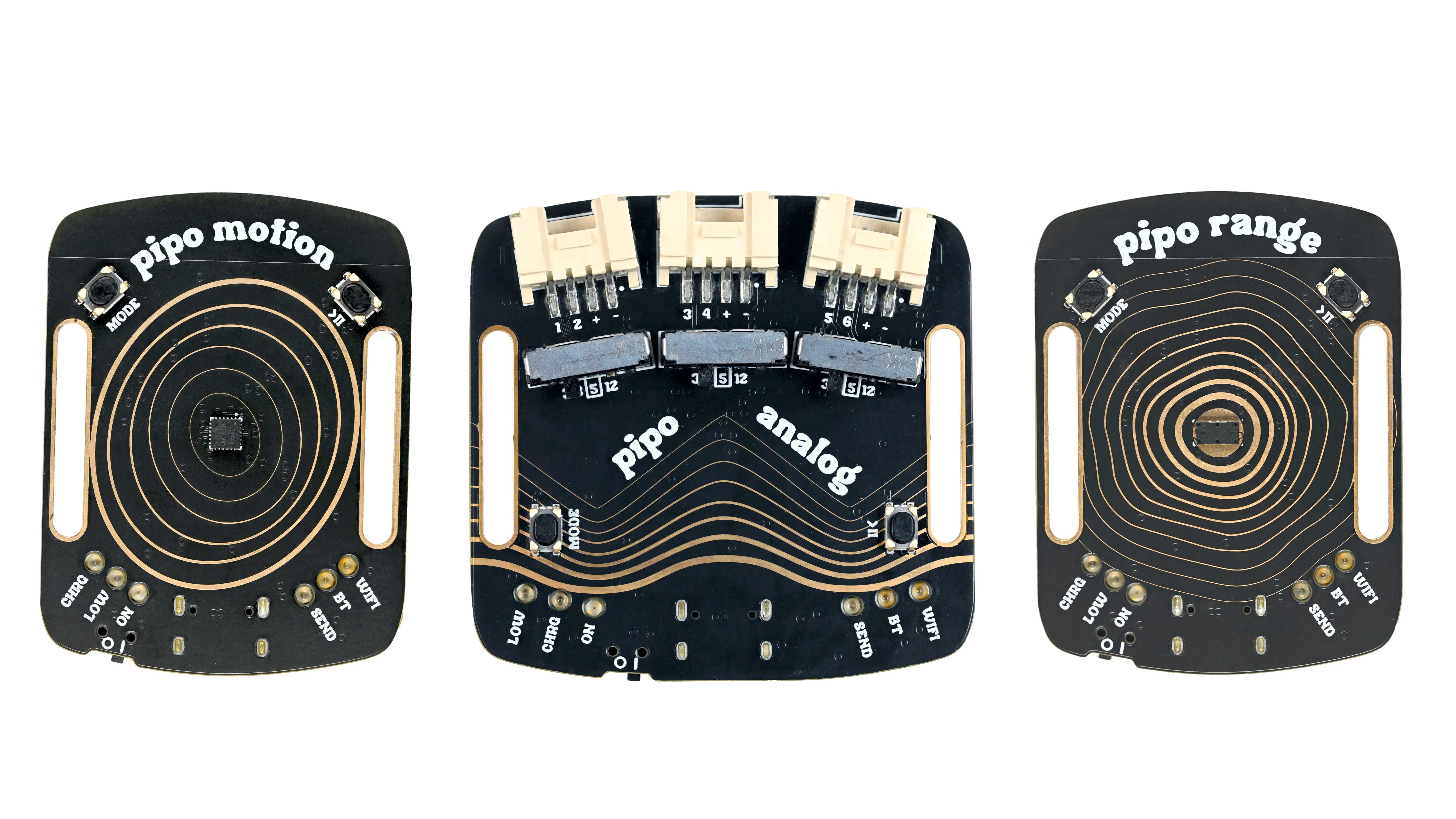
 posted in I/O hardware diy
send audio over wifi from pc to raspberry pi on pd
Hi!
I would like to send audio over wifi in pure data from my pc to several raspberry pi. I tried to send audio over wifi from one pc to another pc with mrpeach udpsend~ and udpreceive~ , and it worked pretty good. My goal is to create a small spacialisation set with 4 to 8 small speakers each one linked to a rasberry pi with audio that i send from my pc. I want to send a different audio channel to each raspberry pi.
i have now one raspberry pi zero 2, so i can try with one speaker first. i installed pure data on it but my problem is that i can't install mrpeach on the raspberry pi OS. Didn't find it on the pure data browser externals and when i put the downloaded files inside the externals file, it doesn't work either.
Do you have a solution?
Thanks
Clément
 posted in technical issues