
[pix_share_read] and [pix_share_write] under windows
@whale-av, here is a log running pd with -lib Gem -verbose.
tried both 32bit and 64bit pd 0.48-1...
tried ./Gem.m_i386 and failed
tried ./Gem.dll and failed
tried ./Gem/Gem.m_i386 and failed
tried ./Gem/Gem.dll and failed
tried ./Gem.pd and failed
tried ./Gem.pat and failed
tried ./Gem/Gem.pd and failed
tried C:/Users/Raphael Isdant/Documents/Pd/externals/Gem.m_i386 and failed
tried C:/Users/Raphael Isdant/Documents/Pd/externals/Gem.dll and failed
tried C:/Users/Raphael Isdant/Documents/Pd/externals/Gem/Gem.m_i386 and failed
tried C:/Users/Raphael Isdant/Documents/Pd/externals/Gem/Gem.dll and failed
tried C:/Users/Raphael Isdant/Documents/Pd/externals/Gem.pd and failed
tried C:/Users/Raphael Isdant/Documents/Pd/externals/Gem.pat and failed
tried C:/Users/Raphael Isdant/Documents/Pd/externals/Gem/Gem.pd and failed
tried C:/Users/Raphael Isdant/AppData/Roaming/Pd/Gem.m_i386 and failed
tried C:/Users/Raphael Isdant/AppData/Roaming/Pd/Gem.dll and failed
tried C:/Users/Raphael Isdant/AppData/Roaming/Pd/Gem/Gem.m_i386 and failed
tried C:/Users/Raphael Isdant/AppData/Roaming/Pd/Gem/Gem.dll and failed
tried C:/Users/Raphael Isdant/AppData/Roaming/Pd/Gem.pd and failed
tried C:/Users/Raphael Isdant/AppData/Roaming/Pd/Gem.pat and failed
tried C:/Users/Raphael Isdant/AppData/Roaming/Pd/Gem/Gem.pd and failed
tried C:/Program Files/Common Files/Pd/Gem.m_i386 and failed
tried C:/Program Files/Common Files/Pd/Gem.dll and failed
tried C:/Program Files/Common Files/Pd/Gem/Gem.m_i386 and failed
tried C:/Program Files/Common Files/Pd/Gem/Gem.dll and failed
tried C:/Program Files/Common Files/Pd/Gem.pd and failed
tried C:/Program Files/Common Files/Pd/Gem.pat and failed
tried C:/Program Files/Common Files/Pd/Gem/Gem.pd and failed
tried D:/pd-0.48-1.windows.64bit/extra/Gem.m_i386 and failed
tried D:/pd-0.48-1.windows.64bit/extra/Gem.dll and failed
tried D:/pd-0.48-1.windows.64bit/extra/Gem/Gem.m_i386 and failed
tried D:/pd-0.48-1.windows.64bit/extra/Gem/Gem.dll and succeeded
D:\\pd-0.48-1.windows.64bit\\extra\\Gem\\Gem.dll: couldn't load
tried D:/pd-0.48-1.windows.64bit/extra/Gem.pd and failed
tried D:/pd-0.48-1.windows.64bit/extra/Gem.pat and failed
tried D:/pd-0.48-1.windows.64bit/extra/Gem/Gem.pd and failed
tried D:/pd-0.48-1.windows.64bit/doc/5.reference/Gem.m_i386 and failed
tried D:/pd-0.48-1.windows.64bit/doc/5.reference/Gem.dll and failed
tried D:/pd-0.48-1.windows.64bit/doc/5.reference/Gem/Gem.m_i386 and failed
tried D:/pd-0.48-1.windows.64bit/doc/5.reference/Gem/Gem.dll and failed
tried D:/pd-0.48-1.windows.64bit/doc/5.reference/Gem.pd and failed
tried D:/pd-0.48-1.windows.64bit/doc/5.reference/Gem.pat and failed
tried D:/pd-0.48-1.windows.64bit/doc/5.reference/Gem/Gem.pd and failed
Gem: can't load library``` posted in pixel#
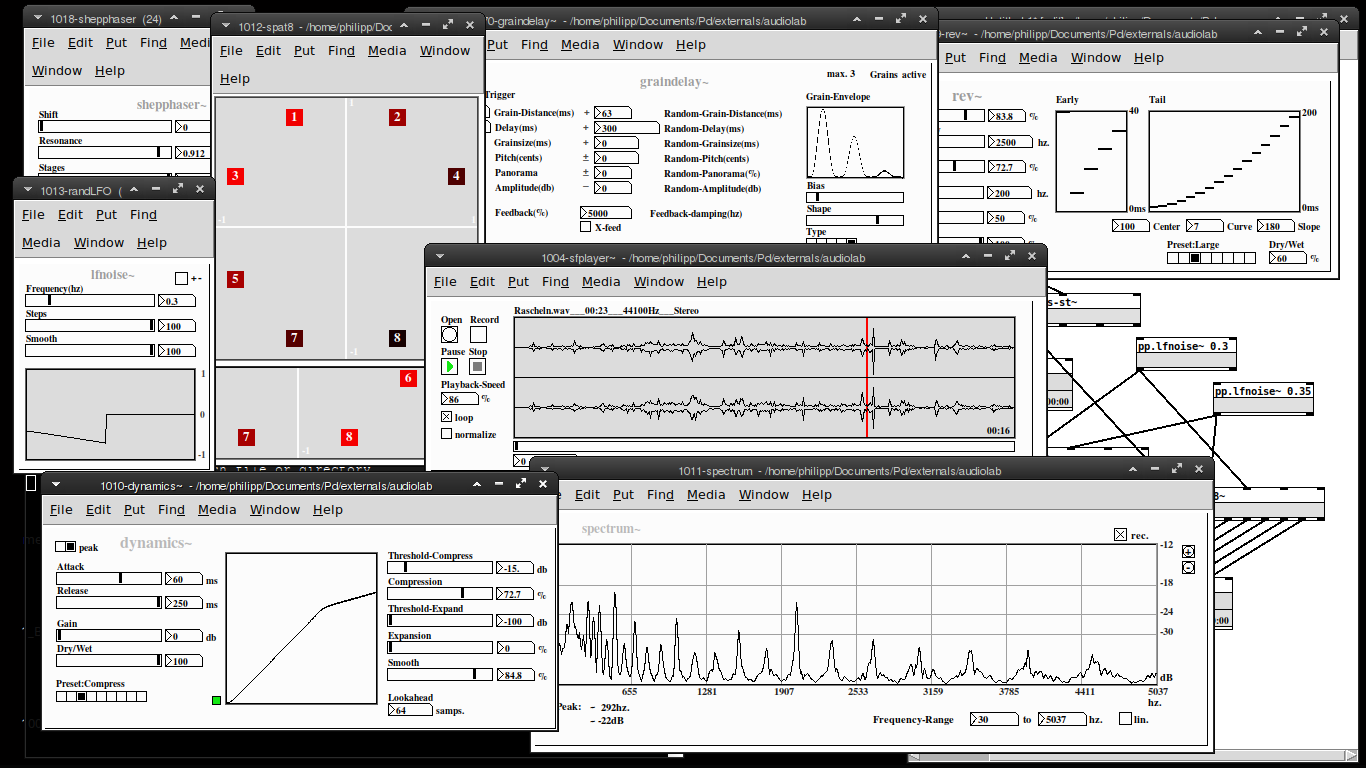
Audiolab is now available on deken!
my "audiolab" abstraction library is now available on deken. You'll need Pd-0.50 or later to run this.
Please report any bugs on github: https://github.com/solipd/AudioLab
here is a picture to draw you in (:
Edit:
list of objects:
Soundfle processing
pp.sfplayer~ ... variable-speed soundfile player
pp.grainer~ ... granular sampler
pp.fft-stretch~ ... pvoc time stretching & pitch shifting
Spatialization
pp.pan~ ... constant power stereo panning
pp.midside~ ... mid-side panning
pp. spat8~ ... 8-channel distance based amplitude panning
pp.doppler~ ... doppler effect, damping & amplitude modulation
pp.dopplerxy~ ... xy doppler effect
Effects
pp.freqshift~ ... ssb frequency shifter
pp.pitchshift~ ... pitch shifter
pp.eqfilter~ ... eq-filter (lowpass, highpass, resonant, bandpass, notch, peaking, lowshelf, highshelf or allpass)
pp.vcfilter~ ... signal controlled filter (lowpass, highpass, resonant)
pp.clop~ ... experimental comb-lop-filter
pp.ladder~ ... moogish filter
pp.dynamics~ ... compressor / expander
pp.env~ ... simple envelope follower
pp.graindelay~ ... granular delay
pp.rev~ ... fdn-reverberator based on rev3~
pp.twisted-delays~ ... multipurpose twisted delay-thing
pp.shepphaser~ ... shepard tone-like phaser effect
pp.echo~ ... "analog" delay
Spectral processing
pp.fft-block~ ... audio block delay
pp.fft-split~ ... spectral splitter
pp.fft-gate~ ... spectral gate
pp.fft-pitchshift~ ... pvoc based pitchshifter
pp.fft-timbre~ ... spectral bin-reordering
pp.fft-partconv~ ... partitioned low latency convolution
pp.fft-freeze~ ... spectral freezer
Misc.
pp.in~ .... mic. input
pp.out~ ... stereo output & soundfile recorder
pp.out-8~ ... 8 channel output & soundfile recorder
pp.sdel~ ... samplewise delay
pp.lfnoise~ ... low frequency noise generator
pp.spectrum~ ... spectrum analyser
pp.xycurve
 posted in news
recursive patching
i was thinking about "recursive patching" lately, meaning to call an abstraction inside of an abstraction inside of an abstraction inside of an abstraction inside of an abstraction inside of an abstraction and so on.
It is clear to me, that this has to be done with dynamic patching in order to stop the process at some point. So the question is not how to implement this, but in what case something like this could be useful? Do you know of any "recursive" patches? The only thing i can think about are reverberators and i actually tried this using a feedback-delay line inside of a feedback-delay line inside of a feedback-delay line inside of a feedback-delay line inside of a feedback-delay line inside of a feedback-delay line feedback-delay line inside of a feedback-delay line inside of a feedback-delay line.. with rather unimpressive results.
Any ideas?
posted in technical issues
best practices, sample-accurate polyphonic envelope, note stealing
Hi everyone. I have frequently revised designs for polyphonic envelopes. i've often misunderstood things about vline~ and scheduling voices in such a way to avoid unwanted clicks while also keeping things on time and snappy.
i'd be really happy to know what your methods are for envelopes.
i submit this patch, a reflection on envelope practices and how i address certain challenges. envwork.pd
this patch makes these assertions:
1- because vline~ maintains sample accuracy by scheduling events for the next block, you can switch dsp on in a subpatch with block~ while sending a message to vline~ and the dsp will be active by the start of the vline~ output. This also works if you need to configure a non-signal inlet before triggering a voice. send a message to such an inlet concurrently with a vline~ message and the parameters will update on the block boundary before the vline~ plays.
2- accounting for note stealing can cause issues in a polyphonic patch. if the stealing note has a slow attack and the envelope of the stolen note is not closed, there will be a click as the pitch of the new note jumps. the voices in my patch apply slight portamento to smooth out this click. if, however, the attack time of the stealing note is faster than this slight portamento it is counterproductive and will soften the attack of stolen notes. Stolen notes need every bit of snap they can get because the envelopes may be starting at a non-zero value. so i limit the time of the portamento to the attack time.
3- to make sure a note that is still in its release phase is treated as a stolen note, it is necessary to monitor the state of the envelopes like so:
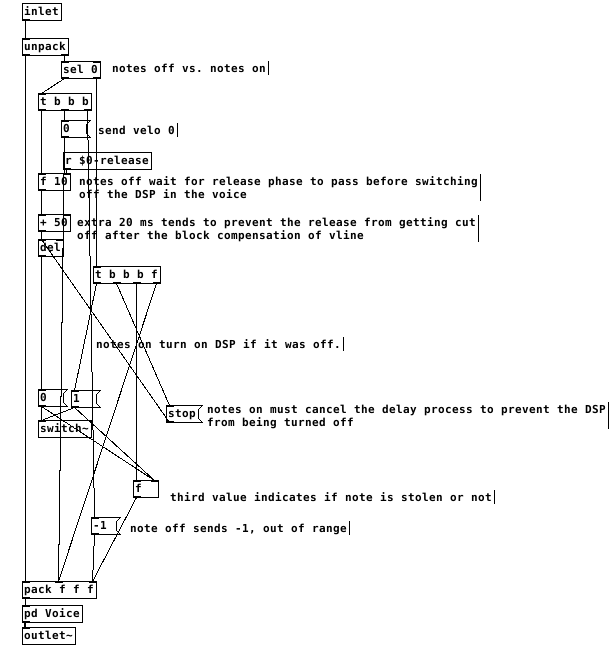
switching the dsp off too close to the end of the release causes clicks. after testing, my system liked a full 50ms of extra delay after the end of a release before it was safe to switch off dsp. I don't think this is attributable just to the scheduling delay of vline~ but it's a small mystery to me. possibly there's a problem with my voices.
This all gets a little more complex when there are multiple envelopes per voice. The release time that affects the final output of the voice must reset all envelopes to when it is finished and before dsp is switched off. Otherwise an envelope with a long release affecting something like filter frequency can be held at a non-zero value when dsp is switched off and spoil the starting state of the vline~ on a new note.
finally, on vline~ and sample accuracy and timing, let me type out what i believe is the case. i could be wrong about this. if you programmed a synth using line~ for the envelopes, it would be faster than vline~ but not all notes equally faster. all notes would sound at the block boundary. Notes arriving shortly after the last block boundary might take 90% of the block period to sound. notes arriving just before the block boundary might take 10% of the period to sound.
vline~ will always be delayed by 100% of the block boundary. but the events will be scheduled sample-accurately, so the vline~ will trigger at exactly the real time intervals of the input. a synth with line~ envelopes will trigger any two events within a single block at the same time.
this should mean that vline~ envelopes can be accurately delay compensated and stay absolutely true to input timing, in the case of something like a Camomile plugin.
however, if one was to build a synth for something like a raspberry pi that will act as hardware, would it be better to use line~ envelopes and gain a little bit of speed? is the restriction of locking envelopes to block boundaries perceptible under normal playing conditions?! i could test some midi input and see if the notes in a chord ever achieve a timing spread greater than the block period anyway...
 posted in technical issues
Calculating Resonance for Delay
@s.elliot.perez "comb filter" refers to 2 simple delays: 1 where you delay the incoming signal, multiply it, and add it to itself (no feedback) and 1 where you take the output, delay it, multiply it and then add it to the input to create the new output (this is the classic "echo" effect and what we generally think of when we think of the "delay" effect with feedback)
the fundamental frequency is equal to the inverse of the delay length (e.g. if your delay length is 1 ms your frequency will be 1000 hz). I don't think the bandpass filters should affect it too much.
in this situation, the delays are feeding back into each other so it's more complex than a simple comb filter. However, the frequencies should still depend on the delay times like that.
Interesting side note: all digital filters can be deconstructed into these 2 simple building blocks, except that they use 1 sample instead of milliseconds or seconds. The feed forward one is called a "zero" and the feedback one is a "pole". This is because the space between the peaks of the comb filter is the inverse of the delay time. So, if you set the delay time to 1 sample you get a "peak" width of the entire spectrum up to the sample rate.
I think you did it right, but you might need to lower your block size within a subpatch to get lower delay times than 64 samples (~1.45 ms @44.1k) also..  and/or do the stuff in the helpfiles G04.control.blocksize.pd and G05.execution.order.pd where you can
 posted in technical issues
Installing Sound Design Toolkit (SDT)
@polyphuckin Are you using windows? The following (probably) if you are.
The frameworks stuff says it is the documentation. You need to just open index.html from the doc/html folder to read that. But there could be more to it. I don't know....
1st..
Pd paths and eccentricities.
I doesn't really matter where you put things, but Pd needs to find them.
In this case the (dot)dll's need to be loaded as libraries (or at least one of them does.... please let us know when you find out more..!!).
Unfortunately Pd expects the DLL to have the same name as the library folder (ONLY for libraries like Gem and Zexy that must be loaded at startup), or it will not find it. It will only look for STD.dll or STD.i386 or STD.darwin in the STD folder......

The author has named the folders so that you know which one you want, but that messes it up for the installation.
The folder STD_PD has STD.dll inside so needs to be renamed STD
The folder Win32 has libSTD.dll inside, so needs to be renamed libSTD
Then startup paths need to be set to those folders (it really doesn't matter where they are).
Then startup flags must be set to load the libraries........ -lib libSTD and -lib STD
Don't forget to restart Pd as it loads the libraries only as it starts..
And then, as if by magic, you can remove the declarations -lib in the startup preferences and it will work forever, even for other (32-bit) versions of vanilla.
Annoying.
Actually I think libSTD.dll probably is for other api's to use, and it belongs in the windows "sytem32" folder, but I am unsure. Maybe email the authors through the page you posted.
You do not need to copy SDT.dll outside its folder, as I did in the screenshot.
David.
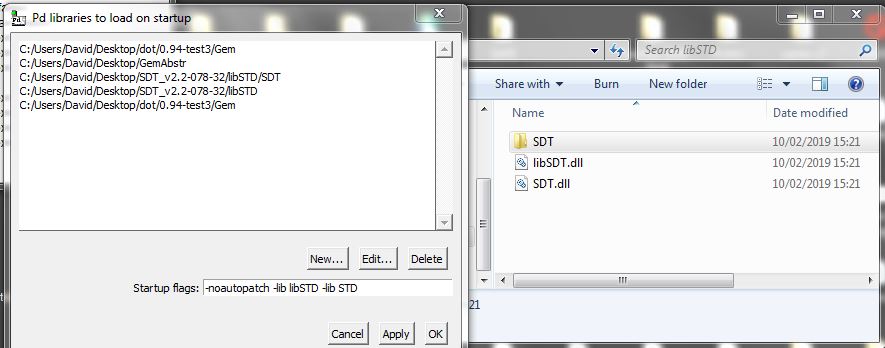
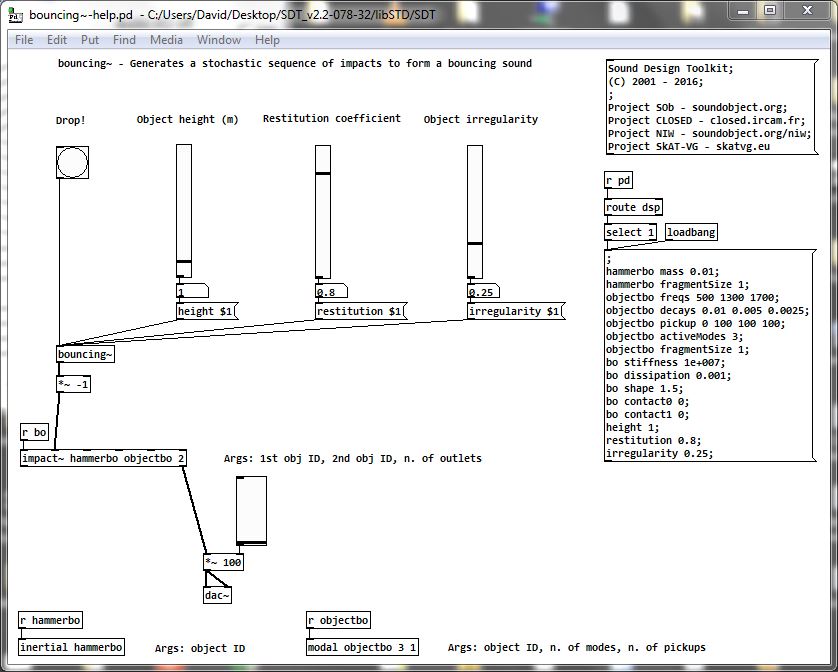
Proof.........
The message below [r pd] needs to be clicked, and dsp needs to be on.
I have checked this file but no others.
If you want help files to be found then you might need to do more. Placing the library STD directly in the "extra" folder might solve that. I didn't.........
 posted in technical issues
[small job offer] porting max external to pd
Edit 1: Took a shot porting it in this little textarea. Probably doesn't compile yet...
Edit 2: Ok, this should compile now. I haven't actually tried to instantiate it yet, though. It's possible I set it up with the wrong number of xlets.
Edit 3: Seems to instantiate ok. It appears it doesn't take signal input so the CLASS_MAINSIGNALIN macro is neccessary. Just comment that part out to make it a control signal.
Note-- in my port it's called [vb_fourses~] for the reason noted below.
I have no idea if the algorithm behaves correctly, but it does output sound.
Btw-- AFAICT you should be able to compile this external for the 64-bit version of Purr Data and it should work properly. It doesn't require a special 64-bit codepath in Pd so I commented that part out.
Btw 2-- there should probably be a "best practices" rule that states you can only name your class something that is a legal C function name. Because this class doesn't follow that practice I made a mistake in the port. Further, the user will make a mistake because I had to change the class name. If I had instead made the setup function a different name than the creator I would create an additional problem that would force users to declare the lib before using it. Bad all around, and not worth whatever benefit there is to naming a class "foo.bar" instead of "foo_bar"
/*
#include "ext.h"
#include "ext_obex.h"
#include "z_dsp.h"
#include "ext_common.h"
*/

#include "m_pd.h"
#include "math.h"

/*
    a chaotic oscillator network
    based on descriptions of the 'fourses system' by ciat-lonbarde
    www.ciat-lonbarde.net

    07.april 2013, volker b?hm
*/

#define NUMFOURSES 4

static void *myObj_class;

typedef struct {
    // this is a horse... basically a ramp generator
    double      val;
    double      inc;
    double      dec;
    double      adder;
    double      incy, incym1;       // used for smoothing
    double      decy, decym1;       // used for smoothing
} t_horse;

typedef struct {
    t_object    x_obj;
    double      r_sr;
    t_horse     fourses[NUMFOURSES+2];  // four horses make a fourse...
    double      smoother;
    t_sample x_f;
} t_myObj;


// absolute limits
static void myObj_hilim(t_myObj *x, t_floatarg input);
static void myObj_lolim(t_myObj *x, t_floatarg input);

// up and down freqs for all oscillators
static void myObj_upfreq(t_myObj *x, t_floatarg freq1, t_floatarg freq2, t_floatarg freq3, t_floatarg freq4);
static void myObj_downfreq(t_myObj *x, t_floatarg freq1, t_floatarg freq2, t_floatarg freq3, t_floatarg freq4);

static void myObj_smooth(t_myObj *x, t_floatarg input);
static void myObj_info(t_myObj *x);

// DSP methods
static void myObj_dsp(t_myObj *x, t_signal **sp);
static t_int *myObj_perform(t_int *w);
//void myObj_dsp64(t_myObj *x, t_object *dsp64, short *count, double samplerate,
//               long maxvectorsize, long flags);
//void myObj_perform64(t_myObj *x, t_object *dsp64, double **ins, long numins,
//                     double **outs, long numouts, long sampleframes, long flags, void *userparam);
//

static void *myObj_new( t_symbol *s, int argc, t_atom *argv);
//void myObj_assist(t_myObj *x, void *b, long m, long a, char *s);


void vb_fourses_tilde_setup(void) {
    t_class *c;
    myObj_class = class_new(gensym("vb_fourses~"), (t_newmethod)myObj_new, 0, sizeof(t_myObj),
                  0, A_GIMME, NULL);
    c = myObj_class;
    class_addmethod(c, (t_method)myObj_dsp, gensym("dsp"), A_CANT, 0);
//  class_addmethod(c, (t_method)myObj_dsp64, gensym("dsp64"), A_CANT, 0);
    class_addmethod(c, (t_method)myObj_smooth, gensym("smooth"), A_FLOAT, 0);
    class_addmethod(c, (t_method)myObj_hilim, gensym("hilim"), A_FLOAT, 0);
    class_addmethod(c, (t_method)myObj_lolim, gensym("lolim"), A_FLOAT, 0);
    class_addmethod(c, (t_method)myObj_upfreq, gensym("upfreq"), A_FLOAT, A_FLOAT, A_FLOAT, A_FLOAT, 0);
    class_addmethod(c, (t_method)myObj_downfreq, gensym("downfreq"), A_FLOAT, A_FLOAT, A_FLOAT, A_FLOAT, 0);

    class_addmethod(c, (t_method)myObj_info, gensym("info"), 0);
    //class_addmethod(c, (t_method)myObj_assist, "assist", A_CANT,0);
    CLASS_MAINSIGNALIN(myObj_class, t_myObj, x_f);
//  class_dspinit(c);
//  class_register(CLASS_BOX, c);

    post("vb_fourses~ by volker b?hm\n");

//  return 0;
}


static void myObj_smooth(t_myObj *x, t_floatarg input) {
//  input = CLAMP(input, 0., 1.);
   if (input < 0.) input = 0;
     if (input > 1.) input = 1;
    x->smoother = 0.01 - pow(input,0.2)*0.01;
}

static void myObj_hilim(t_myObj *x, t_floatarg input) {
    x->fourses[0].val = input;      // store global high limit in fourses[0]
}
static void myObj_lolim(t_myObj *x, t_floatarg input) {
    x->fourses[5].val = input;      // store global low limit in fourses[5]
}

static void myObj_upfreq(t_myObj *x, t_floatarg freq1, t_floatarg freq2, t_floatarg freq3, t_floatarg freq4) {
    x->fourses[1].inc = fabs(freq1)*4*x->r_sr;
    x->fourses[2].inc = fabs(freq2)*4*x->r_sr;
    x->fourses[3].inc = fabs(freq3)*4*x->r_sr;
    x->fourses[4].inc = fabs(freq4)*4*x->r_sr;
}

static void myObj_downfreq(t_myObj *x, t_floatarg freq1, t_floatarg freq2, t_floatarg freq3, t_floatarg freq4) {
    x->fourses[1].dec = fabs(freq1)*-4*x->r_sr;
    x->fourses[2].dec = fabs(freq2)*-4*x->r_sr;
    x->fourses[3].dec = fabs(freq3)*-4*x->r_sr;
    x->fourses[4].dec = fabs(freq4)*-4*x->r_sr;
}


//#pragma mark 64bit dsp-loop ------------------

//void myObj_dsp64(t_myObj *x, t_object *dsp64, short *count, double samplerate,
//               long maxvectorsize, long flags) {
//  object_method(dsp64, gensym("dsp_add64"), x, myObj_perform64, 0, NULL);
//
//  if(samplerate<=0) x->r_sr = 1.0/44100.0;
//  else x->r_sr = 1.0/samplerate;
//
//
//}

//static void myObj_perform64(t_myObj *x, t_object *dsp64, double **ins, long numins,
//                     double **outs, long numouts, long sampleframes, long flags, void *userparam){
//
//  t_double **output = outs;
//  int vs = sampleframes;
//  t_horse *fourses = x->fourses;
//  double val, c, hilim, lolim;
//  int i, n;
//
//  if (x->x_obj.z_disabled)
//      return;
//
//  c = x->smoother;
//  hilim = fourses[0].val;
//  lolim = fourses[5].val;
//
//  for(i=0; i<vs; i++)
//   {
//      for(n=1; n<=NUMFOURSES; n++) {
//          // smoother
//          fourses[n].incy = fourses[n].inc*c + fourses[n].incym1*(1-c);
//          fourses[n].incym1 = fourses[n].incy;
//
//          fourses[n].decy = fourses[n].dec*c + fourses[n].decym1*(1-c);
//          fourses[n].decym1 = fourses[n].decy;
//
//          val = fourses[n].val;
//          val += fourses[n].adder;
//
//          if(val <= fourses[n+1].val || val <= lolim ) {
//              fourses[n].adder = fourses[n].incy;
//          }
//          else if( val >= fourses[n-1].val || val >= hilim ) {
//              fourses[n].adder = fourses[n].decy;
//          }
//
//          output[n-1][i] = val;
//
//          fourses[n].val = val;
//      }
//   }
//
//  return;
//
//}

//#pragma mark 32bit dsp-loop ------------------

static void myObj_dsp(t_myObj *x, t_signal **sp)
{
    dsp_add(myObj_perform, 6, x, sp[0]->s_vec, sp[1]->s_vec, sp[2]->s_vec, sp[3]->s_vec, sp[0]->s_n);

    if(sp[0]->s_sr<=0)
        x->r_sr = 1.0/44100.0;
    else x->r_sr = 1.0/sp[0]->s_sr;
}


static t_int *myObj_perform(t_int *w)
{
    t_myObj *x = (t_myObj*)(w[1]);
    t_float *out1 = (float *)(w[2]);
    t_float *out2 = (float *)(w[3]);
    t_float *out3 = (float *)(w[4]);
    t_float *out4 = (float *)(w[5]);
    int vs = (int)(w[6]);

// Hm... not sure about this member. I don't think we can disable individual
// objects in Pd...
//    if (x->x_obj.z_disabled)
//        goto out;

    t_horse *fourses = x->fourses;
    double val, c, hilim, lolim;
    int i, n;

    c = x->smoother;
    hilim = fourses[0].val;
    lolim = fourses[5].val;

    for(i=0; i<vs; i++)
     {
        for(n=1; n<=NUMFOURSES; n++) {
            // smoother
            fourses[n].incy = fourses[n].inc*c + fourses[n].incym1*(1-c);
            fourses[n].incym1 = fourses[n].incy;

            fourses[n].decy = fourses[n].dec*c + fourses[n].decym1*(1-c);
            fourses[n].decym1 = fourses[n].decy;

            val = fourses[n].val;
            val += fourses[n].adder;

            if(val <= fourses[n+1].val || val <= lolim ) {
                fourses[n].adder = fourses[n].incy;
            }
            else if( val >= fourses[n-1].val || val >= hilim ) {
                fourses[n].adder = fourses[n].decy;
            }

            fourses[n].val = val;
        }

        out1[i] = fourses[1].val;
        out2[i] = fourses[2].val;
        out3[i] = fourses[3].val;
        out4[i] = fourses[4].val;

     }
//out:
    return w+7;
}

static void myObj_info(t_myObj *x) {
    int i;
    // only fourses 1 to 4 are used
    post("----- fourses.info -------");
    for(i=1; i<=NUMFOURSES; i++) {
        post("fourses[%ld].val = %f", i, x->fourses[i].val);
        post("fourses[%ld].inc = %f", i, x->fourses[i].inc);
        post("fourses[%ld].dec = %f", i, x->fourses[i].dec);
        post("fourses[%ld].adder = %f", i, x->fourses[i].adder);
    }
    post("------ end -------");
}

void *myObj_new(t_symbol *s, int argc, t_atom *argv)
{
    t_myObj *x = (t_myObj *)pd_new(myObj_class);
//  dsp_setup((t_pxobject*)x, 0);
    outlet_new((t_object *)x, &s_signal);
    outlet_new((t_object *)x, &s_signal);
    outlet_new((t_object *)x, &s_signal);
    outlet_new((t_object *)x, &s_signal);

    x->r_sr = 1.0/sys_getsr();
    if(sys_getsr() <= 0)
        x->r_sr = 1.0/44100.f;

    int i;
    for(i=1; i<=NUMFOURSES; i++) {
        x->fourses[i].val = 0.;
        x->fourses[i].inc = 0.01;
        x->fourses[i].dec = -0.01;
        x->fourses[i].adder = x->fourses[i].inc;

    }
    x->fourses[0].val = 1.; // dummy 'horse' only used as high limit for fourses[1]
    x->fourses[5].val = -1.;    // dummy 'horse' only used as low limit for fourses[4]

    x->smoother = 0.01;

    return x;
}


//void myObj_assist(t_myObj *x, void *b, long m, long a, char *s) {
//  if (m==1) {
//      switch(a) {
//          case 0: sprintf (s,"message inlet"); break;
//      }
//  }
//  else {
//      switch(a) {
//          case 0: sprintf (s,"(signal) signal out osc1"); break;
//          case 1: sprintf(s, "(signal) signal out osc2"); break;
//          case 2: sprintf(s, "(signal) signal out osc3"); break;
//          case 3: sprintf(s, "(signal) signal out osc4"); break;
//      }
//
//  }
//}
 posted in technical issues
Play buffer from beginning with delread~
@Seán The audio is travelling through the delay line in real time.
You would need a delwrite delay longer than what you are recording to be sure to capture the whole first recording.
You need to feed the output of delread back into delwrite, so that it can be played again.
You would need a timer so as to set delread to the right length for the second read (so that it starts at the beginning).
You would need to use [switch~] to stop all audio in your patch as you end recording and so that you can start the delay line again when you press play......... otherwise the audio will drop down the delay line before you do so........... unless you program it to start again immediately.
You will need to do the fade after delread and not fade what you feedback into delwrite, or you will double down on the fade the second time around.
BUT.
Because the delay line read point for delread has to be longer than the recording, delread will in fact still be feeding back audio to delwrite after you have finished recording.
So you will have to let it finish.
But you can still read the correct output with a second delread.
Do that, and put it into a second delay line of the absolute correct length (now that you know it) and that will become your delay loop, with feedback as above.
All of that can be automated of course.
David.
posted in technical issues
patch recreation of Native Instruments' Kontakt's "authentic expression technology"
hello guys,
I used the last few days to analyze the authentic expression technology filter in Native Instruments' "Kontakt" to make my own remake of it in form of a multiple input audio source morphing tool that functions exactly like the AET filter in NI Kontakt. I'll upload a video demo on how it's done, soon. For now here's the description. This following little patch is a recreation of how Kontakt's modwheel behaves in relation to key velocity. You need it for an authentic AET experience.
Henry velocity plus modwheel merger.pd
What Kontakt's channel vocoder does is this: It swaps the carrier and modulator input signal everytime a morphing has finished while at the same time routing another audio source into the respectively muted input.
This can easily be done with freeware, too - with up to 12 audio sources!
Here is how:
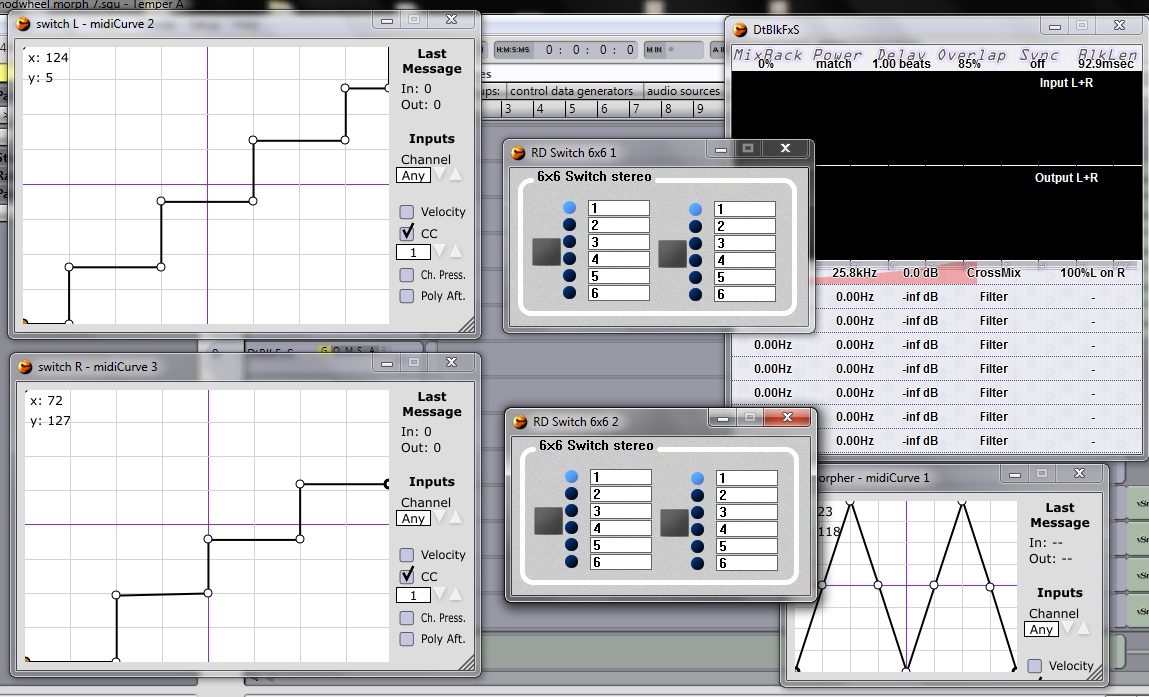 this picture shows all softwares needed to fake the AET filter functioning.: a modular host / VST wrapper; Midicurve; RD switch 6×6; DtblkFXs
routing and parameter assignment:
- MIDI keyboard into Pd, from Pd to your DAW, inside your DAW rout it into all 'Midicurve'-plugins
- rout first and second Midicurves into a 6x6 switch each; assigning 6×6's input switching parameter to the Midi CC coming from the respective Midicurve plug-in
- rout third Midicurve to DtblkFXs, assigning it's "0.Val" parameter to Midi output CC coming from that respective Midicurve
- rout your audio sources (synths / samplers / microphones) into the RD switches - instruments 1,3,5,7 & 9 into one switch and the instruments 2,4,6 & 8 into the other switch (all instruments get a different input at the RD switches - don't put all of them into the first audio channel, otherwise they won' t morph)
- draw the transfer functions of the Midicurves as seen in the picture and make sure to place a hook at "CC" and select the CC of your modwheel!
If you turn your modwheel up, now, the switches should change their input channels exactly in the moment when a full morphing from one source to the next has been finished. - adjust DtblkFXs as seen in the picture!
Much fun with your own totally free AET morphing tool!
 posted in patch~
MIDI Delay with weird fix (has now become an ASIO issue)
Hi there!
New to PD and its really great to use. I have a USB MIDI keyboard which, in any program, has huge input lag, making it unplayable (we're talking quarter of a second here, which is huge in timing terms). This was the same in PD, until I opened Audio Settings in PD and started, gradually, nudging down the delay (msec) value. Since that, I get no noticeable input lag at a msec value of 25 (lower breaks with horrible input lag, higher obviously increases input lag because, well, its a delay), however the input lag comes back if I close the Audio Settings window. After applying and not closing the window, there is no problem. I also notice launching my email client with the window open created huge lag, but I see that as being normal, as you're putting more work on the CPU.
My setup for testing is as follows: USB MIDI keyboard -> PD -> simple input to output patch -> USB MIDI adapter (not the keyboard, a different one) -> Yamaha CBX-T3 MIDI sound module.
This system is running windows 10 64Bit
Preferably, I'd like to remove delay for ALL programs. Worst case I'd like to be able to use PD's midi functions without the Audio Settings window open.
Thanks for any help.
EDIT: Clsoing the Audio Settings window and waiting about 5 seconds fixes the delay issue for PD., still have program delay though, such as Ableton.
 posted in technical issues