
Quality granular processing in pd
OK, here's a basic live input granulator, no really fancy features, just pitch shifting.
The handling of grain playback rate in the one-grain abstraction is a neat trick I had worked out some time ago. For example, if you want to play the grain an octave higher (2x speed), then you need to span 2 * dur ms of audio in dur ms of time. You can do that by modulating the delay time as a straight line, from dur ms to 0 ms -- adding dur to the delay time at the beginning adds that many ms to the amount of audio being used: dur * (rate-1). Or, to play slower, start with a shorter delay and go toward a longer delay, and the boundary is again dur * (rate-1). If rate = 1, then the delay time goes from 0 to 0 = no change = normal speed. That might look a bit funky in the patch you can try it with different transposition intervals, which will show that it's correct.
For sound file processing, replace the delay line with a soundfiler-filled array, and use tabread4~ for the audio source (and the line~ driving it will have to be different too).
IMO granular processing is 99% refinement and more advanced modulation of these basic parameters, which you should be able to tailor to your needs. I think the pitch shifting is more-or-less smooth here, though I'm not sure it matches your comparison plugins -- this is 66.6667 grains per second, with 4x overlap.
one-delay-grain.pd
live-granular.pd
hjh
 posted in technical issues
Waveguide/Karplus strong delay time problem
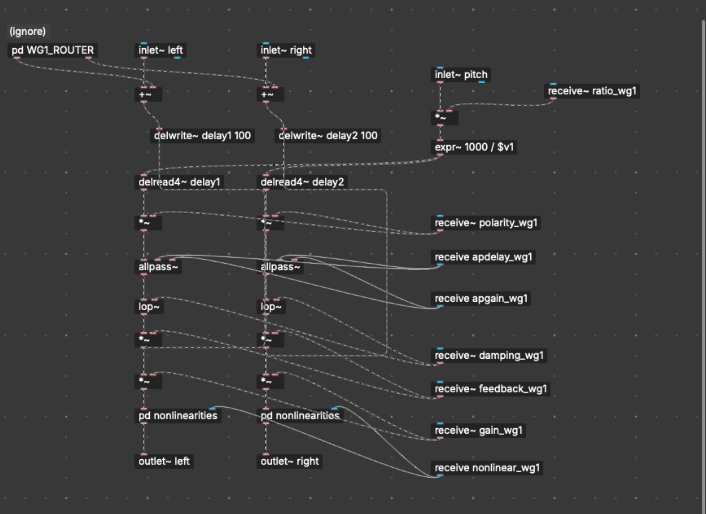
Hello, to put you into context I'm working on a waveguide-style physical modeling synth in PlugData (basically the same as Pure Data), and I'm running into an issue where my delay line won't produce high-pitched notes correctly. I'm using a [delwrite~] and [vd~] or [delread4~] combo, with the delay time calculated from frequency using [expr~ 1000 / $v1], where $v1 is the pitch in Hz (converted from MIDI with [mtof]). The delay time is in milliseconds.
The patch works fine for low and mid frequencies, but when I try to play higher notes (especially MIDI note 100 and up), the pitch output seems stuck. it just keeps playing the same note, i doesn't happen with low notes though.
I've already tried the usual fixes. I made sure the [delwrite~] buffer is small (100 and even around 5–10 ms), verified that the delay time input is a smooth signal ([sig~]), and tried both [vd~] and [delread4~] for interpolation, nothing works.
Out of curiosity, I tested the patch at a global sample rate of 96,000 Hz. That actually allowed the waveguide to reach the correct higher notes, but the patch became very laggy and glitchy, and the CPU usage was noticeably worse (as expected)
At this point, I'm wondering if there's a clean way to make a delay line in Pure Data (or PlugData) that supports very short delay times for high pitches (e.g. MIDI 120+), without needing to oversample the entire patch or push the sample rate to 96kHz. Is there a known solution for sub-millisecond delay accuracy that works well in Pd? Would a local oversampling strategy using [block~] be effective here? Any guidance or best practices would be really appreciated 
 posted in technical issues
ELSE 1.0-0 RC13 with Live Electronics Tutorial Released
Ok, the cat is out of the bag --> https://github.com/porres/pd-else/releases/tag/1.0-rc13 I'm officialy announcing the update and uploaded binaries to deken for mac (intel/arm), Win and Linux. It all looks ok but tell me if you see something funny please. There's also a raspberry pi binary but not working 100%yet and we'll still look into that. Hopefully someone could help me/us with it. I might make another upload just for the pi later on if/when we figure it out. Find release notes and changelog below.
RELEASE NOTES:
Please support me on Patreon https://www.patreon.com/porres I'll now try to add special content for subscribers. You can follow me on instagram as well if you like... I'm always posting Pd development stuff over there https://www.instagram.com/alexandre.torres.porres/
It's been a little bit over 7 months since the last update and I almost broke the record for taking too long to release an update (which had happened in my previous update). So yeah, there's just too much to talk about! I guess the delays in releasing updates is because it's been a little tricky and hard to sync the release cycles of ELSE with PlugData, which includes ELSE in its download.
Plugdata 0.9.2 should come out soon with ELSE RC13 and it's supposedly the last update before 1.0.0, so I've heard. And the plans was to get to that still in 2025! This means ELSE could be at its last "Release Candidate" phase as I'm aiming to sync the final release with PlugData. Until then, I'll still make breaking changes and I can't wait until I can't do that anymore as I really feel bad. On the other hand, it's kind of inevitable when I'm always adding new stuff and redesigning and reconfiguring objects to include more functionalities. And I always got a lot of new stuff! So I'm thinking that I will eventually try some mechanism like Pd's compatibility flag or something. I'll try to come up with something like that in the next update.
This update has 22 new objects for a total of 573 and 26 new examples in my tutorial for a total of 554 examples. Let's dive into the highlights (see full changelog below after the release notes).
-
Multichannel Support: Last release had 92 MC aware objects, now it's 139! Over a 50% increase that include old and new objects (all the new ones have been coming with MC support). Virtually all oscillators and envelope generators now have MC support, plus some other random ones. Let me highlight the new [lace~]/[delace~] objects that are 'MC' tools that perform interleave/deinterleave in Multichannel connections. My bare minimum number of objects "to start with" would be at least a bit over half the number of signal objects. That was my target for 1.0! ELSE right now has 319 signal objects, so that'd be at least 160. I will definitely pass this milestone in the next update. I guess a good number of MC objects would be around 75% of the signal objects. I will aim for that as soon as I can. Some objects simply can't be MC at all, so 100% will never be the case, but maybe an ideal 90% eventually? We'll see... I am just proud and happy that ELSE is taking such a big jump on MC awareness in less than a couple years.
-
Envelope generators ([adsr~]/[asr~]/[envgen~]/[function~]) now have more curve options. For [adsr~]/[asr~] the default is now a new log curve that you can set the curve parameter (and was 'stolen' from SuperCollider). A new [smooth~] family of objects perform the same kind of curved smoothening for alternating inputs - [envgen~] and [function~] also have that but also '1-pole' filtering, 'sine' and 'hann' curves. You can now trigger [adsr~] and [asr~] with impulses.
-
The [play.file~] object now supports even more file formats besides MP3 and stuff. Hey, you can even stream the supported formats from weblinks! The [sfload] object (which loads files into arrays) also gained support for more formats and can download from weblinks as well! It also has a new threaded mode, so loading big files won't choke Pd. It now also outputs the file information, which is a way to tell you when loading finished in threaded mode. The [sample~], [player~], [gran.player~] and [pvoc.player~] objects are now also based on [sfload], so they support all these file formats!!! Now [sample~] and [tabplayer~] are integrated in a way that [tabplayer~] is always aware of the sample rate of the file loaded in [sample~] (so it reads in the "correct speed"). A new [sfinfo] object is able to extract looping regions and instrument metadata information from AIFF files (which is something I wanted for ages) - it should do more stuff in the future.
-
[knob] has become the ultimate featured bloated creep GUI I always feared and avoided. MAX is envy! but I'm happy with this structure and I want to replicate in other GUIs in the future (yeah, I got plans to offer alternatives to all iemguis). I wanna highlight a new 'param' symbol I added that allows you to remotely set a particular method in an object, so you don't to connect to a "method $1" message and you can even do this wirelessly with a send symbol. [knob] now also acts like a number box, where you can type in the value, which may also be displayed in different ways or the value can be sent elsewhere via another send symbol so you can temper with it using [makefilename] or [else/format]. I've been using this for the MERDA modules and it's really cool.
-
We finally have a [popmenu] GUI object! This was in my to do list forever and was crucial to improve the MERDA modules to set waveforms, instruments and whatnot.
-
Let's about MERDA, the "Modular Euroracks Dancing Along" subset of abstractions in ELSE. It was first released in the last update and it's been driving lots of the development in ELSE as you can see. I now added a MIDI Learn feature for all knobs that feels great and quite handy! There are many fixes and improvements in general and some new modules. I wanna highlight the new [sfont.m~] module, which loads "sound font" banks and you can just click on a [popmenu] to choose the instrument you want. The default bank has numerous (hundreds) options and also comes with PlugData. The sequencer module [seq8.m~] was rather worthless but it's now a whole new cool thingie. It allows you to set pitches with symbols and even has quarter tone resolution. I added a right outlet to send impulses to trigger envelopes and stuff (there's still more stuff of course, see full changelog below).
-
There are newly designed/renamed/recreated [resonbank~]/[resonbank2~] objects that are well suited for Modal Synthesis.
-
What actually drives my development is my Live Electronics tutorial, which got a fair upgrade with a new chapter on Modal Synthesis amongst other things, such as new subtractive synthesis examples and a revision of envelope generators with examples on AHDSR and DAHDSR - by the way, there are new gaterelease~/gatedelay~ objects for handling envelopes (and other processes).
-
I have to thank some people. Tim added 'zoom' to the [pic] object, as well as an image offset. Tim also implemented a new and better technique for bandlimited oscillators. Ben Wesh gave me a new [scope3d~] GUI object, pretty cool, that plots an oscilloscope in 3 dimensions, which is coded in LUA - and ELSE has been carrying a modified version of [pdlua] because it now depends on it for a couple of GUIs. Tim and Ben made many improvements to [pdlua] (as well as Albert Graef, of course).
-
For more new objects, let me also tell you about the simple and cool [float2imp~], that is based on [vline~] and can convert floats to impulses with sample accuracy (don't know why I didn't think of that earlier). A new [tanh~] object has Multichannel support. A bit earlier I made an update to Cyclone that actually "borrows" and includes this one from ELSE instead of its original one (which does not have Multichannel support). PlugData users will load the one from ELSE. This is another tiny step that sort of integrates ELSE and Cyclone, specially for PlugData users.
happy patching.
CHANGELOG:
LIBRARY:
Breaking changes:
- [adsr~]/[asr~]: now a gate off before reaching the sustain point does not start the release right away (this allows you to trigger it with impulses). There's a new mode just for immediate release. There's a new exponential setting for curve factors, the old 'log' mode is renamed to 'lag' as it's the same as used in the [lag~] object. For [adsr~], a bang now is not "retrigger", but an impulse at control rate, there's a new 'retrigger' message for control rate retriggering (and now it only retriggers if the gate is on). For [asr~] a bang now also works like an impulse.
- [sample~]: no more 'load' message, args to 'open' message changed, size is now only in 'ms'.
- [format]: outputs are now always symbols, before you could get float outputs. Also, we just have a simplified symbol output, no more lists or anythings. Hopefully I'll be able to get the 'list' output back, but it involved some bugs that I couldn't fix so I just removed it. You cannot use bangs and lists in secondary inlets no more (this is cylone/max crappy paradigm we don't want here). Bang method was actually removed as well.
- [pack2]: no more support for anythings, also no more support for lists in secondary inlets and output has a list selector (I wanna make this more Pd like and not a silly clone from MAX's [pak], cause fuck MAX).
- [merge]/[unmerge]/[group]: no more '-trim' flag (again, respecting pd's usual list paradigm), in [merge] now there's no more 'hot' argument and a bang now represents an empty list and inlets initialized with empty lists
- [mono]: 1st argument is now 'glide' in ms.
- [sfont~] now uses 'mma' for bank selection (this alters how CC messages set the bank number).
- [player~]/[play.file~]: 'open' message does not play files right away anymore.
- [tabplayer~]/[player~]: play message without args now play at the default settings (whole file at regular speed).
- [envgen~]: removed the 'maxsustain' parameter, use the new [gaterelease~] or [gaterelease] objects instead. Removed the rightmost inlet just to set envelopes, now a list input only sets the envelope and doesn't trigger it. The 'set' message is then removed.
- [envgen~]/[function~]: simplified and got rid of '-exp' flag and message, also deleted 'expl' and 'expi' messages. A new 'curve' and cimpler message sets exponential factors for all or individual segments, and includes more curve formats.
- [knob]: 'esc' key now deactivates the object. The 'ticks' message is renamed to 'steps' and there is a new 'ticks' message that toggles showing ticks on and off. The 'start' message has been renamed to 'arcstart'. The 'outline' message has been renamed to 'square' for better clarity. Design changed a bit to make it like it is in PlugData (they won), so we now fill the whole background color when in 'square mode' and the knob circle has an 85% proportion in this case inside the full 100% square size (so it grows bigger when not in 'square' mode). Now, by default, the GUI is in a new 'loadbang' mode (I don't think this will influence old patches). I'm afraid some old patches might behave really weird since I added a lot of new stuff. I changed the 'load' message behaviour to not update the object (this can arguably be considered a bug fix).
- [wavetable~], [bl.wavetable~] and [wt2d~]: 'set' message now sets frequencies because of the MC support in [wt~] and [wt2d~], while there's a new 'table' method to set the table name.
- [gbman~]/[cusp~] list method is now for MC, old list method is now renamed back to an old 'coeffs' method.
- [f2s~]/[float2sig~] default value is now 10 ms.
- [op] now behaves like [*~] where the smaller list wraps til reaching the size of the longer one.
- [list.seq] does not loop anymore by default.
- [impseq~] list input removed, use the new [float2imp~] object to convert floats to impulses.
- [resonant~] now has 'q' as the default.
- [resonant2~] has been removed.
- [decay2~] has also been removed ([asr~] much better).
- [vcf2~] has been renamed to [resonator2~].
- [resonbank~]/[resonbank2~] have basically been deleted and replaced by new objects with the same name... [resonator~] is based on a new [resonator~] object which is similar to [resonant~] and [resonbank2~] is now based on [resonator2~] (old [vcf2~] instead of [resonant2~] that got deleted). These are well suited objects for Modal Synthesis.
- [oscbank~] now uses a 'partial' list and not a frequency list. The freq input now defaults to '1' and this makes [oscbank2~] completely obsolete.
- [oscbank2~] has been deleted since it became completely obsolete.
- [sfload] load message changed the behaviour a bit.
Enhancements/fixes/other changes:
- [adsr~]: We have now a new mode for immediate release (see breaking changes above, I'm not repeating it). Fixed ADSR signal inputs (it was simply not really working, specially for linear). Fixed status output for MC signals. There's a new curve parameter that allows you to set the curvature.
- [asr~] I actually just made the new [adsr~] code into a new [asr~] code as a simplified version (as it was before)... so it's got the same impromevents/fixes.
- [play.file~]: added support for more file formats and even weblinks for online streaming!
- [sfload]: added an outlet to output information, added threaded mode, added support for more file formats and even weblinks for downloading.
- [sample~], [player~], [gran.player~] and [pvoc.player~] are now also based on [sfload], so they support more file formats!
- [sample~]: improved extension management with [file splitext].
- [sample~] and [tabplayer~] now are automatically integrated in a way that [tabplayer~] is always aware of the sample rate of the file loaded in [sample~], so it automatically adjusts the reading speed if it is different than the one Pd is running with.
- [numbox~]'s number display is not preceded by "~" anymore (that was just kinda stupid to have).
- [format]: fixed issues where empty symbols and symbols with escaped spaces didn't work. Added support '%a' and '%A' type. Added support for an escaped 'space' flag. Improved and added support for length modifiers. Improved syntax check which prevents a crash. Improved documentation.
- [knob]: added new 'param', 'var', 'savestate', 'read only', 'loadbang', "active", "reset" and 'ticks' methods. Added the possibility to type in number values and also modes on how to display these number values, plus new send symbols for 'activity', 'typing', 'tab' and 'enter'. New design more like plugdata. Changed some shortcuts to make it simpler. If you have the yet unreleased Pd 0.56-0 you can also use 'double clicking' in the same way that works in PlugData. Properties were also significantly improved (I'm finally starting to learn how to deal with this tcl/tk thingie). Yup, a lot of shit here...
- [autofade2~]/[autofade2.mc~]: fixed immediate jump up for 0 ramp up.
- [synth~]: fixed polyphony bug.
- [metronome~]: fixed bug with 'set' message.
- [midi2note]: fixed range (octaves 0-8).
- [pulsecount~]: fixed reset count to not output immediately, added bang to reset counter at control rate
- [click]: fixed regression bug where it stopped working.
- [else]: new 'dir' method to output ELSE's binary directory in a new rightmost outlet. The print information also includes the directory.
- [pic]: added zoom capability finally (thanks to tim schoen) and added offset message (also thanks to tim).
- [store]: added 'sort' functionality.
- [scales]: fixed octave number argument. Added functionality to allow octave number as part of the note symbol.
- [mono]: added 'glide' parameter, as in [mono~].
- [pluck~]: fixed list input.
- [rescale]/[rescale~]: added a "reverse log" mode.
- [limit]: added a new second ignore mode.
- [graph~]: added an external source input for plotting the graph and a 'clear' message.
- [canvas.setname]: added a new argument for "abstraction mode" and methods to set name, depth (and mode).
- [midi.learn]: added a new argument for "abstraction mode", fixed 'dirty' message sent to parent.
- [brickwall~]: fixed initialization.
- [list.seq]: added a loop mode and a 2nd outlet to send a bang when the sequence is done.
- [delete]: fixed index for positive numbers.
- [dust~]: added 'list', 'set' and '-mc' flag for managing the already existing Multichannel capabilities.
- Thanks to Tim we have many fixes and a whole new technique for band limited oscillators. Now [bl.saw~], [bl.saw2~], [bl.vsaw~], [bl.square~], [bl.tri~], [bl.imp~] and [bl.imp2~] have been redesigned to implement elliptic blep, which should provide better anti-aliasing.
- [parabolic~] now uses and internal wavetable for more efficiency.
- [resonant~]: added 'bw' resonance mode.
- [lowpass~]/[highpass~]: added 't60' resonance mode.
- [quantizer~]/[quantizer]: added a new mode, which combines floor (for negative) and ceil (for positive) values.
- [crusher~]: now uses the new [quantizer~] mode from above (arguably a breaking change).
- [envgen~]: fixed a bug (actually a misconception) where ramps started one sample earlier. Fixed 0-length lines. Added a possibility to set time in samples instead of ms. Maximum number of lines is now 1024. Added loop mode. Added many curve options (sin/hann/log curve/lag).
- [function~]: Added many curve options (sin/hann/log curve/lag).
- [The out~] family of abstractions now use [bitnormal~] so you won't blow your speakers beyond repair in edge cases.
- [trig.delay~]/[trig.delay2~]: fixed bug where impulse values different than '1' didn't work.
- Added MC support to: [trig.delay~], [trig.delay2~], [gatehold~], [vca.m~], [gain2~], [decay~], [asr~], [envgen~], [function~], [bl.osc~], [bl.saw~], [bl.saw2~], [bl.vsaw~], [bl.square~], [bl.tri~], [bl.imp~], [bl.imp2~], [imp2~], [tri~], [saw~], [saw2~], [vsaw~], [square~], [pulse~], [parabolic~], [gaussian~], [wavetable~], [wt2d~], [randpulse~], [randpulse2~], [stepnoise~], [rampnoise~] [pink~], [gbamn~], [cusp~], [gray~] and [white~].
- Also added MIDI input and soft sync to [imp2~], [tri~], [saw~], [saw2~], [vsaw~], [square~], [pulse~], [gaussian~] and [parabolic~].
- [wavetable~] and [wt2d~] gained args to set xfading.
- Updated pdlua to 0.12.23.
- M.E.R.D.A: Added MIDI-LEARN for all modules (this is only for the knobs). Replaced some number boxes that were attached to knobs by an internal number display mechanism (new feature from knob). Improved interface of [gendyn.m~]. Preset/symbol name fixes to [flanger.m~]. Now we have automatic MIDI mode detection for [plaits.m~] and [pluck.m~] when no signals are connected (still trying to get plaits right, huh? Yup! And bow MIDI input with monophony and trigger mode has been fixed in [plaits.m~]). Added MC support to [vca.m~]. Increased range of [drive.m~] down to 0.1. Changed some objects to include the new [popmenu] GUI. [vco.m~] now uses the new MC functionalities of oscillators and doesn't need to load abstractions into [clone], I hope it makes this more efficient and clean. The [seq8.m~] module was worthless and got a decent upgrade, it's practically a new module. Added new modules (see below). Note that MERDA is still at alpha development phase, much experimental. Expect changes as it evolves.
- 22 new objects: [float2imp~], [lace], [delace], [lace~], [delace~], [gatehold], [gatedelay],[gatedelay~], [gaterelease~], [gaterelease], [popmenu], [scope3d~], [tanh~], [resonator~], [sfinfo], [smooth], [smooth2], [smooth~], [smooth2~], [dbgain~], [level~] plus [crusher.m~], [sfont.m~] and [level.m~] MERDA Modules.
Objects count: total of 573 (319 signal objects [139 of which are MC aware] and 254 control objects)!
- 323 coded objects (210 signal objects / 113 control objects)
- 227 abstractions objects (87 signal objects / 140 control objects)
- 23 MERDA modular abstractions (22 audio / 1 control)
TUTORIAL:
- New examples and revisions to add the new objects, features and breaking changes in ELSE.
- Added the MERDA modules into the examples for reference.
- Revised section on envelopes.
- New subtractive synthesis examples.
- New chapter on Modal Synthesis.
- Total number of examples is now 554! (26 new ones)
 posted in news
ofxOfeliaExtended
These are the contents of the .zip file you mention:
abs/                  CHANGES.txt                    examples/     LICENSE.txt  ofelia-object-help.lua  ofelia_textwindow.tcl   opencv_core4100.dll  opencv_features2d4100.dll  opencv_imgproc4100.dll    README.md
assimp-vc142-mt.dll  classesAndGlobalFunctions.txt  libxml2.dll  ofelia.dll   ofelia-object-help.pd   opencv_calib3d4100.dll  opencv_dnn4100.dll   opencv_flann4100.dll       opencv_objdetect4100.dll  stable-diffusion.dll
Are these supposed to be located in the ofeliaExtendedLib directory? Because, all there is in there, is already in the directory of the ofelia.pd_linux Pd external directory too.
 posted in pixel#
Audio-rate round-robin impulse generator?
A few years ago I made a convoluted patch (no pun intended) that outputs a single sample 1-valued pulse on each of its [outlet~]s sequentially in round-robin fashion in response to a positive transition on its [input~]. It's pretty gruesome so I don't want to post it here, but for the morbidly curious suffice it to say it's based on cascaded shift registers with the last stage fed back to the first stage and requires [block~ 8 1 1] to work reliably at 2500 Hz. Anyway, it behaves like this:
- positive transition seen on [input~] -> pulse first [outlet~]
- positive transition seen on [input~] -> pulse second [outlet~]
- positive transition seen on [input~] -> pulse third [outlet~]
... - positive transition seen on [input~] -> pulse last [outlet~]
- positive transition seen on [input~] -> pulse first [outlet~]
...
Anytime I look at my code I gag. Does anyone in the esteemed readership of this forum have a suggestion on how to do this in a less offensive way? I don't care about the signal specifics of the inputs and outputs as long as they are at audio-rate and easily detectable within a constant number of samples. I would gladly accept consistent latency in exchange for efficiency and elegance. Extra respect if the number of outputs can be easily changed without dynamic patching.
 posted in technical issues
Avoid clicks controlling Time Delay with MIDI Knob
@Zooquest You will hear clicks because there will be jumps between samples.... if the playback was at a sample level of 0 and you change the delay time to a point where the level is 1 then the click will be loud.
You will hear "steps" as the playback point is probably being changed repeatedly by the ctrl messages.
You could experiment with a [lop~] filter in the delayed sound output, with a high value e.g... [lop~ 5000] but you will lose some high frequencies in the echo.
That might sound natural though, like an old tape echo, but you will probably still hear the clicks a little.
Or you could "duck" the echoes by not changing the delay time immediately, reducing the echo volume to zero in say 3msecs using using [vline~] and not bringing the echo volume back up to 1 (in, say, 3msecs again) until you have NOT received a ctrl message to change the delay time...... for again 3msecs.
The last part of that would need a [delay 3] using the property that any new bang arriving at its inlet will cancel the previously scheduled bang.
You would need to duck the FB signal as well though, and all that that might sound worse than the [lop~].
I cannot remember well...... but this "sampler_1.pd" might contain elements useful to demonstrate "ducking" https://forum.pdpatchrepo.info/topic/13641/best-way-to-avoid-clicks-tabread4/12
Or do a crossfade between separate delays once the incoming control messages have stopped..... https://forum.pdpatchrepo.info/topic/12357/smooth-delay-line-change-without-artifacts ..... as you can then avoid the "duck"ing effect.
David.
 posted in patch~
Karplus strong and strange issues with fexpr~
@reubenm I never care about computational expense until it's a problem, and even then it sometimes generates some cool stuttering that I would never have thought of. But if that fexpr~ way of doing things speaks to you, then maybe you should look into supercollider  And I'm not trying to be a jerk because as a former java/c# programmer I'd probably prefer it!
Edit: Ouch! I think I'm confused about the delay line and forced order of execution. In KS you're feeding back the output of the delay line into the input, so either you have to have the delay line read upstream of the write (and so you have a min 1 block delay) or you have to send the delay line read signal back up to the delay line write (which also incurs a 1 block delay). So either way I think you have to reduce the block size to get frequencies above 689hz.
posted in technical issues
count~ pause option?
The problem with a [metro]-based approach is that the [metro] puts a hard limit on time granularity. You can get more accuracy by increasing the [metro] speed, but this uses more CPU.
IMO if you want real accuracy, then [metro] isn't the way to go.
At first I was going to keep a [timer] running continuously, and also accumulate a "total pause time" value to subtract from the [timer].
But then I realized... at the moment of pausing, it could "freeze" the pause time -- then, when you resume, reset the timer to 0 and add the last frozen time -- so at that moment, 0 + frozen time = last-paused value, 1000 ms later = 1000 + frozen time etc.
This type of thing is IMO much easier to do in a programming language, but with some clever traffic policing, it does work:
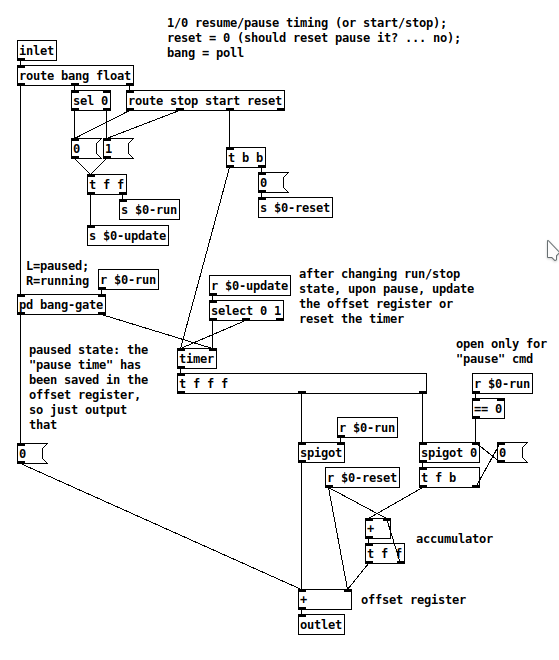
For this type of abstraction, it's good to have a unit test -- provide a controlled input and make sure the output is as expected.
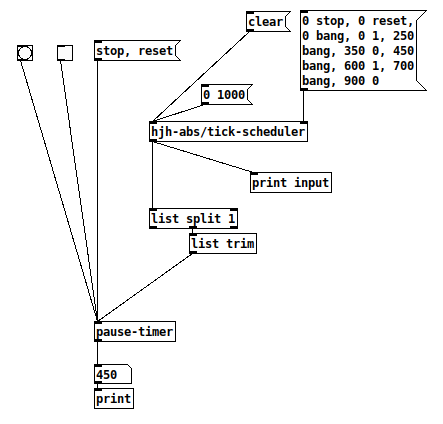
1, clear; 2, init the sequence; 3, "0 1000" to go.
input:  0 stop
input:  0 reset
input:  0 1
input:  0 bang
print: 0            OK
input:  250 bang
print: 250          OK (250 ms later)
input:  350 0       Pause at 350
input:  450 bang    Poll 100 ms later
print: 350          Still paused at 350, OK!
input:  600 1       Resume 250 ms later (time should not have changed)
input:  700 bang    +100 ms after the moment of resuming, then poll
print: 450          Result = 350 ms + 100 ms = 450 ms, OK!
input:  900 0
Unit test passed  The paused duration between 350 and 600 ms does disappear as expected.
So you'll get full [timer] resolution without running a busy-counter loop.
hjh
posted in technical issues
PlugData / Camomile "position" messages: What are these numbers?
@whale-av said:
@ddw_music Yes.... buffer.
Maybe some DAWs have implemented a tempo message since then?
Tempo must be available, since plug-ins have been doing e.g. tempo-synced delays for at least a decade already.
(In fact, it is available via Camomile: [route tempo position].)
Anyway... I've been considering solutions, and I think I can do this.
- Set some threshold close to the beat, but before the beat, say x.9 beats.
- For the first tick past the threshold, get "time to next beat" = roundUp(pos) - pos = int(pos + 0.99999999) - pos.
- [delay] by this many beats ([delay] and the tick-scheduler will have been fed "tempo x permin" messages all along).
- Then issue the tick message to the scheduler, in terms of whole beats (where the time-slice duration is always 1.0).
At constant tempo, I'd expect this to be sub-ms accurate.
If the tempo is changing, especially a large, sudden change, then there might be some overlaps or gaps. But [delay] correctly handles mid-delay tempo changes, so I'd expect these to be extremely small, probably undetectable to the ear.
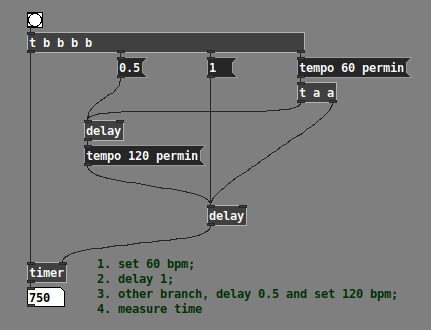
Half a beat at 60 bpm + half a beat at 120 bpm does indeed = 750 ms -- so the delay object is definitively updating tempo in the middle of a wait period.
I'll have to build it out and I don't have time right now, but I don't see an obvious downside.
hjh
posted in technical issues
How to connect the guitar to pure data?
@romulovieira-me Under preferences > audio> select your sound card's line input. If it is the internal sound card there shouldn't be very many options, just a mic and maybe a line input (depends on your OS). Generally it's default set to the mic. (https://puredata.info/docs/faq/audioinput)
Then in a patch, create an [adc~] object. Normally or initially, this is assigned to the mic on the computer, but if you have selected the signal line input from your soundcard you should be able to get a connection established. Getting the correct input and output set up can be the hardest bit of getting set up, stick with it and you'll find what is right for you. If you struggle with it, post a screenshot of your audio options and we can hopefully help point you in the right direction. If it's just a mono input, you may only have sound form one output of the [adc~] object. If you right click the adc object you can find out more, with examples etc. (you can do this with all patches, and is a great way to learn via practise.
You will still have to connect the input sound to the [dac~] object, which will convert your signal back from digital to audio. Be careful though, it will be at full volume, so it is always recommended to put an object before the dac that will lower the volume (0 is silence, 1 is full volume, so lower decimals of 1 are advised before you know what to expect, maybe [*~ 0.1] to start).
A small diagram to describe:
{adc~]
|
{*~ 0.1]
|
[dac~ 1 2]
It's worth searching this forum too, as you might find a lot more tips and help.
 posted in technical issues