
Ofelia simple video analysis questions
I wrote Zack Lee and he was helpful in setting me in the right direction for my particular need - he wrote:
"For example, if you open "ofelia/examples/video/asciiVideoExample/asciiVideoExample.lua", in line 51, you can replace the M.draw() function with the following:
function M.draw()
local stepAmount = 20
for i = 0, camWidth-1, stepAmount do
for j = 0, camHeight-1, stepAmount do
local color = vidGrabber:getPixels():getColor(i, j)
color:invert()
ofSetColor(color)
ofDrawRectangle(i, j, stepAmount, stepAmount)
end
end
end
It will check the pixel every 20 steps, and get the color value, then invert the color and draw a rectangle with the color."
I could still use lots of help with the implementation if anyone is up for some paid Ofelia/Lua work though!
 posted in technical issues
Closing patches without Pd crashing, hopefully in an elegant way...
EUREKA! I solved the following problem:
Problem: provide a mechanism for allowing patches to self-close without Pd crashing.
Requirements: (1) uses only Pd vanilla; (2) action to close patch starts on the very patch that will be closed.
Solution: copy patch killer.pd in the same folder as the patch to be closed, and send a message containing ";pd open killer.pd <dir>;kill_me symbol patch_to_be_closed.pd":
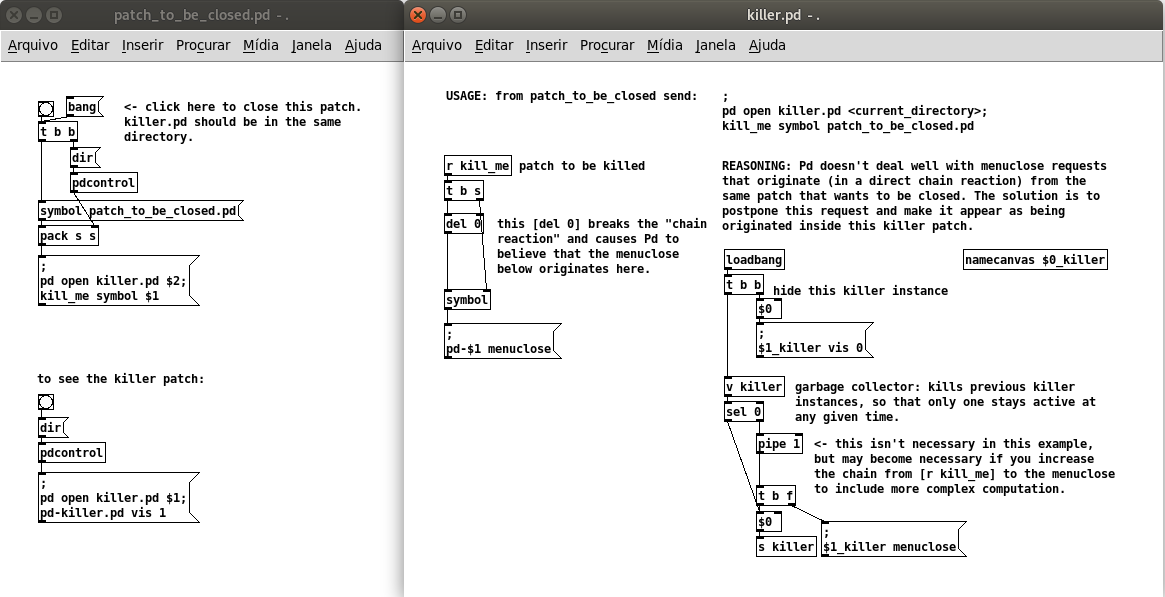
killer.pd
patch_to_be_closed.pd
Comments: (documented in the killer patch) Pd doesn't deal well with menuclose requests that originate (in a direct chain reaction) from the same patch that wants to be closed, so a separate killer patch is needed, which can be opened by the same patch requesting to be closed. In order to break the direct chain reaction, the solution is to postpone this request and make it appear as being originated inside the killer patch. This is done by storing the received symbol and delaying the message menuclose by 0 ms, which is enough to issue a new chain of events. The killer patch stays alive (but invisible), and any new instances of the killer patch will silently kill the previous instances so that only one killer patch is alive at any given time. [EDIT: I included a safeguard [pipe 1] in the killer patch, check the inline comments]. This implementation fixes the problems with my previous solution and also with the 3-patches method by @ingox, both of which didn't work through a send/receive pair. It also does not depend on dynamic patching.
This has been tested in Pd 0.50-2 and Ubuntu 20.04. I appreciate feedback to confirm if it works in other platforms/versions.
@whale-av Thanks again David for the suggestions (hcs, mouse clicks)! I wasn't too keen on the idea of depending on external libraries, and I also had to abandom the idea of having the killer patch embedded in the patch to be closed.
 posted in technical issues
Closing patches without Pd crashing, hopefully in an elegant way...
[EDIT: please refer to this post for a corrected version of this idea]
Hi there! Two years after the last message in this thread I was still trying to overcome this bug (it is a bug isn't it?) of a patch not being able to close itself gracefully.
Even though I was amazed at @ingox secret patch + dynamic patching solution, I think my workaround here may interest others.
It depends on two global names: a killer.pd patch and a killer global value.
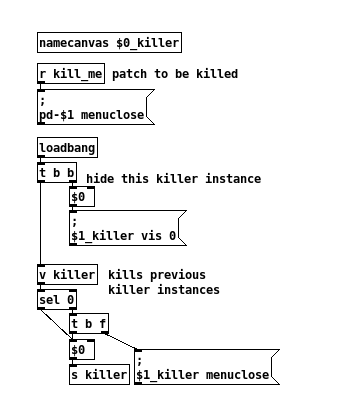
When somepatch.pd wants to get closed, it sends this message |;pd open killer.pd .;kill_me symbol somepatch.pd<. [EDIT: actually it only works if you click on this message. If you connect a |bang< to it, it doesn't work anymore... please find the corrected version in this post.]
It is nice that the killer patch doesn't show up, and it has its own embedded garbage collector. The not-so-elegant part is that an invisible killer patch will be left dangling in the background. Of course you can always bring it to the front with |;pd-killer.pd vis 1< and close it yourself, if this bothers you.
posted in technical issues
Looking for dark layout - is it possible?
@ejoo Hi, currently vanilla doesn't support tk color hooks. However, I have a branch which does that is only a few commits behind HEAD.
https://github.com/sebshader/pure-data/tree/colors
(The names are somewhat different than in extended, as discussed in this pr:)
https://github.com/pure-data/pure-data/pull/196
you have to compile yourself.. there is an example scheme in doc/7.stuff/colors-plugin.txt (change the extension to .tcl and put it in your path, and you can then edit (or remove for defaults) the values below line 43:
array set ::pd_colors {
e.g.
array set ::pd_colors {
canvas_fill "Black"
signal_cord "IndianRed"
signal_iolet "IndianRed"
msg_cord "DodgerBlue"
msg_iolet "DodgerBlue"
atom_box_fill "MintCream"
msg_box_fill "MintCream"
obj_box_fill "MintCream"
obj_box_outline "Black"
msg_box_outline "Black"
atom_box_outline "Black"
graph_outline "Black"
}
there are also more colors than were settable in extended  including colors for GOP box, array values, console window, help browser, and [text] object windows
I have an osx binary btw if anyone wants one
edit: graph_outline as black? .. maybe that was different in extended but it doesn't show up against the black canvas 
& I would also recommend setting "comment" to MintCream or something
 posted in technical issues
[hsl2rgb]: HSL to RGB color converter (vanilla)
What i like about the HSL color model is that if i leave saturation and lightness fixed and only change the hue, i get a linear representation of colors from all over the spectrum. With saturation at 100% and lightness at 50% i get bright and vivid colors that are clean mixes of only two RGB colors each. I think that gives a more intuitive access to colors and also possibly interesting ways to automate the use of colors. 
This patch converts HSL to RGB colors: hsl2rgb.zip
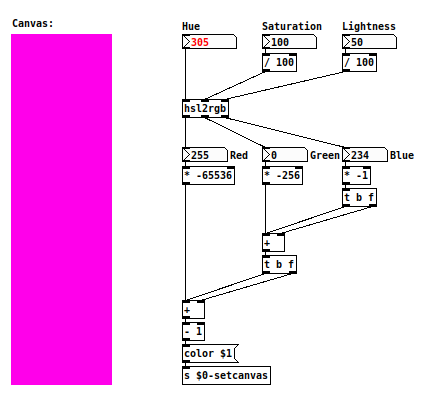
This is an implementation of the algorithm i found here: https://stackoverflow.com/a/9493060.
Enjoy! 
Keywords: HSL. hue, saturation, lightness, HSB, hue, saturation, brightness, HSV, hue, saturation, value, RGB, red, green, blue, converter
 posted in abstract~
canvas colors
You can use BlurPD to change dynamically the colors of objects in Pure Data.
BlurPD system is not for this problem but it contains a good solution for this problem that can be incorporated in your projects.
If you look inside of a module you can see some abstraction that deal with this color problem by calculating the color that you want from RGB directly to Pure Data color system.
Pure Data color system is very strange and interesting.
BlurPD system patch download :
BlurPD.zip
If you need more explanation for how i made the abstractions please let me know. Thanks , i hope this will help you in any way.
BlurPD snapshot:
 posted in patch~
canvas colors
Not sure if I should even bother sharing this thread started to get over my head real quick when the rgb tcl talk started. This process does not use rgb messages.
But originally thought i had some things to share so i spent a few minutes writing this so im going to share it anyways. LMAO
This patch will update the canvas color when a index for the canvas is given.
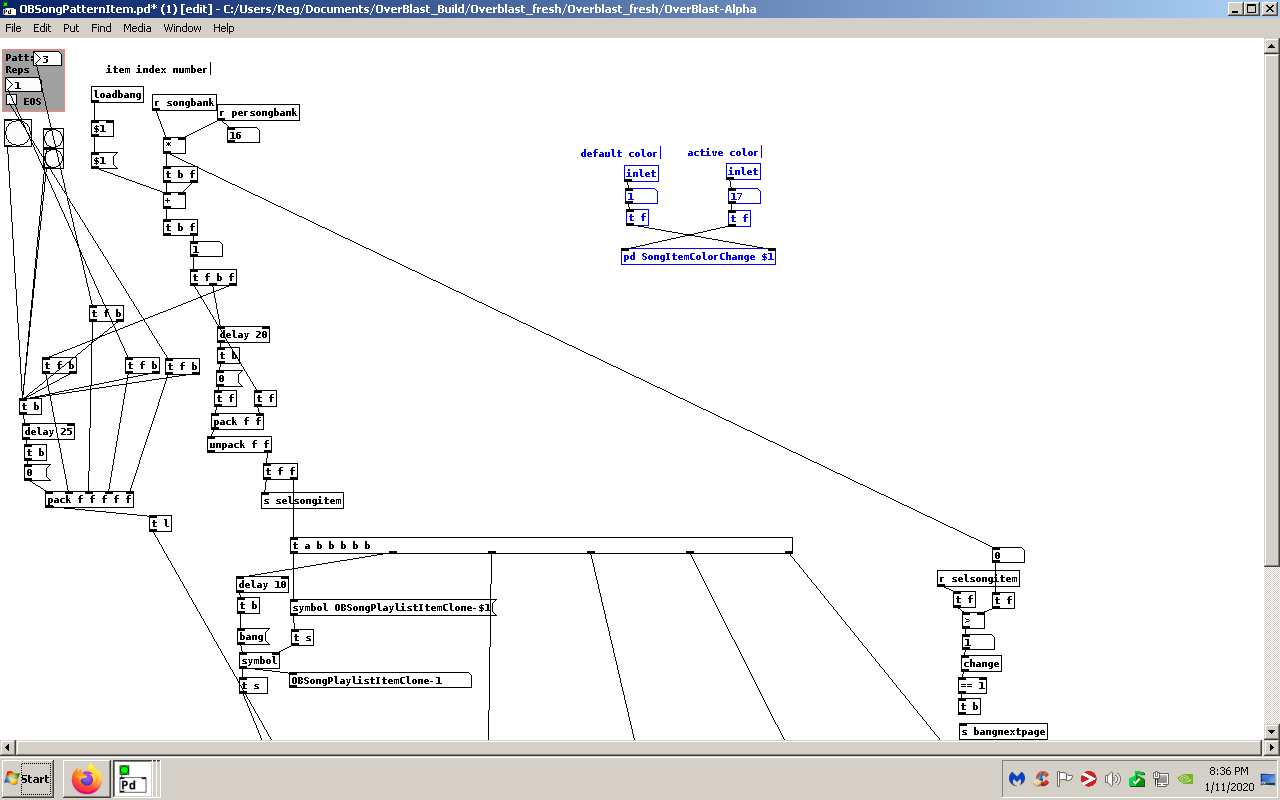
I should mention I have this setup to be used for multiple items. This is how i am using the patch. i have a [bng] underneath a canvas to keep it hidden we will call this my "songitem" This will make the canvas act as a [bng] just make sure the [bng] has the same dimensions as the canvas. So when a [bng] is pressed the canvas color will change to the active color. Then when any other button is pressed it will then become the "active" color and the previous canvas will return to the "default" color.
So if you had a canvas with the send and recieve symbols set as $1-Canvas-send $1-Canvas-recv you can easily feed the index of the canvas by replacing {r selsongitem}
with a inlet and feed whatever index you desired.
Its usage is highlighted in the screenshot.
Near the bottom of the patch you will find the object [symbol $1-songitem-recv]
change $1-songitem-recv to the proper recv symbol for your canvas.
If anything I hope this patch sparks some ideas for new people to pd. I'm only a year in and I think I'm developing a bald spot. lol i kid. And for the vets please pick this apart i need to learn what to do and what not to Ive been focusing on the order of operations as of late.
Enjoy
 posted in patch~
Somewhat nice circles using data structures with anti-aliasing implementing Xiaolin Wu circle algorithm (vanilla)
Hey there, this is an old project of mine. I implemented the Xiaolin Wu circle algorithm to get somewhat nice circles out of data structures. Only somewhat, because the color resolution of data structures is very limited, it has only eight values for every RGB color. So when the foreground and the background are very far away color-wise, like black and white, the algorithm gets a somewhat good result. Not perfect as in the original algorithm, as the color values still have to be rounded to the nearest data structure color. But it is alright. If background and foreground are very close, there is not very much room for interpolation and the result gets worse. Anyhow, this is the patch: circle20.pd
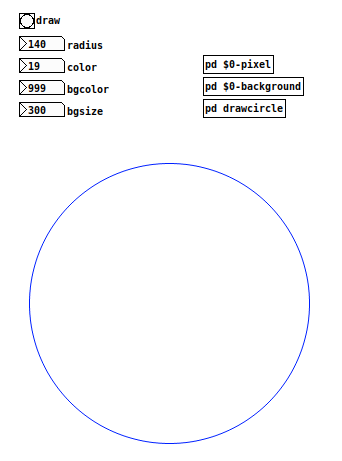
I am not sure if this is already finished, as the patch is almost two years old. I remember having a hard time calculating the number of actual dots to draw the circle. I hope that the amount is accurate in this version 
posted in patch~
Simple math logic...not simple for me :(
Oh...other space color...yeah i thought about it.
I'll explain the patch in more detail.
It loads an image. Every pixel color data RGB, and its combinations, represent a different voice of a 6-voice fugue. This fugue is playing in background all the time. For example. the first voice is associated with the values of the red values. If the value is 1 the fugue voice is at full volume, when the values of the reds gets lower, that fugue voice is filtered and lowered in amplitude...it's like that with the other colors. Each six colors with each six fugue voices.
It's easy to only play the reds, greens and blue voices, cause they're not a combination (or a modulation in my case) of colors. But when I combine two colors (red & green to get yellow o blue & green to get cyan), the "source" colors are sounding too.
Well at this point, i can play yellow or cyan, and not play the source colors. That operation is done. It's Source color (e.g. Green) minus yellow or cyan, and with that the green value is reduced. It's great!!! buuuutttt...
What i want to do is, the sum of all colors is white...so the color green should be sounding like the rest of colors...but i JUST CAN'T GET THAT TO WORK...because the operations i made, the green gets a 0 value...
I'll upload my patch if this explanation is too clumsy...sorry bout that.
 posted in technical issues
Simple math logic...not simple for me :(
Hi...i'm having a problem i just can resolve, or my mind at this point is completely blocked...
I'm doing a patch where you can read rgb pixel data and use it to produce various sounds.
The problem is that i'm trying to split in six different colors, RGB of course, and the combination of that, Cyan Magenta & Yellow. Now i'm at the moment when i can "play" the yellow or cyan color without "playing" the green color. It's just G - Y or C. Great! But what i want to do now, AND I JUST CAN'T (and i'm feeling a little stupid at this point) is to play the three colors in combination when there's a white color. I can't find the right math conditions or operator to do this. I know is not an specific PD issue, but is driving me crazy.
I just want, at least with that particular image, to get a 1 as a result. I mean, the green synth should play when is green and white too...
I'll post some images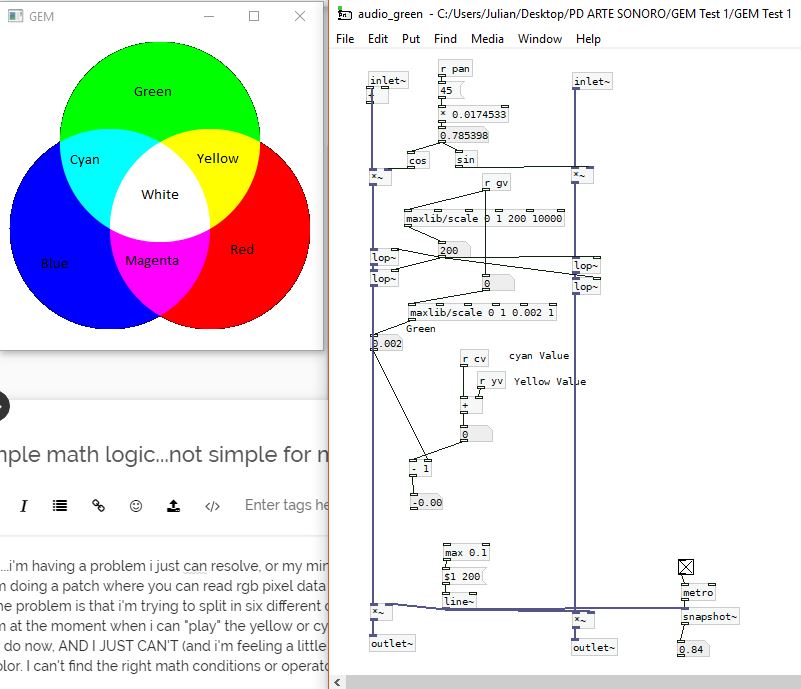
Thanks in advance!
posted in technical issues