
gui externals tutorial ?
so I think the linker should be set to -lCicmWrapper but I got conflicts and undefined
can you help me out ?
cc -rdynamic -shared -L"D:/WORK/DSP/pd-0.46-7/src" -L"D:/WORK/DSP/pd-0.46-7/bin" -o "src/adsr.dll" "src/adsr.o" -L"D:/WORK\DSP/PD/CicmWrapper-camo-dev/Sources/.libs" -lCicmWrapper -lc -lpd
D:/WORK/DSP/pd-0.46-7/bin/pd.lib(pd.dll):(.text+0x0): multiple definition of `error'
/usr/lib/libc.a(t-d000927.o):fake:(.text+0x0): first defined here
D:/WORK\DSP/PD/CicmWrapper-camo-dev/Sources/.libs/libCicmWrapper.a(libCicmWrapper_la-ecommon.o): In function `epd_add_folder':
/cygdrive/d/WORK/DSP/PD/CicmWrapper-camo-dev/Sources/ecommon.c:578: undefined reference to `sys_searchpath'
/cygdrive/d/WORK/DSP/PD/CicmWrapper-camo-dev/Sources/ecommon.c:603: undefined reference to `sys_staticpath'
/cygdrive/d/WORK/DSP/PD/CicmWrapper-camo-dev/Sources/ecommon.c:603: undefined reference to `namelist_append_files'
/cygdrive/d/WORK/DSP/PD/CicmWrapper-camo-dev/Sources/ecommon.c:609: undefined reference to `sys_staticpath'
/cygdrive/d/WORK/DSP/PD/CicmWrapper-camo-dev/Sources/ecommon.c:609: undefined reference to `namelist_append_files'``` posted in extra~
Loop
Pure Data is such a wonderful tool.
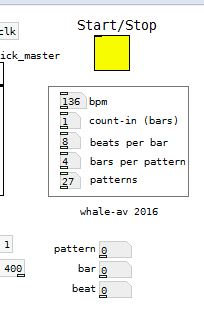
I am not a musician, so some of the terms in this patch will be incorrect. I threw it together this evening because it will make my life easier......
I have a group of classical musicians that often play to click, and they play a piece over six minutes long with an accumulative loop. Using Fruity Loop Studio I had to count my way through the piece whilst mixing......so as to kill the loop and the click as the piece ended....... a bit painful. That could probably be automated in FL, but I know Pd better.
The click runs for the number of patterns required, and the looped playback stops automatically. There is a different first beat for the last pattern in case the musicians get lost.
The bpm, count-in bars, beats per bar, bars per pattern, and the number of patterns can be set, and if the patch is then saved their values will be saved as well........
For each of the parameters in the box type the number you wish and press enter.
It's not very pretty, and you will need headphones, or an earpiece to use it unless you mute the click and count along with the metronome visual, but it works.........
loop.zip
David.
 posted in patch~
how does [list drip] actually work?
Hi folks,
This is going to be a weird and long post, because I am walking through my thinking as much as I am asking questions. Sorry for the length in advance.
I've recently become fascinated with the many possibilities afforded by the list-abs library, and what strikes me at is that [list-drip] seems to be at the heart of most of them. For those of you who don't know, [list-drip] works by separating (aka "dripping") an incoming list into its individual elements (atoms?). This allows you to do a bunch of operations on these elements before repacking them into a new list. For example, [list-compare] functions like [==] but for lists by checking each list's elements against each other to give out a binary yes or no answer. And of course, [list-drip] is at the core here.
I would like to really figure out the logic behind [list-drip], but the help file (well, really the abstraction itself) is deceptively simple. This is because [list-drip] itself is but an abstraction based on the clever use of [list-split] (which is not an abstraction but an external) and some strange binary math and triggering mechanisms that I don't understand.
Here's the [list-drip] extraction itself:
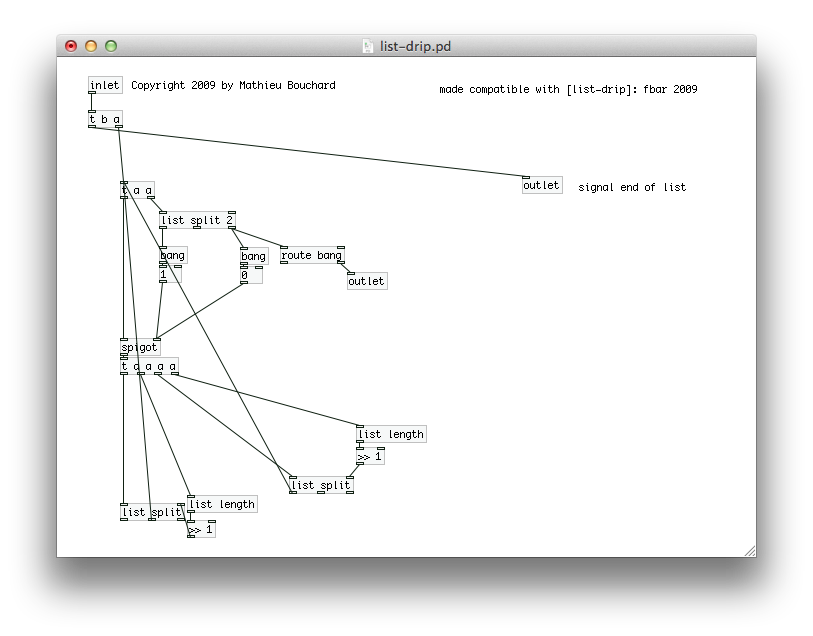
I'll just talk about this abstraction and ask questions along the way.
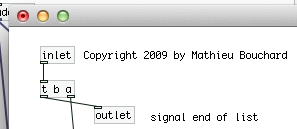
Here's the first part. Pretty simple. [trigger] is passing the entire list on, and then sending a bang. This seems weird but I've heard that pd will take care of all the operations starting at the right outlet of trigger first, so the bang is guaranteed to come after the list has been "dripped."
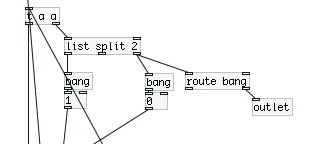
Here's the second part, where we have [list split] doing a binary "less than" operation on the list. "If the list is less than 2 elements long, it gets sent to the outlet and the [spigot] closes, else, open the spigot." This [trigger] then passes a copy of the list onto [spigot] which is either open or closed based on the above result.
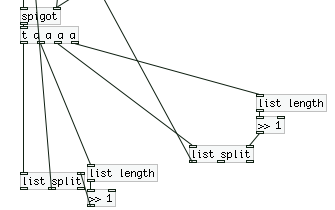
Ok now here is where things start to get crazy. The list is now fed into two identical [list split] mechanisms with some weird math going on, which are also feeding back into the top of the second [trigger].
Let's break this down really quick:
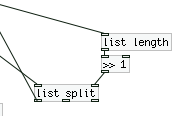
First, we get the length of the list, then we feed it into [>> 1]. With some research in pd and the on the web, I come to the conclusion that we are basically dividing (integer division) by 2. This is setting the point for where [list split] outputs a list with only a certain number (but always half) of elements (using the first outlet). As I said before, this result is being fed back into the second [trigger].
So I think basically what's happening is this:
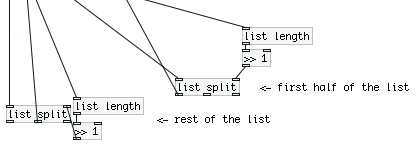
...where the rest of the list is either exactly half the total list length (if it's an even number) or half + 1 (if the total length is an odd number of elements).
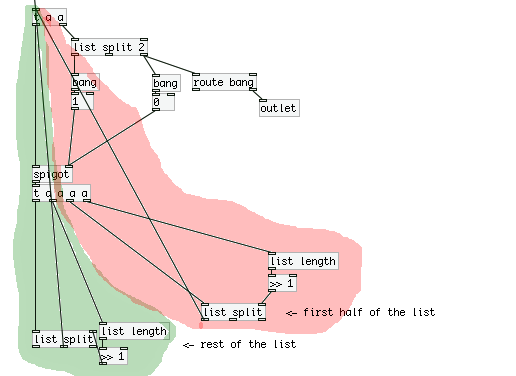
So we have two "loops" going on here, where on operates on the first half of the list (will call this the "red" loop, and the other operates on the second "green loop".
Now in terms of trigger ordering, what is happening here? Are we constantly triggering the red loop until there are no more operations, and then moving on the green loop? And what does this mean in the context of the patch? I'm confused about how [trigger] acts in these situations with many nested loops.
To troubleshoot, I attached a print the outlets of both the red and green **[list split]**s, and sent the list [a b c d 1 2 3 4( to [list drip]. Here's the output from the console:
first half: symbol a
second half: symbol b
first half: list a b
first half: symbol c
second half: symbol d
second half: list c d
first half: list a b c d
first half: 1
second half: 2
first half: 1 2
first half: 3
second half: 4
second half: 3 4
second half: 1 2 3 4
To me this output looks like it was printed backwards. Is there some weird interaction between [trigger] and [print] going on?
Furthermore, how is the output of [list drip] organized so that each element is output in it's sequential order? How does the green loop know to wait for the red loop to finish?
 posted in technical issues
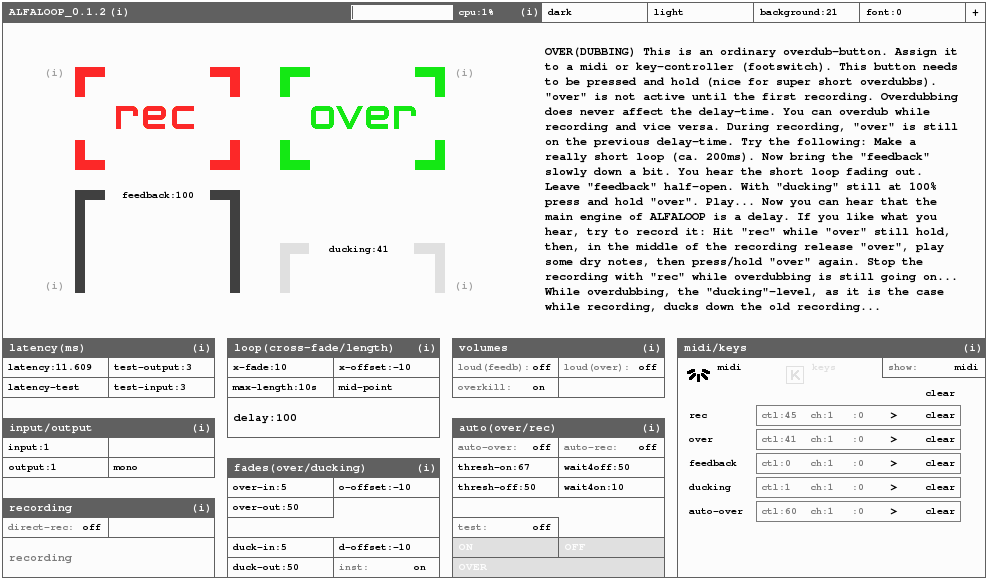
ALFALOOP 0.1.2
Hi everyone!
Thanks to you all for this great forum.
I sure learned a lot here! I'm glad to finally present some work of mine, too...
ALFALOOP is a dynamic looper I've developed with PD Vanilla 0.42.6.
I call it a "non-sticky looper" since it allows you to change its loop-length at any time.
ALFALOOP let's you do basically anything related to looping, such as:
- super short loops of a few milliseconds (that would be a delay...)
- volume-control of the loop in a delayish way (feedback). This results in a "forgettable" looper.
- recording while overdubbing and vice-versa
- free time-shift (make your loop shorter/longer, incl. adjustment of the level of the previous recordings)
- sidechain-compressing of the loop by the input-signal
- proper latency-correction
- etc...
ALFALOOP has four main-buttons: recording, overdubbing, feedback and ducking.
If you assign these four buttons to midi-controllers, you don't need to watch the computers
screen. Everything can be achieved by using these four controllers. You can assign midi or key controllers simply by "touching" like in Ableton and such.
There are plenty of settings-parameters to play around with, like:
- crossfade-length
- crossfade-offset
- fade-in/out-time of the input-signal
- fade-in/out-time of the previous recording while overdubbing (ducking-level)
- automated overdubbing (threshold)
- pre-recording-time (like: 50ms before you hit your controller, scary, isn't it?)
- etc..
All the settings get stored automatically.
My goal was that people with little knowledge of PureData (or computers in general) can easily use it too. ALFALOOP features a lot of on-screen-info.
To make sure the GUI looks more or less the same on every platform only canvases were used as visible gui-objects. I did my best to clean everything up and make it look neat...
The main-engine is a built out of a mixture of delays and tables. In a future release, I will document the subpatches.
There is still a lot to do, of course. But now I feel more like making some music...
You can download ALFALOOP and get some further information at:
https://www.marcobaumgartner.com/#puredata/ALFALOOP
Have fun!
Marco
 posted in patch~
PD cuts off other sound on the computer
I did.
For command jackd I get this terminal output:
matjaz@matjaz-NV59C:~$ jackd
jackdmp 1.9.6
Copyright 2001-2005 Paul Davis and others.
Copyright 2004-2010 Grame.
jackdmp comes with ABSOLUTELY NO WARRANTY
This is free software, and you are welcome to redistribute it
under certain conditions; see the file COPYING for details
Cannot create thread 1 Operation not permitted
Cannot create thread 1 Operation not permitted
usage: jackdmp [ --no-realtime OR -r ]
[ --realtime OR -R [ --realtime-priority OR -P priority ] ]
(the two previous arguments are mutually exclusive. The default is --realtime)
[ --name OR -n server-name ]
[ --timeout OR -t client-timeout-in-msecs ]
[ --loopback OR -L loopback-port-number ]
[ --port-max OR -p maximum-number-of-ports]
[ --midi OR -X midi-driver ]
[ --verbose OR -v ]
[ --clocksource OR -c [ c(ycle) | h(pet) | s(ystem) ]
[ --replace-registry ]
[ --silent OR -s ]
[ --sync OR -S ]
[ --temporary OR -T ]
[ --version OR -V ]
-d backend [ ... backend args ... ]
Available backends may include: alsa, dummy, freebob, firewire or net
jackdmp -d backend --help
to display options for each backend
and for qjackctl:
The same control GUI opened where I clicked start.
15:38:11.262 Patchbay deactivated.
15:38:11.263 Statistics reset.
Cannot connect to server socket err = No such file or directory
Cannot connect to server socket
jack server is not running or cannot be started
15:38:11.286 ALSA connection graph change.
15:38:11.482 ALSA connection change.
15:38:19.241 Startup script...
15:38:19.242 artsshell -q terminate
Cannot connect to server socket err = No such file or directory
Cannot connect to server socket
jack server is not running or cannot be started
sh: artsshell: not found
15:38:19.646 Startup script terminated with exit status=32512.
15:38:19.646 JACK is starting...
15:38:19.646 /usr/bin/jackd -dalsa -d/dev/dsp -r44100 -p256 -n2 -Xseq
15:38:19.649 JACK was started with PID=2544.
Cannot create thread 1 Operation not permitted
Cannot create thread 1 Operation not permitted
jackdmp 1.9.6
Copyright 2001-2005 Paul Davis and others.
Copyright 2004-2010 Grame.
jackdmp comes with ABSOLUTELY NO WARRANTY
This is free software, and you are welcome to redistribute it
under certain conditions; see the file COPYING for details
JACK server starting in realtime mode with priority 10
Cannot lock down memory area (Cannot allocate memory)
ALSA lib control.c:882:(snd_ctl_open_noupdate) Invalid CTL /dev/dsp
control open "/dev/dsp" (No such file or directory)
ALSA lib control.c:882:(snd_ctl_open_noupdate) Invalid CTL /dev/dsp
control open "/dev/dsp" (No such file or directory)
audio_reservation_init
Acquire audio card Audio-1
creating alsa driver ... /dev/dsp|/dev/dsp|256|2|44100|0|0|nomon|swmeter|-|32bit
ALSA lib control.c:882:(snd_ctl_open_noupdate) Invalid CTL /dev/dsp
control open "/dev/dsp" (No such file or directory)
Cannot initialize driver
JackServer::Open() failed with -1
Failed to start server
15:38:19.743 JACK was stopped with exit status=255.
15:38:19.745 Post-shutdown script...
15:38:19.746 killall jackd
jackd: no process found
15:38:20.153 Post-shutdown script terminated with exit status=256.
15:38:21.703 Could not connect to JACK server as client. - Overall operation failed. - Unable to connect to server. Please check the messages window for more info.
Cannot connect to server socket err = No such file or directory
Cannot connect to server socket
jack server is not running or cannot be started
15:38:31.152 Could not connect to JACK server as client. - Overall operation failed. - Unable to connect to server. Please check the messages window for more info.
Cannot connect to server socket err = No such file or directory
Cannot connect to server socket
jack server is not running or cannot be started
15:38:42.143 Could not connect to JACK server as client. - Overall operation failed. - Unable to connect to server. Please check the messages window for more info.
Cannot connect to server socket err = No such file or directory
Cannot connect to server socket
jack server is not running or cannot be started
15:39:02.300 Could not connect to JACK server as client. - Overall operation failed. - Unable to connect to server. Please check the messages window for more info.
Cannot connect to server socket err = No such file or directory
Cannot connect to server socket
jack server is not running or cannot be started
I'm lost.
 posted in technical issues
PD cuts off other sound on the computer
Hi,
Yes.
I have turned on the computer and freshly started jackd. I start it from qjackcti (http://en.wikipedia.org/wiki/Qjackctl).
Error messages:
1. first window:
Could not connect to JACK server as client.
- Overall operation failed.
- Unable to connect to server.
Please check the messages window for more info.
2. Message window:
13:55:36.236 Patchbay deactivated.
13:55:36.254 Statistics reset.
Cannot connect to server socket err = No such file or directory
Cannot connect to server socket
jack server is not running or cannot be started
13:55:36.336 ALSA connection graph change.
13:55:36.559 ALSA connection change.
13:55:36.560 ALSA connection graph change.
13:55:38.356 Startup script...
13:55:38.357 artsshell -q terminate
Cannot connect to server socket err = No such file or directory
Cannot connect to server socket
jack server is not running or cannot be started
sh: artsshell: not found
13:55:38.760 Startup script terminated with exit status=32512.
13:55:38.760 JACK is starting...
13:55:38.760 /usr/bin/jackd -dalsa -d/dev/dsp -r44100 -p256 -n2 -Xseq
13:55:38.798 JACK was started with PID=2106.
Cannot create thread 1 Operation not permitted
Cannot create thread 1 Operation not permitted
jackdmp 1.9.6
Copyright 2001-2005 Paul Davis and others.
Copyright 2004-2010 Grame.
jackdmp comes with ABSOLUTELY NO WARRANTY
This is free software, and you are welcome to redistribute it
under certain conditions; see the file COPYING for details
JACK server starting in realtime mode with priority 10
Cannot lock down memory area (Cannot allocate memory)
ALSA lib control.c:882:(snd_ctl_open_noupdate) Invalid CTL /dev/dsp
control open "/dev/dsp" (No such file or directory)
ALSA lib control.c:882:(snd_ctl_open_noupdate) Invalid CTL /dev/dsp
control open "/dev/dsp" (No such file or directory)
audio_reservation_init
Acquire audio card Audio-1
creating alsa driver ... /dev/dsp|/dev/dsp|256|2|44100|0|0|nomon|swmeter|-|32bit
ALSA lib control.c:882:(snd_ctl_open_noupdate) Invalid CTL /dev/dsp
control open "/dev/dsp" (No such file or directory)
Cannot initialize driver
JackServer::Open() failed with -1
Failed to start server
13:55:39.278 JACK was stopped with exit status=255.
13:55:39.279 Post-shutdown script...
13:55:39.279 killall jackd
jackd: no process found
13:55:39.700 Post-shutdown script terminated with exit status=256.
13:55:40.822 Could not connect to JACK server as client. - Overall operation failed. - Unable to connect to server. Please check the messages window for more info.
Cannot connect to server socket err = No such file or directory
Cannot connect to server socket
jack server is not running or cannot be started
13:55:54.576 Could not connect to JACK server as client. - Overall operation failed. - Unable to connect to server. Please check the messages window for more info.
Cannot connect to server socket err = No such file or directory
Cannot connect to server socket
jack server is not running or cannot be started
13:58:38.483 Could not connect to JACK server as client. - Overall operation failed. - Unable to connect to server. Please check the messages window for more info.
Cannot connect to server socket err = No such file or directory
Cannot connect to server socket
jack server is not running or cannot be started
13:59:09.197 Could not connect to JACK server as client. - Overall operation failed. - Unable to connect to server. Please check the messages window for more info.
Cannot connect to server socket err = No such file or directory
Cannot connect to server socket
jack server is not running or cannot be started
As you can see the last paragraph (...jjack server is not running or cannot be started...) then repeats itself over and over again every 30 seconds.
Seems like Jack isn't working??
Thanks.
posted in technical issues
Interaction Design Student Patches Available
Greetings all,
I have just posted a collection of student patches for an interaction design course I was teaching at Emily Carr University of Art and Design. I hope that the patches will be useful to people playing around with Pure Data in a learning environment, installation artwork and other uses.
The link is: http://bit.ly/8OtDAq
or: http://www.sfu.ca/~leonardp/VideoGameAudio/main.htm#patches
The patches include multi-area motion detection, colour tracking, live audio looping, live video looping, collision detection, real-time video effects, real-time audio effects, 3D object manipulation and more...
Cheers,
Leonard
Pure Data Interaction Design Patches
These are projects from the Emily Carr University of Art and Design DIVA 202 Interaction Design course for Spring 2010 term. All projects use Pure Data Extended and run on Mac OS X. They could likely be modified with small changes to run on other platforms as well. The focus was on education so the patches are sometimes "works in progress" technically but should be quite useful for others learning about PD and interaction design.
NOTE: This page may move, please link from: http://www.VideoGameAudio.com for correct location.
Instructor: Leonard J. Paul
Students: Ben, Christine, Collin, Euginia, Gabriel K, Gabriel P, Gokce, Huan, Jing, Katy, Nasrin, Quinton, Tony and Sandy
GabrielK-AsteroidTracker - An entire game based on motion tracking. This is a simple arcade-style game in which the user must navigate the spaceship through a field of oncoming asteroids. The user controls the spaceship by moving a specifically coloured object in front of the camera.
Features: Motion tracking, collision detection, texture mapping, real-time music synthesis, game logic
GabrielP-DogHead - Maps your face from the webcam onto different dog's bodies in real-time with an interactive audio loop jammer. Fun!
Features: Colour tracking, audio loop jammer, real-time webcam texture mapping
Euginia-DanceMix - Live audio loop playback of four separate channels. Loop selection is random for first two channels and sequenced for last two channels. Slow volume muting of channels allows for crossfading. Tempo-based video crossfading.
Features: Four channel live loop jammer (extended from Hardoff's ma4u patch), beat-based video cross-cutting
Huan-CarDance - Rotates 3D object based on the audio output level so that it looks like it's dancing to the music.
Features: 3D object display, 3d line synthesis, live audio looper
Ben-VideoGameWiiMix - Randomly remixes classic video game footage and music together. Uses the wiimote to trigger new video by DarwiinRemote and OSC messages.
Features: Wiimote control, OSC, tempo-based video crossmixing, music loop remixing and effects
Christine-eMotionAudio - Mixes together video with recorded sounds and music depending on the amount of motion in the webcam. Intensity level of music increases and speed of video playback increases with more motion.
Features: Adaptive music branching, motion blur, blob size motion detection, video mixing
Collin-LouderCars - Videos of cars respond to audio input level.
Features: Video switching, audio input level detection.
Gokce-AVmixer - Live remixing of video and audio loops.
Features: video remixing, live audio looper
Jing-LadyGaga-ing - Remixes video from Lady Gaga's videos with video effects and music effects.
Features: Video warping, video stuttering, live audio looper, audio effects
KatyC_Bunnies - Triggers video and audio using multi-area motion detection. There are three areas on each side to control the video and audio loop selections. Video and audio loops are loaded from directories.
Features: Multi-area motion detection, audio loop directory loader, video loop directory loader
Nasrin-AnimationMixer - Hand animation videos are superimposed over the webcam image and chosen by multi-area motion sensing. Audio loop playback is randomly chosen with each new video.
Features: Multi-area motion sensing, audio loop directory loader
Quintons-AmericaRedux - Videos are remixed in response to live audio loop playback. Some audio effects are mirrored with corresponding video effects.
Features: Real-time video effects, live audio looper
Tony-MusicGame - A music game where the player needs to find how to piece together the music segments triggered by multi-area motion detection on a webcam.
Features: Multi-area motion detection, audio loop directory loader
Sandy-Exerciser - An exercise game where you move to the motions of the video above the webcam video. Stutter effects on video and live audio looper.
Features: Video stutter effect, real-time webcam video effects
 posted in news
Smoothing the 'pops' out of a looped live sample
so. since i can't afford a fancy loopstation pedal, i'm making one in pd and taking advantage of my low-latency soundcard.
i've made a set of midi trigger pedal buttons - 8 channels, two buttons each channel (one for "record", one to toggle "play" or "silent"). you stomp on the "record" button on the first track and start playing music, then when you're done you hit the button again and the track starts playing back on loop. every subsequent track records in sync with the first loop. you can alter the volume of each of the 8 loop tracks, or stop and start them at will.
i use the [tabwrite~] object to record each loop, then play them back using [tabread]s controlled by [line~]s.
despite driving myself bonkers trying to program the operation of the button interface, so far everything's shaping up well. but the biggest annoyance is the 'pop' that you get when a loop of a constant but unsteady sound (ie, a single sustained violin note, recorded badly) jumps back to the zero position to start playing again - due to a difference in amplitude between the end of the loop and the start.
could anyone suggest a way that i could automatically alter the end of each recorded array so that over the final few milliseconds the amplitude is smoothed (or 'faded') to approach the amplitude at the exact start of the loop? i'm guessing this might eliminate the jump in amplitude that causes the 'pop' effect - let me know if you think i'm wrong 
err, hope this is understandable.
cheers,
jon.
 posted in technical issues
Seq Sampler Loop
No sound out of this Oscar.
Here's a bit of the error message:
ch file or directory
error: soundfiler_read: /home/pelao/Documentos/audio/loops/terminus13.wav: No such file or directory
error: soundfiler_read: /home/pelao/Documentos/audio/loops/terminus15.wav: No such file or directory
error: soundfiler_read: /home/pelao/Documentos/audio/loops/terminus15.wav: No such file or directory
error: soundfiler_read: /home/pelao/Documentos/audio/loops/terminus15.wav: No such file or directory
error: soundfiler_read: /home/pelao/Documentos/audio/loops/terminus15.wav: No such file or directory
error: soundfiler_read: /home/pelao/Documentos/audio/loops/terminus16.wav: No such file or directory
error: soundfiler_read: /home/pelao/Documentos/audio/loops/terminus16.wav: No such file or directory
error: soundfiler_read: /home/pelao/Documentos/audio/loops/terminus15.wav: No such file or directory
error: soundfiler_read: /home/pelao/Documentos/audio/loops/terminus15.wav: No such file or directory
error: soundfiler_read: /home/pelao/Documentos/audio/loops/terminus14.wav: No such file or directory
error: soundfiler_read: /home/pelao/Documentos/audio/loops/terminus14.wav: No such file or directory
error: soundfiler_read: /home/pelao/Documentos/audio/loops/terminus15.wav: No such file or directory
error: soundfiler_read: /home/pelao/Documentos/audio/loops/zapa06.wav: No such file or directory
error: soundfiler_read: /home/pelao/Documentos/audio/loops/terminus15.wav: No such file or directory
error: soundfiler_read: /home/pelao/Documentos/audio/loops/terminus15.wav: No such file or directory
error: soundfiler_read: /home/pelao/Documentos/audio/loops/terminus15.wav: No such file or directory
error: soundfiler_read: /home/pelao/Documentos/audio/loops/terminus15.wav:
But, it looks awesome.
Keep well ~ Shankar
 posted in patch~
Controlling Jack from PD
I'm using PD and Jack on OSX.
Is there any way I can use some sort of PD external to control the Patching/Routing of my jack server? I'm using PD to send OSC signals to control SooperLooper, a looping system that runs on jack, and I'd like to be able to use PD to control which of my DAC inputs go to each loop. I've only got two inputs, but I loop them separately and it would be nice to be able to have setups like... four loops from input one and two loops from input two switching to two loops from input one and six loops from input two without having to have ten total loops, all routed ahead of time, with several loops taking up audio processing power without actually being in use at any given time.
Can I send commands to jack (perhaps OSC?) from within PD like "route system input one to SooperLooper input 4" with some sort of object?
Does anyone else think it would be useful to control audio routing within PD?
 posted in technical issues