
Play buffer from beginning with delread~
@Seán The audio is travelling through the delay line in real time.
You would need a delwrite delay longer than what you are recording to be sure to capture the whole first recording.
You need to feed the output of delread back into delwrite, so that it can be played again.
You would need a timer so as to set delread to the right length for the second read (so that it starts at the beginning).
You would need to use [switch~] to stop all audio in your patch as you end recording and so that you can start the delay line again when you press play......... otherwise the audio will drop down the delay line before you do so........... unless you program it to start again immediately.
You will need to do the fade after delread and not fade what you feedback into delwrite, or you will double down on the fade the second time around.
BUT.
Because the delay line read point for delread has to be longer than the recording, delread will in fact still be feeding back audio to delwrite after you have finished recording.
So you will have to let it finish.
But you can still read the correct output with a second delread.
Do that, and put it into a second delay line of the absolute correct length (now that you know it) and that will become your delay loop, with feedback as above.
All of that can be automated of course.
David.
 posted in technical issues
Bug in Pd Patch
@seb-harmonik.ar Whenever the code would create an infinite loop, you can use [del 0] to break the loop:
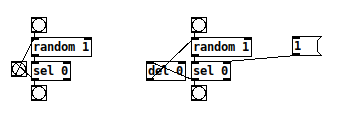
The example on the left side creates an infinite loop and thus you get a stack overflow. The example on the right has no infinite loop, as [del 0] breaks the loop and starts a new calculation each time. The [1 (-message can be used to end the calculation. But of course it is better to avoid this and write code where the conditions are well defined so no infinite loops occur in the first place. 
 posted in patch~
Some questions regarding a loop station
Hi,
I'm creating a loop station and I've got several questions about different issues.
- Latency
- Fading/Cutting recorded samples at start and end
- Metronom settings
1) Latency
I'm using the latency tester from the repo.
http://www.pdpatchrepo.info/patches/patch/92
Latency might be calculated with different methods:
a ) Connecting the output of the soundcard directly to the input via cable. This way the lowest possible latency is received. (Around 440 samples in my case)
b ) Calculating via microphone and speakers. Latency will be higher compared to a ). Also the bigger the distance between mic and speakers, the higher the latency will be.
Which calculation should be used?
(To me it seemes to be logical, to use the latency calculated by b ), as that is the method which reflects the real circumstances. But I'm not shure and it's very hard to tell by what I hear.)
2) Fading/Cutting recorded samples at start and end
When the recorded sample contains a phrase which is completly finished before the next 1, doing a fade with [vline~] sounds OK. But when you record a continuous sound (like a string pad) you will always hear that fade of [vline~].
Compared to Reaper: Cutting a sound and looping it, will result in a continuous sound. To me it seemes like some kind of crossfade between the beginning and the end of the sample is done.
Does someone know more about this? How should it be done correctly?
Crossfading seemes to be a quite difficult task in my eyes, as a lot of calculation has to be done. (Recording has to start a bit earlier and to stop later, sync has to start earlier, and so on)
3) Metronom settings
This loop station depends on a metronom and works similar to Ableton Live. As pd uses blocks of 64 samples, the tempo is corrected to a tempo which corresponds to an array with a size multiple of 64. So playing can easily be kept in sync.
I'm not shure about this. Is it a good idea to do it like this?
But changing this to a manner, where the tempo might be chosen freely, will result in much more complicated calculations. Is it worth it?
Thanks for any comments in advance,
Xaver
My patch is still in development and can be found here:
https://github.com/XRoemer/puredata/tree/master/loop-machine
(downloading from github: go up one folder and use the download/clone button
https://github.com/XRoemer/puredata/tree/master)
 posted in technical issues
audioflow~ - delay~ to forward-backward looper using +/-speed control-VERSION 2 (with correction for broken inlets)
The updated version 2 files are now included here.
They correct the problem pointed out by @oootini making it impossible to send msgs (ex. ctrlin values) to the inlets.
Apologize for any inconvenience and/or frustration this might have caused. (note/fyi: it arose from conflicting send/receive's)
Thank you.
Sincerely,
Scott
@Whale-Av
@pierre-guillot
(David and Pierre: This is very close to what I had in mind when I asked about playing an incoming stream backwards. It does as you suggested David, work backwards from the jump off point, via a delay. However it then passes that delay to a sample looper and both feeds it back on itself and is able to be controlled by either playing the speed forward or backward (like you would rotate turntables, tapes, etc. Would love to hear what you guys think. Peace and thanks, for the input. -Scott
p.s. visually I have the image of a leaf floating down a stream gyrating/rotating as it goes, but almost always going "downstream". Oh, also, maybe you guys and tell me if the "phase*" is even germane to the patch? Oh, and I think this abs is ideal for the 2-d expression pedal I have mentioned elsewhere. Will share what results once I try it out.)
The delayfb effect is from DIY2 and the looper~ is from parts I can not remember the source of which.
VERSION 2
abs_audioflow~2_sv-help.pd
abs_audioflow~2_sv.pd
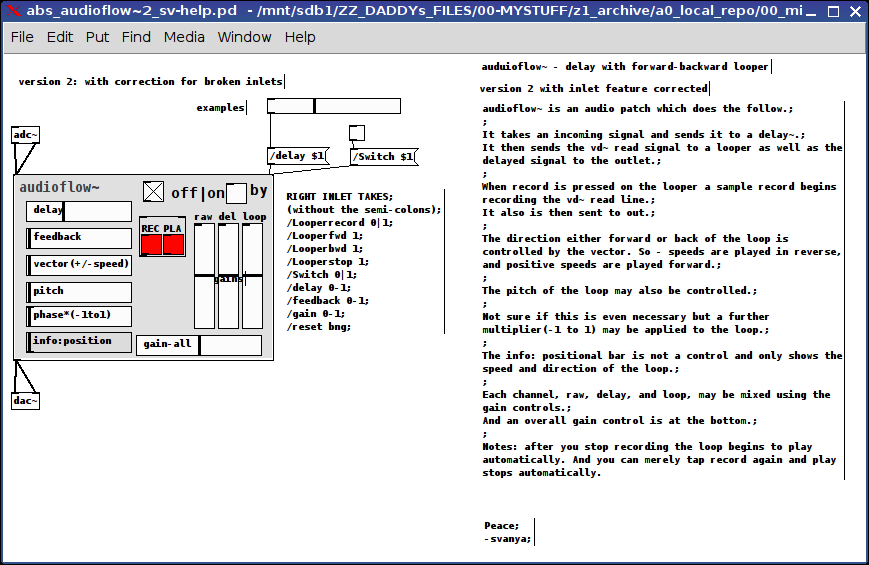
From the Help file:
audioflow~ is an audio patch which does the follow.;
;
It takes an incoming signal and sends it to a delay~.;
It then sends the vd~ read signal to a looper as well as the delayed signal to the outlet.;
;
When record is pressed on the looper a sample record begins recording the vd~ read line.;
It also is then sent to out.;
;
The direction either forward or back of the loop is controlled by the "vector". So negative speeds are played in reverse and positive speeds are played forward.;
;
The pitch of the loop may also be controlled.;
;
Not sure if this is even necessary but a further multiplier(-1 to 1) may be applied to the loop.;
;
The info: positional bar is not a control and only shows the speed and direction of the loop.;
;
Each channel, raw, delay, and loop, may be mixed using the gain controls.;
And an overall gain control is at the bottom.;
;
Notes: after you stop recording the loop begins to play automatically. And you can merely tap record again and play stops automatically and a new loop recording is begun.
 posted in abstract~
What is the opposite of [r pd-dsp-started]?
Well, I recently made a revision to [dsp-status(---[pdinfo] in Purr Data specifically to avoid reporting temporary suspensions of audio. That gets the user the ability to query dsp status with the least element of surprise. And it works for fetching the dsp status on [loadbang] which is the common case for querying dsp state. (And something you can't do in Pd Vanilla without a kluge.)
But I'm not sure I understand the use case for pd-dsp-started/stopped. Why would the user need to track all dsp graph rebuilds?
 posted in technical issues
Matrices and reallocating memory
I get exceptions when I change the length while dsp is on.
I can't recreate the error, are you sure you use the object compiled with the last version of the code. Sometimes on Windows, you really need to clean the project before compiling otherwise the modifications are not taken into account.
The dspmethod argument is used to tell if the function is called in our dsp method. If the allocation failed, the buffer are null and I need to avoid the perform method. If the dsp is off, there is no problem. But if the dsp is running, I need to notify Pd to stop and recompile the chain and to recall our dsp method that will say that the perform method can't be called. But, as in the dsp method we call the buffer allocation function, this can create a loop (imagine that the allocation fails again, so it tells to Pd to recompile the dsp chain, and in our dsp method we recall the buffer allocation function that fails again, so it tells to Pd to recompile the dsp chain, etc.). So the dspmethod argument is used to tell even if the dsp seems to be on because the dsp is compiling and the allocation fails don't notify Pd.
 posted in extra~
Conditional Bang
Hello everybody,
I was wondering whether anybody knew of a good way to hold off a bang until the right conditions have been met.
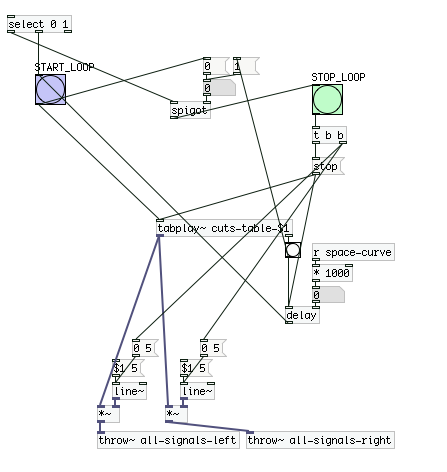
It's kind of hard to explain, but essentially I have a looping patch. The loop repeats over and over again until a random parameter tells it to stop looping. The problem? The bang that stops the loop doesn't consider where it is stopping in the sample. So I have a tablplay~ that is looping, and suddenly it stops and pops/clicks right in the middle of it. The goal is to create a kind of check that only sends a bang when the sample is done playing.
When a bang is sent at the end of the tabplay~, check whether the spigot object has been opened. If it has, pass through the bang, and stop the playback. If not, WAIT until it has opened, and THEN pass it through. Does anybody have a good idea of doing this?
This is a simplified version of the looper subpatch. Notice a couple of things.
- Select objects sends a 1 which starts the loop
- The delay object delays the bang from the end of the tabplay to start the loop all over again (it increases over time actually)
- Select object sends a 0 (at some random point (we don't know when)) but the bang will go through only when the spigot is open. So the sample needs to have stopped playing when this happens.
The tricky part about all of this is that the looper needs to stop IN BETWEEN the start of the next loop, and the end of the sample.
Help would be tremendously appreciated.
 posted in technical issues
Question regarding internal operation of delay lines in Pd
I just started learning Pd a few weeks ago, and, up to this point, everything has made sense and been unambiguous, until I got into delay lines.
The problem is that the Pd tutorials and docs that mention delread~ and delwrite~ are lacking in detail as to the internal operation of delay lines, which I really need to understand if I'm to use them.
I've looked at the Pd 0.47-1 source code, using the LXR source code cross referencing tool, which I set up on my LAN, but, the source code is a mess, to say the least, and it's very sparsely commented.
To get to the point, does delwrite~ allocate a circular buffer, or FIFO/shift-register? Also, when using a delread~ object, what happens to the data read from the corresponding delwrite~'s buffer? Does it get shifted off? In addition, does a recirculating delay line ( ie. delread~ output connected to delwrite~'s input ) overwrite the data in delwrite~'s buffer if another signal is being fed to delwrite~ at the same time? Or, do the two signals connected to delwrite~'s input get mixed/added?
I apologize if this seems like a stupid bunch of questions, but I've done extensive research and googling, including trying to find out how MAX delay lines work internally, but I've had no success.
Thank you and regards,
jdb2
EDIT : Note that I did search the forums regarding my question but I couldn't find any really relevant results, assuming I didn't miss them.
 posted in technical issues
faust-to-pd external collection (of three sets of examples) I built won't load...
My friends, while this was a worm-hole that I Am glad I went down, I must let it go for my own peace of mind.
I am posting below the shell script I used to convert the faust files, but it is just too far away from what i Really want to do to continue.
Peace, good cheer to you, and may I get back on to making music again.
-svanya
#! /bin/bash
for dsp in `find '/root/00-MYSTUFF/zz_archive/01_tabled/compilefaust/pd-faust-0.4/examples' -name "*.dsp"`
do

FILE="$dsp"
extension="${dsp##*.}"
FILEBASE=$(basename "$FILE" .$extension)
base=`dirname "$dsp"`


echo "$dsp"
echo "$FILEBASE"
echo "$base"

# compile the Faust source and generate the xml file
faust -a puredata.cpp -xml "$dsp" -o "$FILEBASE".cpp
# compile the C++ module to a Pd plugin
g++ -shared -Dmydsp="$FILEBASE" "$FILEBASE".cpp -o "./pdfaust_built/$FILEBASE"~.pd_linux
# generate the Pd patch from the xml file
faust2pd "$dsp".xml --output-file "./pdfaust_built/$FILEBASE~-help.pd"
rm "$FILEBASE".cpp

done
gui externals tutorial ?
@Pierre-Guillot
"make install" does not seem to install anything so I added object files manualy
It compiles but the linker cant seem to find pd stuffs although it is linked with pd...
cc -I"D:/WORK/DSP/pd-0.46-7/src" -Wno-unused-parameter -DPD -DVERSION='"0.0"'  -O6 -funroll-loops -fomit-frame-pointer  -Wall -W -g -o "src/adsr.o" -c "src/adsr.c"
cc   -rdynamic -shared -L"D:/WORK/DSP/pd-0.46-7/src" -L"D:/WORK/DSP/pd-0.46-7/bin" -o "src/adsr.dll" "src/adsr.o"  libCicmWrapper_la-ebox.o libCicmWrapper_la-egraphics.o libCicmWrapper_la-eclass.o libCicmWrapper_la-eobj.o libCicmWrapper_la-ecommon.o libCicmWrapper_la-epopup.o  -lpd
libCicmWrapper_la-ebox.o: In function `ebox_dosave':
/cygdrive/d/WORK/DSP/CicmWrapper/Sources/ebox.c:819: undefined reference to `s__X'
libCicmWrapper_la-ebox.o: In function `ebox_properties':
/cygdrive/d/WORK/DSP/CicmWrapper/Sources/ebox.c:1098: undefined reference to `s_symbol'
/cygdrive/d/WORK/DSP/CicmWrapper/Sources/ebox.c:1113: undefined reference to `s_symbol'
libCicmWrapper_la-eclass.o: In function `eclass_attr_getter':
/cygdrive/d/WORK/DSP/CicmWrapper/Sources/eclass.c:639: undefined reference to `s_float'
/cygdrive/d/WORK/DSP/CicmWrapper/Sources/eclass.c:653: undefined reference to `s_symbol'
libCicmWrapper_la-eclass.o: In function `eclass_attr_setter':
/cygdrive/d/WORK/DSP/CicmWrapper/Sources/eclass.c:753: undefined reference to `s_float'
/cygdrive/d/WORK/DSP/CicmWrapper/Sources/eclass.c:775: undefined reference to `s_symbol'
libCicmWrapper_la-eclass.o: In function `eclass_addmethod':
/cygdrive/d/WORK/DSP/CicmWrapper/Sources/eclass.c:240: undefined reference to `s_float'
/cygdrive/d/WORK/DSP/CicmWrapper/Sources/eclass.c:252: undefined reference to `s_symbol'
 posted in extra~