
s~/r~ throw~/catch~ latency and object creation order
IIRC (sorry if i'm wrong).
Building the DSP chain means doing a topological sort to linearize the graph of the DSP objects.
For that all the DSP objects of the topmost patch are collected in reverse order of their creations. Then the first node in the collection that has no DSP entry is fetched. The graph is explored depth-first (outlet by outlet) appending the DSP method/operation of the connected objects to the DSP chain. For that all the inlets of the tested node must have been visited. Otherwise the algorithm stop and fetches the next outlet, or the next object in the collection, and restart the exploration from it. That process is recursively done in subpatches discovered.
Notice that it is not easy to explain (and i don't have it fresh in mind). The stuff in Spaghettis is there. AFAIK it is more or less the same that in Pure Data (linked in previous post).
I can bring details back in my head, if somebody really cares.
.
.
.
You can also watch the beginning of that video of Dave Rowland about Tracktion topological process.
EDIT: The first ten minutes (the rest is not relevant).
WARNING: the way things are done in that talk is NOT how it is done in Pd.
It is just an illustration of the problem needed to be solved!
Introducing Tracktion Graph: A Topological Processing Library for Audio - Dave Rowland - ADC20
.
.
.
@whale-av said:
@jameslo I agree. I did report a bug once, but have never dared ask a question on the list.
The list is the domain of those creating Pd. I often read what they have to say, but I would not dare to show my face.
David.
It is really sad to see experienced users intimidated by developers.
But at the same time i totally understand why (and i still have the same felling). 
 posted in technical issues
s~/r~ throw~/catch~ latency and object creation order
@whale-av I opened the s~r~NoLatency patch I posted above and swapped the [-~] inputs. The latency (or lack thereof) didn't change.
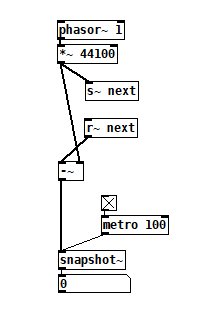
Then I recreated the patch where every object is created in top to bottom order, the permutation in row 18 of the spreadsheet, and swapped the [-~] inputs. Again no change in latency.
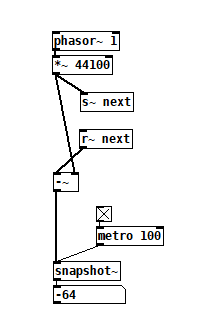
If I've understood your theory, I think this disproves it, no? I wouldn't have guessed that audio sends and receives are simply replaced by audio connections by the interpreter because it would suggest that Pd's dsp loop detection is more sophisticated than what I've observed it to be.
If my conjecture in the original post is correct, then for any patch with non local signal connections (and that does not contain feedback), you should be able to make it latency-free with the following procedure:
{1] trace backwards from the end of the audio chain to the first set of [r~] or [catch~] you encounter. Cut and re-paste them.
[2] continue tracing from their corresponding [s~] and [throw~] until you reach the next set of [r~] or [catch~], if any. Cut and re-paste those.
[3] repeat [2] until you have nothing but audio chain heads. Cut and re-paste them.
This worked on a patch I made when I started investigating this, one that I decided was too complicated to be able to see what was going on.
Edit: This procedure also worked on a patch with delwrite~/delread~ to overcome the minimum 1 block delay: delwrite~read~.pd
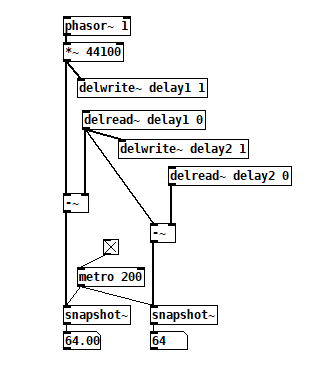 You can watch the minimum delays go away by starting DSP, cut/pasting [delread~ delay2 0], then [delread~ delay1 0], and finally [phasor ~1].
 posted in technical issues
CPU usage of idle patches, tabread4~?
Hi zigmhount!
This is a copy paste of a message I (hopefully) sent via chat as well:
I figured I’d tell you a bit more about my patch so we can see if there’s overlap. Switch is definitely an overlap. I’m not using a metronome at all on mine. The inspiration was two loopers I love: the line 6 DL4 and the EHX 45000. It’s going to be 4 foot switches. Record, play, previous and next. Record and play function the way they do in the DL4. Record to start a new loop, record again to set length and start overdubbing or play to simply set length and start looping. From there record works like overdub on/ off toggle and play stop or restarts the loop. Previous and next are where it gets interesting.
There’s a 7 segment display (meaning a 1 digit number read out) that tells you what loop you’re “focused” on. It starts on 0. You can’t change focus until you have a loop going. Once you do, prev or next change focus. If you change focus while recording, it closes the loop you’re on and starts playing it, then immediately starts recording the next loop. The next loop though can be as long as you want. However, silence gets added to the end of the loop when you are done so that it matches up with a multiple of “loop 0”
In other words, loop 0, acts as a measure length and all other loops are set to a multiple of that measure length.
But...they can start anywhere you want. To the person playing the looper, it will feel like individual loops are all overdubs of the first loop, just at any length you want. I don’t know if I’m explaining this so well, but the point is, you don’t have to worry about timing or a metronome with this. You don’t have to wait for the beginning of measures to start or end loops. Once you have the timing of the first loop down there’s no waiting... you start recording and playing whenever you want as long as you want t and if it’s in time when you play it it will be i the recording.
So far I have recording and overdubbing down on loop 0 WITHOUT CLICKS. this took a lot of work and messing. Sounds like you are struggling with that now. Hardware is important yes.
I’m running it on a rasberry pi 4b 4 gig memory but with a pi sound audio interface. It’s more expensive than the pi but the latency and sound quality are GREAT. I also wanted to make the hardware all independent eventually and have the whole thing fit i it’s own box. The foot pedals run on an arduino that talks through comport to the pi and pure data.
In pure data I’m timing the loops and recording them via tabwrite. I’m then playing them with tabplay with a 0 $1 message box where 0 is start and $1 is the length, rounded to block size, of the recording. I record and play the same arrays for each loop at the same time while overdubbing, but delay the recording so it’s a few blocks back from the tabplay. The delay on the recording seemed to help elimate clocks as well. So did using tabplay instead of tabread 4. I think the phasor is CPU expensive or something. I don’t know. When I start / stop recording I use a line ramp on the volume going into the recording of 5 msecs. This is also necessary to eliminate clicks. Also, I had to stop resizing or clearing arrays as both cause clicks. Now I just overwrite what I need and don’t read from what I didn’t overwrite (If that makes sense).
If you are getting clicking I would try upping block size, buffer size and just delaying the actual recording (delay the audio in the same amount) giving the computer time to think avoids drop outs. Also you don’t want monitoring if you can avoid it. I don’t know if you are using a mic or what.
Hopefully some of this made sense.
 posted in technical issues
CPU usage of idle patches, tabread4~?
Hello there,
I started developing a sampler/looper with Purr Data a couple of months ago (and I've used this forum a lot!), to be used with a 8*8 MIDI launcher. In order to avoid audio drop-out and glitches, I spent the past 2 weeks separating the UI and DSP patches, communicating via OSC (so the UI can be launched with -nrt and -noaudio while DSP is using -rt -jack -nogui) (I'm on Debian 9.0).
To avoid dynamic patching and array creation, I then have 64 instances of the track's DSP abstraction, waiting for the UI to use them, even if only 3 or 4 tracks are actually used.
I find however that the idle DSP instance of Pd - all tracks' abstractions loaded, but not recording or playing any audio - uses 28-29% of my CPU when monitoring with Pd's load meter, while the idle UI instance uses only 5% (I'm on an old machine, but still). I have narrowed it down to the tracks abstractions, since I get only 5% CPU use (DSP side) when there is only one idle track patch instead of 64.
Looking deeper into it, I find that if I delete the 2 [tabread4~] objects (each track has 2 arrays for stereo) I significantly reduce the CPU load, from ~28% to ~17% with 64 idle patches. 17% is still significant, but I couldn't identify any other object with such an important impact.
Is it known that [tabread4~] (tabread~ does no better) uses significant CPU even if idle, both with a phasor~ at 0Hz or not connected at all to the phasor~? Is there a way to make it "sleep" completely? or is there no/little risk of audio drop-out if I create that tabread4~ object dynamically once I actually need the track?
The CPU load increases too ~40% when I turn DSP off, I guess because of errors or confused messages with empty arguments when processing audio signals.
Any other advice to reduce the CPU load is of course also welcome 
Thank you!
 posted in technical issues
This Loop Machine (4 tracks) nearly perfect but.....
@whale-av new bug (4)
Loop 1, loop 2, loop 3 are playing > Stop a loop (or 2 loops) > Stop All > Play (not using play all) one of the stopping loop(s) > The loop(s) won't produce sounds. After delete track(s) of that particular loop(s) can't records the new loop(s).
 posted in technical issues
This Loop Machine (4 tracks) nearly perfect but.....
Hi @whale-av or somebody else,
https://github.com/undessens/Lucibox/tree/master/machines/1
This Loop Machine (4 tracks) nearly perfect but there are 2 points I would like to change. The points I would like to change:
-
The stop record button. Now you need to push the record button again to finish a record. I would like to change it by pushing the record button again (track 1) OR another record track (track 2). By pushing the record track loop 2 the record loop 1 will stop and the new record on loop 2 will start.
-
The stop/play button. To stop a loop you have to wait until the loop finish. When there are multiple loops and you will stop a loop you have to wait until the whole loop finish. To play the stopping loop you have to wait the whole loop start from the beginning. So a good solution is the mute a loop when you push the stop button. The stop/play all button works perfect, I am talking about the stop/play button on a loop track.
Can you help me with this? I am very new in Pure Data so I REALLY need your help.
Thank you for any help.
posted in technical issues
PD's scheduler, timing, control-rate, audio-rate, block-size, (sub)sample accuracy,
Hello, 
this is going to be a long one.
After years of using PD, I am still confused about its' timing and schedueling.
I have collected many snippets from here and there about this topic,
-wich all together are really confusing to me.
*I think it is very important to understand how timing works in detail for low-level programming … *
(For example the number of heavy jittering sequencers in hard and software make me wonder what sequencers are made actually for ? lol )
This is a collection of my findings regarding this topic, a bit messy and with confused questions.
I hope we can shed some light on this.


- a)
The first time, I had issues with the PD-scheduler vs. how I thought my patch should work is described here:
https://forum.pdpatchrepo.info/topic/11615/bang-bug-when-block-1-1-1-bang-on-every-sample
The answers where:
„
[...] it's just that messages actually only process every 64 samples at the least. You can get a bang every sample with [metro 1 1 samp] but it should be noted that most pd message objects only interact with each other at 64-sample boundaries, there are some that use the elapsed logical time to get times in between though (like vsnapshot~)
also this seems like a very inefficient way to do per-sample processing..
https://github.com/sebshader/shadylib http://www.openprocessing.org/user/29118
seb-harmonik.ar posted about a year ago , last edited by seb-harmonik.ar about a year ago
• 1
 whale-av
@lacuna An excellent simple explanation from @seb-harmonik.ar.
Chapter 2.5 onwards for more info....... http://puredata.info/docs/manuals/pd/x2.htm
David.
“
There is written: http://puredata.info/docs/manuals/pd/x2.htm
„2.5. scheduling
Pd uses 64-bit floating point numbers to represent time, providing sample accuracy and essentially never overflowing. Time appears to the user in milliseconds.
2.5.1. audio and messages
Audio and message processing are interleaved in Pd. Audio processing is scheduled every 64 samples at Pd's sample rate; at 44100 Hz. this gives a period of 1.45 milliseconds. You may turn DSP computation on and off by sending the "pd" object the messages "dsp 1" and "dsp 0."
In the intervals between, delays might time out or external conditions might arise (incoming MIDI, mouse clicks, or whatnot). These may cause a cascade of depth-first message passing; each such message cascade is completely run out before the next message or DSP tick is computed. Messages are never passed to objects during a DSP tick; the ticks are atomic and parameter changes sent to different objects in any given message cascade take effect simultaneously.
In the middle of a message cascade you may schedule another one at a delay of zero. This delayed cascade happens after the present cascade has finished, but at the same logical time.
2.5.2. computation load
The Pd scheduler maintains a (user-specified) lead on its computations; that is, it tries to keep ahead of real time by a small amount in order to be able to absorb unpredictable, momentary increases in computation time. This is specified using the "audiobuffer" or "frags" command line flags (see getting Pd to run ).
If Pd gets late with respect to real time, gaps (either occasional or frequent) will appear in both the input and output audio streams. On the other hand, disk strewaming objects will work correctly, so that you may use Pd as a batch program with soundfile input and/or output. The "-nogui" and "-send" startup flags are provided to aid in doing this.
Pd's "realtime" computations compete for CPU time with its own GUI, which runs as a separate process. A flow control mechanism will be provided someday to prevent this from causing trouble, but it is in any case wise to avoid having too much drawing going on while Pd is trying to make sound. If a subwindow is closed, Pd suspends sending the GUI update messages for it; but not so for miniaturized windows as of version 0.32. You should really close them when you aren't using them.
2.5.3. determinism
All message cascades that are scheduled (via "delay" and its relatives) to happen before a given audio tick will happen as scheduled regardless of whether Pd as a whole is running on time; in other words, calculation is never reordered for any real-time considerations. This is done in order to make Pd's operation deterministic.
If a message cascade is started by an external event, a time tag is given it. These time tags are guaranteed to be consistent with the times at which timeouts are scheduled and DSP ticks are computed; i.e., time never decreases. (However, either Pd or a hardware driver may lie about the physical time an input arrives; this depends on the operating system.) "Timer" objects which meaure time intervals measure them in terms of the logical time stamps of the message cascades, so that timing a "delay" object always gives exactly the theoretical value. (There is, however, a "realtime" object that measures real time, with nondeterministic results.)
If two message cascades are scheduled for the same logical time, they are carried out in the order they were scheduled.
“
[block~ smaller then 64] doesn't change the interval of message-control-domain-calculation?,
Only the size of the audio-samples calculated at once is decreased?
Is this the reason [block~] should always be … 128 64 32 16 8 4 2 1, nothing inbetween, because else it would mess with the calculation every 64 samples?
How do I know which messages are handeled inbetween smaller blocksizes the 64 and which are not?
How does [vline~] execute?
Does it calculate between sample 64 and 65 a ramp of samples with a delay beforehand, calculated in samples, too - running like a "stupid array" in audio-rate?
While sample 1-64 are running, PD does audio only?
[metro 1 1 samp]
How could I have known that? The helpfile doesn't mention this. EDIT: yes, it does.
(Offtopic: actually the whole forum is full of pd-vocabular-questions)
How is this calculation being done?
But you can „use“ the metro counts every 64 samples only, don't you?
Is the timing of [metro] exact? Will the milliseconds dialed in be on point or jittering with the 64 samples interval?
Even if it is exact the upcoming calculation will happen in that 64 sample frame!?
- b )


There are [phasor~], [vphasor~] and [vphasor2~] … and [vsamphold~]
https://forum.pdpatchrepo.info/topic/10192/vphasor-and-vphasor2-subsample-accurate-phasors
“Ive been getting back into Pd lately and have been messing around with some granular stuff. A few years ago I posted a [vphasor.mmb~] abstraction that made the phase reset of [phasor~] sample-accurate using vanilla objects. Unfortunately, I'm finding that with pitch-synchronous granular synthesis, sample accuracy isn't accurate enough. There's still a little jitter that causes a little bit of noise. So I went ahead and made an external to fix this issue, and I know a lot of people have wanted this so I thought I'd share.
[vphasor~] acts just like [phasor~], except the phase resets with subsample accuracy at the moment the message is sent. I think it's about as accurate as Pd will allow, though I don't pretend to be an expert C programmer or know Pd's api that well. But it seems to be about as accurate as [vline~]. (Actually, I've found that [vline~] starts its ramp a sample early, which is some unexpected behavior.)
[…]
“
- c)


Later I discovered that PD has jittery Midi because it doesn't handle Midi at a higher priority then everything else (GUI, OSC, message-domain ect.)
EDIT:
Tryed roundtrip-midi-messages with -nogui flag:
still some jitter.
Didn't try -nosleep flag yet (see below)
- d)

So I looked into the sources of PD:
scheduler with m_mainloop()
https://github.com/pure-data/pure-data/blob/master/src/m_sched.c
And found this paper
Scheduler explained (in German):
https://iaem.at/kurse/ss19/iaa/pdscheduler.pdf/view
wich explains the interleaving of control and audio domain as in the text of @seb-harmonik.ar with some drawings
plus the distinction between the two (control vs audio / realtime vs logical time / xruns vs burst batch processing).
And the "timestamping objects" listed below.
And the mainloop:
Loop
- messages (var.duration)
- dsp (rel.const.duration)
- sleep
With
[block~ 1 1 1]
calculations in the control-domain are done between every sample? But there is still a 64 sample interval somehow?
Why is [block~ 1 1 1] more expensive? The amount of data is the same!? Is this the overhead which makes the difference? Calling up operations ect.?
Timing-relevant objects
from iemlib:
[...]
iem_blocksize~   blocksize of a window in samples
iem_samplerate~  samplerate of a window in Hertz


------------------ t3~ - time-tagged-trigger --------------------
-- inputmessages allow a sample-accurate access to signalshape --
t3_sig~          time tagged trigger sig~
t3_line~         time tagged trigger line~


--------------- t3 - time-tagged-trigger  ---------------------
----------- a time-tag is prepended to each message -----------
----- so these objects allow a sample-accurate access to ------
---------- the signal-objects t3_sig~ and t3_line~ ------------
t3_bpe           time tagged trigger break point envelope
t3_delay         time tagged trigger delay
t3_metro         time tagged trigger metronom
t3_timer         time tagged trigger timer

[...]
What are different use-cases of [line~] [vline~] and [t3_line~]?
And of [phasor~] [vphasor~] and [vphasor2~]?
When should I use [block~ 1 1 1] and when shouldn't I?
[line~] starts at block boundaries defined with [block~] and ends in exact timing?
[vline~] starts the line within the block?
and [t3_line~]???? Are they some kind of interrupt? Shortcutting within sheduling???
- c) again)

https://forum.pdpatchrepo.info/topic/1114/smooth-midi-clock-jitter/2
I read this in the html help for Pd:
„
MIDI and sleepgrain
In Linux, if you ask for "pd -midioutdev 1" for instance, you get /dev/midi0 or /dev/midi00 (or even /dev/midi). "-midioutdev 45" would be /dev/midi44. In NT, device number 0 is the "MIDI mapper", which is the default MIDI device you selected from the control panel; counting from one, the device numbers are card numbers as listed by "pd -listdev."
The "sleepgrain" controls how long (in milliseconds) Pd sleeps between periods of computation. This is normally the audio buffer divided by 4, but no less than 0.1 and no more than 5. On most OSes, ingoing and outgoing MIDI is quantized to this value, so if you care about MIDI timing, reduce this to 1 or less.
„
Why is there the „sleep-time“ of PD? For energy-saving??????
This seems to slow down the whole process-chain?
Can I control this with a startup flag or from withing PD? Or only in the sources?
There is a startup-flag for loading a different scheduler, wich is not documented how to use.
- e)

[pd~] helpfile says:
ATTENTION: DSP must be running in this process for the sub-process to run. This is because its clock is slaved to audio I/O it gets from us!
Doesn't [pd~] work within a Camomile plugin!?
How are things scheduled in Camomile? How is the communication with the DAW handled?
- f)

and slightly off-topic:
There is a batch mode:
https://forum.pdpatchrepo.info/topic/11776/sigmund-fiddle-or-helmholtz-faster-than-realtime/9
EDIT:
- g)
I didn't look into it, but there is:
https://grrrr.org/research/software/
clk – Syncable clocking objects for Pure Data and Max
This library implements a number of objects for highly precise and persistently stable timing, e.g. for the control of long-lasting sound installations or other complex time-related processes.
Sorry for the mess!
Could you please help me to sort things a bit? Mabye some real-world examples would help, too.

 posted in technical issues
About my patch "OverBlast" a sampler sequencer and its current state.
Here is the patch that I have been working on for the past few months. OverBlast is a sampler sequencer that will be used as the UI for a DIY midi workstation with a Raspberry pi. And now with a lot of help from people in this forum I have been able to play midi sequences from midi hardware which was a huge step in its development process. Boy let me tell you learning puredata has been an experience that taught me to learn from the headaches and appreciate the highs. lol
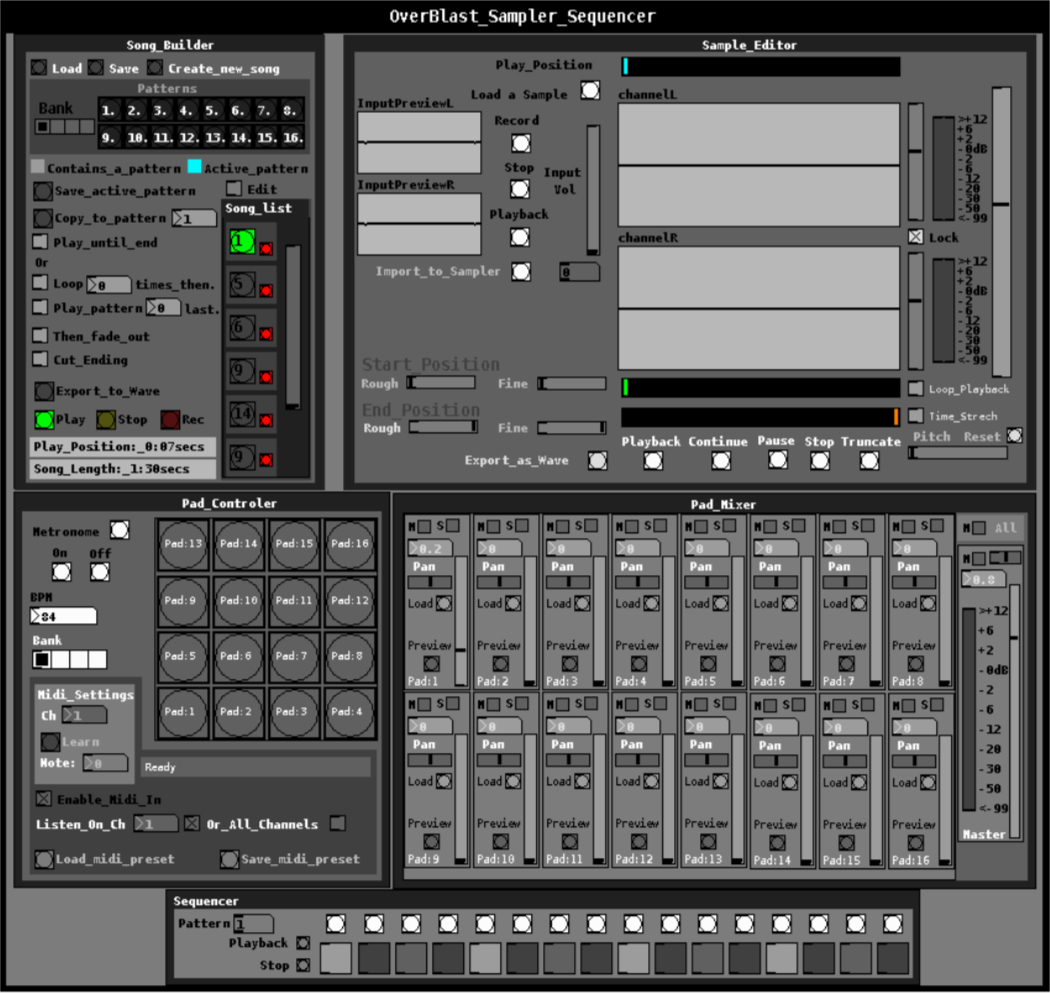
In its current state I have been At this point there are a few known bugs. listed below.
Known Bugs
- Sample Editor - Truncate btn dose not work correctly. saves whatever is in soundfiler buffer should clip start and end positions.
- Sample Editor - Loop playback toggle dose not do anything at the moment. sample will automaticly loop.
- Sample Editor - When start and end positions are adjusted the patch will crash the next time the sample is played or looped
- Sample Editor - Loop playback toggle dose not do anything at the moment. sample will automaticly loop.
- Sample Editor - Time stretch dose not to any thing. pitch slider will only changes the pitch. Time stretch should take in account the pitch and bmp to make it a true time strecth.
- Sample Editor - Loop playback toggle dose not do anything at the moment. sample will automaticly loop.
- Sample Editor - Export as Wave dose not do anything at the moment.
- Sequencer dose not work.. WIP contains only ui design
- Song builder does not work. WIP contains only ui design
With that said if you wish to play around with this patch it will more then likely crash while using the sample editor if the start and end positions are adjusted as there is still work to be done with it. The only thing that works in the sample editor is the sample recorder. You are able to record sample and import them to the sample editor to be edited but you cant actually make edits yet.
So why release the patch in this state? Well i could use some feedback and peoples thoughts on the workflow. And simply if there is anyone out there that is interesting in lending a hand in its development. What can you do with it?
You can load samples to the mixer and play sequences from your midi hardware. Record samples from a mic to the sample editor and play them (Dont adjust the start and end positions) it may crash.
Again the song builder and sequencer do not work they are simply ui designs. Be warned if you are going to dive int he sample editor is very messy as it was when I was doing the majority of my exploration/noobing into puredata. I have been slowly cleaning it up.
I should mention you can learn midi notes then save them as a preset the pad controller is fully functional.
Sadly I cant make a video my laptop locks up when I try to use obs or xsplit. 
The main patch is OverBlast.pd inside of the zip
 posted in patch~
best practices, sample-accurate polyphonic envelope, note stealing
Hi everyone. I have frequently revised designs for polyphonic envelopes. i've often misunderstood things about vline~ and scheduling voices in such a way to avoid unwanted clicks while also keeping things on time and snappy.
i'd be really happy to know what your methods are for envelopes.
i submit this patch, a reflection on envelope practices and how i address certain challenges. envwork.pd
this patch makes these assertions:
1- because vline~ maintains sample accuracy by scheduling events for the next block, you can switch dsp on in a subpatch with block~ while sending a message to vline~ and the dsp will be active by the start of the vline~ output. This also works if you need to configure a non-signal inlet before triggering a voice. send a message to such an inlet concurrently with a vline~ message and the parameters will update on the block boundary before the vline~ plays.
2- accounting for note stealing can cause issues in a polyphonic patch. if the stealing note has a slow attack and the envelope of the stolen note is not closed, there will be a click as the pitch of the new note jumps. the voices in my patch apply slight portamento to smooth out this click. if, however, the attack time of the stealing note is faster than this slight portamento it is counterproductive and will soften the attack of stolen notes. Stolen notes need every bit of snap they can get because the envelopes may be starting at a non-zero value. so i limit the time of the portamento to the attack time.
3- to make sure a note that is still in its release phase is treated as a stolen note, it is necessary to monitor the state of the envelopes like so:
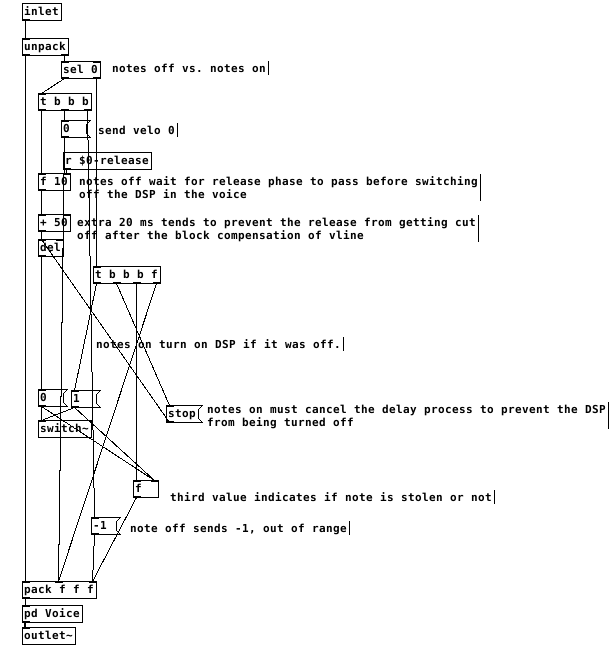
switching the dsp off too close to the end of the release causes clicks. after testing, my system liked a full 50ms of extra delay after the end of a release before it was safe to switch off dsp. I don't think this is attributable just to the scheduling delay of vline~ but it's a small mystery to me. possibly there's a problem with my voices.
This all gets a little more complex when there are multiple envelopes per voice. The release time that affects the final output of the voice must reset all envelopes to when it is finished and before dsp is switched off. Otherwise an envelope with a long release affecting something like filter frequency can be held at a non-zero value when dsp is switched off and spoil the starting state of the vline~ on a new note.
finally, on vline~ and sample accuracy and timing, let me type out what i believe is the case. i could be wrong about this. if you programmed a synth using line~ for the envelopes, it would be faster than vline~ but not all notes equally faster. all notes would sound at the block boundary. Notes arriving shortly after the last block boundary might take 90% of the block period to sound. notes arriving just before the block boundary might take 10% of the period to sound.
vline~ will always be delayed by 100% of the block boundary. but the events will be scheduled sample-accurately, so the vline~ will trigger at exactly the real time intervals of the input. a synth with line~ envelopes will trigger any two events within a single block at the same time.
this should mean that vline~ envelopes can be accurately delay compensated and stay absolutely true to input timing, in the case of something like a Camomile plugin.
however, if one was to build a synth for something like a raspberry pi that will act as hardware, would it be better to use line~ envelopes and gain a little bit of speed? is the restriction of locking envelopes to block boundaries perceptible under normal playing conditions?! i could test some midi input and see if the notes in a chord ever achieve a timing spread greater than the block period anyway...
 posted in technical issues
record audio of any length into array
Keep in mind that resizing an array necessarily will rebuild the dsp graph. This means:
- dsp is suspended
- Pd sorts all the signal objects in the running Pd instance so that each will receive its input before generating output
- once finished, dsp is restored to whatever state it was in before
The reason this must happen is because all of the array handling signal objects like [tabread~] and others cache the array and its size so they don't have to look it up every dsp tick.
Now, if you have audio running and you resize the array, Pd needs some way to immediately tell all the table-related objects the new size. For example-- suppose you are shrinking the array. If Pd doesn't update the relevant objects to cache the new array size, a signal object may try to index past the end of the array. This would end up causing a crash in Pd. (Not to mention that a resized array might live in a new location in memory, but that's another story.)
So the question is-- how does Pd immediately tell all the table-related objects which have cached a particular array that you've just resized that array?
Unfortunately, Pd's internal API doesn't have a standard method by which to update the array/size for table-related classes. The only required method it has is "dsp" which adds a signal object to the dsp graph. Most of the table-related objects have a "set" method, but it's not required and I'm not sure if every external array-handling class has one.
That means the only way to tell the table objects to update their array size is to trigger their "dsp" methods. And the only way to do that safely is to rebuild the entire dsp graph. So that's what Pd does.
Anyway, the rebuilding happens all at once. So if your patch is pretty small Pd might be able to sneak a graph rebuild into a single dsp tick on schedule and avoid dropouts. For larger, complex patches it's probably impossible to avoid dropouts. (Plus who knows what the worst-case time is for allocating memory for a large array.)
 posted in technical issues