
Tracker style "FX" list
@cfry said:
The problem that arise is that when I start to improvise I kind of "break the (your) concept". And I would like to avoid ending up in another patch that is so messy that I can not use it if I bring it up after a half a year or so. Lets continue working on it!
You are definitely getting parts of it and seeing how to develop it but there are parts you don't quite have yet and I can't quite identify what those are so I can explain things. I made a sizable patch that adds a lot of commands but last night I realized I went to far and it would probably confuse things for you, so I will reduce it down to just the things you mentioned, I will follow your lead.
Passing the text name as an argument is just a matter of using your dollar arguments, [text get $1], but you will want to tweak your input for text symbols some.
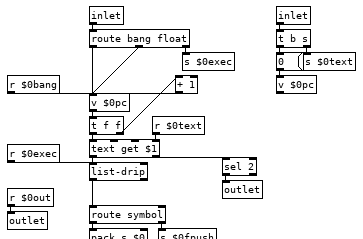
So our right inlet for text symbols goes to a send now so we can easily access that text anywhere in the patch, like in our commands, and we also reset the counter which uses a value for its float for the same reason, we will want to be able to access and change its value from commands. "pc" is short for program counter and it is important that we increment its value before sending a float to the text get otherwise if we change its value in some command it will get overwritten, so having a [t f f] here is almost a must. This also means that [v $0pc] points to the next line to be run and not the one that is currently being run, this is important, fairly useful, and occasionally irksome.
The left inlet has change some as well, we have a [route bang float], bangs and floats go to the counter so we can increment the program or set the next line to be run, the right outlet sends to our [list-drip] which enables us to run commands from the parent patch so when things don't work you can run that print command to print the stack and get some insight or just run commands from a listbox to test things out or whatnot. We also have [r $0bang] on the counter, this lets us increment the counter immediately from a command and start the next line. And finally we have a new outlet that bangs when we reach the end of the text file so we can turn off the metro in the parent patch which is doing the banging, reset the counter to zero, load a new program, or what ever you want to do when the program completes. Middle outlet I did away with, globals can be done as a command, as can most everything.
Variables we can implement with some dynamic patching and a simple abstraction to create the commands for setting and getting the value of any variable.
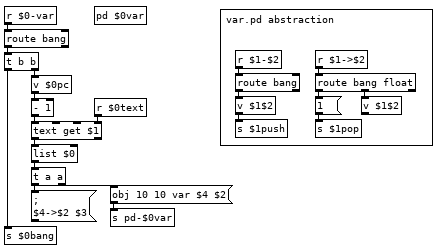
This looks more complicated than it is. If we have the line var val1 10 in our program it runs the var command which bangs [v $0pc] and subtracts 1 from it to get the current line from the text holding our program and then appends our $0 to it giving us the list var val1 10 $0. The first message it goes to creates an instance of the var.pd abstraction in [pd $0var] with the second and fourth elements of the list as arguments, val1 and $0. Second message sends $3 to $4->$2, 10 to $0->val1. To finish off we use that new $0bang receive to bang [v $0pc] so we don't execute the rest of the line which would run val1 pushing 10 to the stack and then push another 10 to the stack. Variable name with a > prepended to it is the command for setting the value of a variable, 22 >val1 in your program would set the value of val1 to 22, val1 would push 22 to the stack. If we could see how pd expands all those dollar arguments in the abstraction it would look like this:
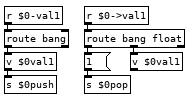
Now you can create as many variables as you would like in your programs and a couple tweaks you can have the abstraction global.pd and subpatch [pd $0globals] so you can have the line global val2 0 and get a global variable that all instances of tracky can read and write from. There are a couple catches, each variable definition must appear on its own line with nothing else after it and with our simple parsing there is nothing to stop you from creating multiple instances of the same variable, if you run the line var val1 10 a second time it will create a second abstraction so when you run val1 it will bang both and each will push 10 to the stack giving you an extra 10 and screw up your program. We can fix this with adding a registry to the var command which searches a [text] to see if it has been created already, something like this after the [list $0] should do it:
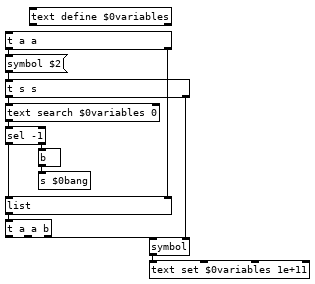
And you will want to create a command to clear all variables (and the text if you use it) by sending [clear( to [pd-$0var], or get fancy and add another command in var.pd which bangs [iemguts/canvasdelete] so you can delete individual variables. Using [canvasdelete] has the advantage of not needing a registry for variables, you can just always run ```delete-<variable name>, or what ever you name your delete command, before creating a new variable. Each method has advantages.
Your loop does not work because the unpack needs to go into the left inlet of the float, that triggers the first loop and causes it to go back, each time the program gets back up to the loop command it increments [v $0loopi] until the select hits the target number of loops which sets $0loopi to -1 which ends the looping.
Not sure what you mean by groups/exclusive groups, can you elaborate or show it with a patch?
None of the above has been tested, but I did think them through better than I did the loop, fairly certain all is well but there might be a bug or two for you to find. Letting you patch them since we think about how things work more when we patch than when we use a patch. Try and sort out and how they work from the pictures and then patch them together without the pictures, following your understanding of them instead of your memory of how I did it. And change them as needed to suit your needs.
 posted in technical issues
Tracker style "FX" list
@oid said:
I used [value] because add works off the last value that was output and [value] keeps things neater than tying lots of stuff to a single [float].
Yes its convenient, I have tried to add a global function to share the variable "var" between several instances. [v] is good for this purpose. Use case: for example one instance with a list with "add" +1, and another instance with a list with "add" -1. And they are triggered independently.
It would be good to be able to have different groups (like "exclusive" groups).
I also see a use case for several "var" (var0, var1, var2, var3 etc)
...adding a global mode, exclusive groups, idle-reset, and so forth are configuration settings, not part of the live output. Question is where this should go. In the text file also? Or in another text file? Or if they are just a few, maybe just as arguments in the abstraction. The config settings should be retained. It would also be good if one could write the text to use as an argument in the abstraction: [tracky mycommands]. Not sure how to do that.
Slightly annoying and could be fixed but would be less efficient, so I just remember that when patching commands which push a list, the list needs to be backwards or it will cause confusion elsewhere.
that is fine, I just need to include some instructions on how the syntax goes.
We will deal with that in the next post and start really exploiting that this is a programming language and will save you work as any programming language should.
The problem that arise is that when I start to improvise I kind of "break the (your) concept". And I would like to avoid ending up in another patch that is so messy that I can not use it if I bring it up after a half a year or so. Lets continue working on it!
Edit2: No, that loop will not quite work, for got to resend the float to $0-goto on each iteration, only loops once.
I have given your loop code several shots but I can not figure out how to get it working. I managed to (in a messy way) to have it repeat for x times, or loop forever, or loop just once. But never loop x times and then be ready again to to loop x times.
Current patch: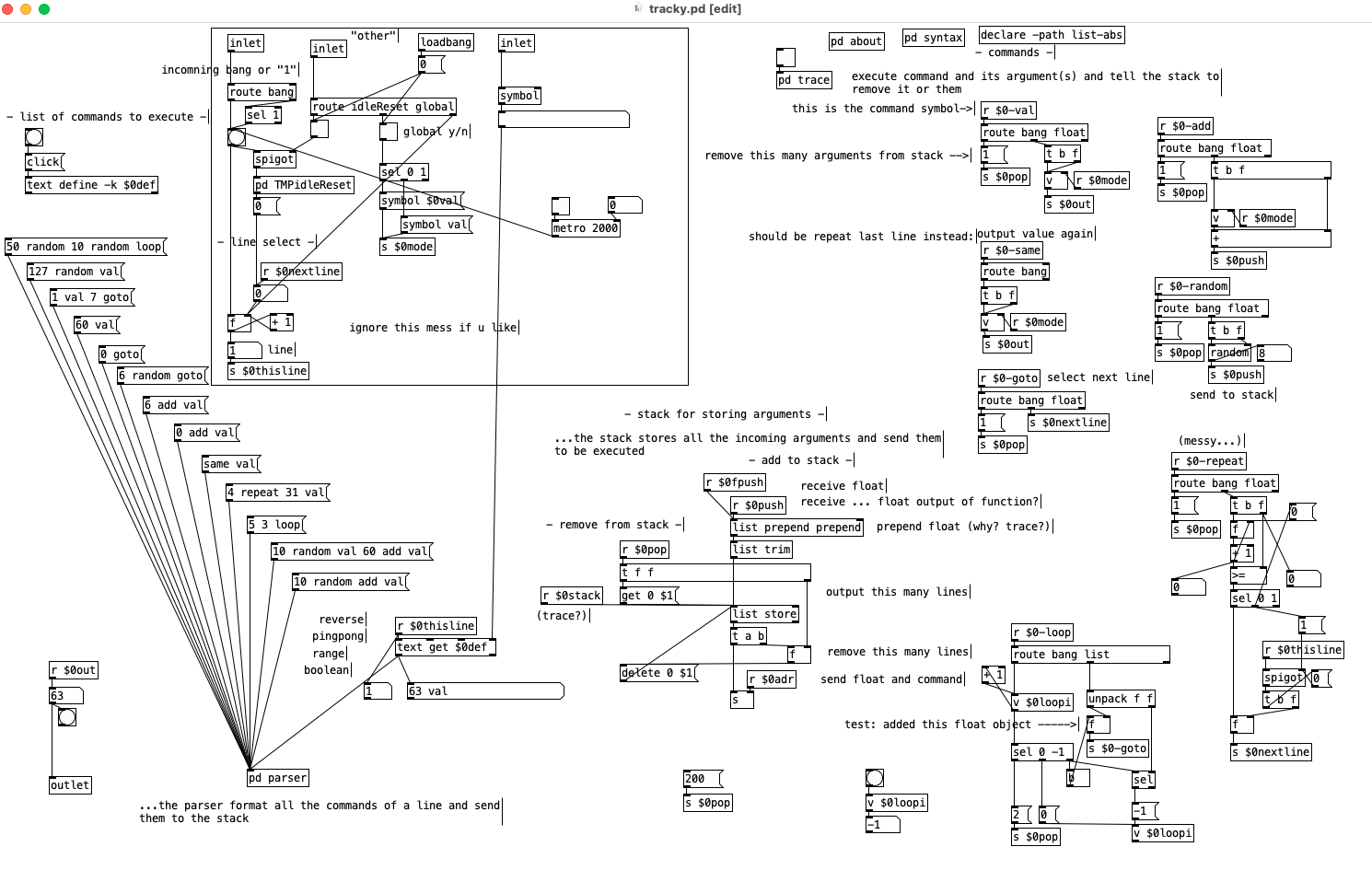
 posted in technical issues
Tracker style "FX" list
@cfry Doing two arguments is just changing how many arguments you pop off the stack and replacing the [route bang float] after the command receive to [route bang list]. So a loop command could be made like this (untested and not even fully thought through):
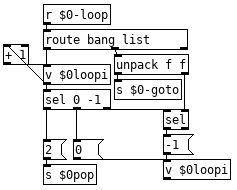
I used [value] because add works off the last value that was output and [value] keeps things neater than tying lots of stuff to a single [float]. In this case you don't need to use [v $0val] to get the output for val, it just stores the float for add, same, and any other command you want to use it for, sending the float to both [v $0val] and [s $0out] is exactly what I would do in this case. I don't think $0-same will work as you expect, there is no need to pop for that and out is getting a bang instead of a float, just need to do [route bang] -> [v $0val] -> [s $0out].
Your comments look to be correct. [r $0stack] is used for the trace but it is useful for other things, you can have a print command which just bangs the message [send $0print( to [s $0stack( and then a [r $0print] connected to a [print] so you can check the stack's condition in those cases when things did not work as planned and you did not have the trace on. Notice the send message is to $0print and not $0-print, receives with the $0 hyphen prefix are only for commands and you will get into trouble if you use that prefix for non-commands. In this case we send the print to $0print instead of $0-print because if the stack is empty it would output a bang which would bang the message again and send you into an infinite loop. Remember to save before testing new commands, it is easy to miss an obvious loop like this.
We prepend to stack instead of append because that means we always get to do [delete 0 $1(, if we appended we would have to keep track of stack size and then subtract how many to delete so we can do a [delete $1 $2(, just more efficient to do it this way in pd land. There is a bit of a flaw here as well, think about what happens if you run the line 1 2 3, one is pushed, then two, then three, so three is top of the stack and the contents of the stack is reversed as 3 2 1, as it should be, the issues is if we have a command which pushes more than one value onto the stack. If you had the command which just bangs the message [1 2 3( to [s $0push] you would have one as top of the stack instead of three so in commands you need to send your lists backwards. Slightly annoying and could be fixed but would be less efficient, so I just remember that when patching commands which push a list, the list needs to be backwards or it will cause confusion elsewhere.
I will do another post later tonight or tomorrow going into the rest and elaborating on a few things.
Edit: Suppose that loop command only works for looping to a point earlier in the program, which is probably workable but perhaps not ideal. We will deal with that in the next post and start really exploiting that this is a programming language and will save you work as any programming language should. Trying not to dump too much on you all at once, next post will be a big one. Or maybe you are already ahead of me? can't quite tell.
Edit2: No, that loop will not quite work, for got to resend the float to $0-goto on each iteration, only loops once.
posted in technical issues
array-maxx and array-minn - get multiple peaks of an array / does array-sort
@lacuna said:
Still I don't understand your idea of building a list without rescanning the array or list for each peak?
Sure. To trace it through, let's take a source array A = [3, 5, 2, 4, 1] and we'll collect 3 max values into target array B.
The [array max] algorithm does 3 outer loops; each inner loop touches 5 items. If m = source array size and n = output size, it's O(m*n). Worst case cannot do better than 15 iterations (and best case will also do 15!).
My suggestion was to loop over the input (5 outer loops):
- Outer loop i = 0, item = 3.
- B is empty, so just add the item.
- B = [3].
- Outer loop i = 1, item = 5.
- Scan backward from the end of B to find the smallest B value > item.
- j = B size - 1 = 0, B item = 3, keep going.
- j = j - 1 = -1, reached the end, so we know the new item goes at the head.
- Slide the B items down, from the end to j+1.
- k = B size - 1 = 0, move B[0] to B[1].
- k = k - 1 = -1, stop.
- Now you have B = [3, 3].
- Put the new item in at j+1: now B = [5, 3].
- Scan backward from the end of B to find the smallest B value > item.
- Outer loop i = 2, item = 2.
- Scan backward from the end of B to find the smallest B value > item.
- j = B size - 1 = 1, B item = 3, found it!
- There's nothing to slide (j+1 is 2, past array end), so skip this step.
- B hasn't reached the requested size, so just add the item.
- Now B = [5, 3, 2].
- Scan backward from the end of B to find the smallest B value > item.
- Outer loop i = 3, item = 4.
- Scan backward from the end of B to find the smallest B value > item.
- j = B size - 1 = 2, B item = 2, keep going.
- j = j - 1 = 1, B item = 3, keep going.
- j = j - 1 = 0, B item = 5, found it!
- Slide the B items down, from the end to j+1.
- Now B is full, so start with second-to-last, not the last.
- k = size - 2 = 1, move B[1] to B[2]: [5, 3, 3].
- k = k - 1 = 0, this item shouldn't move (k == j), so, stop.
- Put the new item in at j+1: now B = [5, 4, 3].
- Scan backward from the end of B to find the smallest B value > item.
- Outer loop i = 4, item = 1.
- Scan backward from the end of B to find the smallest B value > item.
- j = size - 1 = 1, B item = 3.
- B is full, and B's smallest item > source item, so there is nothing to do.
- Scan backward from the end of B to find the smallest B value > item.
Finished, with B = [5, 4, 3] = correct.
This looks more complicated, but it reduces the total number of iterations by exiting the inner loop early when possible. If you have a larger input array, and you're asking for 3 peak values, the inner loop might have to scan all 3, but it might be able to stop after 2 or 1. Assuming those are equally distributed, it's (3+3+3) / 3 = 3 in the original approach, vs (3+2+1) / 3 = 2 here (for larger output sizes, this average will approach n/2). But there are additional savings: as you get closer to the end, the B array will be biased toward higher values. Assuming the A values are linearly randomly distributed, the longer it runs, the greater the probability that an inner loop will find that its item isn't big enough to be added, and just bail out on the first test, or upon an item closer to the end of B: either no, or a lot less, work to do.
The worst case, then, would be that every item is a new peak: a sorted input array. In fact, that does negate the efficiency gains:
a = Array.fill(100000, { |i| i });
-> [0, 1, 2, 3, 4, 5, 6, 7, 8, 9, 10, 11, ... ]

// [array-maxx] approach
bench { f.(a).postln };
time to run: 4.2533088680002 seconds.

// my approach, using a primitive for the "slide" bit
bench { g.(a).postln };
time to run: 3.8446869439999 seconds.

// my approach, using SC loops for the "slide" bit
bench { h.(a).postln };
time to run: 7.6887966190002 seconds.
In this worst case, each inner loop has to scan through the entire B array twice: once to find that the new item should go at the head, and once again to slide all of the items down. So I'd have guessed about 2x worse performance than the original approach -- which is roughly what I get. The insert primitive helps (2nd test) -- but the randomly-ordered input array must cause many, many entire inner loops to be skipped, to get that 2 orders of magnitude improvement.
BUT it looks like Pd's message passing carries a lot of overhead, such that it's better to scan the entire input array repeatedly because that scan is done in C. (Or, my patch has a bug and it isn't breaking the loops early? But no way do I have time to try to figure that out.)
hjh
 posted in abstract~
Numbers incremented in a loop coming out in the wrong order
@jamcultur It's not a bug -- it's normal behavior.
It's documented in the html manual: https://msp.ucsd.edu/Pd_documentation/resources/chapter2.htm#s2.4.2
2.4.2. Depth first message passing
Whenever a message is triggered in Pd, the receiver may then send out further messages in turn, and the receivers of those messages can send yet others. So each message sets off a tree of subsequent messages. This tree is executed in depth first fashion.
"Depth first" means that, when a value comes out of an object's outlet, that branch of the tree must continue all the way to its end before the same outlet can go down a different branch, or before the same object can send data out of a different outlet.
Take a simpler example:
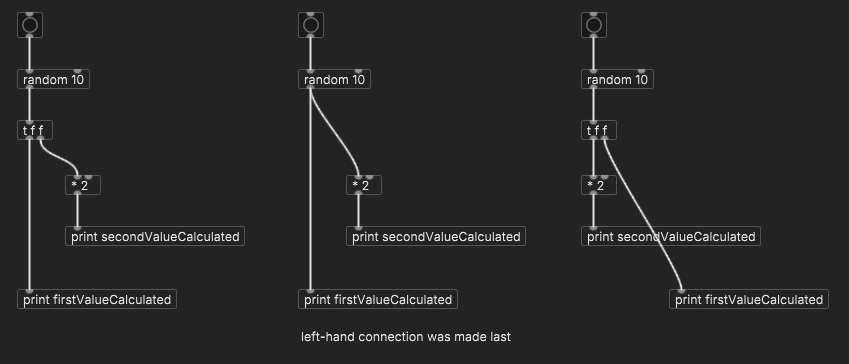
When the random number goes down the [* 2] branch, it must continue down to the [print secondValueCalculated] before it can advance down the [print firstValueCalculated] branch. The whole [* 2] branch must 100% complete.
Humans might look at this patch and think, "Well, the 'print first' branch is simpler, so, intuitively it should be done first." Computers don't think like that.
In code (I'll use SC), it would look like:
(
~func1 = {
    var number = 10.rand;
    ~func2.value(number);
    "first value = %\n".postf(number);
};

~func2 = { |number|
    var result = number * 2;
    "second value = %\n".postf(result);
    result
};

~func1.value;
)

->

second value = 14
first value = 7
~func1 specifies to do ~func2 first, then print. The Pd patch is the same.
I wish Pd's documentation called more attention to looping formulas that Just Work. Users often end up just trying to figure it out for themselves and getting tied in knots.
A for loop goes like this: for(i = 0; i < count; i++) { loop body }
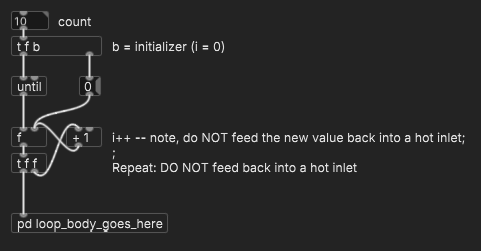
That is, in C, there's a standardized way to write a counting loop -- following the formula avoids confusion. In Pd, there does exist (what should be) a standardized way to write a counting loop, and just like in C, following the formula avoids confusion -- but the formula isn't well enough known, and tricky for users to discover.
hjh
posted in technical issues
how would you recreate this mixer channelstrip abstraction?
@oid said:
@esaruoho If you are trying to save CPU than I would just separate UI and DSP, run the UI in its own instance of PD and DSP in another, communicate between them with [netsed]/[netreceive], there comes a time in PD when you just have to either separate UI and DSP or sacrifice. Beyond that it is difficult to say, I do not know what your needs are and what sacrifices are acceptable. What are your requirements? I can optimize these patches in a dozen different ways but I have no idea if any of them will meet your needs since I do not know what your needs are or even why you are trying to change things beyond a vague notion of there possibly being something better.
ok. i have heard about this UI DSP separation. so.. is it a case of every single slider for instance needs to do a [netsend] to some other abstraction that only does DSP? or have two separate patches altogether, one for UI and one for DSP? sorry, i'm really vague on this.
So, my main painpoints with the current channelstrip is that when I set up 16 "LFOs" to "breathe" up and down the volume slider (which also has slider-color-changing while it is moved from 0 to 1) - when i have more than 4 of these LFO counters cycling from 0...1 on the channelstrips, all sliders stop updating. it might be 4, 8 or 12, but by the time i try to get all 16 of the looper volumes to cycle from 0...1 (my "breather" has a setup of cycling from "min-max every 2 seconds" to "min-max every 60 seconds") -- and that to me makes me think that the UI is not as optimized as possible.
i keep hearing that ELSE library supposedly has some larger crossmatrix/channelstrip that i could use, but i have not looked at it.
so ideally i'd prefer to take the channelstrip even further, i.e. have all effect sends be modulatable (well, that word where the effects have LFO modulation) so i could have even larger more complex things going on where the channelstrips that receive audio from loopers, are sent to specific sends like reverbs, delays and so on. this kind of larger modulation on all parameters would be really useful.
the way the channelstrip is built is that the dwL and dwR go to a separate [diskwrite~] abstraction which i use to record audio. the "p" (and p1-p8) defines that any channelstrip that has p enabled, is sending to all the other loopers - so in that case, any audio that goes to a channelstrip, can be sampled into the 64kb loopers (16 of them).
also i have thechannelstrip labels (i.e. volume slider name) dynamically written to, so i can always have them easily understandable / informative.
here's the "init state". i use bunches and bunches of loadbang -> message -> senders to get them to a specific state. .

one thing i've been toying around as an idea is to incorporate highpass and lowpass filters to the channelstrips, and EQ. but i haven't figured out how to solve the EQ issue so that the single band peak EQ could be incorporated into such a small formfactor ( the width is only 38 and height is 189 so it's hard to conceive how an EQ could be usable there).
i also have for the 16 channelstrip looper instances, BCR2000 + BCF2000 volume slider control and so on. but i'm willing to take the whole setup "to the dock" and rewrite it, if i could be sure that it will be lighter on the cpu..
so yeah, i do only have a vague notion of "maybe it could be better, i'm not sure?".. but i've not yet seen much netsend + netreceive stuff so i'm not entirely familiar how it could be done and how much i need to rewrite (i.e. does everything need to be netsend+netreceived with a complete split of DSP and UI, to reap the benefits, or can i just try it with the 16 loopers and see what happens?
 posted in technical issues
How to loop/reset an audio file to the beginning
Sound file usage is one of those things in Pd that really triggers me. All the pieces are there, but... sound files should be easy. They aren't easy.
For the sake of my students, a year or two ago I made a set of abstractions that do make sound files easy. (A couple of them use cyclone btw, so you would have to install that.)
https://github.com/jamshark70/hjh-abs
Using these abstractions, I can re-trigger a sound file easily in two ways.
-
On the left, feed the "bang at end" back to trigger another "all" message. (The [spigot] is to make sure it really stops when you stop it.)
- The loop will be quantized to the audio block size.
-
On the right, enable crossfade looping in the player and just let it run.
- The loopx message specifies the number of ms at the end to use for the cross fade, so the loop will be file_duration - loopx ms.
IMO the crossfade is better, to avoid clicks at the loop point.
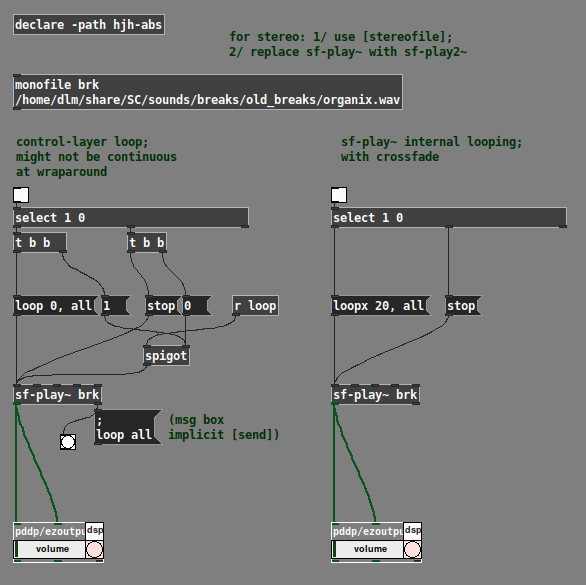
(Note the comment at the top about stereo.)
Admittedly, this doesn't directly answer the original question about how to repeat the file using the design in that screenshot. But, if I'm honest, my answer is that I wouldn't do it the vanilla way, because I think the baseline vanilla objects don't provide a usable programming interface. If part of the problem that you're running into is that the object interfaces aren't usable, one solution is to use a different interface.
hjh
posted in technical issues
looper overdubbing not lining up.....
Yes, I want to be able to punch in and out in the middle of a loop. I think enabling recording with using the [edge~] object to detect the top of the loop was a good idea. Only thing is, if I am playing a super slowed down loop I might have to wait a long time to get to the top of a loop.
I found out about the loop~ object, which looks similar to the ipoke~ object. ipoke~ is a little annoying for me because it doesn't load everytime I launch pd.
I think I'm going to try and go back to my initial looping patch, just record at normal speed, use loop~ and record into a 2nd buffer. Maybe bounce back and forth between two buffers and use loop~ to stretch and repitch the loops. I will try and construct a basic version of this and post here.
 posted in technical issues
samplerate~ delayed update
@seb-harmonik.ar said:
@alexandros in one case you're telling pd to start DSP
In the other pd is telling you that it has indeed been started
"telling pd to start DSP" = [s pd]
But here, the message is coming out of [r pd] -- so it isn't telling pd to start DSP. (Don't get confused by the "; pd dsp 1" -- to demonstrate the issue, it is of course necessary to start DSP. But the troublesome chain begins with an [r].)
@alexandros said:
So this:
[r pd]
|
[route dsp]
|
[sel 1]
gives different results than this?
[r pd-dsp-started]I guess this should be fixed as well? Shouldn't it?
Not necessarily.
"dsp 1" / "dsp 0," as far as I can see, only reflect the state of the DSP switch.
The pd-dsp-started "bang" is sent not only when starting DSP, but also any time that the sample rate might have changed -- for example, creating or destroying a block~ object. That is, they correctly recognized that "dsp 1" isn't enough. If you have an abstraction that depends on the sample rate, and it has a [block~] where oversampling is controlled by an inlet, then it may be necessary to reinitialize when the oversampling factor changes.
It turns out that this is documented, quite well actually! I missed it at first because [samplerate~] seems like such a basic object, why would you need to check the help? 
hjh
posted in technical issues
Convert analog reading of a microphone back into sound
@MarcoDonnarumma Just had a cursory look at you video.... very good.
So you will understand more musical tech terms.
With your low sample rate the steps in the waveform are massive. The result is approximately what you would ask of a "fuzz" box.
Your ears only hear the rapid changes where the waveform rises or falls vertically. Your brain can only interpret the audio that way as it gets no intermediate information.
A rapid rise or fall like those you see in the scope are..... because the signal rate is now (after [sig~] ) 44100 samples per second..... actually a very high frequency signal....... one half (the left or right half) of a 22KHz "note".
Usually called "aliasing"...... they are there because there was no information before or after to give the real analogue slope of the wave before it was sampled.
For CD audio the rate is also 44100Hz. The Nyquist is 22050Hz and a low pass filter in the DAC removes everything above 20000Hz so as to remove such artefacts.
Putting a [lop] will smooth out those steps and approximate the original waveform as it was originally sampled. The downside is that you will no longer hear the audio because it is likely outside the range of most peoples hearing (in this case only!.... with audio below 40Hz..... if it was a 200Hz note you would hear it).
If you put a [lop~] (between [sig~] and [dac~] with a fader connected to its right inlet with a range of say 0.3 to 40 you can play with the fader to get an audible signal that is close to what you want to hear.
A sort of "depth of fuzz".
You might need a slightly different range on the fader..... 0.1 to 25 or something.
Looking at your video....... seeing (yes, ok, hearing) that you need audible sound.... not 192KHz audiophile sound.... and bearing in mind the original 40Hz analogue signal is inaudible to a lot of people, I don't think the clock problem is going to have a significant effect.
But if you are mistaken about the 40Hz maximum and there is actually more information that you need....... think heartbeat (low) + blood rushing (high) then upping your sample rate from the arduino will be necessary to get the higher frequencies.
500Hz sample rate will only give you up to 250Hz of audio information, just like 44100Hz only renders 22050Hz for our delectation.
David.
P.S. I don't much like maths..... not true..... it is fascinating but too hard for my feeble brain.
But without bothering to work it out, in theory, to preserve the signal the [lop] should be just below half the nyquist... so for 500Hz sampling a [lop~ 240]  ?? should do that.
So I was way off base with the [lop~] values I posted above.
The signal would be very reduced (much lower I think) with the values I gave above.
However, [lop~] is not a very "sharp" filter... low dB/octave...... so maybe I was not in fact wrong...... and anyway you will need some distortion so as to properly hear your 40Hz note.
I hope you like to have someone struggling alongside you while you work.
I have to research what that means when the signal has already been oversampled by [sig~]..... but I think it doesn't matter.
Someone clever will tell us first no doubt.
@jameslo 's solution above should give a better outcome though than with a rather uncertain value for [lop~].
It will depend on what you need from your patch.
 posted in technical issues